How to Use the BESPOKE Jet™ Extra Stick LED Panel

The LED panel on your Samsung BESPOKE Jet™ Extra Stick provides essential information about your vacuum's status, settings, and potential issues. This guide explains how to navigate settings and interpret common messages displayed on the LED panel.
1. How to Use the LED Panel Settings on Your BESPOKE Jet™ Extra Stick
The LED panel allows you to adjust key settings directly on your BESPOKE Jet™ Extra Stick. Follow these steps to configure your device:
- Change the Language Setting:
- Use the (+) or (-) buttons to scroll through available languages.
- Hold the (+) button for 3 seconds to confirm your selection.
To access the language setting mode while using the vacuum, press and hold the (+) button for 3 seconds.
- Enable Energy Saving Mode:
- Press and hold the (+) button for 5 seconds while the vacuum is docked on the Clean Station™ to activate Energy Saving Mode.
- To deactivate, press and hold the (+) button for 5 seconds again.
- Note: Energy Saving Mode is only available when the vacuum is mounted on the Clean Station™ and will automatically turn off when the vacuum is in use.
- Adjust Cleaning Mode:
- Press the Power button to start cleaning in [MID] mode.
- Use the (+) and (-) buttons to switch between suction power levels: [MIN], [MID], [MAX], and [JET].
- Note: When the Spray Spinning Sweeper is attached, the vacuum will automatically default to Spray Spinning Sweeper mode.
2. Understanding Information Messages on the LED Panel
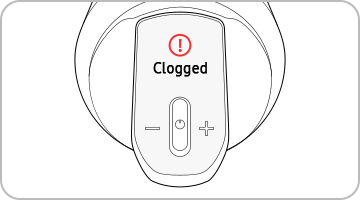
The LED panel displays various messages to inform you about your vacuum's status or potential issues. Here are some common messages and their meanings:
| Display | Explanation |
|---|---|
| [MIN] / [MID] / [MAX] / [JET] | Indicates the currently selected suction power mode. |
| [WET] | Wet Brush mode is active. Press and hold the (+) button to spray water for up to 2 seconds. |
| Low Battery | Battery level is low; charge the vacuum as soon as possible. |
| Object stuck in Brush / Tool | An object is obstructing the brush or tool; remove it to continue cleaning. |
| Filter not inserted | The Micro Filter is missing; insert it to resume operation. |
| Clogged | The vacuum is clogged; inspect and clear any blockages. |
| Check Brush, Tool, or Filter | Inspect the brush, tool, or filter for debris or damage. |
| Clean Micro Filter | Regularly clean the Micro Filter to maintain optimal performance. |
| Energy Saving on | Energy Saving Mode is active. |
| Energy Saving off | Energy Saving Mode is inactive. |
3. Additional Things to Check
- If you encounter an information message not listed here, consult the manual for your specific model number.
- Information messages may vary depending on the model of your BESPOKE Jet™ Extra Stick.
- If you cannot resolve an issue using the LED panel, contact the nearest Samsung service center for assistance.
4. Supported Samsung BESPOKE Jet™ Devices
The LED panel functionality described in this guide is compatible with the following Samsung BESPOKE Jet™ models:
- BESPOKE Jet™ Extra Stick
5. Related Samsung Support Topics
Thank you for your feedback!
Please answer all questions.