Space Monitor 32’’ – S32R750UEU

{{priceAnchor.priceWrapper.info.noLineOrignal}}

{{priceAnchor.priceWrapper.info.monthlyPriceText}} {{priceAnchor.priceWrapper.info.totalPrice}} avec la reprise
{{priceAnchor.priceWrapper.info.totalPrice}}

Simulation de financement avec la reprise de votre Galaxy S22 128Go Grade A estimé à 200€ et d’un bonus reprise de 150€.<br/>Offre de financement sans frais. Sous réserve d’acceptation du dossier par ONEY. Vous disposez d'un délai de rétractation. Voir conditions du paiement en plusieurs fois ONEY <a href="https://www.samsung.com/fr/estore/static/link_terms_and_conditions_of_sale/" target="_blank" title="Open in a new window">ici</a>.

{{priceAnchor.priceWrapper.info.ceExchangePrice}}

{{priceAnchor.priceWrapper.info.orignalPriceAddText}}
{{priceAnchor.priceWrapper.info.lowestWasPricetext}}

Prix Fréquent


Le « prix fréquent » désigne le prix le plus fréquemment affiché (à minima 30 jours) sur le site Samsung.com au cours des 90 derniers jours. Information présentée à des fins de comparaison, ne constitue pas une annonce de réduction de prix.

{{priceAnchor.priceWrapper.info.orignalPrice}}
{{priceAnchor.priceWrapper.info.savePrice}}
{{priceAnchor.priceWrapper.info.disclaimer}}

Couleur

couleur :
Space Monitor 32’’ – S32R750UEU
black

{{item.name}}

{{item.summaryPrice}}

Samsung Rewards

{{rewards.formatted.totalPoint}}

{{rewards.rewardsDescription}}

{{price.priceWrapper.info.totalPrice}} {{price.priceWrapper.info.vatText}}

{{price.priceWrapper.info.orignalPriceAddText}}

{{price.priceWrapper.info.lowestWasPricetext}}

{{price.priceWrapper.info.orignalPrice}} {{price.priceWrapper.info.savePrice}}

Earn 5% back in rewards

{{price.priceWrapper.info.walkoutQtyText}}

{{price.priceWrapper.info.homeDeliveryQtyText}}

{{price.priceWrapper.info.salesPitch}}

{{price.priceWrapper.info.text}}

{{price.priceWrapper.info.text2}}

{{price.priceWrapper.info.text3}}

{{price.priceWrapper.info.shippingOrBack}}

{{price.priceWrapper.info.taxPriceDisplay}}

Désolé, ce produit n'est plus disponible

{{upgrade.title}}

{{upgrade.learnMoreCta.text}}

{{upgrade.description}}

{{upgradeResult.displayModelName}}

{{upgradeResult.discountText1}}

{{upgradeResult.description1}}

{{upgradeResult.description2}}

{{offerFinance.title}}

{{offerFinance.learnMoreCta.text}}

{{offerFinance.description}}

{{galaxyForever.title}}

{{galaxyForever.learnMoreCta.text}}

{{galaxyForever.description}}

{{galaxyForeverResult.displayModelName}}

{{galaxyForeverResult.discountText1}}

{{galaxyForeverResult.description1}}

{{galaxyForeverResult.description2}}

Choisissez votre cadre

Cadre interchangeable vendu séparément

Choisissez la couleur de votre coque

Coque personnalisable vendue séparément

  • {{item.name}}

    Rupture de stock

  • {{item.name}}

    Rupture de stock

  • {{item.name}}

    Rupture de stock

Couleur d’enveloppe

  • {{item.name}}

    Rupture de stock

{{shippingOrBack.shippingOrBack}}
{{deliveryMessage.deliveryMessage}}

{{tradeIn.title}}

{{tradeIn.learnMoreCta.text}}

{{tradeIn.description}}

You have maximum number of Trade-in in cart already. If you wish to add in Trade-in, please remove from cart.

{{tradeInResult.displayModelName}}

{{tradeInResult.discountText1}}

{{tradeInResult.discountText2}}

{{tradeInResult.discountText3}}

{{tradeInResult.discountText4}}

{{tradeInResult.discountText5}}

{{tradeInResult.discountText6}}

{{tradeInResult.specialDiscountText}}

{{tradeInResult.description}}

{{tradeInResult.contentText}}

Dealer stock quantity

You can check the stock quantity for each region

Please select city

Only {0} left in stock.

Sorry, this product is not currently available in selected city.

{{assuredBuyBack.title}}

{{newAssuredBuyBack.title}}

{{newAssuredBuyBack.learnMoreCta.text}}

{{newAssuredBuyBack.description}}

Please select Samsung Assured Buyback or no coverage

{{care.title}}

{{care.learnMoreCta.text}}

{{care.description}}

Sélectionnez l'assurance Samsung Care+ ou Pas d'assurance pour continuer

  • {{item.specialText}}

Inclut la taxe sur les primes d’assurance, au taux applicable. Franchise payante.

{{warranty.title}}

{{warranty.learnMoreCta.text}}

{{warranty.description}}

{{warrantyResult.displayModelName}}

{{warrantyResult.discountText1}}

{{warrantyResult.description1}}

{{warrantyVd.description}}

{{warrantyVdResult.title}}

{{warrantyVdResult.priceDisplay}}

{{delivery.headline}}

{{delivery.errorMessage}}

Choisir

{{deliveryResult.priorityText}}

{{deliveryResult.mainText}}

{{deliveryResult.subText}}
Standard installation charges may apply.Click here for more details.

{{deliveryResult.decText}}

{{item.disclaimer}}

{{tariffOption.headline}}

En savoir plus

{{tariffOption.description}}

{{tariffOptionResult.displayModelName}}

{{tariffOptionResult.discountText1}}

{{tariffOptionResult.description1}}

{{tariffOptionResult.description2}}

{{tariffOptionResult.description}}

{{tariffOptionResult.price}}

{{tariffOptionResult.disclaimer}}

{{embedAddon.title}}

{{embedAddon.description}}

  • {{item.imgAlt}} {{item.imgAlt}}
    {{item.iconTitle}}

    {{item.name}}

    {{item.modelCode}}

    {{item.description}}

    {{item.finalPrice}}

    {{item.originalPrice}} {{item.savePrice}} Rupture de stock
  • {{item.imgAlt}} {{item.imgAlt}}
    {{item.iconTitle}}

    {{item.name}}

    {{item.modelCode}}

    {{item.description}}

    • {{item.dotList1}}
    • {{item.dotList2}}
    • {{item.dotList3}}

    {{item.finalPrice}}

    {{item.originalPrice}} {{item.savePrice}} Rupture de stock
{{message.item.offerTitle}}

{{message.item.offerTooltip}}

{{message.item.linkText}}

{{message.item.tcCTAText}}

{{message.item.periodText}}

{{finance.item.emiText}} {{finance.item.emiText}}

{{finance.item.offerTooltip}}

{{finance.item.cta.label}}

Fonctionnalités clés

4K Ultra HD

UHD

Design élégant

Design élégant

Pied ajustable en hauteur

Pied ajustable en hauteur

Charnière robuste

Charnière robuste

Fonctionnalités

Une économie d'espace optimale

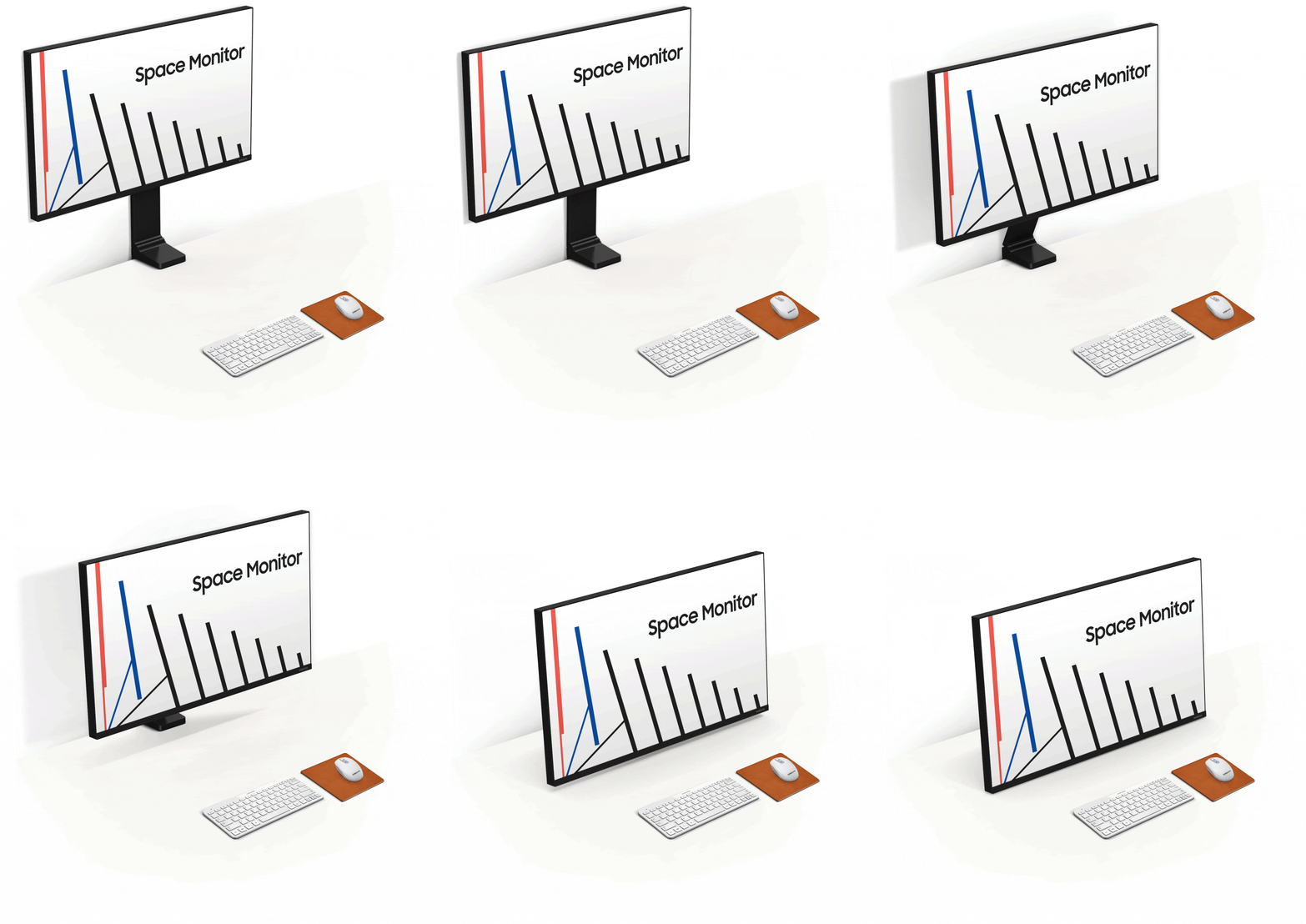
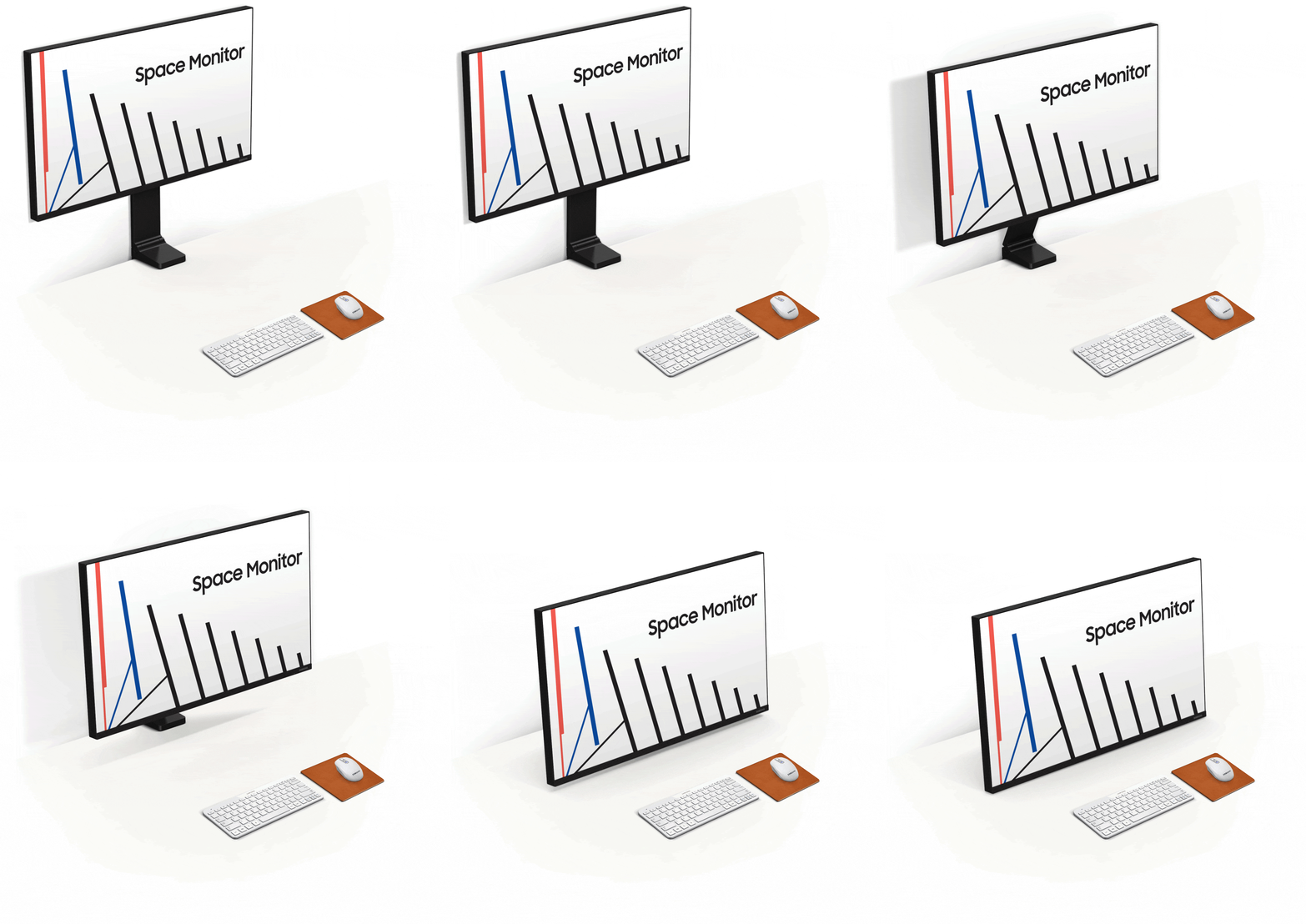
Pour gagner un maximum d’espace, positionnez l’écran du Space Monitor contre le mur. Ajustez le en tirant simplement l’écran vers vous en fonction de vos besoins.

Optimisez l'espace de votre bureau

Le Space Monitor vous permet d'utiliser votre espace de travail plus efficacement. Placé sur un bureau standard (120cm x 50cm), le Space Monitor permet de gagner jusqu'à 40% d'espace en plus par rapport à un moniteur classique ou équivalent (Samsung SD850).

4K Ultra HD

With 4x the pixels of Full HD, the 31.5” Space Monitor delivers more screen space and amazingly life-like UHD images. View documents and webpages with less scrolling, work more comfortably with multiple windows and toolbars, and enjoy your photos, videos and games in stunning 4K quality.

Un design élégant

Avec sa dalle fine et ses bords discrets, le Space Monitor offre une solution design, sobre et discrète, pour chaque espace de travail.

Des câbles discrets

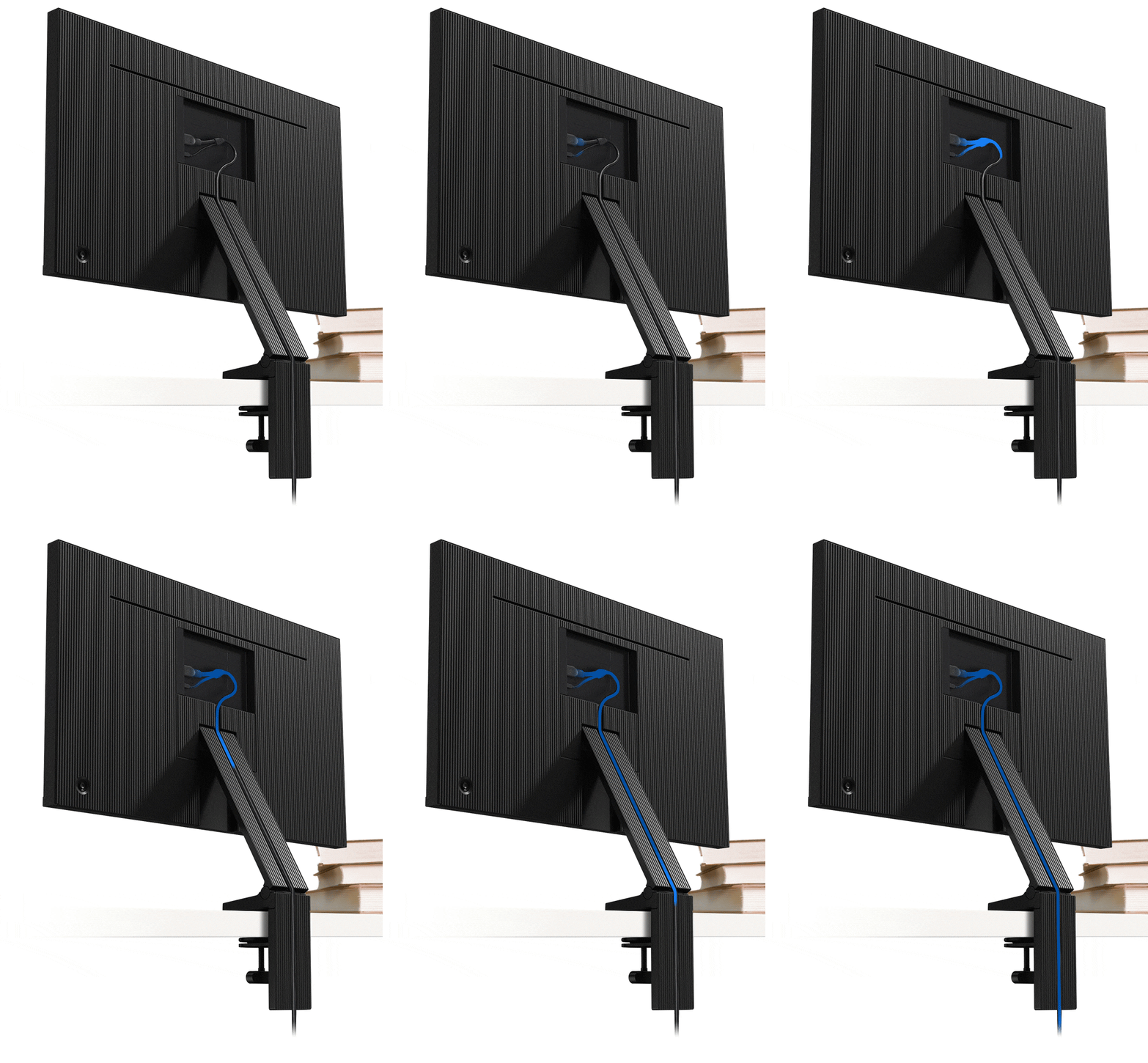
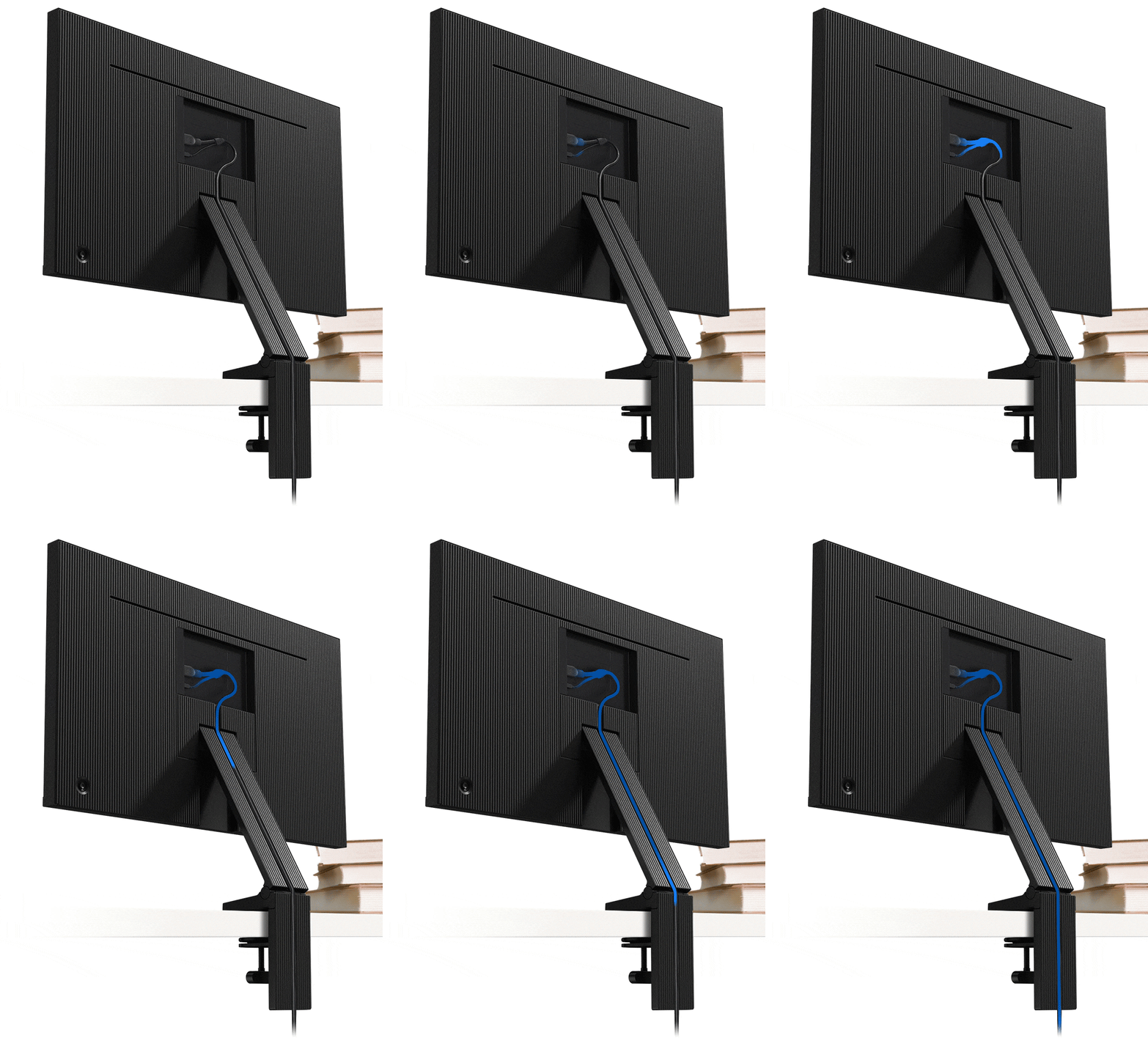
Le pied du Space Monitor dissimule soigneusement son câble HDMI-Y pour éviter l'enchevêtrement de câbles et tout désordre superflu sur votre espace de travail.

Un pied ajustable en hauteur

Le pied du Space Monitor réglable en hauteur, permet un positionnement facile de l'écran pour un confort et une efficacité optimale. L'ajustement de son pied de qualité permet de positionner l'écran jusqu'à 213mm au-dessus du bureau (écran 27 pouces).

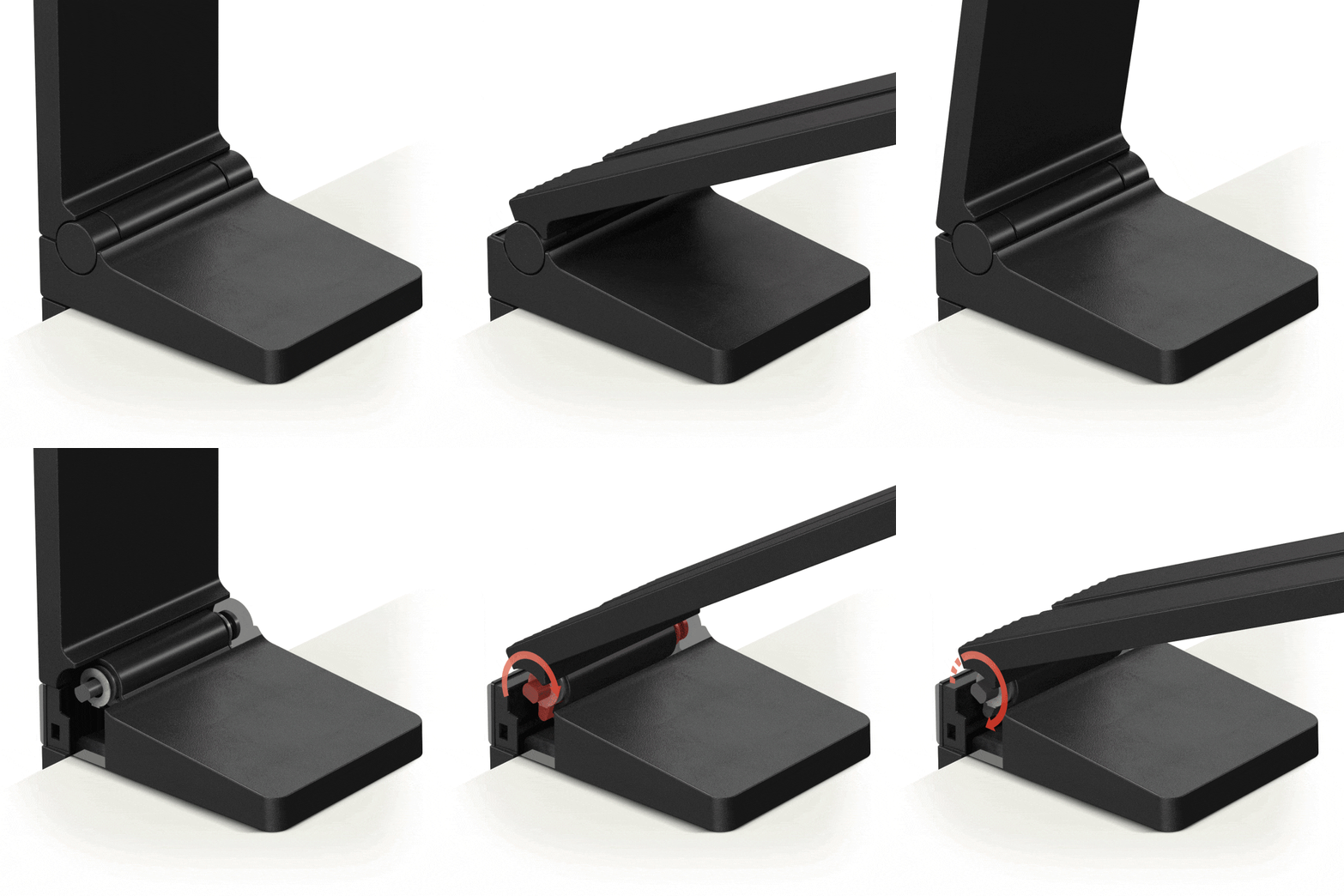
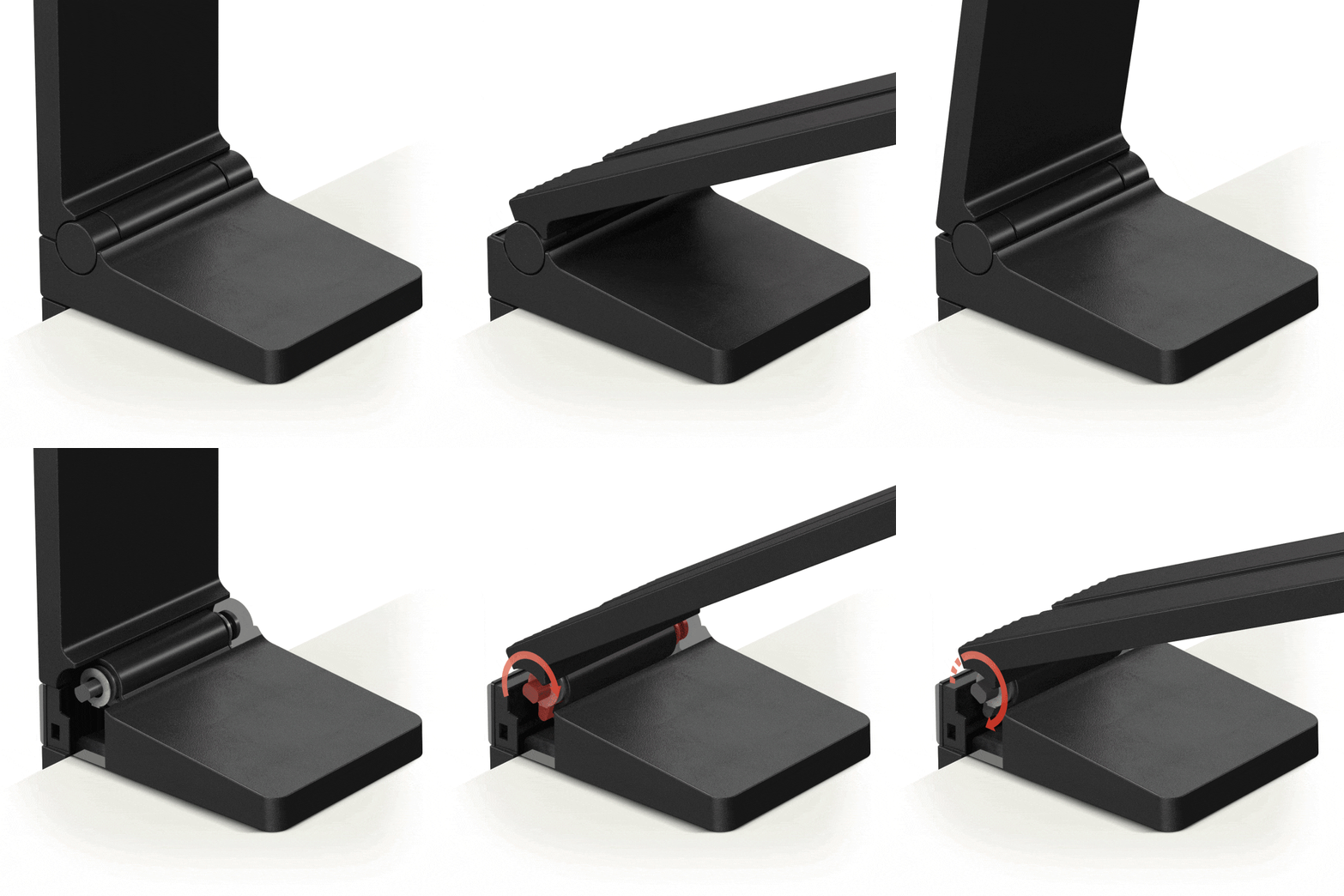
Une charnière robuste

Le pied du Space Monitor est composé d'une charnière souple et solide pour une performance toujours fiable et régulière. Développé à l'aide de la technologie Samsung, afin de supporter plus de 5 000 mouvements, la solidité de la charnière assure un positionnement précis de l'écran pour un usage quotidien.

Confort visuel

Le Space Monitor s'adapte parfaitement à chaque utilisateur et à l'utilisation qu'il souhaite en faire. En relevant ou baissant simplement l'écran, faites du Space Monitor un moniteur multi-usage, pour n'importe quelle situation, que ce soit dans votre bureau ou dans un espace public.

Des fonctionnalités multitâches

Le mode PBP (Picture-by-Picture) vous permet d'afficher les sources de deux appareils sans perdre en qualité d'image. La technologie PIP (Picture-in-Picture) vous permet de redimensionner la seconde source jusqu'à 25% de l'écran afin de la positionner où vous le souhaitez. De plus avec la technologie Samsung Easy Setting Box, divisez instantanément l'espace de travail du moniteur, jusqu'à 6 fenêtres, pour une utilisation optimale de votre écran.

Des fonctionnalités multitâches

Le mode PBP (Picture-by-Picture) vous permet d'afficher les sources de deux appareils sans perdre en qualité d'image. La technologie PIP (Picture-in-Picture) vous permet de redimensionner la seconde source jusqu'à 25% de l'écran afin de la positionner où vous le souhaitez. De plus avec la technologie Samsung Easy Setting Box, divisez instantanément l'espace de travail du moniteur, jusqu'à 6 fenêtres, pour une utilisation optimale de votre écran.

Des fonctionnalités multitâches

Le mode PBP (Picture-by-Picture) vous permet d'afficher les sources de deux appareils sans perdre en qualité d'image. La technologie PIP (Picture-in-Picture) vous permet de redimensionner la seconde source jusqu'à 25% de l'écran afin de la positionner où vous le souhaitez. De plus avec la technologie Samsung Easy Setting Box, divisez instantanément l'espace de travail du moniteur, jusqu'à 6 fenêtres, pour une utilisation optimale de votre écran.

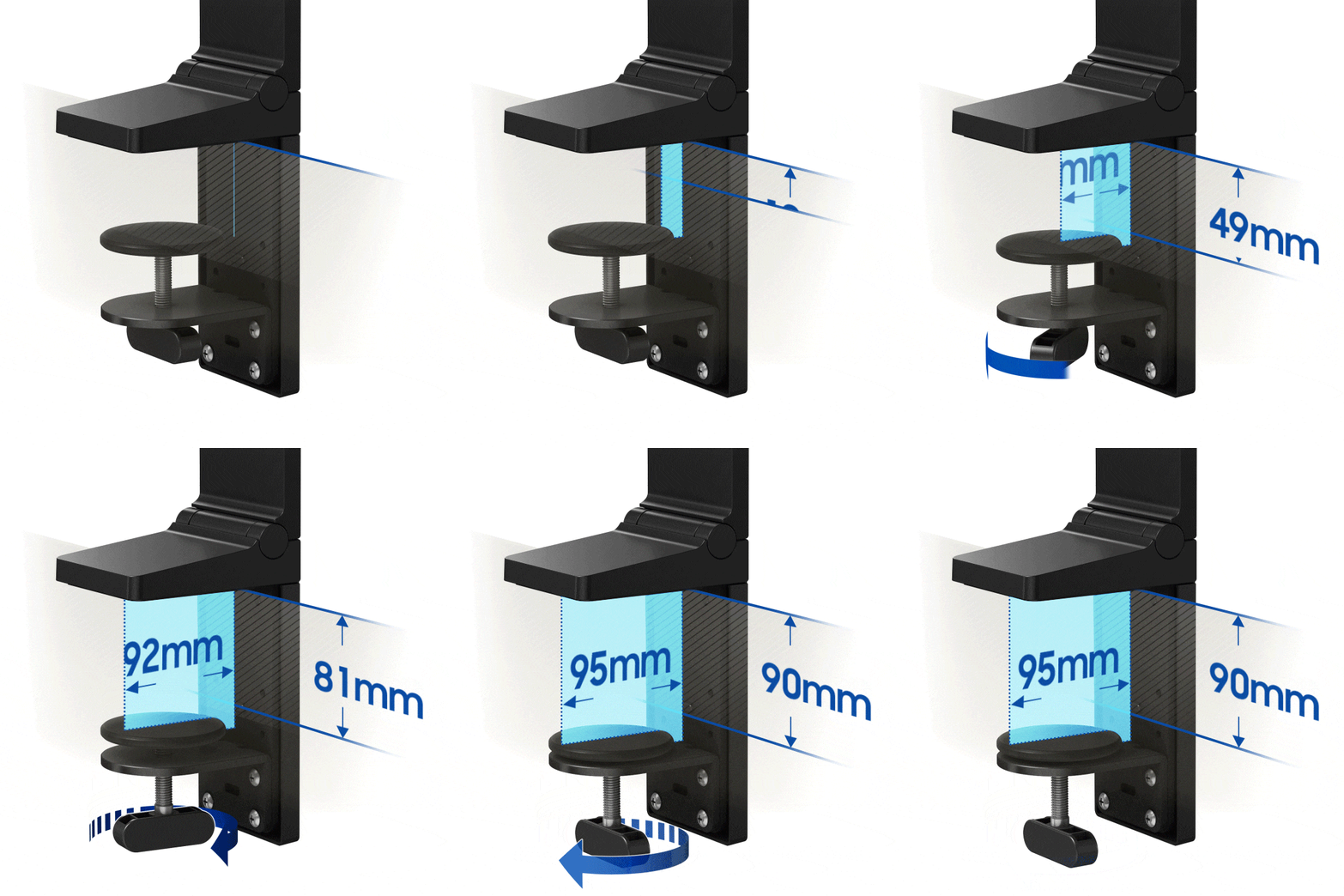
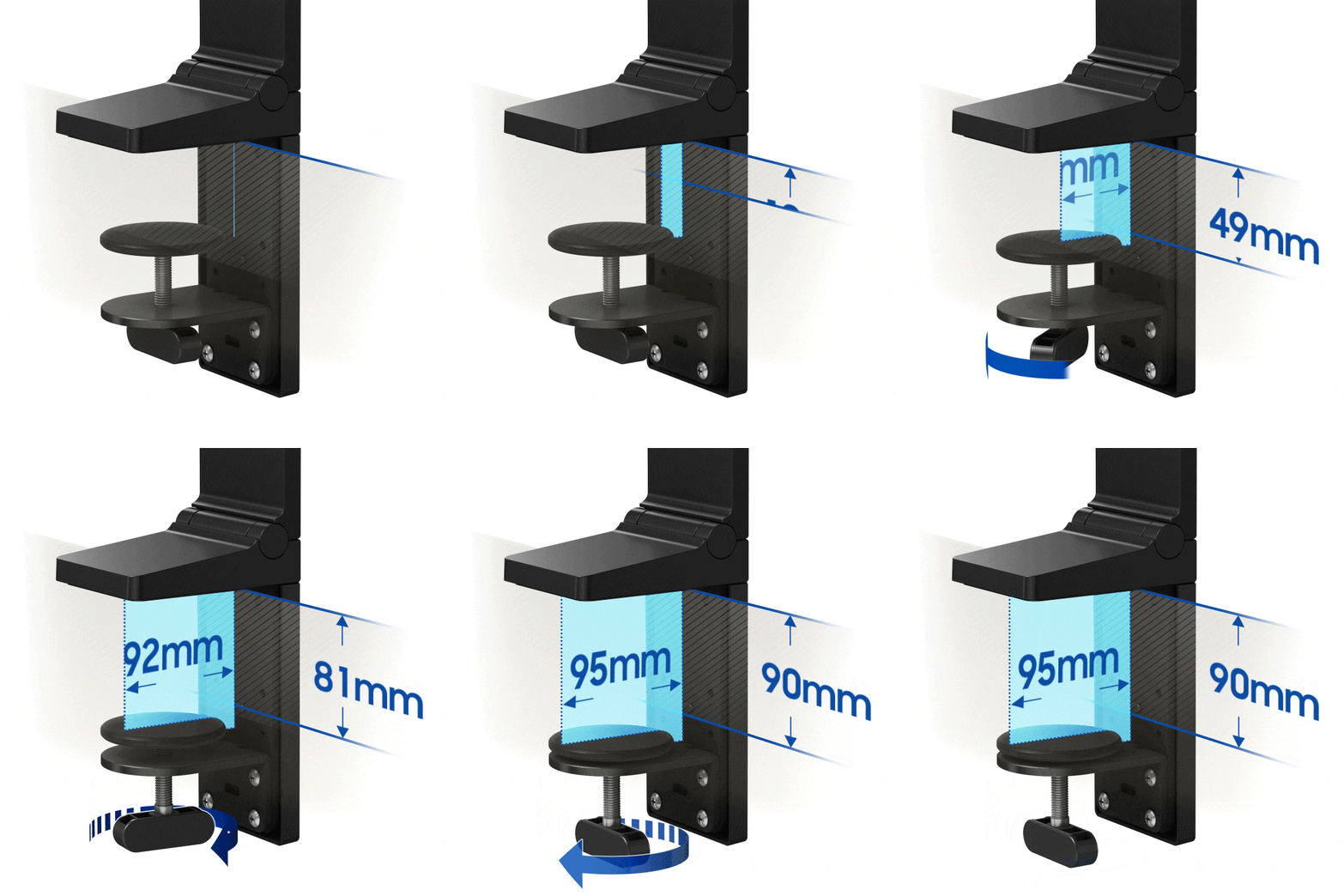
Une installation simple et rapide

Avec une fixation intégrée, ajustable jusqu'à 90mm, l'installation du moniteur devient simple et rapide. La fixation permet au Space Monitor d'être fixé, en toute sécurité, à des surfaces de différentes épaisseurs.

Caractéristiques

  • Résolution

    3,840 x 2,160

  • Format

    16:9

  • Luminosité

    250 cd/㎡

  • Rapport de contraste (statique)

    2500:1(Typ.)

  • Temps de réponse

    4(GTG)

  • Taux de rafraîchissement

    60Hz

  • Taille de l'écran (pouces)

    31.5

  • Taille de l'écran (cm)

    80.0

  • Taille de l'écran

    32

  • Plat / Incurvé

    Flat

  • Zone active (HxV) (mm)

    697.3 x 392.2mm

  • Format

    16:9

  • Type de dalle

    VA

  • Luminosité

    250 cd/㎡

  • Luminosité (Min)

    200 cd/㎡

  • Rapport de contraste (statique)

    2500:1(Typ.)

  • Ratio de Contraste (Dynamique)

    Mega ∞ DCR

  • Résolution

    3,840 x 2,160

  • Temps de réponse

    4(GTG)

  • Angle de vue (H/V)

    178°(H)/178°(V)

  • Prise en charge des couleurs

    1B

  • Gamme de couleurs (NTSC)

    72%

  • Gamme de couleur (sRGB Coverage)

    100%(Typ.)

  • Taux de rafraîchissement

    60Hz

  • Samsung MagicBright

    Yes

  • Samsung MagicUpscale

    Yes

  • Eco Saving Plus

    Yes

  • Mode protection des yeux

    Yes

  • Antiscintillement

    Yes

  • Picture-In-Picture

    Yes

  • Incrustation d'image

    Yes

  • Mode jeu

    Yes

  • Taille de l'image

    Yes

  • USB Super Charging

    No

  • Easy Setting Box

    Yes

  • Certification Windows

    Windows 10

  • FreeSync

    No

  • Off Timer Plus

    Yes

  • Affichage sans fil

    No

  • VGA

    No

  • DVI

    No

  • Dual Link DVI

    No

  • Display Port

    No

  • Version du DisplayPort

    1.2

  • Display Port Out

    No

  • Display Port Out Version

    No

  • Mini-Display Port

    1 EA

  • HDMI

    1 EA

  • Version HDMI

    2.0x1

  • Entrée Audio

    No

  • Prise casque

    No

  • USB Ports

    No

  • Version USB

    2.0

  • USB-C

    No

  • Haut-parleurs

    No

  • USB Sound Bar (Ready)

    No

  • Température

    10~40 ℃

  • Taux d'humidité

    10~80,non-condensing

  • Couleur

    BLACK

  • Type de pied

    Dual Hinge

  • Ajustable en hauteur

    0~184.7mm

  • Inclinaison

    -5.0°(±2.0°)~ 20.0°(±2.0°)

  • ENERGY STAR

    No

  • Classe d’efficacité énergétique

    G

  • Alimentation

    AC 100~240V

  • Consommation énergétique - Max

    54 W

  • Consommation d'énergie (Typ)

    53 W

  • Consommation d'énergie (DPMS)

    ≤0.3 W

  • Consommation d'énergie (Mode OFF)

    ≤0.3 W

  • Consommation anuelle

    77 kWh/year

  • Type de produit

    External Adaptor

  • Dimensions de l'ensemble avec pied (LxHxP)

    714.5 x 757.2 x 115.5 mm

  • Dimensions de l'ensemble sans pied (LxHxP)

    714.5 x 418.2 x 26.0 mm

  • Dimensions de l'emballage (LxHxP)

    978.0 x 159.0 x 502.0 mm

  • Poids de l'ensemble avec pied

    7.0 kg

  • Poids de l'ensemble sans pied

    4.8 kg

  • Poids du produit dans son emballage

    9.4 kg

  • Cable HDMI

    Yes

  • Cable DP

    No

  • Thunderbolt 3 Cable

    No

  • Mini-Display Gender

    No

  • CD d'installation

    Yes

  • Cable USB Type A à B Upstream

    No

Avis

Space Monitor 32’’ – S32R750UEU

4.2

Recommandé par 83% des clients.

Rédiger un avis
5.0 42%
4.0 43%
3.0 6%
2.0 6%
1.0 3%

Filtres

Le tri par pertinence affiche les meilleurs avis en premier. Nous prenons en compte différents critères tels que les votes utiles, les derniers avis, les photos et d'autres caractéristiques que les lecteurs recherchent dans leurs avis.

Trier

Filtres

33 Avis

Natalya
4 (9,999)

30/08/2019

:
4 (9,999)
My new Samsung Space Monitor S32R75 has arrived a couple of days ago and I am really enjoying it so far. It was super easy to put together (15 minutes from box to desk), the monitor itself looks sleek and minimalistic. I love the stand design as it really does save the desk space. Neat cable "hiding" grove along the back of the stand is a cool feature. I only wish the stand would allow sidewise swivel motion too, to give more flexibility, for example, when showing the screen to a colleague sitting nearby. The image quality, the sharpness and the colour balance are perfect. Overall, I am very happy with this purchase, it is a very welcome upgrade to my home office!

Qualité

5 (9,999)

Design

5 (9,999)

Prise en main

5 (9,999)

Qualité du son

4 (9,999)
Réponse de Samsung :
31/08/2019

Samsung Support

Hey there. We are extremely happy to see that the Space Monitor has improved your home office and made a real difference to your desk space and love of working from home! We are appreciative of your feedback regarding the stand and will pass it on. This review will prove invaluable to those considering the purchase, so thank you very much for taking the time to leave us some details of your experience with incredible monitor! ^CR at Samsung Support

Emziic
5 (9,999)

23/10/2019

Bristol

:
5 (9,999)
[This review was collected as part of a promotion.] The screen is absolutely fabulous and makes work an absolute doddle I love the fact the screen is huge and that I am able to have sicks pages of my work open all on the same screen and whilst looking for references etc it’s made such like work of it. The 4K quality is fabulous and even when I have been naughty and watched tv whilst working the screen quality is excellent there was no flickering or buffering or as we say pixel lines it made me realise how much I was missing on a tv screen. But most importantly I’ve found my drawing quality has exceeded just by the detail this screen helps me be able to see!
Réponse de Samsung :
25/10/2019

Samsung Support

Thanks for the awesome feedback, Emziic! We're glad that you're loving the 4K ultra HD display of your LS32R750UEUXEN monitor! We know how important it is to have life-like UHD images and multiple windows, perfect for an artist, like yourself! Enjoy! ^HA at Samsung Support

Emzii
5 (9,999)

07/08/2019

:
5 (9,999)
This was an absolute god send and I adore the fact you can move the screen as you find visibly fit the detail I can see when drawing and on the computer on the screen is amazing the amount of detail I am able to create has actually been life changing I’ve been able to have 4 document open at the same time and when writing lots of pages I’ve had 3 pages open on word at same time it’s been so an efficient way to work but I have to admit I’ve loved working and having th news in hi def at the same time! This is awesome

Qualité

5 (9,999)

Design

5 (9,999)

Prise en main

5 (9,999)

Qualité du son

5 (9,999)
Réponse de Samsung :
08/08/2019

Samsung Support

Hey Emzii! It's a pleasure to know that we have made such a positive difference in your work productivity and enjoyment. The superb display provides you with the perfect multi-tasking, high-resolution setup! Thanks for the five stars! ^CR at Samsung Support

Derk
5 (9,999)

09/08/2019

Drachten

:
5 (9,999)
Ik ben erg tevreden met deze monitor. Deze 4K monitor is een aanwinst voor mijn PC setup! Videobewerking, fotobewerking, programmeren... alles is nu zo overzichtelijk op dit grote scherm! Een film kijken op deze monitor is ook een plezier: een groot scherm en zeer gedetailleerd. De handige voet zorgt ervoor dat er geen kabels zichtbaar zijn omdat deze aan de achterzijde van de voet worden weggewerkt. Heel handig! Wanneer je bepaalde items op het scherm iets beter wilt bekijken, dan kun je heel erg makkelijk het scherm dichterbij halen. Dit gaat zonder gekraak of gepiep en voelt erg robuust aan! Dit is zo'n mooi scherm dat het haast onmogelijk is om terug te gaan naar een 'simpele' FHD monitor. Al met al, ik ben zeer tevreden over deze monitor en zou van harte aanbevelen bij mij vrienden en collega's.
SimonK
2 (9,999)

28/01/2020

Denmark

:
2 (9,999)
This is a really nice display, if your computer graphic card is able to power it with high resolution and refresh rate on display port or HDMI. It lacks USB-C based connection and preferably a USB dock feature. But biggest problem is a chirping noise that comes and goes and that Samsung doesn't seem to fix: https://us.community.samsung.com/t5/Monitors-and-Memory/Space-Monitor-32-inch-Chirping-or-Clicking-sound/td-p/812156 Harmless to start with, it will drive you mad over time.

Qualité

4 (9,999)

Design

4 (9,999)

Prise en main

5 (9,999)

Qualité du son

2 (9,999)
Réponse de Samsung :
29/01/2020

Kunde Support Samsung

Hi! We're sorry to hear that you have experienced issues with these noises from your Samsung Space Monitor. We would be happy to try and help you sort this out at our technical support. Our Danish phone support can be contacted 24/7 on +4570701970, and you can also find further support possibilities on our website: https://www.samsung.com/dk/info/contactus/ The display can be connected through HDMI and DisplayPort, but is not meant for connections through USB-C, as stated in the product specifications.

earlyh
5 (9,999)

18/08/2019

:
5 (9,999)
Scherm doet wat het beloofd. Perfecte beeldkwaliteit, super scherp, kraakhelder en reageert snel. Het scherm is ideaal in kleine ruimtes en makkelijk te bevestigen aan het bureau. Ziet er futuristisch uit wanneer deze is bevestigd op het bureau. Enige minpuntje wat ik kon vinden: het scherm is niet te draaien. Om dit scherm te installeren moet je wel een HDMI aansluiting op je PC hebben, helaas had ik dit nog niet. Maar het was wel een mooi excuus om ook de PC te vernieuwen.
JPD29
2 (9,999)

13/09/2019

:
2 (9,999)
The idea of a monitor being attached via a clamp to your desk and freeing up desk space and also cable management is great. ISSUE: there is no vertical height adjustment without it being also horizontal which then brings the monitor closer (to close) to the eyes and takes up greater desk space than a standard monitor. If there was a vertical adjustment without bringing the monitor closer to the eyes and over the desk I would recommend and adjust my ratings to 4 or 5.

Qualité

3 (9,999)

Design

4 (9,999)

Prise en main

1 (9,999)

Qualité du son

3 (9,999)
Réponse de Samsung :
14/09/2019

Samsung Support

Thank you for the review and feedback regarding your UHD Space Monitor. The hinge is designed to be a versatile solution for finding the optimum viewing height for any user and any purpose, but we appreciate your feedback regarding your own experience with it. We hope that it is still helping you maximise your productivity through its range of multi-tasking features. ^DB at Samsung Support

petec82
4 (9,999)

23/08/2019

:
4 (9,999)
We recently moved into new work premises and thought this monitor would be perfect and it was. The hinge mechanism really does allow for that extra space on your desk when it's needed and the monitor slides effortlessly into place. The display itself is crisp and bright. Some office applications don't fare so well with such a high resolution screen (Sage) but they are still usable. Being able to have multiple programs open and actually on the same screen/desktop has really helped me with productivity. I can't vouch for colour representation but what little work I do with PhotoShop the colours looked fantastic. Set up was easy and painless and the inclusion of the HDMI was a nice touch. I've had both my Windows PC and MacBook Pro attached and swapping between them is simple. We were so impressed with the units that we purchased 2 more for the office. I would certainly recommend this for any workplace or home office.

Qualité

4 (9,999)

Design

5 (9,999)

Prise en main

5 (9,999)

Qualité du son

4 (9,999)
Réponse de Samsung :
26/08/2019

Samsung Support

Thanks for your brilliant review, Pete. Your awesome Space Monitor gives you that extra little bit of space when you need it, and we're thrilled to see that you're enjoying its brilliance. Boasting a 4K Ultra HD display alongside life-like UHD images, it really does make all of your work stand out. ^HA at Samsung Support

pete2401
5 (9,999)

23/10/2019

Castlewellan

:
5 (9,999)
[This review was collected as part of a promotion.] We recently moved into new work premises and thought this monitor would be perfect and it was. The hinge mechanism really does allow for that extra space on your desk when it's needed and the monitor slides effortlessly into place. The display itself is crisp and bright. Some office applications don't fare so well with such a high resolution screen (Sage) but they are still usable. Being able to have multiple programs open and actually on the same screen/desktop has really helped me with productivity. I can't vouch for colour representation but what little work I do with PhotoShop the colours looked fantastic. Set up was easy and painless and the inclusion of the HDMI was a nice touch. I've had both my Windows PC and MacBook Pro attached and swapping between them is simple. We were so impressed with the units that we purchased 2 more for the office. I would certainly recommend this for any workplace or home office.
Réponse de Samsung :
25/10/2019

Samsung Support

We are incredibly grateful that you took the time out to leave us your five-star review, Pete. We're so glad that you love every aspect of your monitor, and even purchased two more for the office! That's brilliant! Thank you for the five-stars. ^HA at Samsung Support

MiTh
5 (9,999)

09/08/2019

:
5 (9,999)
This is indeed a perfect companion for my computer. As is use a 4K monitor as a main monitor, this one does the trick for showing all my menus that i need for my Adobe programs. And because i have a home office, this Samsung monitor is perfect because you can move it to the wall, saving (lots of) space. Need a 2nd monitor? This one is the perfect choice!

Qualité

4 (9,999)

Design

4 (9,999)

Prise en main

5 (9,999)

Qualité du son

4 (9,999)
Réponse de Samsung :
11/08/2019

Samsung Support

We are delighted to read that you have found a great match for your computer and home office set up. With its crisp definition and space-saving design, it's certainly a perfect piece of kit for a multiscreen environment. ^CR at Samsung Support

raj8
4 (9,999)

23/10/2019

:
4 (9,999)
[This review was collected as part of a promotion.] Had the monitor for a week now and I'm pleasantly surprised! It was easy to set up and the picture looks great. Having some issues connecting my device but I think this is down to me rather than the monitor. I'll give you further update once I've used it more. In general, I'm pleased it and it's given me a lot more space on my desk! Well done Samsung.
Réponse de Samsung :
25/10/2019

Samsung Support

We know how important it is to have that vibrant 4K display, Raj, and we're glad that you're enjoying it! Boasting life-like images and 4K quality gaming, it really is awesome. Enjoy and thanks for the five-stars! ^HA at Samsung Support

Anonymous
5 (9,999)

11/09/2020

Kikinda

:
5 (9,999)
Teško mogu da zamislim bolji balans kvaliteta slike (i boja), veličine i cene. Izrazito je funkcionalan - sa neobičnim aspektom dva (horizontalna) rotaciona podešavanja - čime se postiže i udaljenost i visina. Uopšte mi ne nedostaju vertikalno visinsko i vertikalno ("swivel") obrtno podešavanje oko vertikalne ose.
Omair
4 (9,999)

06/08/2019

:
4 (9,999)
Having needing a new computer screen I decided to buy the new Samsung space saving screen. The item itself has both good points and developmental points which I feel it would be appropriate to mention. Pros It’s a good solid screen with an expensive feel to it. You save space on your desk you actually don’t appreciate the amount of space you save with not having a stand on the desk The superb 4K quality is something you can expect with Samsung so it’s definitely one you can trust The resolution is therefore awesome and makes you want to test awesome 4K YouTube videos or gaming videos Cons It only accepts one hdmi and on mdi port which can be restrictive if you’d like to hook it up to multiple screens and multiple devices. There are no speakers inbuilt into the pc despite it being so big. The screen width is quite big and I would have expected it to have been thinner. Overall a good sized pc screen and worth the money! A good upgrade for those who want to try.

Qualité

3 (9,999)

Design

5 (9,999)

Prise en main

4 (9,999)

Qualité du son

3 (9,999)
Réponse de Samsung :
06/08/2019

Samsung Support

Thank you for your four-star feedback, Omair, we really appreciate it. It's awesome to see that you are enjoying the space-saving design, enabling you to push back the monitor. The 4K Ultra HD display gives you the best experience doing what you love and we can see that you're utilising that to its fullest potential. Enjoy your awesome monitor! ^HA at Samsung Support

jake_199999
4 (9,999)

09/01/2021

:
4 (9,999)
Absolutely worth the money, with an amazing clean look, pixel perfect colours and an innovative stand. That said, the unit I first received had to be sent back, as it had dead pixels. Additionally, the lack of USB inputs on the sides or back is frustrating.

Qualité

3 (9,999)

Design

5 (9,999)

Prise en main

5 (9,999)

Qualité du son

4 (9,999)
Réponse de Samsung :
11/01/2021

Samsung Support

We're sorry to see that you had an issue with the first monitor sent to you, Jake, but delighted to see that you're now getting the superb levels of quality that you were expecting. We do thank you for all of your feedback, as we're always looking for ways to improve everything that we produce. ^DB at Samsung Support

bobmo
5 (9,999)

22/02/2020

:
5 (9,999)
Moniteur léger 4K, très bonne image. Pied très pratique. Design agreable. J'en ai acheté 4.

Qualité

5 (9,999)

Design

5 (9,999)

Prise en main

4 (9,999)

Qualité du son

5 (9,999)
dennington7
1 (9,999)

20/01/2021

:
1 (9,999)
Had this monitor about 5 weeks and when I tried to adjust the angle, the screen cracked and now won't work. Very poor quality and not covered by warranty. Avoid

Qualité

3 (9,999)

Design

3 (9,999)

Prise en main

1 (9,999)

Qualité du son

1 (9,999)
Réponse de Samsung :
23/01/2021

Samsung Support

We do design all of our monitors to be adjustable to cater for a range of needs, but we're sorry to see that you've had an issue while trying to adjust yours. Unfortunately, any accidental damage is not covered under the warranty, but we would still be happy to look into all available options with you to get this repaired. You can find details for all the different ways to contact our Customer Support team, by following this link: https://bit.ly/SamsungUK-Support ^DB at Samsung Support

Anonymous
5 (9,999)

20/05/2021

:
5 (9,999)
Hola, he comprado este monitor por su gran diseño, tamaño y calidad pero me gustaría poder montarlo en pared ¿Existe algun adaptador para fijarlo?

Qualité

5 (9,999)

Design

5 (9,999)

Prise en main

5 (9,999)

Qualité du son

4 (9,999)
Lancelot
5 (9,999)

24/10/2020

:
5 (9,999)
It is great and is exactly what I needed. I would have loved a screen protector for it though as find I do get finger marks on it when moving it.

Qualité

5 (9,999)

Design

5 (9,999)

Prise en main

5 (9,999)

Qualité du son

5 (9,999)
Réponse de Samsung :
26/10/2020

Samsung Support

We're pleased to see that your new monitor is providing you with everything that you needed, so thank you for the feedback. ^DB at Samsung Support

Samboy
3 (9,999)

11/01/2022

:
3 (9,999)
Näytön kehys on haljennut vasemmasta reunasta vaikka näyttö on ollut staattisessa tilassa vuoden aikana. Kummalista.

Qualité

3 (9,999)

Design

3 (9,999)

Prise en main

5 (9,999)

Qualité du son

3 (9,999)
daverh
3 (9,999)

03/08/2019

:
3 (9,999)
I've been using this screen for two weeks now and have a mostly positive experience but with a couple of annoyances. The first thing to get out of the way is that this is my second monitor after the original arrived faulty - a stuck pixel and a penny-sized bright spot on the screen. Pros It's big. It dwarfs my previous 24" screen. I like the minimalist design The cable runs are fiddly but work I like the combined power/HDMI cable Brightness is pretty good Colours and veiwing are sufficient for my use-case (software dev) Cons It's too high without bringing it halfway across my desk Limited movement - I'm used to a monitor that has height, tilt and rotation and the ability to be used in portrait, although the latter would be impractical for the size. Connectivity is limited - it really should at least have an additional Display Port No USB - I didn't think I'd miss this but I do. Overall I'm enjoying just how much screen space I have with this monitor and it's great value for money at the RRP but I would have to factor in the price of a replacement stand. At that point, this monitor would lose its main selling point as any other display could also be used with a desk-mount stand. It's safe to say I'm undecided for my personal use-case but that wouldn't stop me recommending the monitor to others.

Qualité

3 (9,999)

Design

4 (9,999)

Prise en main

4 (9,999)

Qualité du son

3 (9,999)
Réponse de Samsung :
06/08/2019

Samsung Support

Thank you for the in-depth, honest review, and recommendation, Dave. Your monitor was designed to maximise your desk space, by giving you 40 percent more usable surface area than a conventional monitor of equivalent size. The life-like 4K Ultra HD screen and PBP display input will also help boost your both your work-rate, and display everything in superb quality. While we have added features such as a zero-level Height Adjustable Stand, adjustable eye level, and a durable hinge, we can understand your comments regarding your own circumstances. ^DB at Samsung Support

Sofie88
4 (9,999)

22/08/2019

Zevenaar

:
4 (9,999)
Het scherm is niet heel fel maar door de anti reflecterende coating is het contrast wel goed. Ook bij een lichte kamer is het scherm goed te zien. - De kleuren zijn intens. Ze springen van je scherm en zwart is ook diep zwart. Er zijn geen donkere of lichte vlekken in te zien. - Voor de rest ben ik nog aan het spelen met de instellingen. Maar het is een wereld van verschil met het LG scherm dat ik had. - De kijkhoeken zijn geweldig - De bediening is wat minder prettig. 1 joystick. Ik ben meer van de losse knopjes. Het scherm is erg kras gevoelig. Het was me niet opgevallen toen ik hem uit de doos haalde dus is het er op gekomen tijdens het monteren en dat was een shocker want ik was toch echt voorzichtig. Positie op bureau Het valt me op hoeveel ruimte je wint doordat er geen standaard onder zit. 2 schermen op standaarden zouden teveel ruimte in beslag nemen op mijn bureau, waardoor dit niet mogelijk was. Maar dit scherm heeft eigenlijk geen standaard als je het zo bekijkt. Je kan je hele bureau vol leggen (en geloof mij, dat doe ik). DIKKE PLUS! Voordelen: Veel extra ruimte, Kleuren boven verwachting, Goed beeld vanuit elke hoek, Formaat (meerdere schermen), Makkelijk te monteren Nadelen : Kras gevoelig, Geen USB hub of geïntegreerde speakers, Bediening via 1 joystick, Kabel te dik bij uiteinde
Omairk
4 (9,999)

23/10/2019

Bradford

:
4 (9,999)
[This review was collected as part of a promotion.] I decided to buy the S32R75 space saving monitor to upgrade my desk area at home to allow me to work more comfortably. I decided to hook this up straight away as soon as it arrived to see how it looks. I've taken a picture of this as apart of this review. There are some clear pros and cons of this screen. Pro's - I like the picture quality of the product and that it brings out all of the colour from the image it is displaying. I wouldn't expect anything less from a Samsung Product. - I love the fact the wires are hidden and that you can't see these when the item is installed. - Love the size! 32" seemed big to me but I'm glad I did get one! It's amazing! - Loved the thickness of the product. It seems like a good solid computer screen something which I don't feel we get nowadays. Cons - We should have the choice of space saving or a stand. I wanted to try both but didn't get the chance to. Neither is there a chance to buy a seperate stand as no screw holes - There is only 1 HDMI port and 1 Mini DP port. I'd want more than one to connect to the number of systems. - Speakers - Could we have inbuilt speakers to at least give some sound as these have nothing inside. All in all this is a very good product something which I'm sure will help me work smarter and neater. There are some things which could make it better but all in all I do feel this is money well spent and a good addition to the desk at home.
Réponse de Samsung :
25/10/2019

Samsung Support

Thanks for leaving us a four-star review, Omairk! We're glad that you're loving the 4K display and the concealed cables of your monitor, it really does make everything so much more cleaner! We appreciate your feedback. ^HA at Samsung Support

ma10
4 (9,999)

23/10/2019

Mitcham

:
4 (9,999)
[This review was collected as part of a promotion.] I chose the larger 32" space saving monitor as I'm used to working with multiple monitors at work, but do not have the space for such at home, so was hoping one larger monitor would be enough. And the verdict? Yes, it works out rather nicely! Getting the monitor out of the box and setup on the desk was a breeze, and the clamp wasn't too difficult to work with even with just one person as the monitor was lighter than expected. Once setup, I was delighted with the amount of space saved over a traditional monitor stand, and as you can see from the photos, I took full advantage of this! Comparing this new setup to my previous one (see other photo), you can see that my keyboard and mouse now looks quite lonely surrounded by so much desk space! Also, I can now orientate the monitor much closer to me to work on photo editing, or spreadsheets that require that closer attention, or something in between for other uses like gaming. The monitor arm doesn't rotate left or right like an aftermarket flexible monitor arm does, but due to the size of this monitor, I don't think I would have need to do so anyway and suits me just fine as it is. As for the monitor screen itself, it's bright and the colours vivid and didn't need much calibration out of the box for my needs. I can fit multiple windows and multi-task with ease, and would happily replace my multiple monitors at work with this single large monitor! Highly recommended!!
Réponse de Samsung :
25/10/2019

Samsung Support

We're glad that you're loving your 32-inch 4K monitor and you decided to take the plunge and purchase it! The Space-Saving Design is our favourite feature and we're super happy yo see that it's looking great on your desk. Enjoy! ^HA at Samsung Support

Anonymous
5 (9,999)

06/08/2019

:
5 (9,999)
First impression was great. Installation is pretty simple, there are only a few components and they are all very easy to identify. Monitor is not too heavy and you just need to attach the stand, set the cable, yes, THE cable, and set it to the table. The cable is a very clever one from Samsung, basically you have the HDMI and the plug-in cable all in one. This only cable goes through the monitor stand so it is not visible at all and keeps your desk super tidy. Once set you don’t need to do anything else to enjoy it! First thing I did was to launch PHPStorm and it is G R E A T. At the office I have 2 27” monitors and at home I used to have just one monitor and the laptop, so having now this incredible monitor at home will help loads to my efficiency working from home (My company will be very grateful!) I have tested the 4K feature with some great documentaries from Netflix/BBC and it is amazing, colours are great and response is super good. My husband has also tested it with his PS4 and compared to our LG 42” TV, games look so much better in this monitor, that’s so that he has already moved the PS4 to the desk and he no longer plays with it connected to the TV! It also really saves space with that kind of stand and I’m not very tall so I need to move it lower to work. It is very easy and movement is very smooth, then once you are done, you just move it back again and you don’t have any wasted space in your desk. Overall super happy with this monitor I would definitely recommend it.

Qualité

5 (9,999)

Design

5 (9,999)

Prise en main

4 (9,999)

Qualité du son

4 (9,999)
Réponse de Samsung :
07/08/2019

Samsung Support

Thank you for your five-star review, it's awesome to see that you are utilising the brilliant space-saving design and the 4K Display. We appreciate your review, enjoy! ^HA at Samsung Support

Fantspants
4 (9,999)

23/10/2019

Pevensey

:
4 (9,999)
[This review was collected as part of a promotion.] This monitor replaced a 27" 2k monitor as I wanted a bigger screen with a higher resolution for work. I have a lot of large documents open (including very wide spreadsheets) and this allows me to see much more of it on the screen at any one time. The stand is sleek and doesn't take up much desk space. It's easy to install - slot the monitor into it and attach a few screws. Attaching it to the desk is as easy as just screwing the clamp shut. The downside with this type of stand is it's not quite as versatile as other stands. It's not as easy to change the exact angle of it. For example, having the monitor lower also means it has to be closer to you as the whole thing bends. The sideways movement is also limited by the design of the clamp. It can also not be turned vertically. The monitor stand has cutouts that allows for hiding the wires for a nice look. The monitor itself has HDMI and miniDP ports. I would personally have preferred 2 HDMI as DP is not something I've had to use. From what I can tell there are no VESA mounting holes which is unfortunate as having the option of attaching it to a traditional monitor arm would be nice. As mentioned above, it's a big monitor with a 4K resolution. The picture quality is good and the viewing angles are good enough for the work I do. I have not tried any gaming on it but my assumption is it would be a fine monitor for that also. Overall it's a good monitor with a couple of drawbacks as mentioned above. I'd definitely recommend it for anyone in the market for a 32" 4K display.
Réponse de Samsung :
25/10/2019

Samsung Support

Thanks for your four-star review! We appreciate all feedback and we're glad that you're loving the 4K display of your LS32R750UEUXEN alongside the space saving design. If you require any assistance, simply call us on 0330 726 7864 and we'll be happy to help. ^HA at Samsung Support

KfantsUK
5 (9,999)

09/08/2019

:
5 (9,999)
This monitor replaced a 27" 2k monitor as I wanted a bigger screen with a higher resolution for work. I have a lot of large documents open (including very wide spreadsheets) and this allows me to see much more of it on the screen at any one time. The stand is sleek and doesn't take up much desk space. It's easy to install - slot the monitor into it and attach a few screws. Attaching it to the desk is as easy as just screwing the clamp shut. The downside with this type of stand is it's not quite as versatile as other stands. It's not as easy to change the exact angle of it. For example, having the monitor lower also means it has to be closer to you as the whole thing bends. The sideways movement is also limited by the design of the clamp. It can also not be turned vertically. The monitor stand has cutouts that allows for hiding the wires for a nice look. The monitor itself has HDMI and miniDP ports. I would personally have preferred 2 HDMI as DP is not something I've had to use. From what I can tell there are no VESA mounting holes which is unfortunate as having the option of attaching it to a traditional monitor arm would be nice. As mentioned above, it's a big monitor with a 4K resolution. The picture quality is good and the viewing angles are good enough for the work I do. I have not tried any gaming on it but my assumption is it would be a fine monitor for that also. Overall it's a good monitor with a couple of drawbacks as mentioned above. I'd definitely recommend it for anyone in the market for a 32" 4K display.

Qualité

5 (9,999)

Design

5 (9,999)

Prise en main

5 (9,999)

Qualité du son

5 (9,999)
Réponse de Samsung :
09/08/2019

Samsung Support

It's great to see that you're enjoying the space-saving design and the 4K display of your space monitor. We appreciate your feedback and thank you for the five-stars! ^HA at Samsung Support

Anonymous
5 (9,999)

09/07/2019

:
5 (9,999)
I have been using this monitor for a couple of days now and I am very impressed with it. It is a genuinely amazing monitor with a really clear 4k display, the speakers aren’t bad either! What makes this monitor worth it is the tiny amount of space that it takes up on my desk, it really makes taking notes so much easier on a small desk and you don’t feel confined to a small amount of space when not using the monitor but still using the desk for writing and drawing. When I first tried to clip the monitor onto my desk I found the mechanism was too small to attach onto my quite thick desk but I was surprised to find that it can be adjusted using 4 screws to fit on very thick desks. I was expecting it to make the desk unbalanced since it is only a cheap Ikea desk but actually the desk remains very stable; I think the height of the screen helps with this. It is kind of annoying that the screen only leans towards you to reduce the height, especially on small desks as a 32 inch screen is quite difficult to look at anyway without being any closer to your face. I was disappointed that the monitor only came with a HDMI to HDMI lead when nearly everyone has a spare one but fewer people (me included) have a spare Micro HDMI cable for the other port. Not even an adapter was included in the box. Overall, I am very pleased with this monitor; the screen is insane and it really helps to declutter your desk, but it is let down by the lack of adapters included for the other display ports and by the fact that it leans to reduce height rather than slides vertically

Qualité

4 (9,999)

Design

5 (9,999)

Prise en main

4 (9,999)

Qualité du son

5 (9,999)
Réponse de Samsung :
11/07/2019

Samsung Support

The Samsung Space Monitor pushes back to sit flat against a back wall and leave your entire work surface clear. With 4x the pixels of Full HD, it delivers amazingly life-like images. So whatever you are doing, enjoy it with full clarity! ^EM at Samsung Support

sonic_matt
4 (9,999)

30/07/2019

:
4 (9,999)
My first impression when unboxing the Samsung S32R75 Space Monitor was along the lines of "Look at the size of that thing!", as I'm used to a 24" 1080p screen it's something of a beast. The space-saving design did unfortunately mean that it wasn't immediately compatible with my desk - as it has a back panel I couldn't start using the monitor immediately as I couldn't attach it to my desk. I needed to disassemble my desk and cut a section out of the back to allow the monitor's clamp to affix to the desk. Once this was done though, I attached the clamp and had the monitor up and running quickly. Once affixed to the desk, the monitor stand is very sturdy and holds the screen firmly in place, and it is easy to adjust the monitor to the desired position. My only criticism is that it isn't possible to adjust the height of the screen without also bringing the screen closer, which obscures a large portion of the desk which then means that space isn't usable. This is kind of in conflict with the idea of saving desk space! The screen itself is beautiful. Whilst it doesn't support HDR (a little disappointing for a screen of this cost), the screen is plenty bright enough and the resolution is amazing. The 60Hz refresh rate is fine for my needs which is mostly desktop work with the occasional bit of gaming. Of course running games at this resolution requires a pretty powerful graphics card! Overall I'm very pleased with this monitor. Although it hasn't strictly saved me any desk space (I've actually lost some, due to the need to bring the monitor forward in order to have it at the desired height), my desk is certainly tidier. But having such a large and high-resolution screen have made using my PC so much more of a pleasure.

Qualité

5 (9,999)

Design

4 (9,999)

Prise en main

5 (9,999)

Qualité du son

4 (9,999)
Réponse de Samsung :
30/07/2019

Samsung Support

Thank you for your four-star feedback, Sonic! Your 4K UHD Space Monitor ensures that your desk is completely clutter-free and we're sad to see that you have not quite got that yet. As the monitor pushes itself flat against a back wall, it gives you more space on your desk. While it does not support HDR, it does have 4K Ultra-HD that gives you lifelike UHD images, every time! Thank you for your four-stars and enjoy! ^HA at Samsung Support

SW7922
4 (9,999)

25/07/2019

:
4 (9,999)
My expectation of this product was high as my previous Samsung 4K monitor has preformed extremely well although on my desk it does take up a lot of space considering it was only 24 inches. On receiving my parcel I was glad to see that the packaging and information provided on and in the box was more than adequate. I had no prejudice before getting my hands on this not reading any reviews or articles and never had any encounters with previous 'space' models. The setup was quick and relatively straight forward although I would strongly recommend following the instructions to make sure you handle the stand and monitor in the right way. May sound obvious but putting the monitor face down to attach the stand is something which if you don't do, could end up being disastrous. The box contains the monitor, stand, instructions, warranty card, power adaptor/brick, UK & EU plug adaptors and a HDMI cable with built in power extension (so you only need one cable to go into the back if you just use HDMI). I think the concept of this monitor is brilliant because for most desk space will be at a premium, even on my desk which is not small, my previous monitors footprint meant it was tight to get a laptop on with my PC's keyboard and mouse already on the desk. Now with the Samsung Space Monitor I can easily fit my laptop on along side my PC's keyboard and mouse. The monitor stand itself is very flexible and can be moved up and down, tilted forward and backwards. The only downside is it cannot be rotated. Having worked on mostly the web and documents so far I can say the text on screen is sharp and colours appear accurate. I have enjoyed having so much more space on my desktop vs my old 24" monitor whilst not feeling like it has taken over my desk.

Qualité

4 (9,999)

Design

4 (9,999)

Prise en main

5 (9,999)

Qualité du son

4 (9,999)
Réponse de Samsung :
28/07/2019

Samsung Support

Many thanks for sharing your thoughts with us, we really appreciate it. Your Space Monitor has a beautiful space-saving design, enabling you to have a clear desk space, so we're very happy to see that you're utilising this feature. Thank you for your four-star review and we'd love to know how we could get that fifth one, do let us know. Enjoy. ^HA at Samsung Support

swade
4 (9,999)

23/10/2019

Northampton

:
4 (9,999)
[This review was collected as part of a promotion.] My expectation of this product was high as my previous Samsung 4K monitor has preformed extremely well although on my desk it does take up a lot of space considering it was only 24 inches as you can see from my first pic. On receiving my parcel I was glad to see that the packaging and information provided on and in the box was more than adequate. I had no prejudice before getting my hands on this not reading any reviews or articles and never had any encounters with previous 'space' models. The setup was quick and relatively straight forward although I would strongly recommend following the instructions to make sure you handle the stand and monitor in the right way. May sound obvious but putting the monitor face down to attach the stand is something which if you don't do, could end up being disastrous. The box contains the monitor, stand, instructions, warranty card, power adaptor/brick, UK &amp; EU plug adaptors and a HDMI cable with built in power extension (so you only need one cable to go into the back if you just use HDMI). I think the concept of this monitor is brilliant because for most desk space will be at a premium, even on my desk which is not small, my previous monitors footprint meant it was tight to get a laptop on with my PC's keyboard and mouse already on the desk. Now with the Samsung Space Monitor I can easily fit my laptop on along side my PC's keyboard and mouse. The monitor stand itself is very flexible and can be moved up and down, tilted forward and backwards. The only downside is it cannot be rotated. Having worked on mostly the web and documents so far I can say the text on screen is sharp and colours appear accurate. I have enjoyed having so much more space on my desktop vs my old 24" monitor whilst not feeling like it has taken over my desk, more to come as the weeks progress!
Réponse de Samsung :
25/10/2019

Samsung Support

Thank you for leaving such an in-depth review, Swade, we really appreciate it. We're glad that your monitor is up and running and that you're enjoying the 4K display alongside the flexibility. Enjoy! ^HA at Samsung Support

Gexguy
4 (9,999)

30/07/2019

:
4 (9,999)
Unboxing experience was very good. The parts were easily identifiable and preassembled, so the installation became as simple as attach the stand to the desk and the monitor to the stand. The stand was not set to the correct gap for my desk, however I found it easy to identify how to change the depth and the physical connection between parts felt solid and durable. Where I installed my monitor how the stand works impacted the desk. The desk has a draw in it and because the grip on the stand imposes on the bottom of the desk this now impacts my ability to close the draw. The only work around would be to cut the draw so that it avoids the bottom of the draw. It would be better if the clamp on the stand did not take up as much space and could be tightened from the rear with a removable widget. This would ensure compatibility with more setups. Having a single HDMI and power cable was a nice surprise and they feel high quality. What was an issue is that the cable management slot on the screen doesn’t hold the cable well and I found when adjusting the monitor position, the cable would often come out of the slot. A solution could be to have clips at the top and bottom of the stand to stop the cable escaping the trench. In use the screen is stunning, the clarity is impressive and the colours really ‘pop’. I have had no issues with the screen whilst in use. Having tested both fast pace and highly detailed strategy games they look glorious and transitions are smooth. Having a screen that large and pixel dense made working from home a pleasure as I could really multitask. The one thing I think is missing is the ability to adjust the height of the screen. I have a high-performance gaming laptop and a work laptop. The work laptop fits perfectly under the screen at the upright height however my gaming laptop is taller and hence when the laptop is in front of the monitor it blocks some of the bottom of the screen. If the height could adjust it would be nice to more it up an inch or two so that my laptop didn’t block the lower part of the screen. Its great having the whole desk space in front of the screen available. This allows me to use my laptop keyboard and trackpad whist having both screens to work with. Although the stand setup is flawed it is a glorious stylish display and I would definitely recommend the investment.

Qualité

3 (9,999)

Design

5 (9,999)

Prise en main

4 (9,999)

Qualité du son

4 (9,999)
Réponse de Samsung :
01/08/2019

Samsung Support

Thanks so much for the glowing review of your Space Monitor! You have summed up how wonderful it is and what an amazing addition it is to your home or office. We love how it maximises your desk space and delivers in stunning 4K. View documents and webpages with less scrolling, work more comfortably with multiple windows and enjoy your photos, videos and games in stunning HD! ^EM at Samsung Support

giantgexguy
4 (9,999)

23/10/2019

Birmingham

:
4 (9,999)
[This review was collected as part of a promotion.] Unboxing experience was very good. The parts were easily identifiable and preassembled, so the installation became as simple as attach the stand to the desk and the monitor to the stand. The stand was not set to the correct gap for my desk, however I found it easy to identify how to change the depth and the physical connection between parts felt solid and durable. Where I installed my monitor how the stand works impacted the desk. The desk has a draw in it and because the grip on the stand imposes on the bottom of the desk this now impacts my ability to close the draw. The only work around would be to cut the draw so that it avoids the bottom of the draw. It would be better if the clamp on the stand did not take up as much space and could be tightened from the rear with a removable widget. This would ensure compatibility with more setups. Having a single HDMI and power cable was a nice surprise and they feel high quality. What was an issue is that the cable management slot on the screen doesn’t hold the cable well and I found when adjusting the monitor position, the cable would often come out of the slot. A solution could be to have clips at the top and bottom of the stand to stop the cable escaping the trench. In use the screen is stunning, the clarity is impressive and the colours really ‘pop’. I have had no issues with the screen whilst in use. Having tested both fast pace and highly detailed strategy games they look glorious and transitions are smooth. Having a screen that large and pixel dense made working from home a pleasure as I could really multitask. The one thing I think is missing is the ability to adjust the height of the screen. I have a high-performance gaming laptop and a work laptop. The work laptop fits perfectly under the screen at the upright height however my gaming laptop is taller and hence when the laptop is in front of the monitor it blocks some of the bottom of the screen. If the height could adjust it would be nice to more it up an inch or two so that my laptop didn’t block the lower part of the screen. Its great having the whole desk space in front of the screen available. This allows me to use my laptop keyboard and trackpad whist having both screens to work with. Although the stand setup is flawed it is a glorious stylish display and I would definitely recommend the investment.
Réponse de Samsung :
28/10/2019

Samsung Support

Thanks for the in-depth review. Your High Resolution Space Monitor was designed to offer versatility with any workspace, but we can understand why this not apply to every part of your own desk. We like to make all of our products accessible and user-friendly, so we're glad to see that the initial set-up was simplistic. The 4K Ultra HD screen will bring any gaming experience to life, or allow you to view documents with clearer clarity, and the PBP function makes multitasking a breeze. ^DB at Samsung Support

Alias6023
5 (9,999)

05/08/2019

:
5 (9,999)
Even though the Samsung Space Monitor 32" is very big, it does not take away much space on my desk. I tried several different kinds of monitors of various sizes, but my table was always very cluttered. However, the Space Monitor has a minimal footprint, so I have a great deal of space on my desk now. While not in use, the monitor can be pushed back to the wall. If I want to immerse myself into the screen, I can quickly move it closer to me. Even if the monitor is close to the wall, I can adjust the viewing height by just tilting (not the height) the screen. The hinge is very stable, so I can grab the screen with two hands and adjust the angle. The stand can be easily mounted on the desk, so there is no need to drill any holes into the wall or desk. It's a 32" 4K screen with a fantastic stand. It can be easily setup alone since Samsung offers simple step by step guide. Only four screws are needed to tighten the stand to the screen. The screen is quite bright, so even with direct sunlight, I can see everything. Since the display is matt, there is not glare – ideal of very bright rooms. The 32" model has a resolution of 4k with 60hz. I used the Apple USB-C Digital AV Multiport Adapter to connect the screen to my laptop. First, I noticed quite a lag when moving the cursor very quickly. Even while typing, there was a lag. I quickly figured out that the AV adapter only supports 30Hz. I tried an adapter that supports 60Hz, and now there is no more lag. Unfortunately, the 32" version does not support 144Hz like the smaller 27" version. The Samsung Space Monitor 32" does not support full Adobe RGB colours, so I was sceptical first since I work with photo and video editing software. However, after calibrating the screen with colour calibrating hardware, the colours are quite accurate. If you a professional photographer, this monitor might not be ideal since it cannot deliver full Adobe RGB colours; however, it's excellent for most users. I love the design of the Space Monitor. It has a straightforward design, and everything is kept in black. The hinge also looks very sleek, so it fits in almost any interior. This monitor might not be perfect for a professional photographer, which heavily rely on the very high colour gamut. For hardcore gamers, this monitor might not be great since it only supports 60Hz. However, for most other people, the Samsung Space Monitor is perfect. I love the design and functionality. Therefore, I give the Samsung Space Monitor 5 stars!

Qualité

5 (9,999)

Design

5 (9,999)

Prise en main

5 (9,999)

Qualité du son

5 (9,999)
Réponse de Samsung :
06/08/2019

Samsung Support

We appreciate your five-star feedback, Alias! It's awesome to see that you're utilising the brilliant space-saving design and the 4K Ultra HD display. Enjoy! ^HA at Samsung Support

Manuels d'utilisation et téléchargements Fiche technique

Manuel de l'utilisateur

Version 1.0 | 1.59 MB

15/10/2019

Anglais

Manuel de l'utilisateur

Version 1.0 | 1.64 MB

15/10/2019

Français

Besoin d’aide ?

Trouvez des réponses à vos questions.

Nos experts vous conseillent

Échangez avec nos experts et obtenez des conseils sur les produits qui correspondent le mieux à vos besoins.

Assistance produit

Obtenez le meilleur de vos appareils et services Samsung.