Wall chargers and charging your Samsung phone or tablet

Charging isn't the most exciting aspect of a phone or tablet, but it's a vital one. You can charge your Galaxy device using any Samsung travel adapter, but charging speeds may vary depending on the charger. You should only use original Samsung travel adapters and USB cables with your phone or tablet. If you need additional adapters, chargers, or cables, they are available on our website.
Samsung Galaxy S25 Ultra phone connected to a black wall charger, displaying Super fast charging 99%, 1 min until full on a gradient background.

Wall chargers and charging your Samsung phone or tablet

Which charging technology is supported by my phone or tablet?

Samsung Galaxy S22 Ultra phone with compatible chargers

We've noticed that many Galaxy users are choosing to reuse accessories they already own. As a result, we're moving toward excluding wall chargers and earphones from our latest Galaxy devices. If you purchase a new phone or tablet, you'll need to buy the wall charger separately. However, the in-box items will still include a USB-C cable, which can be used for data transfer or connecting to an existing charger.

Our latest devices are compatible with USB-C chargers. They can be charged using a standard Fast charger or a Super Fast charger for quicker charging. Samsung has been using USB-C chargers since 2017, starting with the Galaxy S8 and Note8. If you've had a Galaxy device since then, you can continue using its charger.

Chargers with Superfast charging

Here are past devices that included Superfast chargers in the box:

  • Note20 series phones
  • S20 series phones
  • Note10 series phones
  • Z Fold2 and Z Fold3
  • Z TriFold
Note
These models can also be used with a standard 15W charger if needed.

Chargers with Adaptive fast charging

Here are past devices that included Adaptive fast chargers in the box:

  • Z Fold and Z Flip series phones
  • S10 series phones
  • Note9 and Note8 series phones
  • S9 and S8 series phones
  • A70, A50, A51, A52 5G, A42 5G, A32 5G, A13, A12, and A02s

If you are a first-time Galaxy customer or do not have the charger for past devices, you can purchase a new wall charger or wireless charger from the Samsung website. Please see the third section in this article for more information on different chargers.

Read less

Charging cables and USB connection types

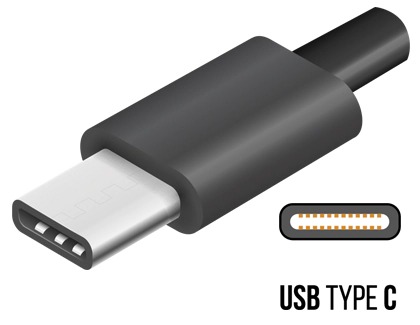
USB Type C charger cable

If you don't have a compatible charger from a previous Samsung phone or tablet, you need a replacement, or just want to have a spare, they are available on our website. Just find your model in the following list to make sure you get the right one!

Most phones and tablets use either a USB Type C or Micro USB charger. USB Type C is the newest type of USB charger. The design helps prevent damage occurring inside the USB port because it doesn't matter which way you insert it into a phone or tablet.

If you aren't sure what model phone or tablet you have, you can check in the device's settings. Navigate to and open Settings, and then tap About phone or About tablet. Your device's name and model number will appear on this page.

Devices that use USB Type C

  • Galaxy Z phones: Z Fold, Z Fold2, Z Fold3, Z Fold4, Z Fold 5, Z Fold6,Z Fold7,  Z TriFold, Z Flip, Z Flip 5G, Z Flip3 5G, Z Flip4, Z Flip5, Z Flip6, Z Flip7, and Z Flip7 FE
  • Galaxy S phones: S8, S8+, S9, S9+, S10e, S10, S10+, S10 5G, S20 FE, S20 5G, S20+ 5G, S20 Ultra 5G, S21 FE 5G, S21 5G, S21+ 5G, S21 Ultra 5G, S22, S22+, S22 Ultra, S23 FE, S23, S23+, S23 Ultra, S24, S24+, S24 Ultra, S24 FE, S25, S25+, S25 Edge, S25 Ultra, S25 FE, S26, S26+, and S26 Ultra
  • Galaxy Note phones: Note8, Note9, Note10, Note10+, Note10+ 5G, Note 20 5G, Note20 Ultra 5G
  • Galaxy A phones: A01, A02, A03s, A10e, A11, A12, A13, A13 5G, A14 5G, A15 5G, A16 5G, A17 5G, A20, A21, A23 5G, A25 5G, A26 5G, A32 5G, A35, A36 5G, A42 5G, A50, A51, A52 5G, A53 5G, A54 5G, A56 5G, and A71
  • Galaxy XCover phones: Galaxy XCover6 Pro
  • Galaxy S tablets: Tab S3, Tab S4, Tab S5e, Tab S6, Tab S7, TabS7+, Tab S7 FE, Tab S8, Tab S8+, Tab S8 Ultra, Tab S9, Tab S9+, Tab S9 Ultra, Tab S9 FE, Tab S9 FE+, Tab S10+, Tab S10 Ultra, Tab Tab S10 FE, Tab S10 FE+, Tab S10 Lite, Tab S11, and Tab S11 Ultra
  • Galaxy A tablets: Tab A11+, Tab A9+, Tab A 10.1 (2019-2020), Tab A 10.5 (2019), Tab A 8.0 (2016-2019), Tab A 8.4 (2020), Tab A7 (2020), Tab A7 Lite (2021), Tab A 8 (2022)
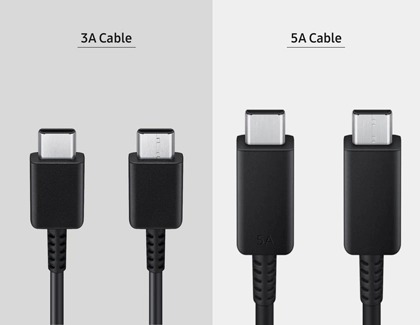
3A and 5A Cables

Also, keep in mind that there are different kinds of USB-C cables. If you’re unsure which USB Type C cable you have, it's most likely a 3A or 5A cable. Both types are capable of charging your devices as well as transferring data. However, 5A cables are thicker and able to carry more power.

Devices that use Micro USB Type B
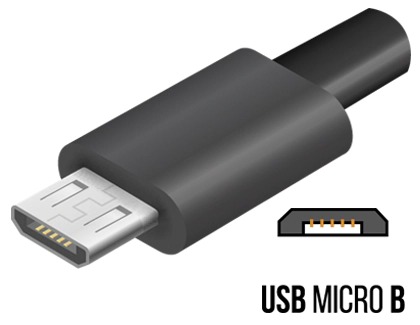
USB Micro B charger cable

You're probably already familiar with Micro USB Type B cables. They've been used for a long time with multiple devices. The cable's head is not symmetrical. One side has ridges while the other is flat. Make sure to insert it into your phone's or tablet's USB port the correct way or it could damage the inside of your device.

  • Galaxy S phones: S5, S6, S6 edge, S7, S7 edge
  • Galaxy Note phones: Note5
  • Galaxy A phones: A6
  • Galaxy J phones: J3 and J7 (all models)
  • Galaxy S and E tablets: Tab S, Tab S2, Tab E
  • Galaxy A tablets: Tab A 10.1 (2016), Tab A 8.0 (2015), Tab A 7.0, Tab A 9.7

If you've lost your Micro USB Type B charger, you can purchase a new one. You can also use adapters with these cables to charge USB Type C devices.

Read less

Types of travel adapters and wireless chargers

Important
Using third-party chargers may invalidate your warranty and cause damage.

All phones since the S8 and Note8 are compatible with USB-C chargers and Qi-certified wireless chargers. Newer Galaxy tablets are also compatible with USB-C chargers, but may not work with wireless chargers because of their size.

For your convenience, compatible charging accessories such as wireless chargers, wall chargers, and cables can be found on the official Samsung website

Read less

What charger should I use when traveling internationally?

Galaxy S22 Ultra and chargers for traveling

Most Samsung chargers can be used in countries outside of the United States. However, you should check the charger to make sure it's compatible.

"TRAVEL ADAPTER" and an input voltage of 100-240 V will be printed on Samsung chargers. If your charger has these features, then typically only a plug adapter is required when traveling internationally. These can be purchased from many electronics retailers.

Read less

Charging practices

Note
If your phone or tablet is not charging, there are a couple things that could be causing the problem. However, if your charger doesn't work at all, it should be replaced. If it's under warranty, you can request service. If not, you can purchase a replacement Samsung charger from our website.
The following tips and instructions will help you get the most out of your device's battery.

Wall charger

Before you start charging, make sure you are using the correct charger for your device. When you're ready, all it takes is three easy steps to get your device charging at top speed.

  1. First, connect the USB cable to a charging adapter, and then insert the other end of the USB cable into the USB port on your phone or tablet.
  2. You can then connect the adapter into a power source.

    Note: For the fastest charging time, connect your adapter to a power outlet. Plugging the USB cable into a computer or another device will lengthen the charging time.
  3. To use a charging feature, navigate to and open Settings, then tap Battery, and then tap Charging settings. Tap the switch next to Fast charging or Fast wireless charging. Only the charging speeds your device supports will show up here. The device will determine the fastest charging available based on connected charger and battery status.
  4. When your device is finished charging, disconnect the USB cable from your device, and then remove the adapter from the power source.

Wireless charging and PowerShare

You can use wireless charging or PowerShare with compatible devices, such as Galaxy phones, Galaxy watches, and Galaxy earbuds. Please refer to our wireless charging and PowerShare guide for more information.

Best practices for charging

  • When using wireless charging accessories, please be aware that any metal or magnetic materials (e.g., coins, magnetic cards) placed between the device and the wireless charger may decrease charging efficiency or cause damage to the phone or tablet and charger.
  • Charging may take longer when using adapters, charging wirelessly, or charging the phone or tablet through another device like a PC.
  • When using wired charging accessories, always check whether any foreign objects are in the connector or plug, as they may prevent charging or cause the charging accessories to overheat.
  • Make sure your phone or tablet doesn't overheat. Keep it in a cool location, especially while charging.
  • Don't let your battery completely drain. With new lithium-ion batteries being used, it is better to keep the battery partially charged, instead of letting it die. When possible, charge your device in small amounts to keep the battery from depleting.

    Note: If the power has been depleted, the battery charging indicator may take up to 10 minutes to appear on the device's screen while charging.
  • Use a genuine Samsung fast charger for the quickest charge. You can't use the fast charging feature if you're using a standard charger.
  • If your phone or tablet is not charging, there are a couple of things that could be causing the problem. However, if your charger doesn't work at all, it should be replaced. If it's under warranty you can request service. If not, you will need to purchase a new one.
  • To get the most out of your battery, be sure to see our guide.
Read less

Make sure your charger is authentic

Important
Using third-party chargers may invalidate your warranty and cause damage.

Samsung does not recommend using any chargers other than Samsung chargers, especially chargers that are uncertified or counterfeit. These can hinder the charging of your device and may cause battery issues if used long term.

You should also make sure your charger is an authentic Samsung charger. Standard, genuine Samsung chargers will have the following:

  • The Samsung logo
    Samsung charger's logo
  • The words "TRAVEL ADAPTER"
    Samsung Travel Adapter words
  • A serial number
    Samsung Travel Adapter's serial number
  • A model code
    Samsung Travel Adapter's model number
Read less

Show charging information

Show charging information highlighted in Display settings

Your device can display the current battery status and estimated charging time when the Always On Display screen is turned off. This will let you know how much time is left until your battery is fully charged.

To enable this, navigate to and open Settings, then tap Display, and then tap the switch next to Show charging information.

Read less
Was this content helpful?
Table of contents
We're here for you

Contact Samsung Support

Contact us online through chat and get support from an expert on your computer, mobile device or tablet. Support is also available on your mobile device through the Samsung Members App.
auto-contact_us-pc-2x auto-contact_us-pc-2x


