How to change the band on your Samsung Galaxy smart watch
Strap compatibility for Galaxy Watch8 series
Galaxy Watch8 / Galaxy Watch8 Classic
- The Galaxy Watch8 series uses a new dedicated attachment mechanism and is not compatible with bands from other previously released models.
- Bands are mutually compatible between the Galaxy Watch8 and Galaxy Watch8 Classic models.
Strap compatibility for Galaxy Watch7 and Galaxy Watch Ultra
- Official, separately sold metal straps are model-specific and cannot be interchanged between different watch lines.
- Galaxy Watch7 bands may not be fully compatible with older models due to slight shape differences.
- The Galaxy Watch7 in-box band is compatible with Watch4, 5, and 6, but subtle differences in design may cause a slight variance in fit and feel.
Galaxy Watch7
- The band connection width is 20 mm.
- You can use bands from the previously released Galaxy Watch6 (40mm/44mm), Galaxy Watch6 Classic (43mm/47mm), Galaxy Watch5 (40mm/44mm), and Galaxy Watch4 (40mm/44mm) on the Galaxy Watch7.
Galaxy Watch Ultra
- The Galaxy Watch Ultra can only be used with its dedicated bands.
- The band connection width is 34 mm, making it incompatible with any previously released Galaxy Watch bands.
Strap compatibility for Galaxy Watch6 series
Galaxy Watch6
- The band connection width is 20 mm.
- You can use bands from the Galaxy Watch5 (40mm/44mm), Galaxy Watch4 (40mm/44mm), Galaxy Watch3 (41mm), Galaxy Watch Active2 (40mm/44mm), Galaxy Watch Active, and Galaxy Watch (42mm) on the Galaxy Watch6.
Galaxy Watch6 Classic
- The band connection width is a standard 20 mm.
- You can use bands from the Galaxy Watch5 (40mm/44mm), Galaxy Watch4 (40mm/44mm), Galaxy Watch3 (41mm), Galaxy Watch Active2 (40mm/44mm), Galaxy Watch Active, and Galaxy Watch (42mm) on the Galaxy Watch6 Classic.
Strap compatibility for Galaxy Watch5 series
Galaxy Watch5
- Features a standard 20 mm band connection.
- You can use bands from the Galaxy Watch4 (40mm/44mm), Galaxy Watch3 (41mm), Galaxy Watch Active2 (40mm/44mm), Galaxy Watch Active, and Galaxy Watch (42mm) on the Galaxy Watch5.
Galaxy Watch5 Pro
- Features a standard 20 mm band connection.
- You can use bands from the Galaxy Watch4 (40mm/44mm), Galaxy Watch3 (41mm), Galaxy Watch Active2 (40mm/44mm), Galaxy Watch Active, and Galaxy Watch (42mm) on the Galaxy Watch5 Pro.
Strap compatibility for Galaxy Watch4 series
- Due to the precise structural design of the strap connection lug, third-party 20 mm bands may not fit or connect properly. It is highly recommended to use official Samsung original bands.
- Galaxy Watch4 Classic bands are not backward-compatible with older models due to unique shape differences.
Galaxy Watch4
- The band connection width is 20 mm.
- You can use bands from the Galaxy Watch3 (41mm), Galaxy Watch Active2 (44mm/40mm), Galaxy Watch Active, and Galaxy Watch (42mm) on the Galaxy Watch4.
Strap Length
- SM-R860 / SM-R865N models come with an S/M band (130–190 mm).
- SM-R870 / SM-R875N models come with an M/L band (145–205 mm).
Galaxy Watch4 Classic
- The band connection width is 20 mm.
- You can use bands from the Galaxy Watch3 (41mm), Galaxy Watch Active2 (44mm/40mm), Galaxy Watch Active, and Galaxy Watch (42mm) on the Galaxy Watch4 Classic.
Strap Length
- SM-R880 / SM-R885N models come with an S/M band (130–190 mm).
- SM-R890 / SM-R895N models come with an M/L band (145–205 mm).
Strap compatibility for Galaxy Watch3 series
Galaxy Watch3 (41mm)
- The band connection width is 20 mm.
- Compatible with Galaxy Watch3 (41mm), Galaxy Watch Active2 (40mm/44mm), Galaxy Watch Active, and Galaxy Watch (42mm) bands
Strap Length
- SM-R850 / SM-R855N model strap: S/M (130–185 mm).
Galaxy Watch3 (45mm)
- The band connection width is 22 mm.
- Compatible with Galaxy Watch3 (45mm) and original Galaxy Watch (46mm) bands.
Strap Length
- SM-R840 / SM-R845N model strap: M/L (145–205 mm).
Determine the right band length for your wrist
Official Samsung watch bands are offered in two sizes. Size S/M fits 130mm - 190mm wrists. Size M/L fits 145mm - 205mm wrists. To find the right size for you, you'll need to measure your wrist. If you don't have a cloth or paper tape measure, just use a string by following these steps:
- Take a piece of rope or string and wrap it around your wrist.
- Use a pen or marker to mark the spot where the string meets.
- Take the string and lay it flat on a ruler or tape measure to find the size in millimeters.
How to replace your Galaxy watch strap
Attaching the Galaxy Watch8 Classic band
- Rotate the Dynamic Lug on the band.

- Align the band with the Watch, then press the band button and attach the band.

Attaching the Galaxy Watch8 band
Align the band with the Watch, then press the band button and attach the band.

Change your fitness band
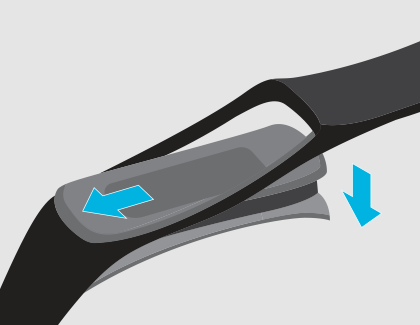
You can change out the fitness band on your Galaxy Fit and Galaxy Fit2 if you need to replace it. Attaching the band on the Galaxy Fit2 is slightly different.
Galaxy Fit3
The Galaxy Fit3 bands are one click bands, similar to our newest smartwatches. Simply press the release button on the underside of the watch, and pull the band out. To put a new band on, just push it into place on each end.
Galaxy Fit2
To detach the current band, gently pull on one side of the band until it disconnects from the watch. Hook one side of the new band to the watch, and then tug on the band’s other side to secure it. Make sure the band fits snugly around the watch with no gaps.

Galaxy Fit
Remove the current band by gently pulling on one end of the band until it disconnects from the watch. Then, insert the new band’s holder into the grooves on the watch. Push the band into the grooves until it clicks into place.