Galaxy XR usage environments

The Samsung Galaxy XR is designed to provide an immersive experience, but its performance can be affected by the environment in which it is used. This article outlines the optimal usage environments for the Galaxy XR, including lighting conditions, mobility, and indoor vs. outdoor use.
A person wearing the Galaxy XR headset while standing on a forest path.

Galaxy XR usage environments

Lighting conditions

A person wearing the Galaxy XR headset indoors with both hands raised for gesture input. 

Hand tracking is based on the camera, so it may not work properly in dark environments because the camera cannot detect hand movements clearly. For the best experience, please use the device in a well-lit area where the camera can easily track your hand movements.

Read more
Read less

Mobility and moving vehicles

Avoid using the Galaxy XR in moving vehicles such as cars, buses, trains, or while engaged in activities like driving, cycling, or exercising. Tracking may fail, and distractions can increase adverse symptoms. Use the device in a stable, stationary environment.
Read more
Read less

Indoor and outdoor use

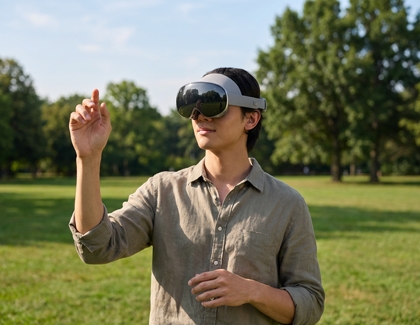
A person using the Galaxy XR headset outdoors while performing a hand gesture.

The Galaxy XR can be used outdoors, but optimal performance may not be guaranteed due to environmental factors like lighting, wind, or other external conditions. For the best tracking performance, use the device indoors in a controlled environment.

Read more
Read less
Was this content helpful?
Table of contents
We're here for you

Contact Samsung Support

Contact us online through chat and get support from an expert on your computer, mobile device or tablet. Support is also available on your mobile device through the Samsung Members App.
auto-contact_us-pc-2x auto-contact_us-pc-2x


