Welcome to the
! Please enjoy our special offers for you

Galaxy S25 Ultra S Pen replacement

The Galaxy S25 Ultra includes a built-in S Pen that you can easily replace if it becomes damaged or stops responding. This guide shows you how to remove the old S Pen and install a new one using simple steps. Follow the instructions below to ensure proper performance and to keep your device protected.
Galaxy S25 Ultra with the S Pen resting against the side of the device.

Galaxy S25 Ultra S Pen replacement

Galaxy S25 Ultra S Pen removal
Galaxy S25 Ultra S Pen installation
Galaxy S25 Ultra S Pen removal
Caution
Leaving screws inside the device may damage internal components, such as the battery. During assembly, be extra careful not to leave any unassembled screws inside the device.

Press the end of the S Pen to disengage it. Pull out the S Pen from the slot.
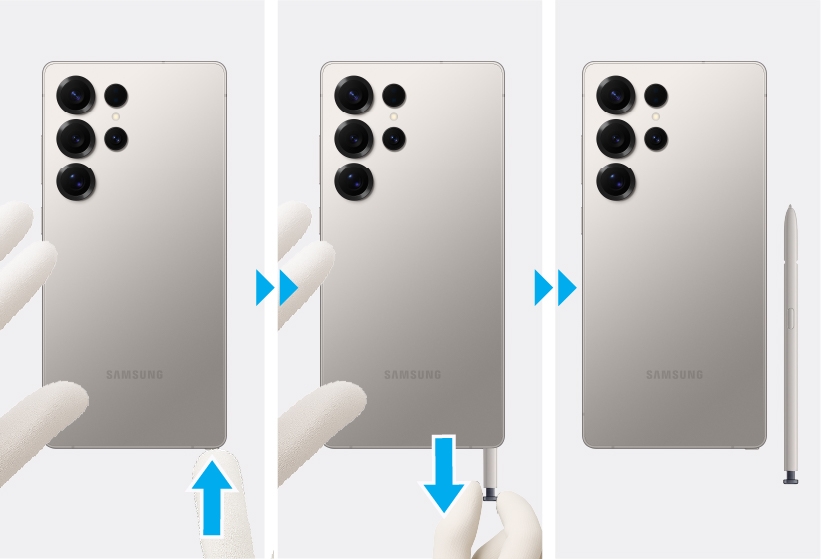
Gloved hands removing the S Pen from the bottom slot of the Galaxy S25 Ultra.

Galaxy S25 Ultra S Pen installation

Insert the S Pen into the slot and push it in its position.
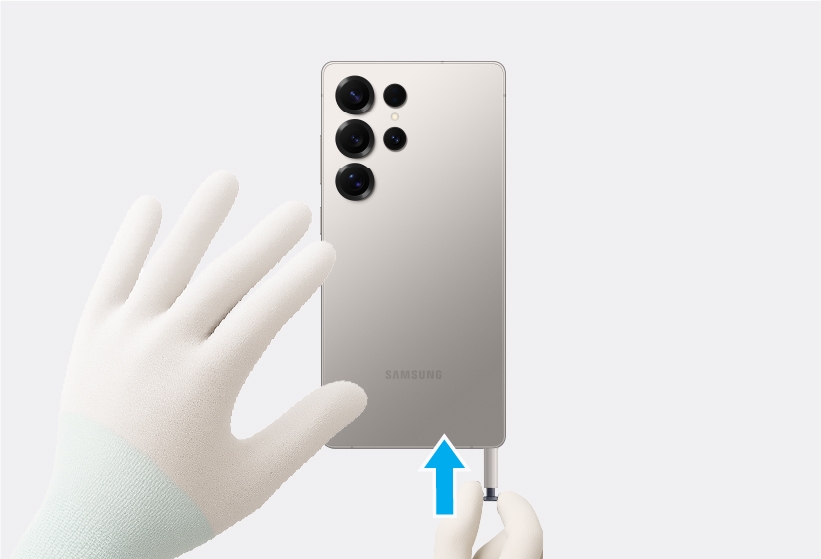
Gloved hands inserting the S Pen into the bottom slot of the Galaxy S25 Ultra.

Was this content helpful?
Table of contents
We're here for you

Contact Samsung Support

Contact us online through chat and get support from an expert on your computer, mobile device, or tablet. Support is also available on your mobile device through the Samsung Members App.

Fast, easy checkout with Shop Samsung App
Easy sign-in, Samsung Pay, notifications, and more!
Or continue shopping on Samsung.com
×
The Shop Samsung app
Free standard shipping, exclusive offers and financing options.
GET
×
The Shop Samsung app
Free standard shipping, exclusive offers and financing options.
GET
×

You Are About To Be Redirected To Investor Relations Information for U.S.

Thank you for visiting Samsung U.S. Investor Relations. You will be redirected via a new browser window to the Samsung Global website for U.S. investor relations information.
CANCEL
CONTINUE
×

Redirect Notification

As of Nov. 1, 2017, the Samsung Electronics Co., Ltd. printer business and its related affiliates were transferred to HP Inc.

For more information, please visit HP's website: http://www.hp.com/go/samsung


Select CONTINUE to visit HP's website.

CANCEL
CONTINUE
