How to wear the Samsung Galaxy Buds4 or Buds4 Pro
If you want to experience the bold, new sound from the Galaxy Buds4 or Buds4 Pro, it's important to wear them properly. A proper fit results in both the best possible sound quality and a more comfortable fit. It also helps prevent them from falling out of your ears, and no one wants to lose an earbud!
How to wear the Samsung Galaxy Buds4 or Buds4 Pro
The Galaxy Buds4 do not have rubber earbud tips, but the Buds4 Pro model does, and they come with different sized ear tips. If you have the Buds4 Pro, the first thing you want to do is make sure to use the right size tips for your ears. You want them to fit so that there isn't a gap between your ear and the ear tip. This helps to avoid sound leaks and ensure optimal audio. If you need instructions for changing the tips, check out our guide for the Buds4 Pro tips.
Now, whether you have the Galaxy Buds4 or Buds4 Pro, follow these steps:
- Look on the lower, inside-facing part of the blade. Between the two metallic dots, which are the charging contacts, you'll see either an L or an R indicating whether it's the Left or Right earbud.
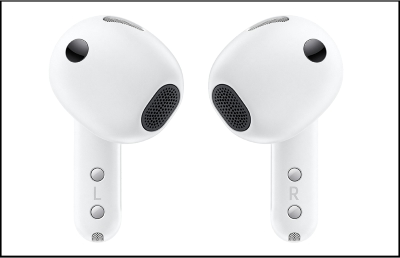
- Insert the R bud into your right ear with the R facing you.
- Insert the L bud into your left ear with the L facing you.
- Angle the blade slightly so that the microphone on the bottom is pointing towards your mouth rather than straight down.
- You can adjust the buds by rotating them forwards and backwards until the fit feels right.
If you have the Buds4 Pro model, you can also run an earbud fit test to ensure you have the proper fit.
Recommended Articles
How to wear your Samsung Galaxy Buds3, Buds3 Pro, or Buds3 FE
How to wear your Samsung Galaxy Buds3, Buds3 Pro, or Buds3 FE It's important to wear your earbuds properly for many reasons. You'll get better sound quality from them, they'll fit more comfortably, and they'll stay in your ears. Wearing them improperly can cause discomfort, sound leaks, and makes them more likely to fall out. No one wants to lose a
How to change the tips on the Galaxy Buds4 Pro
How to change the tips on the Galaxy Buds4 Pro The Galaxy Buds4 Pro come with medium sized earbud tips already attached, but you'll find a set of small and large tips in the box. It's essential that you choose the size that best fits your ears to create a proper seal. Otherwise there will be a gap, which can interfere with sound quality and the per
How to wear your Samsung Galaxy earbuds
How to wear your Samsung Galaxy earbuds Experiencing discomfort with earbuds, whether they're too tight or too loose can be frustrating, especially during activities like jogging or when enjoying music. Samsung earbuds offer a solution to this common problem. If you find the fit isn't perfect, you can easily switch out the earbud tips and wingtips
We're here for you
Contact Samsung Support
Contact us online through chat and get support from an expert on your computer, mobile device or tablet. Support is also available on your mobile device through the Samsung Members App.


