Benefits in the Galaxy Store app

The Benefits tab in the Galaxy Store is a place where you can earn prizes by playing games, installing apps, and exploring new content. You can participate in daily sweepstakes, earn Gems and Tickets, and redeem prizes like Galaxy Store coupons and digital gift cards to use on Samsung.com. Read below to learn more about Galaxy Store Benefits!

Benefits in the Galaxy Store app

Galaxy Store Activities

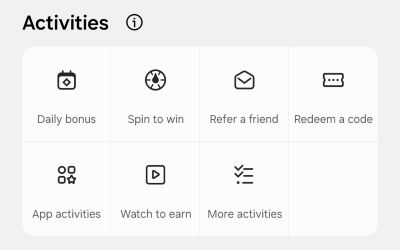
In the Galaxy Store, you'll see these activities on the Benefits tab.

  • Daily bonus: Start your day with an easy win just by checking in. Earn Gems or Tickets, hit milestones to unlock double rewards, and enjoy the flexibility of non-consecutive progress. A five day milestone is yours as long as you check in on any five days this month. 
  • Spin to win: Spin once a day and see what reward you get! Spins refresh every day at 12 AM Eastern Time, giving you a fresh shot at Gems or Tickets. It is quick, fun, and the perfect little moment of chance in your day.
  • Refer a friend: Invite friends to join Galaxy Store Benefits and earn rewards together. Hit referral milestones to unlock bonuses and keep the momentum going.  
  • Redeem a code: Promo codes pop up regularly inside Galaxy Store or through push notifications. To ensure you are receiving notification, enable them by going to Galaxy store > Menu > Settings (gear icon) > Notification categories, and then tap the switch next to Offers and events.
  • App activities: Explore featured apps and earn rewards along the way! Whether you’re installing something new, opening an app you already have, or leaving a rating to support your favorites, every activity brings you closer to more rewards. Just make sure the app comes from Galaxy Store for your activity to count. App events for the same app may appear more than once, so keeping the Galaxy Store version installed ensures you never miss out. Activities refresh weekly, giving you new opportunities to earn.
  • Watch to earn: Sit back, watch short videos, and earn rewards along the way! Watch until the progress bar hits 100% and then click "Claim" to lock in your reward.
  • More activities: Rewards are not just tied to apps. You will also find simple tasks that improve and personalize your overall Galaxy Store experience. These activities may include adding a credit card to your account, opting in for marketing communications, or completing quick surveys.


Read more
Read less

Galaxy Store Sweepstakes

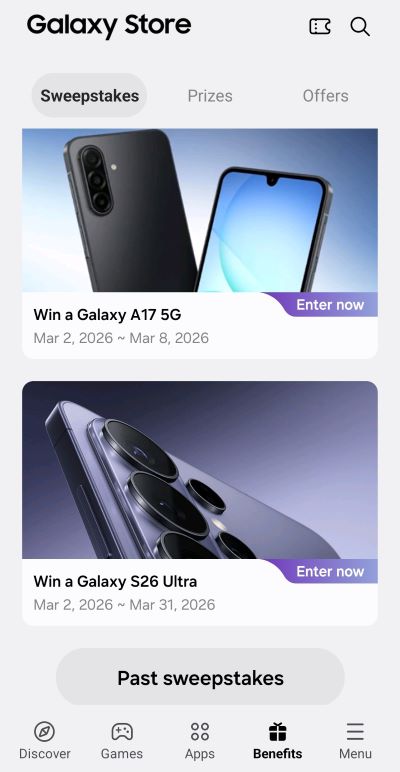
In the Galaxy Store, tap the Benefits tab, and scroll down to locate the current Sweepstakes. Remember to come back daily to try and win Samsung gear from Daily Instant Wins, Weekly Giveaways, and Monthly Mega Prizes. 

Read more
Read less

Gems and Tickets

Note
Gems and Tickets are separate and not interchangeable. 

Participating in the various daily activities and tasks will result in receiving Gems or Tickets.

  • Gems: Redeem Gems for prizes in the Galaxy Store Prize Shop.
  • Tickets: Use these to add additional sweepstakes entries and increase your chances to win.


Read more
Read less

Galaxy Store Prizes

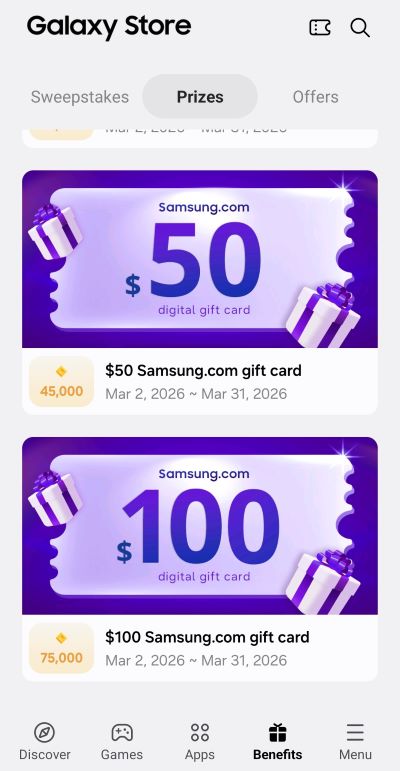
In the Galaxy Store on your Samsung phone, you can go to the Benefits tab, scroll down below the Activities section, and tap the Prizes section to see what options you can choose from.

Read more
Read less

Monthly reset

A system-wide reset occurs at the end of each calendar month. Unused balances will not carry over.

  • Gems and Tickets: Both Gems and Tickets will expire at the end of each month, so be sure to use them while you can.
  • Sweepstakes: All ongoing sweepstakes conclude at the month's end and the prize inventory is refreshed.
  • Task Progress: Any incomplete activities or progress toward tasks will be cleared. You may restart the task or journey during the new month.
Read more
Read less
Was this content helpful?
Table of contents
We're here for you

Contact Samsung Support

Contact us online through chat and get support from an expert on your computer, mobile device or tablet. Support is also available on your mobile device through the Samsung Members App.
auto-contact_us-pc-2x auto-contact_us-pc-2x


