How to couple or reset Samsung Galaxy earbuds

In the event that a single bud is lost or damaged, individual earbuds may be purchased or received as a replacement. When this happens, the old and new earbuds have to be connected or coupled together. This process only has to be done once, and then the two should function together as a pair. Complete the steps below to couple the two earbuds.

How to couple or reset Samsung Galaxy earbuds

1

Insert both earbuds into the charging cradle.

Make sure both earbuds are properly placed in the case, and that the charging contacts are aligned.
2

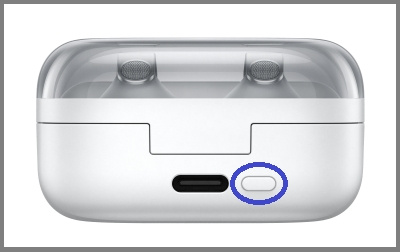
Open the lid, and press the Connect button for seven seconds.

Open the lid of the case, but leave the earbuds inside it. Then, with the lid open, press and hold the connect button on the back of the case for seven seconds until the battery indicator light starts flashing.
Note
On the Buds4 series, the indicator light will flash blue and turn off once the earbuds are properly coupled. If they flash red, they are not coupled correctly. Repeat these steps if they flash red.
3

Connect the earbuds to a mobile device.

The software versions on the earbuds may be different, so you need to connect them to your mobile device and check for any available software updates. If there is an update available, install it. If you need steps for connecting your earbuds to your phone or tablet, you can view our guide.
Was this content helpful?
Table of contents
We're here for you

Contact Samsung Support

Contact us online through chat and get support from an expert on your computer, mobile device or tablet. Support is also available on your mobile device through the Samsung Members App.
auto-contact_us-pc-2x auto-contact_us-pc-2x

