Get driving insights on your Samsung Galaxy phone
The Screen time while driving feature helps you understand how you use your Galaxy phone while driving. It records your driving time, how long you actively use your phone, and which apps you use while driving. You can review your daily and weekly activity, and even exclude navigation apps from your driving insights.

Get driving insights on your Samsung Galaxy phone
Note
Screen time while driving only records activity when your Galaxy phone is connected to your vehicle using Bluetooth.
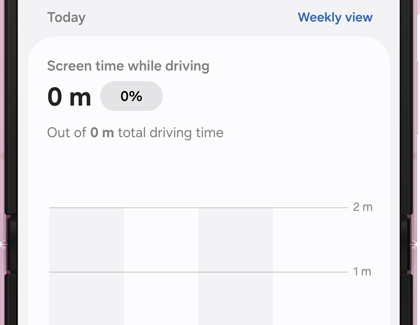
Once enabled, Screen time while driving displays your driving activity in an easy-to-read dashboard. You can review your driving time, screen time while driving, the apps you use while driving, and your daily or weekly activity over time.
- Open the Settings menu, then navigate to and tap Digital Wellbeing.
Note: On some Galaxy devices, this option may appear as Digital Wellbeing and parental controls. - Look for Driving monitor or Screen time while driving, then tap the option that appears.
If you see Driving monitor, you're setting up the feature for the first time. Tap Start and grant any required permissions if prompted.
If you see Screen time while driving, the feature has already been set up and is ready to use.
- Once you've completed a drive, review your driving insights. The dashboard displays your driving time, screen time while driving, and a graph showing your activity throughout the day or week.
Note
Always follow local traffic laws and avoid using your phone while driving whenever possible. Many Galaxy features can be used hands-free with voice commands or through your vehicle's compatible infotainment system.
Recommended Articles
We're here for you
Contact Samsung Support
Contact us online through chat and get support from an expert on your computer, mobile device, or tablet. Support is also available on your mobile device through the Samsung Members App.