Charge your Samsung Galaxy Z Fold8

Charge your Samsung Galaxy Z Fold8
Battery and charging overview

Your Samsung Galaxy Z Fold8 features a 4,800 mAh battery and supports Super Fast Charging 2.0, Super Fast Wireless Charging, and Wireless PowerShare. Whether you're recharging at home, in the office, or while traveling, you can choose the charging method that best fits your routine.
Charge your device with a USB cable
Charging with a USB-C cable is the quickest way to recharge your Samsung Galaxy Z Fold8. For the best results, use the USB-C cable included with your device together with a compatible Samsung power adapter. Your Galaxy Z Fold8 supports Super Fast Charging 2.0 with compatible charging accessories, so you can spend less time waiting and more time enjoying your device.

For reliable charging and the best performance, Samsung recommends using genuine Samsung charging accessories.
Looking for more charging tips? Learn about compatible Samsung chargers, charging while traveling internationally, and how to identify genuine Samsung accessories in our guide to Samsung wall chargers.
You can also discover how to use fast charging and other charging features on your Samsung Galaxy to help keep your device powered throughout the day.
Wirelessly charge your device
Charge your Samsung Galaxy Z Fold8 wirelessly by placing it on a compatible wireless charger. When paired with a compatible Samsung wireless charger, your device supports Super Fast Wireless Charging. For the best results, make sure your phone is positioned correctly on the charging pad.
Due to the Galaxy Z Fold8's larger form factor, the wireless charging coil is located closer to the bottom of the device rather than in the center. To help ensure a stable charging connection, position the bottom portion of your phone so the charging coil aligns with the center of the wireless charging pad.
The location of the wireless charging coil in the device

The device placement during wireless charging

Samsung offers a range of compatible wireless chargers, including:
Explore fast charging and other charging features on your Samsung Galaxy to help keep your device powered throughout the day.
Share power with Wireless PowerShare
Wireless PowerShare lets your Samsung Galaxy Z Fold8 act as a wireless charger for compatible devices, including Galaxy phones, Galaxy Watches, Galaxy Buds, and other Qi-certified devices.
- Make sure your Samsung Galaxy Z Fold8 has at least 30% battery remaining.
- Swipe down from the top right corner of the screen to open the Quick settings panel, then tap the Wireless power sharing icon.
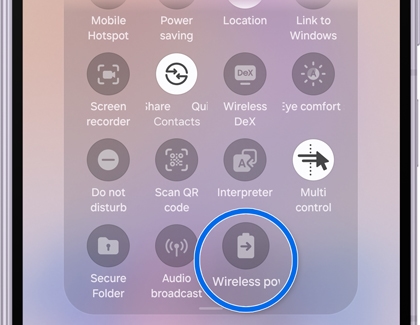
- Place the compatible device on the back of your Samsung Galaxy Z Fold8, making sure both devices are properly aligned.
- Charging starts automatically. If needed, slightly adjust the position of the devices to maintain a reliable charging connection.
Note: Remove thick cases or accessories if they interfere with charging. - When charging is complete, separate the two devices. Wireless PowerShare automatically turns off after 60 seconds if no compatible device is detected.

