Determine when your Samsung Galaxy phone battery needs replacing
The battery in your Galaxy device is a consumable component that naturally degrades over time. As battery health decreases, you may notice shorter battery life, unexpected shutdowns, or other abnormal battery behavior. If you experience these symptoms, check the battery condition on your Galaxy device and consider battery replacement if necessary.

Determine when your Samsung Galaxy phone battery needs replacing
Note
- Battery replacement may be covered under warranty or may require paid service depending on the warranty conditions.
- Menu names, settings, and screen layouts may vary depending on the model and software version.
Check for signs of battery aging
When to consider replacing the battery
Lithium-ion batteries gradually lose performance over time with continued use. The common signs of battery aging include:
- Battery drains quickly after charging
- The device turns off unexpectedly, especially in cold environments or during winter
These symptoms may indicate that the battery is nearing the end of its lifespan. If you notice these changes, consider checking the battery condition and replacing the battery if necessary.
How to identify battery replacement timing through the alert
When the battery performance significantly declines, your Galaxy device may display a battery performance degradation alert.
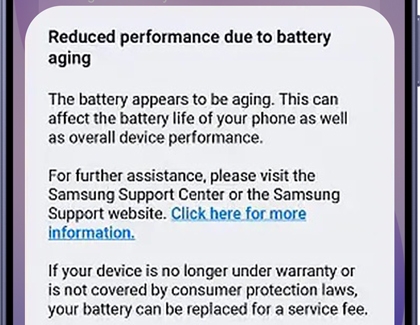
If this notification appears, visit a Samsung service center to have the battery inspected.
Read less
Check battery status using Samsung Members app
You can use Samsung Members Phone diagnostics to check the current battery condition of your Galaxy device.
- Open the Samsung Members app, then tap Support.
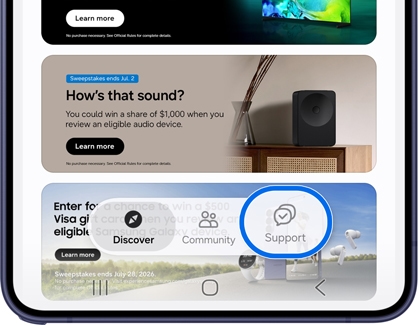
- Tap Get Started. Start the full diagnostics first, stop the test, and then select the item you want to test. If the diagnostics page does not open properly, try using the Samsung Internet app.
- Tap Battery status.
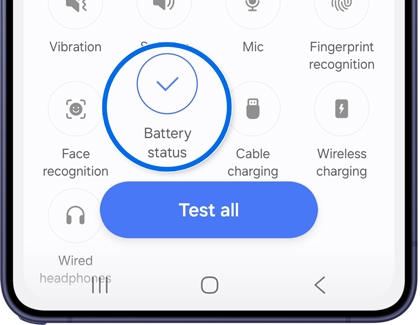
- Check the diagnostic results.
Read less
Note
If you continue experiencing battery-related issues, contact Samsung Support or visit a Samsung service center for professional assistance.
Recommended Articles
We're here for you
Contact Samsung Support
Contact us online through chat and get support from an expert on your computer, mobile device, or tablet. Support is also available on your mobile device through the Samsung Members App.

