How to enable Raise wrist to wake on your Samsung Galaxy Watch
The Raise wrist to wake feature automatically turns on your Galaxy Watch screen when you lift your wrist. This allows you to quickly check the time or notifications without pressing any buttons. You can enable this feature directly on your watch or through the Wearable app on your phone.

How to enable Raise wrist to wake on your Samsung Galaxy Watch
Note
If Power saving mode is enabled, the Raise wrist to wake feature may be limited. This feature may also be turned off when Sleep mode or Theater mode is active. In some cases, the response may feel slower depending on usage conditions.
Enable it directly on your watch
When you have your watch on hand, you can quickly enable this feature directly on the watch.
- Swipe up to open the Apps screen > Open Settings.
- Tap Display.
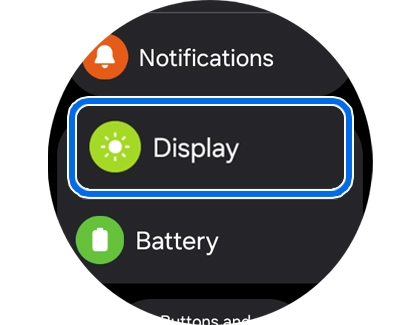
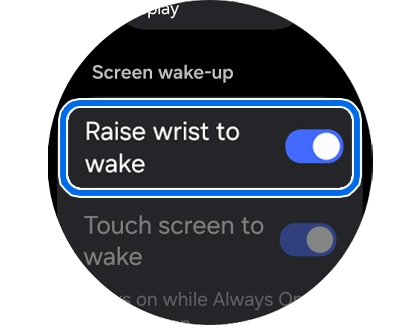
- Enable Raise wrist to wake.
Read less
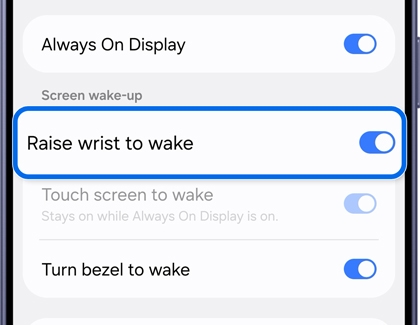
Enable it using the Wearable app on your phone
You can also enable this feature from your phone on a larger screen.
- Open the Wearable app on your phone.
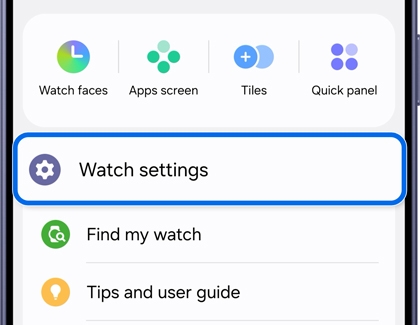
- Tap Watch settings.
- Tap Display.
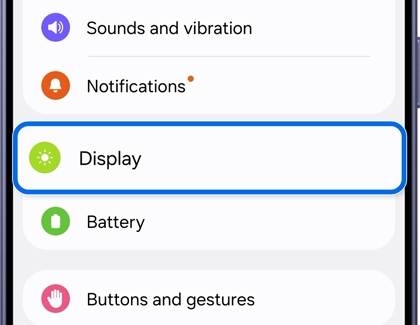
- Enable Raise wrist to wake.
Read less
Recommended Articles
We're here for you
Contact Samsung Support
Contact us online through chat and get support from an expert on your computer, mobile device, or tablet. Support is also available on your mobile device through the Samsung Members App.