How to wear the Galaxy Buds On
The Galaxy Buds On are a clip-on, open-ear style earbud. This provides a more gentle fit since they don't rest inside the ear canal, which also helps your ears stay more dry than with traditional earbuds or headphones. This design also allows for you to hear rich audio from the earbuds while also being able to hear the people and noises around you.

How to wear the Galaxy Buds On
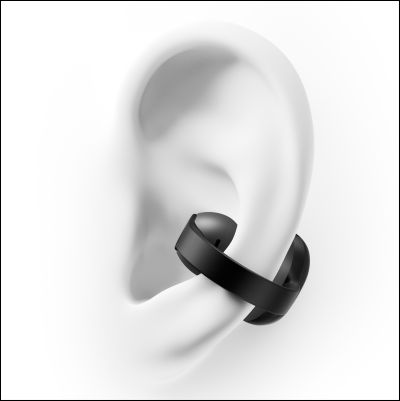
There are two sides to the Galaxy Buds On, the speaker-side and the touchpad-side. The speaker side is the smaller, round portion. The touchpad is the larger, rectangular side.
- Place the round speaker portion into the opening area of your ear.
- Hook the touchpad section behind your ear.
- Adjust the position of the earbuds so the touch-sensitive sensor makes contact with your ear and can detect that you're wearing them.
- The angle of the earbuds should be at a slight diagonal with the touchpad section resting lower than the speaker.
Note
With the Galaxy Buds On, there is no left or right earbud. The two are interchangeable and can be worn in either ear.
Recommended Articles
We're here for you
Contact Samsung Support
Contact us online through chat and get support from an expert on your computer, mobile device, or tablet. Support is also available on your mobile device through the Samsung Members App.