Front Panel / Top Panel of the Soundbar and How to Use the Remote Control: HW-T510
The soundbar can be controlled with either the remote or the controls on top.

Front Panel / Top Panel of the Soundbar and How to Use the Remote Control: HW-T510
Front Panel / Top Panel


- Display
- Power Button
- Volume Button
- Source Button
How to Use the Remote Control
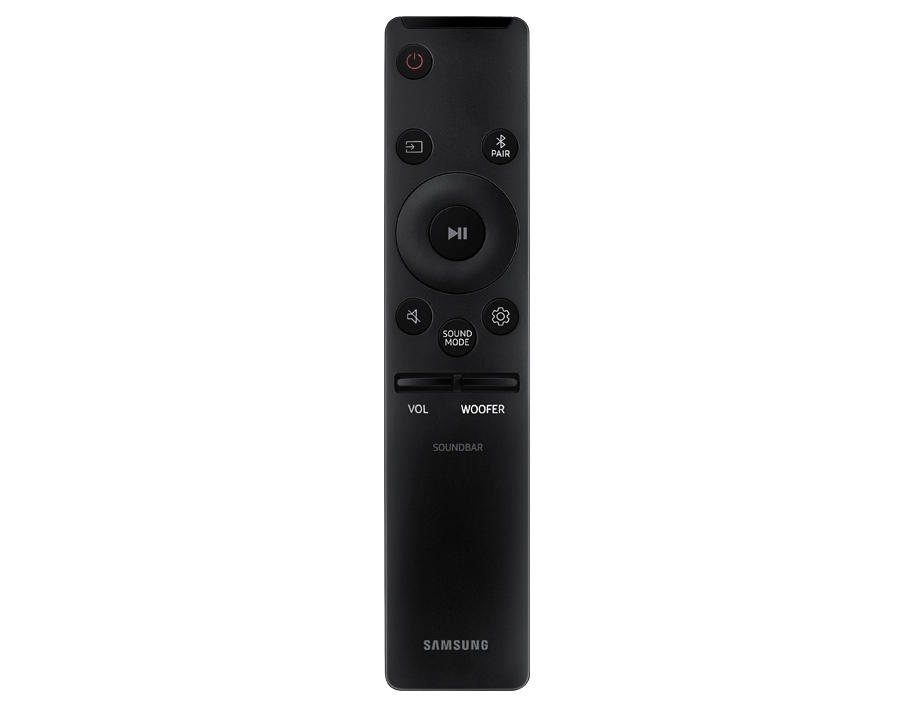


- Power
- Source
- Mute
- SOUND MODE
- Bluetooth PAIR
- Play/Pause
- Up/Down/Left/Right
- Sound Control
- WOOFER
- VOLUME
Recommended Articles
We're here for you
Contact Samsung Support
Contact us online through chat and get support from an expert on your computer, mobile device, or tablet. Support is also available on your mobile device through the Samsung Members App.

