Blood glucose meter NFC recognition issues after One UI 8 update

After updating to Android 16 with One UI 8.0, some blood glucose meters, such as Libre, may not be properly recognized by blood glucose apps via NFC. To resolve this, temporarily turn off and then turn on the NFC setting before using the meter.

Blood glucose meter NFC recognition issues after One UI 8 update

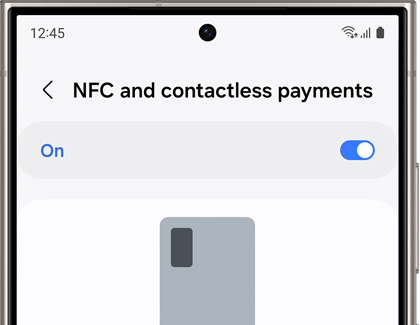
NFC and Contactless Payments settings on a Samsung Galaxy phone. .

  1. Open the blood glucose recognition app on your phone.
  2. Before the app recognizes the meter, turn NFC off and on; Open Settings on your phone, and then tap Connections. Turn off the switch next to NFC and Contactless Payments, and then turn the switch back on.
  3. Navigate back to the blood glucose recognition app. The app will now recognize your blood glucose meter.

Note
A software update is in progress to address this issue. The update will be rolled out gradually, varying by region and carrier. Be sure to keep your device updated for the latest fixes.
Was this content helpful?
We're here for you

Contact Samsung Support

Contact us online through chat and get support from an expert on your computer, mobile device or tablet. Support is also available on your mobile device through the Samsung Members App.
auto-contact_us-pc-2x auto-contact_us-pc-2x