Samsung Messages discontinuation: Switch to Google Messages

Samsung Messages will reach its End of Service (EOS) in the US starting July 6, 2026, for devices running Android 12 or newer versions. To keep your messaging experience seamless and up-to-date, we encourage you to transition to Google Messages, which will continue to provide reliable messaging services. Notifications regarding this change will be shared on Samsung.com and through in-app alerts. Follow the provided steps to ensure a smooth switch to Google Messages.
A Galaxy S26 Ultra home screen showing both Google Messages and Samsung Messages app icons.

Samsung Messages discontinuation: Switch to Google Messages

Note
  • Available settings and screens may vary by wireless service provider, software version, and device. 
  • Samsung Messages remains available and functional on devices operating on Android 11 or older versions. 
  • Google Messages is the recommended messaging app for devices running Android 12 or newer versions.


Check software version:

To check your device's software version and confirm compatibility, follow these steps:

  1. Open Settings on your device.
  2. Swipe to and tap About phone or About tablet
  3. Tap Software information.
  4. Review the displayed version to confirm your Android version.

If your device is running Android 12 or newer, switch to Google Messages to avoid disruptions to your messaging experience.

Read more
Read less

Notification period:

During the notification period, users with devices running Android 12 or newer versions will see a screen with the following options:

  • Switch now: Get guidance on how to change the default to Google Messages.
  • Later: Continue using Samsung Messages, with a reminder tip at the top of the chat room.
    A Galaxy S26 Ultra showing a notification to switch to Google Messages with a blue Switch now button.
Read more
Read less

Post-switch screen:

A Galaxy S26 Ultra showing a popup to set Google Messages as the default SMS app with a Set as default button.

After changing the default message app to Google Messages, launching Samsung Messages will show a Continue with Samsung Messages button (initially). The button will be removed once the discontinuation date is reached.

Read more
Read less

Switch to Google Messages:

There are a couple of ways you can switch the default messaging app while still using Samsung Messages:

  • Open Samsung Messages, and then tap Switch on the in-app notification. Google Messages will launch. 
  • Open or download Google Messages from the Play Store, tap Switch Set default SMS app, and then select Google Messages.

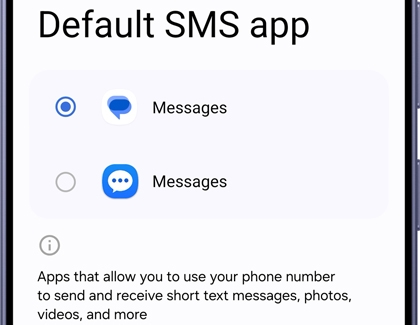
Alternativley, you can set any message app installed on your device as the default by navigating to Settings > Apps > Choose default apps > SMS app.

A Galaxy S26 Ultra showing the Default SMS app settings screen with two different Messages app options.

Read more
Read less

Add Google Messages to the Home screen:

For devices running Android 12 or newer 13, the Google Messages icon won't automatically move to the Home screen after switching. After installing the app, follow these steps to add it for quick access:

  1. If the Samsung Message icon is still on the Home screen, touch and hold the icon, and then tap Remove.
    A Galaxy S26 Ultra showing an app shortcut menu with the Remove option highlighted in a blue circle.
  2. Locate the Google Messages app icon, touch and hold it, and then tap Add to Home.
    A Galaxy S26 Ultra showing an app shortcut menu with the Add to Home option highlighted in a blue circle.
  3. To rearrange or move the Google Messages icon to a different Home screen, simply touch and hold the icon, then drag it to your desired position.
Read more
Read less

FAQs:

  • Is Samsung Messages no longer supported on my Galaxy device?
    Starting July 2026, the Samsung Messages app will no longer be supported on Galaxy devices running Android 12 or newer.

  • Can older Tizen OS watches, like the Galaxy Watch3, use Google Messages?
    No, they can't. After discontinuation, these watches won't show the full message history, but can still read and send texts.
    Note: The Samsung Galaxy Watch4 and newer models are compatible with Google Messages. To use this feature, ensure your watch is connected to a Galaxy phone and that Google Messages is set as the default messaging app. Additionally, Remote connection settings must be enabled for seamless functionality.
     
  • What happens to tablets using Call & text on other devices with Samsung Messages? The Message Continuity feature, which allows texting on tablets via the Allow texting on this tablet option in the Call & text on other devices menu, will be disrupted when Samsung Messages is discontinued.

  • How do I use Call & text on other devices with Google Messages on my tablet?
    If you switch to Google Messages on your devices, texting will still be available. Follow these steps to set it up:
    Note: Call & text on other devices currently does not work with Verizon and AT&T phones, and may not be available on all models from other carriers.

    Enable Call & text on other devices: Go to your phone's Settings, and then tap Connected devices > Call & text on other devices. Turn on the Text on other devices switch.
    Note: Samsung account login required.

    Sign in to Google Messages:  Open Google Messages on your tablet, and then sign in to the same Google account used on your phone. Alternatively, you can open Google Messages on your phone, and then tap your profile icon > Device pairing > Switch to QR pairing. Use the QR code scanner on your phone to scan the QR code displayed on your tablet's screen.

    Adjust Text on Galaxy device settings (optional): Open Google Messages on your tablet, and then tap your profile icon> Messages settings > Advanced > Text on Galaxy devices.
    Note: Google Messages does not require the Allowing texting on this tablet option to be enabled in the Call & text on other devices menu.

  • Is Samsung Messages still available for download after discontinuation?
    The downloadable version will be discontinued for Galaxy devices running Android 12 or newer.

  • Does the Galaxy S26 support Samsung Messages?
    No, downloadable Samsung Messages will not be supported starting with the Galaxy S26.

  • Is the Samsung Messages app available for download on newer devices?
    The Samsung Messages app cannot be downloaded from the Galaxy Store on the Galaxy S26 and newer devices.

  • What happens if I don't switch before the discontinuation date?
    After July 6, 2026, Samsung Messages will be unusable for sending messages except for emergency calls.

  • Can I send messages via Samsung Messages after discontinuation?
    No, except for emergency numbers or contacts.  

  • What happens to existing messages when switching?
    All your messages and conversations will automatically transfer from Samsung Messages to Google Messages. The transfer time depends on the amount of data, and it may take up to approximately 24 hours to complete the full transfer.

  • What happens to RCS conversations when switching apps?
    RCS may pause temporarily on pre-2022 devices, but resumes if both parties use Google Messages. MMS/SMS remains available.
    Note: For RCS Messaging to function properly, all chat participants must have RCS enabled. On Android, this requires Google Messages installed, while on iOS, iOS 18 or later is necessary.

  • Why switch to Google Messages?
    It offers an enhanced experience with RCS and AI features.

  • How can I learn more about Google Messages?
    To learn more about using Google Messages, visit Google's support page. You'll find detailed instructions for initial setup, sending and receiving messages, managing your messages, using RCS chat, and more. For assistance, explore the resources available on their official support site.
Read more
Read less
Was this content helpful?
We're here for you

Contact Samsung Support

Contact us online through chat and get support from an expert on your computer, mobile device, or tablet. Support is also available on your mobile device through the Samsung Members App.