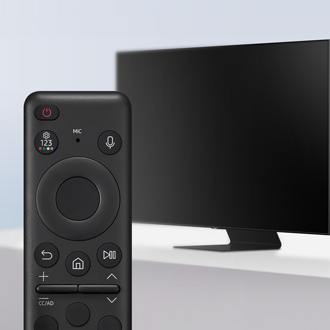
Voice recognition service has been terminated notice displayed on Samsung TV

Starting June 30, 2026, the voice recognition service for Samsung Smart TV models from 2014 to 2016 will no longer be available, as Microsoft has ended support for the Nuance ASR Server. If you own one of these TVs, you may have noticed weekly notifications informing you of this change. While the voice recognition feature is no longer operational, please note that TV control commands remain fully functional. Additionally, the embedded Voice Interaction feature continues to work, enabling you to use basic TV controls without significant disruption to your viewing experience.

Voice recognition service has been terminated notice displayed on Samsung TV

Use Voice Interaction

Speak into the microphone on your Samsung Smart Remote to control your TV.
Read more
Read less

Run Voice Interaction

Press and hold the Voice command button (the microphone icon) on your Samsung Smart Remote, speak a command such as "Play", "Pause", or "Channel up", and then release the button. The TV will process and respond to your voice command.
Read more
Read less

View the Voice Interaction guide

To view the Voice Interaction guide, press the Voice command button once. When you press the voice command button for the first time, the Voice Interaction button appears at the bottom of the screen. Press the Select button > Voice Interaction pop-up window appears.
Read more
Read less

Learn about Voice Command Guide

You can learn the voice commands to use the Voice Interaction in various situations. Use the directional buttons to move to the desired command, and then press the Select button. You can operate the TV with various voice commands.
Read more
Read less

Precautions for Voice Interaction

  • The supported voice interaction languages and features may differ depending on the geographical area.
  • If the language set differs from the language of your country, some features are not available.
  • Voice Interaction is available only when the TV is connected to the Internet.
  • Even if the TV is connected to the Internet, there may be no response due to a Voice Interaction server error.
  • The existing functional specifications may be changed if Voice Interaction is updated.
  • Voice Interaction is available only on TVs that support it and come with remote controls that have a microphone.
  • Symbols including "-" and special characters are not supported. Consequently, if a word or sentence contains numeric values or symbols, the function may not operate properly.
  • Searched results may not provide complete results.
  • You may be required to pay for some apps. Consequently, you may encounter a service application or contract.
  • To change the current channel by saying channel names as voice commands, you must finish Set Up Your Service Provider. If Set Up Your Service Provider is not completed, you can complete it using the following menu.

    Navigate to Home, and select Start > Settings General > Setup.
  • To use the voice text input function and Smart search function, you must consent to provisions allowing third parties to collect and use your voice data.
  • To use the Voice Interaction function, you must:

    a. Agree to Smart Hub's Terms of Use.
    b.
     Agree to guidance regarding the collection and use of personal information for the Smart Hub service.
    c. Consent to the collection and use of personal information for the voice interaction-based service.
Read more
Read less

Requirements for using Voice Interaction

  • The voice interaction rate differs with the volume/tone, pronunciation, and ambient sound environment (TV sound and ambient noise).
  • The optimal volume for voice commands is between 75 dB and 80 dB.
Read more
Read less
Was this content helpful?
We're here for you

Contact Samsung Support

Contact us online through chat and get support from an expert on your computer, mobile device, or tablet. Support is also available on your mobile device through the Samsung Members App.

