
Space Monitor 32" LS32R750


Gallery popup


Escanea el código QR con tu dispositivo móvil y coloca este producto en el lugar que prefieras.
{{upgradeResult.displayModelName}}
{{upgradeResult.discountText1}}
{{upgradeResult.description1}}
{{upgradeResult.description2}}
{{offerFinance.title}}
{{offerFinance.learnMoreCta.text}}{{offerFinance.description}}
{{galaxyForeverResult.displayModelName}}
{{galaxyForeverResult.discountText1}}
{{galaxyForeverResult.description1}}
{{galaxyForeverResult.description2}}
Elige tu marco
Marcos personalizables de venta por separado
Elige el color de tu Freestyle
Fundas personalizables vendidas por separado
-
{{item.name}}
Agotado
Color de marco
-
{{item.name}}
Agotado
Tipo biselado
-
{{item.name}}
Agotado
Colores adicionales
-
{{item.name}}
Agotado
Tipo de marco

- Color de marco
Los marcos personalizados de The Frame encajan magnéticamente en tu TV. Ahora puedes cambiar de estilo en un instante.
Tipo de marco

- Tipo biselado
El nuevo diseño de tipo biselado ofrece un elegante bisel con borde interior en ángulo de 45 grados.
{{tradeIn.title}}
{{tradeIn.learnMoreCta.text}}{{tradeIn.description}}
{{tradeInResult.displayModelName}}
{{tradeInResult.discountText1}}
{{tradeInResult.discountText2}}
{{tradeInResult.discountText3}}
{{tradeInResult.discountText4}}
{{tradeInResult.discountText5}}
{{tradeInResult.discountText6}}
{{tradeInResult.specialDiscountText}}
{{tradeInResult.description}}
{{tradeInResult.contentText}}
EliminarDealer stock quantity
You can check the stock quantity for each region
Please select city
{{assuredBuyBack.title}}
{{newAssuredBuyBack.title}}
{{newAssuredBuyBack.learnMoreCta.text}}{{newAssuredBuyBack.description}}
Please select Samsung Assured Buyback or no coverage
{{care.title}}
{{care.learnMoreCta.text}}{{care.description}}
Selecciona "Samsung Care+" o "No" para continuar
-
{{item.specialText}}
-
*La franquicia se abona en caso de que el siniestro haya sido aprobado
{{warrantyResult.displayModelName}}
{{warrantyResult.discountText1}}
{{warrantyResult.description1}}
{{warrantyVdResult.title}}
{{warrantyVdResult.priceDisplay}}
{{delivery.headline}}
{{delivery.errorMessage}}
{{deliveryResult.priorityText}}
{{deliveryResult.mainText}}
{{deliveryResult.subText}}
Standard installation charges may apply.Click here for more details.
{{deliveryResult.decText}}
{{item.disclaimer}}
{{tariffOptionResult.displayModelName}}
{{tariffOptionResult.discountText1}}
{{tariffOptionResult.description1}}
{{tariffOptionResult.description2}}
{{tariffOptionResult.description}}
{{tariffOptionResult.price}}
{{tariffOptionResult.disclaimer}}
{{embedAddon.title}}
{{embedAddon.description}}
-
{{item.name}}
{{item.modelCode}}
{{item.description}}
{{item.finalPrice}}
{{item.originalPrice}}{{item.savePrice}} Agotado
-
{{item.name}}
{{item.modelCode}}
{{item.description}}
- {{item.dotList1}}
- {{item.dotList2}}
- {{item.dotList3}}
{{item.finalPrice}}
{{item.originalPrice}}{{item.savePrice}} Agotado
{{message.item.tcCTAText}}
{{message.item.periodText}}
Destacados

UHD (3840x2160)

Diseño elegante

HAS de nivel cero

Bisagra robusta
Características


Recupera tu espacio


Diseñado para ahorrar espacio
Cuando no lo usas, el monitor Samsung Space permanece completamente pegado a la pared liberando tu espacio de trabajo. Cuando lo necesites, simplemente tira de él hacia ti y ajústalo a la posición que tú prefieras.


Maximiza el espacio de tu escritorio
Aprovecha mejor tu superficie de trabajo con el Samsung Space Monitor. Sobre una mesa de 120 x 50 cm (47,2 x 19,7 pulgadas), el Space Monitor ofrece hasta un 40 % más de espacio utilizable en comparación con un monitor convencional de tamaño equivalente (Samsung SD850).


4K Ultra HD
Con 4 veces más píxeles que el Full HD, el Space Monitor de 31,5” ofrece más espacio de pantalla e imagenesUHD ultrarealistas. Visualiza documentos y páginas web sin scrolling, trabaja cómodamente con múltiples ventanas y barras de herramientas y disfruta de tus fotos, vídeos y juegos en impresionante calidad 4K.


Cables ocultos
El soporte del Samsung Space Monitor oculta perfectamente el cable en Y de alimentación/HDMI en una guía para evitar enredos y mantener tu espacio de trabajo limpio y en orden.


Elegante diseño
Con su delgado panel y su pantalla sin marco en 3 lados, el Samsung Space Monitor ofrece una solución discreta para cualquier lugar de trabajo u hogar.


HAS de nivel cero
El ajuste de altura Zero-Level del Samsung Space Monitor te permite posicionar fácilmente la pantalla para un optimo confort. Cuenta con el mejor rango de regulación permitiendo la visualización desde una altura de 21,3 cm sobre la mesa (pantalla de 27'') hasta poder colocarlo sobre la superficie de la mesa.
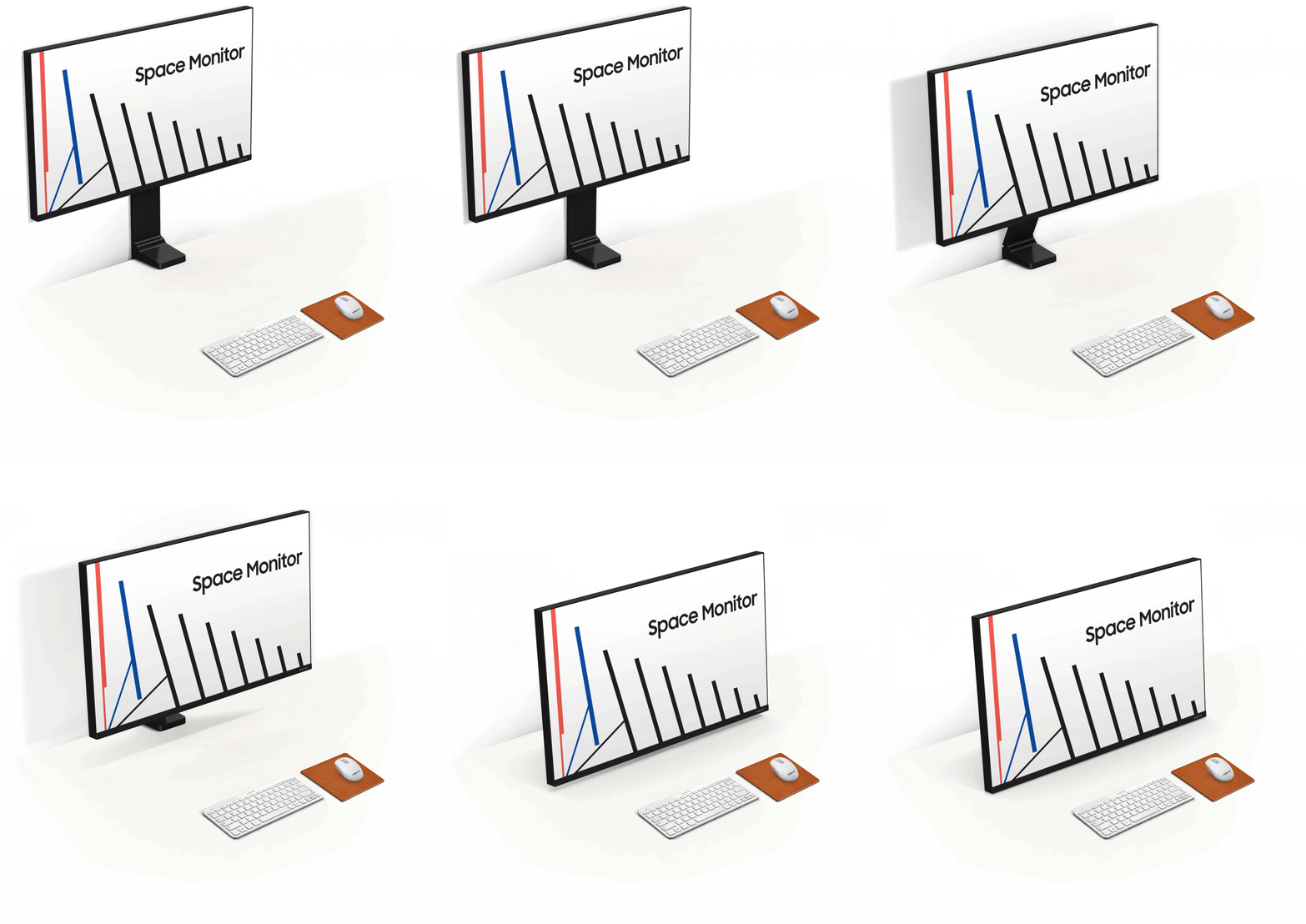
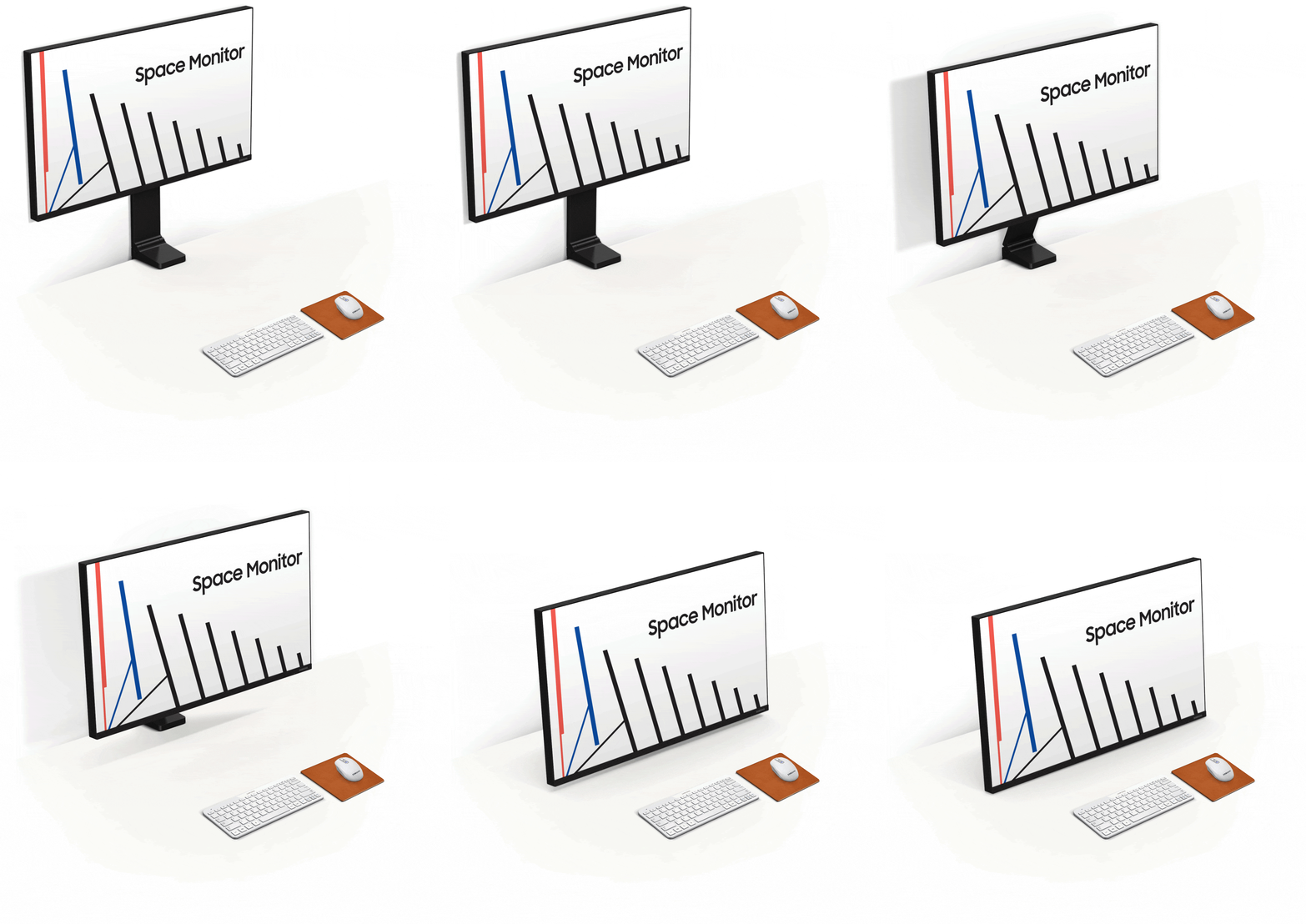
Bisagra robusta
El soporte del Samsung Space Monitor utiliza una bisagra robusta que asegura un funcionamiento seguro y resistente.


Regulable a la altura de los ojos
El Samsung Space Monitor se puede elevar o bajar fácil y rapidamente hasta alcanzar la altura de visualización óptima para cualquier usuario y necesidad, lo que lo convierte en una solución versatil para su uso en casa o en espacios públicos como librerias.


Multitarea
El modo PBP muestra en pantalla dos fuentes de entrada a sus resoluciones nativas. El modo PIP permite reposicionar una segunda entrada y redimensionarla hasta ocupar un 25 % de la pantalla. Con el software de división de pantalla Easy Setting Box de Samsung podrás organizar las ventanas al instante para una óptima multitarea.


Multitarea
El modo PBP muestra en pantalla dos fuentes de entrada a sus resoluciones nativas. El modo PIP permite reposicionar una segunda entrada y redimensionarla hasta ocupar un 25 % de la pantalla. Con el software de división de pantalla Easy Setting Box de Samsung podrás organizar las ventanas al instante para una óptima multitarea.


Multitarea
El modo PBP muestra en pantalla dos fuentes de entrada a sus resoluciones nativas. El modo PIP permite reposicionar una segunda entrada y redimensionarla hasta ocupar un 25 % de la pantalla. Con el software de división de pantalla Easy Setting Box de Samsung podrás organizar las ventanas al instante para una óptima multitarea.


Fácil instalación
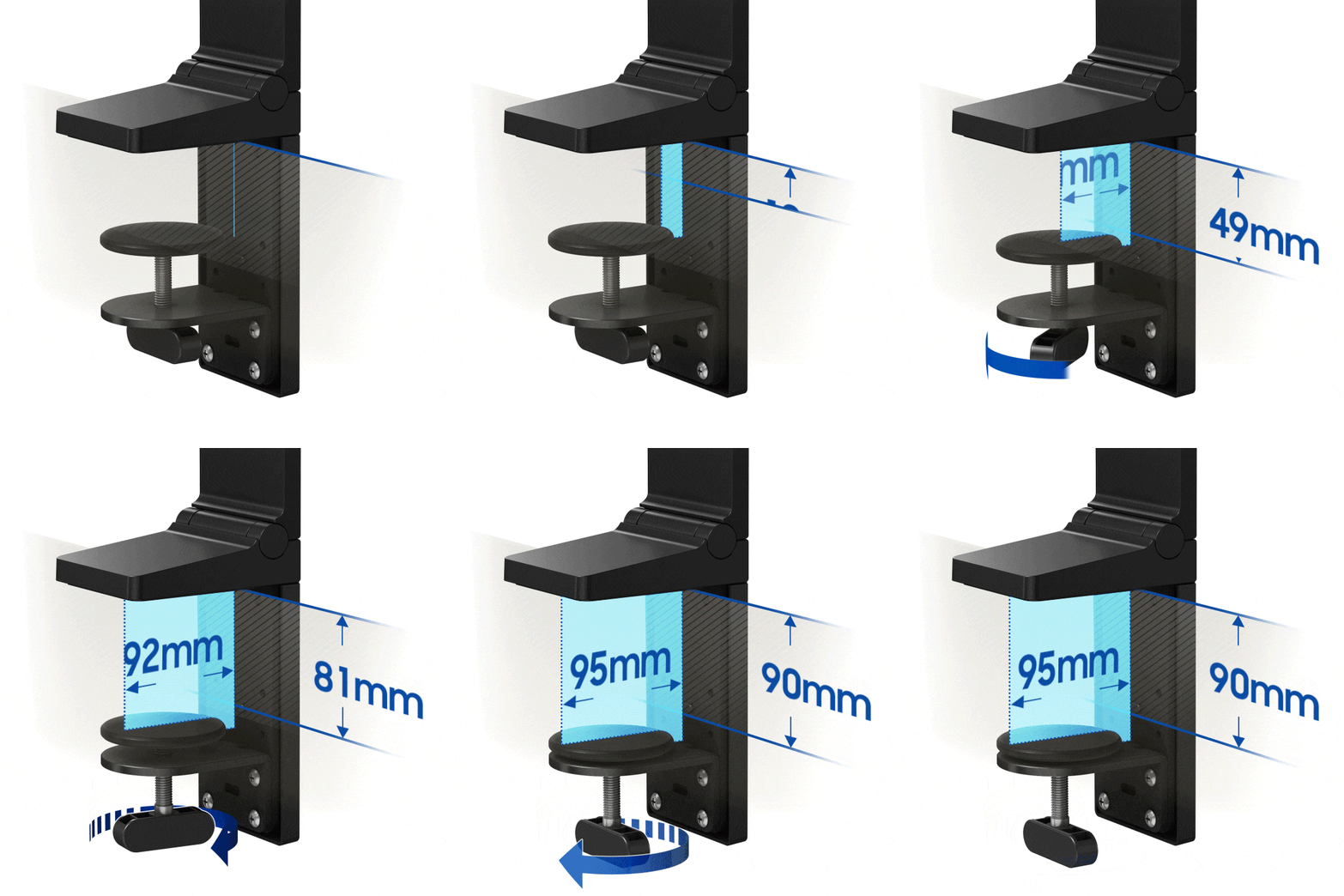
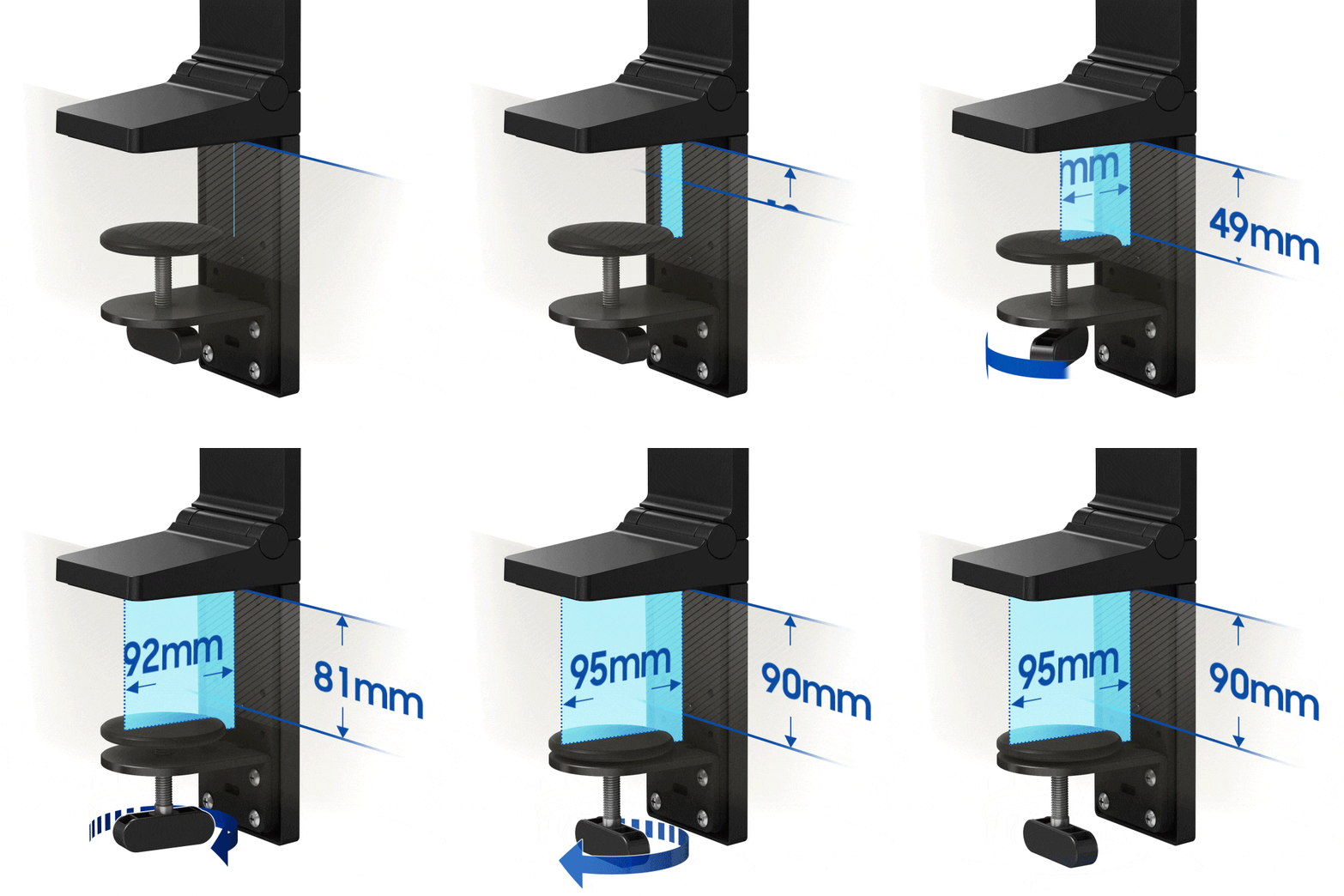
El soporte del Samsung Space Monitor integra una pinza para una instalación rápida y fácil. La pinza se puede ajustar hasta los 90 mm, y permite fijar el Space Monitor de forma segura a mesas y superficies de distintos grosores.
Especificaciones
-
Relación de aspecto
16:9
-
Brillo (Normal)
250 cd/㎡
-
Relación de contraste estático
2500:1(Typ.)
-
Resolución
3,840 x 2,160
-
Tiempo de Respuesta
4(GTG)
-
Ángulo de Visión (H/V)
178°(H)/178°(V)
-
Refresco
60Hz
-
Pantalla (pulgadas)
31.5
-
Pantalla (cm)
80.0
-
Tamaño de pantalla (Class)
32
-
Plana / Curva
Flat
-
Active Display Size (HxV) (mm)
697.3 x 392.2mm
-
Relación de aspecto
16:9
-
Panel
VA
-
Brillo (normal)
250 cd/㎡
-
Brillo (Min)
200 cd/㎡
-
Ratio de contraste (Estático)
2500:1(Typ.)
-
Ratio de contraste (Dinámico)
Mega ∞ DCR
-
Resolución
3,840 x 2,160
-
Tiempo de Respuesta
4(GTG)
-
Ángulo de Visión (H/V)
178°(H)/178°(V)
-
Soporte de color
1B
-
Color Gamut (NTSC)
72%
-
Color Gamut (sRGB Coverage)
100%(Typ.)
-
Frecuencia de Imagen
60Hz
-
Samsung MagicBright
Sí
-
Samsung MagicUpscale
Sí
-
Eco Saving Plus
Sí
-
Modo Eye Saver
Sí
-
Flicker Free
Sí
-
Picture-In-Picture
Sí
-
Imagen a imagen
Sí
-
Modo gaming
Sí
-
Tamaño de imagen
Sí
-
USB Super Charging
No
-
Easy Setting Box
Sí
-
Certificación de Windows
Windows 10
-
FreeSync
No
-
Off Timer Plus
Sí
-
Wireless Display
No
-
D-Sub
No
-
DVI
No
-
Dual Link DVI
No
-
Display Port
No
-
Display Port Version
1.2
-
Salida Display Port
No
-
Versión de salida Display Port
No
-
Mini-Display Port
1 EA
-
HDMI
1 EA
-
HDMI Version
2.0x1
-
Entrada Audio
No
-
Auriculares
No
-
USB Ports
No
-
USB Hub Version
2.0
-
USB-C
No
-
Altavoz
No
-
USB Sound Bar (Ready)
No
-
Temperatura
10~40 ℃
-
Humedad
10~80,non-condensing
-
Color
BLACK
-
Tipo de peana
Dual Hinge
-
HAS(Height Adjustable Stand)
0~184.7mm
-
Inclinación
-5.0°(±2.0°)~ 20.0°(±2.0°)
-
ENERGY STAR
No
-
Clase de eficiencia energética
G
-
Fuente de alimentación
AC 100~240V
-
Consumo de energía (máx.)
54 W
-
Consumo típico
53 W
-
Consumo (DPMS)
≤0.3 W
-
Consumo (Apagado)
≤0.3 W
-
Consumo anual
77 kWh/year
-
Tipo
External Adaptor
-
Dimensiones Netas con Peana (AnxAltxProf)
714.5 x 757.2 x 115.5 mm
-
Dimensiones Netas sin Peana (AnxAltxProf)
714.5 x 418.2 x 26.0 mm
-
Dimensiones embalado (AnxAltxProf)
978.0 x 159.0 x 502.0 mm
-
Peso con peana
7.0 kg
-
Peso sin peana
4.8 kg
-
Peso paquete
9.4 kg
-
Cable HDMI
Yes
-
DP Cable
No
-
Thunderbolt 3 Cable
No
-
Mini-Display Gender
No
-
CD de instalación
Sí
-
USB 3.0 Cable
No
Reseñas
Space Monitor 32" LS32R750
Filtros
La ordenación por relevancia muestra las mejores reseñas primero. Consideramos elementos como votos útiles, reseñas más recientes, imágenes y otras características que los lectores buscan en sus reseñas.
Filtros
33 Reseñas
2021-05-20
2022-01-11
2021-01-20
Samsung Support
We do design all of our monitors to be adjustable to cater for a range of needs, but we're sorry to see that you've had an issue while trying to adjust yours. Unfortunately, any accidental damage is not covered under the warranty, but we would still be happy to look into all available options with you to get this repaired. You can find details for all the different ways to contact our Customer Support team, by following this link: https://bit.ly/SamsungUK-Support ^DB at Samsung Support
2021-01-09
Samsung Support
We're sorry to see that you had an issue with the first monitor sent to you, Jake, but delighted to see that you're now getting the superb levels of quality that you were expecting. We do thank you for all of your feedback, as we're always looking for ways to improve everything that we produce. ^DB at Samsung Support
2020-10-24
Samsung Support
We're pleased to see that your new monitor is providing you with everything that you needed, so thank you for the feedback. ^DB at Samsung Support
2020-02-22
2020-01-28
Denmark
Kunde Support Samsung
Hi! We're sorry to hear that you have experienced issues with these noises from your Samsung Space Monitor. We would be happy to try and help you sort this out at our technical support. Our Danish phone support can be contacted 24/7 on +4570701970, and you can also find further support possibilities on our website: https://www.samsung.com/dk/info/contactus/ The display can be connected through HDMI and DisplayPort, but is not meant for connections through USB-C, as stated in the product specifications.
2019-10-23
Birmingham
Samsung Support
Thanks for the in-depth review. Your High Resolution Space Monitor was designed to offer versatility with any workspace, but we can understand why this not apply to every part of your own desk. We like to make all of our products accessible and user-friendly, so we're glad to see that the initial set-up was simplistic. The 4K Ultra HD screen will bring any gaming experience to life, or allow you to view documents with clearer clarity, and the PBP function makes multitasking a breeze. ^DB at Samsung Support
2019-10-23
Mitcham
Samsung Support
We're glad that you're loving your 32-inch 4K monitor and you decided to take the plunge and purchase it! The Space-Saving Design is our favourite feature and we're super happy yo see that it's looking great on your desk. Enjoy! ^HA at Samsung Support
2019-10-23
Bradford
Samsung Support
Thanks for leaving us a four-star review, Omairk! We're glad that you're loving the 4K display and the concealed cables of your monitor, it really does make everything so much more cleaner! We appreciate your feedback. ^HA at Samsung Support
2019-10-23
Northampton
Samsung Support
Thank you for leaving such an in-depth review, Swade, we really appreciate it. We're glad that your monitor is up and running and that you're enjoying the 4K display alongside the flexibility. Enjoy! ^HA at Samsung Support
2019-10-23
Castlewellan
Samsung Support
We are incredibly grateful that you took the time out to leave us your five-star review, Pete. We're so glad that you love every aspect of your monitor, and even purchased two more for the office! That's brilliant! Thank you for the five-stars. ^HA at Samsung Support
2019-10-23
Samsung Support
We know how important it is to have that vibrant 4K display, Raj, and we're glad that you're enjoying it! Boasting life-like images and 4K quality gaming, it really is awesome. Enjoy and thanks for the five-stars! ^HA at Samsung Support
2019-10-23
Pevensey
Samsung Support
Thanks for your four-star review! We appreciate all feedback and we're glad that you're loving the 4K display of your LS32R750UEUXEN alongside the space saving design. If you require any assistance, simply call us on 0330 726 7864 and we'll be happy to help. ^HA at Samsung Support
2019-10-23
Bristol
Samsung Support
Thanks for the awesome feedback, Emziic! We're glad that you're loving the 4K ultra HD display of your LS32R750UEUXEN monitor! We know how important it is to have life-like UHD images and multiple windows, perfect for an artist, like yourself! Enjoy! ^HA at Samsung Support
2019-10-10
2019-09-13
Samsung Support
Thank you for the review and feedback regarding your UHD Space Monitor. The hinge is designed to be a versatile solution for finding the optimum viewing height for any user and any purpose, but we appreciate your feedback regarding your own experience with it. We hope that it is still helping you maximise your productivity through its range of multi-tasking features. ^DB at Samsung Support
2019-08-30
Samsung Support
Hey there. We are extremely happy to see that the Space Monitor has improved your home office and made a real difference to your desk space and love of working from home! We are appreciative of your feedback regarding the stand and will pass it on. This review will prove invaluable to those considering the purchase, so thank you very much for taking the time to leave us some details of your experience with incredible monitor! ^CR at Samsung Support
2019-08-23
Samsung Support
Thanks for your brilliant review, Pete. Your awesome Space Monitor gives you that extra little bit of space when you need it, and we're thrilled to see that you're enjoying its brilliance. Boasting a 4K Ultra HD display alongside life-like UHD images, it really does make all of your work stand out. ^HA at Samsung Support
2019-08-22
Zevenaar
2019-08-18
2019-08-09
Samsung Support
It's great to see that you're enjoying the space-saving design and the 4K display of your space monitor. We appreciate your feedback and thank you for the five-stars! ^HA at Samsung Support
2019-08-09
Samsung Support
We are delighted to read that you have found a great match for your computer and home office set up. With its crisp definition and space-saving design, it's certainly a perfect piece of kit for a multiscreen environment. ^CR at Samsung Support
2019-08-09
Drachten
2019-08-07
Samsung Support
Hey Emzii! It's a pleasure to know that we have made such a positive difference in your work productivity and enjoyment. The superb display provides you with the perfect multi-tasking, high-resolution setup! Thanks for the five stars! ^CR at Samsung Support
2019-08-06
Samsung Support
Thank you for your five-star review, it's awesome to see that you are utilising the brilliant space-saving design and the 4K Display. We appreciate your review, enjoy! ^HA at Samsung Support
2019-08-06
Samsung Support
Thank you for your four-star feedback, Omair, we really appreciate it. It's awesome to see that you are enjoying the space-saving design, enabling you to push back the monitor. The 4K Ultra HD display gives you the best experience doing what you love and we can see that you're utilising that to its fullest potential. Enjoy your awesome monitor! ^HA at Samsung Support
2019-08-05
Samsung Support
We appreciate your five-star feedback, Alias! It's awesome to see that you're utilising the brilliant space-saving design and the 4K Ultra HD display. Enjoy! ^HA at Samsung Support
2019-08-03
Samsung Support
Thank you for the in-depth, honest review, and recommendation, Dave. Your monitor was designed to maximise your desk space, by giving you 40 percent more usable surface area than a conventional monitor of equivalent size. The life-like 4K Ultra HD screen and PBP display input will also help boost your both your work-rate, and display everything in superb quality. While we have added features such as a zero-level Height Adjustable Stand, adjustable eye level, and a durable hinge, we can understand your comments regarding your own circumstances. ^DB at Samsung Support
2019-07-30
Samsung Support
Thanks so much for the glowing review of your Space Monitor! You have summed up how wonderful it is and what an amazing addition it is to your home or office. We love how it maximises your desk space and delivers in stunning 4K. View documents and webpages with less scrolling, work more comfortably with multiple windows and enjoy your photos, videos and games in stunning HD! ^EM at Samsung Support
2019-07-30
Samsung Support
Thank you for your four-star feedback, Sonic! Your 4K UHD Space Monitor ensures that your desk is completely clutter-free and we're sad to see that you have not quite got that yet. As the monitor pushes itself flat against a back wall, it gives you more space on your desk. While it does not support HDR, it does have 4K Ultra-HD that gives you lifelike UHD images, every time! Thank you for your four-stars and enjoy! ^HA at Samsung Support
2019-07-25
Samsung Support
Many thanks for sharing your thoughts with us, we really appreciate it. Your Space Monitor has a beautiful space-saving design, enabling you to have a clear desk space, so we're very happy to see that you're utilising this feature. Thank you for your four-star review and we'd love to know how we could get that fifth one, do let us know. Enjoy. ^HA at Samsung Support
2019-07-09
Samsung Support
The Samsung Space Monitor pushes back to sit flat against a back wall and leave your entire work surface clear. With 4x the pixels of Full HD, it delivers amazingly life-like images. So whatever you are doing, enjoy it with full clarity! ^EM at Samsung Support
Estas reseñas son gestionadas por Bazaarvoice y cumplen la Política de autenticidad de Bazaarvoice, que está respaldada por análisis humano y tecnología contra el fraude.
Más información en
Manual de usuario y descargas Ficha técnica del producto
Soluciones y consejos
- Actualiza tu Samsung Gaming Monitor usando un dispositivo USB
- [2022] Cómo instalar y configurar el monitor para videojuegos Odyssey Ark de Samsung
- Cómo usar la Detección de logos y el Salvapantallas en tu monitor OLED
- Cómo evitar el desplazamiento de la imagen en tu monitor Samsung OLED
- Cómo usar el monitor Gaming Odyssey Ark de Samsung (2022)
Soporte del producto
Encuentra respuestas a las pregunta que tienes sobre el producto





