
Galaxy Buds2 Pro


Gallery popup


Please scan the QR Code with your mobile device, then place the product image in desired place.
{{upgradeResult.displayModelName}}
{{upgradeResult.discountText1}}
{{upgradeResult.description1}}
{{upgradeResult.description2}}
{{offerFinance.title}}
{{offerFinance.learnMoreCta.text}}{{offerFinance.description}}
{{galaxyForeverResult.displayModelName}}
{{galaxyForeverResult.discountText1}}
{{galaxyForeverResult.description1}}
{{galaxyForeverResult.description2}}
Bezel_Choose your color
Customizable bezels sold separately
Choose your skin color
Customizable skin sold separately
-
{{item.name}}
Out Of Stock
Modern Type
-
{{item.name}}
Out Of Stock
Beveled Type
-
{{item.name}}
Out Of Stock
Skin color
-
{{item.name}}
Out Of Stock
Bezel type

- Modern Type
The Frame's custom bezels magnetically click into place. Now, you can switch between styles in a snap.
Bezel type

- Beveled Type
The new Beveled type bezel design offers an elegant 45-degree angled inner edge bezel.
{{tradeIn.title}}
{{tradeIn.learnMoreCta.text}}{{tradeIn.description}}
{{tradeInResult.displayModelName}}
{{tradeInResult.discountText1}}
{{tradeInResult.discountText2}}
{{tradeInResult.discountText3}}
{{tradeInResult.discountText4}}
{{tradeInResult.discountText5}}
{{tradeInResult.discountText6}}
{{tradeInResult.specialDiscountText}}
{{tradeInResult.description}}
{{tradeInResult.contentText}}
DeleteDealer stock quantity
You can check the stock quantity for each region
Please select city
{{assuredBuyBack.title}}
{{newAssuredBuyBack.title}}
{{newAssuredBuyBack.learnMoreCta.text}}{{newAssuredBuyBack.description}}
Please select Samsung Assured Buyback or no coverage
{{care.title}}
{{care.learnMoreCta.text}}{{care.description}}
Please select Samsung Care+ or No to continue
-
{{item.specialText}}
-
{{warrantyResult.displayModelName}}
{{warrantyResult.discountText1}}
{{warrantyResult.description1}}
{{warrantyVd.title}}
{{warrantyVd.description}}
{{warrantyVdResult.title}}
{{warrantyVdResult.priceDisplay}}
{{delivery.headline}}
{{delivery.errorMessage}}
{{deliveryResult.priorityText}}
{{deliveryResult.mainText}}
{{deliveryResult.subText}}
Standard installation charges may apply.Click here for more details.
{{deliveryResult.decText}}
{{item.disclaimer}}
{{tariffOptionResult.displayModelName}}
{{tariffOptionResult.discountText1}}
{{tariffOptionResult.description1}}
{{tariffOptionResult.description2}}
{{tariffOptionResult.description}}
{{tariffOptionResult.price}}
{{tariffOptionResult.disclaimer}}
{{embedAddon.title}}
{{embedAddon.description}}
-
{{item.name}}
{{item.modelCode}}
{{item.description}}
{{item.finalPrice}}
{{item.originalPrice}}{{item.savePrice}} Out Of Stock
-
{{item.name}}
{{item.modelCode}}
{{item.description}}
- {{item.dotList1}}
- {{item.dotList2}}
- {{item.dotList3}}
{{item.finalPrice}}
{{item.originalPrice}}{{item.savePrice}} Out Of Stock
{{message.item.tcCTAText}}
{{message.item.periodText}}
Highlights

360 Audio

Sound experience

Intelligent ANC

Fit
Features

360 Audio experience on Dolby Atmos
"24-bit audio support is just the start of some sweeping improvements."
Android Authority
08/2022
"The Galaxy Buds2 Pro look like the Samsung earbuds we’ve been waiting for"
Digital Trends
08/2022
From Digital Trends. © 2022 Digital Trends Media Group. All rights reserved. Used under license.
"The audio is crisp and clear across all levels with the earbuds getting nice and loud at the top end."
Sammobile
08/2022
"As top-end earbuds go, Samsung’s Galaxy Buds2 Pro seem to tick every box."
Stuff
08/2022

- Ultimate Hi-Fi sound in your ear
- Seamless connectivity
- Comfortable fit
- AI assistance right in your ear
Galaxy AI is here
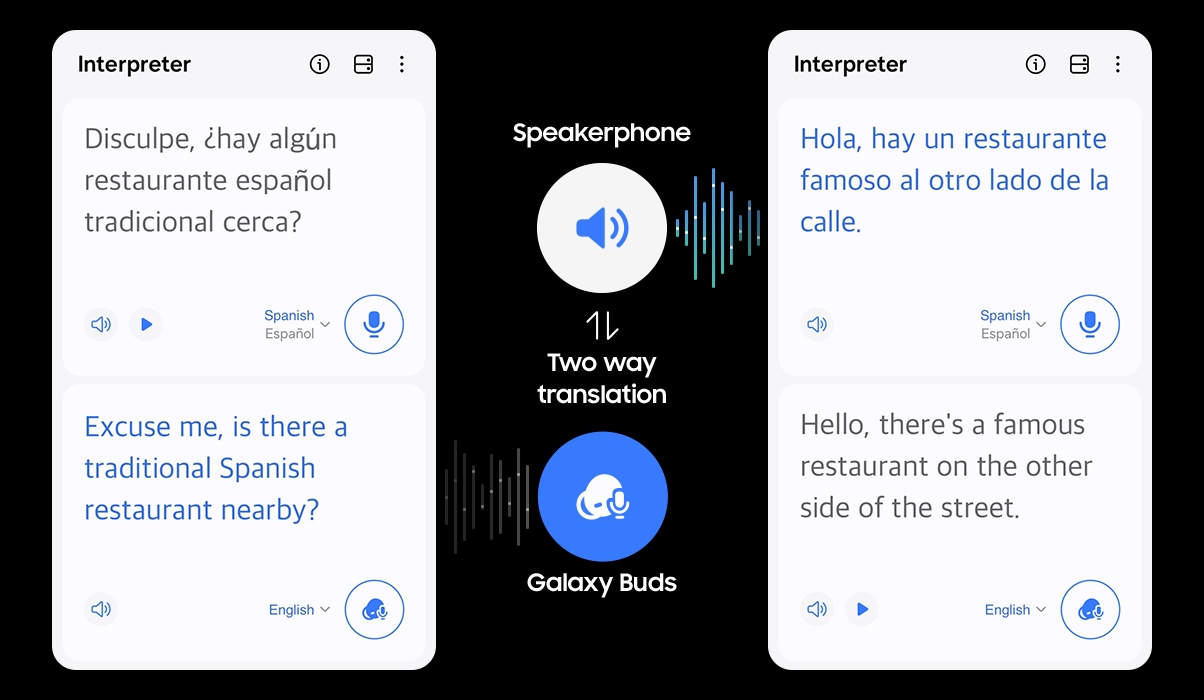
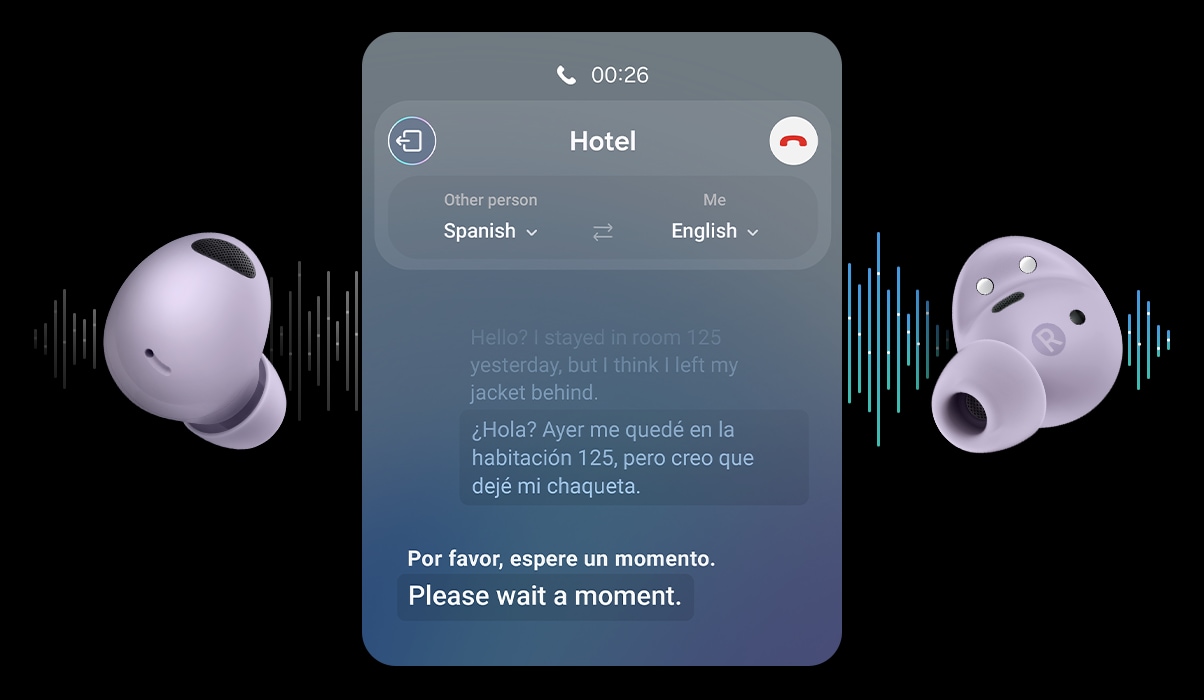
Elevate your Galaxy AI experience with Galaxy Buds2 Pro. Now you have a translator right in your ear. Turn on the translation features on your Samsung Galaxy smartphone with Galaxy Buds2 Pro on. Make friends with no language barrier when talking face-to-face or over the phone.




SOUND EXPERIENCE
The clear choice for quality sound
24-BIT Hi-Fi AUDIO
Hear sound
as it was intended,
wirelessly
for wide frequency response Woofer
delivers deeper bass Tweeter
produces crisp treble
24-bit
Hi-Fi audio
INTELLIGENT ANC
Puts your
playlist in focus
is better than ever.
Active Noise Canceling (ANC)
is better than ever. With 3 high SNR (Signal-to-Noise Ratio) microphones, the Galaxy Buds2 Pro tracks and eliminates more outside sound — even soft sounds like wind. 3
Switching to in-person conversations is easy with Voice Detect.
Simply start talking and Voice Detect will turn off ANC and activate Ambient sound — allowing you to clearly hear the conversation without removing your Galaxy Buds2 Pro. 3
360 AUDIO
Hear it like
you're there
What is 360 Audio?
360 Audio is a feature that pinpoints the direction of the sound as you move your head, putting your ears right in the scene.
play Cone-shaped sound funnels are directed at a mannequin head from the left and right. Then, five funnels of sound face the head from all around. Next, the funnels transform into an orb that surrounds the entire head.
360 AUDIO
Activating is easy with Samsung Galaxy
To watch videos with spatially aware surround sound, open the Galaxy Wearable app, go to 360 audio and tap the toggle to activate.
- *Availability may vary depending on country, region, carrier or device.
- *Image simulated for illustrative purposes.
Open the Galaxy Wearables app and activate "360 audio"
Turn on "Head tracking" for an immersive experience
IMMERSIVE SOUND EXPERIENCE
Sound on for deeper dimension
- *For optimal experience, listen with earbuds or headphones on a device with Dolby Atmos support.
- *Tracks are intended for playback in Atmos-supported environments for Dolby Atmos technology demonstration purposes only.
Music
A vocalist, guitarist and percussionist perform together as they record music in a studio.
360 AUDIO RECORDING
Capture the world as you hear it
- *Image simulated for illustrative purpose.
- *360 Audio recording is available for Samsung Galaxy Z Fold4, Z Flip4 with Android One UI version 5.0 or later and must be paired with Galaxy Buds2 Pro.
- *Enhanced head tracking and Direct Multi-channel is supported with Android One UI version 4.1.1 or later.
360 AUDIO RECORDING
Create videos with 360 Audio
Before you hit record, go into your Samsung Camera app's advanced video options. Wear your Galaxy Buds2 Pro and tap the 360 audio recording toggle. Now you're ready to record 3D sound.
- *360 Audio recording is available for Samsung Galaxy Z Fold4, Z Flip4 with Android One UI version 5.0 or later and must be paired with Galaxy Buds2 Pro.
- *360 Audio and head tracking support may vary depending on the application and content.
Hear from the creators
- *For optimal experience, listen with earbuds or headphones on a device with Dolby Atmos support.
- *360 Audio recording is available for Samsung Galaxy Z Fold4, Z Flip4 with Android One UI version 5.0 or later and must be paired with Galaxy Buds2 Pro.
- *360 Audio and head tracking support may vary depending on the application and content.
-
Vlog & SocialPlay
A young woman waits at a train platform. She takes out a Galaxy Buds2 Pro case and places the earbuds in her ears. In the camera app, 360 Audio Recording is activated. She checks her makeup in the selfie camera of her Galaxy Z Flip4. As the train pulls into the station, the 360 Audio Recording toggle is activated. She boards the train. Next, the 360 Audio Recording toggle is activated again as she waits at a crosswalk during the day. She is holding up her Galaxy Buds2 Pro cradle on her right hand. Suddenly, it changes from day to nighttime. She closes the cradle and crosses the crosswalk with her earbuds in her ears. Next, she is seen walking down a pedestrian tunnel, recording with her Galaxy Z Flip4. Next, she poses for the camera from a seated position. Next, she arrives home, puts her earbuds in the cradle, and jumps into bed to sleep. Samsung logo.
-
Music & DancePlay
A young man touches his earbud in his right ear. Next, a group of young men including him are all seen together in a dance studio doing hip hop dance. Various angles and shots of them show them interacting with the camera in a dynamic way. Then the 360 Audio Recording toggle is activated. They film themselves dancing with the selfie mode on, using 360 Audio Recording. At the same time the view finder screen they're seeing is shown above the phone the man is holding up. The view finder disappears and they dance for the camera. Then they make circle and keep dancing. The 360 Audio Recording toggle is activated. Suddenly, they jump together and are transported back outside to a sidewalk. The 360 Audio Recording toggle is activated. They continue dancing down the street. Samsung logo.
-
Sports & ActivitiesPlay
A young woman is sitting outdoors. She takes her Galaxy Buds2 Pro earbuds from the cradle and places them in her ears. Next, she is walking while carrying a skateboard in one arm and using her Galaxy Z Flip4 in the other. Using the camera app in selfie mode, she turns on 360 audio recording. At the same time, the 360 audio recording toggle is activated. She records herself posing for the camera, and then skateboarding in the park. There are various shots of her spinning on the skateboard and touring the park with the earbuds in her ears. The toggle is activated twice. She slowly stops and her back is seen to the camera. Samsung logo.
SEAMLESS CONNECTIVITY
Your life
in sync
EASY PAIRING
Pop open
and tap in
Galaxy Buds2 Pro will automatically pop up on your Samsung Galaxy devices and are ready to connect with a tap. As simple as that.
*Requires Samsung Galaxy devices with Android 10 and above or SmartThings application over 1.7.85 version
Auto Switch on Samsung Galaxy Buds2 Pro intelligently detects mobile activity and seamlessly shifts its connection to your Samsung Galaxy phone, tablet and watch.
Switching to answer the phone works even when you're connected to a Samsung TV. Once the Galaxy Buds2 Pro are connected to the Samsung TV via Bluetooth, there is no need to take the earbuds out to answer the phone. Incoming calls can be answered simply by tapping the Galaxy Buds2 Pro twice. 6
SMARTTHINGS FIND
Keep track
of your buds
ERGONOMIC DESIGN
Style in tune with you
FIT
In your
comfort
zone
COLOURS
Colours that
set the tone
Both the earbuds and cradle are available in a range of premium colours. Each bud is polished to a high gloss with a matte interior that feels soft against your skin.12
Galaxy Buds2 Pro case and earbuds in Graphite.
Galaxy Buds2 Pro case and earbuds in White.
Galaxy Buds2 Pro case and earbuds in Bora Purple.
Both the earbuds and cradle are available in a range of premium colors. Each bud is polished to a high gloss with a matte interior that feels soft against your skin. 12
GALAXY EXCELLENCE
Plays all
the hits
GALAXY EXCELLENCE
Plays all the hits
Two Bora Purple Galaxy Buds2 Pro earbuds are floating in the middle of the screen.
-
Battery
Get up to 5 hrs of continuous playtime with ANC on and up to 18 hrs in the cradle. 13, 14, 15 -
Bluetooth 5.3
Bluetooth 5.3 is available and LE Audio will be eventually supported. 16 -
IPX7 Water Resistance
Play on. Rain or shine. Galaxy Buds2 Pro is water resistant. 17, 18
COMPARE
Your next
Buds are
calling
2-way speaker
Up to 8hours (ANC off)
Up to 7.5hours (ANC off)
Up to 8hours (ANC off)
- *Availability of colours, sizes and models may vary by country or region.
- **Audio play time tested by pairing a pre-production Samsung Galaxy Buds2 Pro/Galaxy Buds2/Galaxy Buds Live to a recently released Galaxy Smartphones with ANC On / Off settings. Actual battery life may vary and depend on usage conditions, settings, number of times charged, Bluetooth signal strength and other factors.
ECOSYSTEM
The connected power of Samsung Galaxy
*Galaxy Z Flip4, Galaxy Z Fold4, Galaxy Watch5 and Galaxy Watch5 Pro sold separately.
- Samsung Galaxy device with One UI version 4.0 or higher is required.
- 24-bit audio support may vary depending on the application.
- Requires Voice Detect function to be turned on under settings on the Galaxy Wearable application.
- 360 Audio available only on Samsung Galaxy smartphones and tablets with Android One UI version 3.1 or later.
- Enhanced head tracking and Direct Multi-channel is supported with Android One UI version 4.1.1 or later. 360 Audio and head tracking support may vary depending on the application and content.
- Auto Switch feature only available on Samsung Galaxy smartphones and tablets with One UI 3.1 or later and Galaxy Watch4 series or later. Samsung Galaxy devices must be logged in to Samsung Account to enable Auto Switch feature. Auto Switch feature for Samsung TV is only available on Samsung TVs launched Feb ’22 or later after getting a firmware update from Jul ’22. Autoswitch with TV is only available for making and receiving phone calls.
- When the battery runs out, it tracks based on the last connected location.
- The SmartThings Find application is only available on Samsung Galaxy devices with Android 8 or later.
- SmartThing Find is not supported in China.
- To receive notification from SmartThings Find, you must turn on the notification under settings.
- 15% size reduction is compared to the Galaxy Buds Pro based on size volume. Ear tips size can be adjusted to increase comfort.
- Available colours may vary by country, region, or carrier.
- Earbuds provide up to 5hrs of play time with ANC on, while the case provides up to 18 hours of battery life when the case and earbuds are charged to 100%. Based on internal testing. Audio playback time tested by pairing a pre-production Galaxy Buds2 Pro to a recently released Galaxy smartphone with default settings including ANC on. Actual battery life may vary and depend on usage conditions, settings, number of times charged, Bluetooth signal strength, and other factors.
*'Default setting' refers to the original setting for the Galaxy Buds2 Pro when it was first released, simply with the power turned on.
*'Play time' refers to when the Galaxy Buds2 Pro are connected to the phone, streaming music. - Play time may vary based on settings.
- The typical capacity has been tested under third party laboratory conditions. The typical capacity is the estimated average capacity considering the deviation in battery capacity among the battery samples tested under the IEC 61960-3 standard. The rated capacity is 58mAh (earbuds), 500mAh (charging case). Actual battery life may vary depending on the network environment, usage patterns, and other factors.
- Some devices, especially those that are not tested or approved by the Bluetooth SIG, may be incompatible with the earbuds. LE audio will be available later this year.
- IPX7 is based on laboratory test conditions for submersion in up to 1 meter of fresh water for up to 30 minutes.
- Charging case is not water resistant. If the earbuds are damaged, they are not guaranteed to be water resistant. If the earbuds or your hands are wet, they must be dried thoroughly prior to handling or placing into the charging case. If placed into the charging case without drying, the earbuds may be damaged.
- Bixby service availability may vary depending on country; Bixby recognizes selected languages and certain accents/dialects; Samsung Account log-in and data network connection (Wi-Fi or data network) required.
- IPX2 is based on laboratory test conditions for water is sprayed at 15° angle or less.
Specifications
-
Earbud Weight (g)
5.5 g
-
Bluetooth Version
Bluetooth v5.3
-
Sensors
Accelerometer,Gyro Sensor,Hall Sensor,Proximity Sensor,Touch Sensor,VPU(Voice Pickup Unit)
-
Number of MIC
6 High-SNR (Signal-to-Noise Ratio)
-
Speaker
Custom Coaxial 2-way
-
Ambient Sound
Yes
-
Active Noise Cancellation
Yes
-
Voice Detect
Yes
-
360 Audio
Yes
-
Audio Codec
SSC (Samsung Seamless Codec) HiFi,AAC,SBC
-
AirVent
Yes
-
Bluetooth Version
Bluetooth v5.3
-
Bluetooth Profiles
A2DP,AVRCP,HFP
-
Auto Switch
Yes
-
Accelerometer,Gyro Sensor,Hall Sensor,Proximity Sensor,Touch Sensor,VPU(Voice Pickup Unit)
-
Earbud Dimension (HxWxD, mm)
21.6 x 19.9 x 18.7 mm
-
Earbud Weight (g)
5.5 g
-
Case Dimension (HxWxD, mm)
50.2 x 50.1 x 27.7 mm
-
Case Weight (g)
43.4 g
-
Durability
IPX7 Water resistance (Earbuds)
-
Removable
No
-
Talk Time/Voice Call
up to 14 (Earbud 3.5) Hours
-
Audio Playback Time
up to 18 (Earbud 5) Hours
-
Earbud Battery Capacity (mAh, Typical)
61 mAh
-
Case Battery Capacity (mAh, Typical)
515 mAh
-
SmartThings Find
Yes
-
Bixby Voice Wake-up
Yes
-
Neck Stretch Reminder
Yes
Reviews
Galaxy Buds2 Pro
- The product offers excellent sound quality and effective noise cancellation
- Some users have experienced issues with the fit and comfort of the earbuds
- Some users have experienced occasional connectivity problems
- The battery life is reported to be good
- A number of customers feel the product is overpriced given the reliability concerns
Reviews with images & videos
Filters
Relevancy sort places the best reviews at the top, factoring in helpfulness votes, latest reviews, images, and other traits that readres look for in their reviews.
Filters
1,095 Reviews
2022-12-16
Fort Wayne, IN
![[D] Alternative Text](https://img.youtube.com/vi/IXwnS_lY9e4/hqdefault.jpg)
2024-03-17
2022-08-31
Auckland, NZ
2024-01-03
CX
Thank you for taking the time to share with us this in-depth review about your experience with the Galaxy Buds2 Pro, Danny. While we are pleased to read that you are satisfied with the sound quality of these earbuds, with their amazing features and stylish look, we also appreciate that you are not finding them comfortable to wear; which is affecting the way you use them negatively. It is of the greatest importance to us to make sure you can make the most of your amazing earbuds with your everyday tasks and needs, when you are at home or outside, to keep you company when listening to your lovely tunes. Please follow this link where you will find our official Samsung video on YouTube with a step-by-step guide on how to wear the Galaxy Buds2 Pro correctly while also taking advantage of the included wing tips: https://bit.ly/HowToWearGalaxyBuds2ProCorrectly The set of wing tips that come with these earbuds will help you adjust their size to your ears to be able to wear them comfortably and safely every day. Nevertheless, we appreciate that you enjoyed the design of our previous models more compared to the Galaxy Buds2 Pro, and we will make sure to take your feedback on board, so we can use it to improve our future products and technology. ^CL at Samsung Support
2023-08-25
New York
Social Commerce
Hello JimmyJames, thank you for sharing your thoughts with us about your Samsung Galaxy Buds2 Pro. We love nothing more than to help our customers in any way we can to make the most of their user experience. With regards to the fit of your device, we do have available on our website conform foam ear tips that can help you with a more secure fit. You can turn off the touch settings if you are finding them more disruptive to your listening enjoyment. We have also included a link below to an article about the Bluetooth connectivity of your device. We have also included a link to the Samsung Support Team if you have questions or the information does not resolve your difficulty. Thank you for being a Samsung customer. -Elizabeth Galaxy Buds disconnect from phone often https://www.samsung.com/us/support/troubleshooting/TSG01208805/ Samsung Support smsng.us/Samsung-Support Samsung Community smsng.us/Samsung-Community Facebook smsng.us/Facebook-Messenger Twitter smsng.us/Twitter-Messages
2023-07-22
Kentucky
Social Commerce
Hi Hamal66... Thank you for your thoughts on the Samsung Galaxy Buds2 Pro earbuds. Your opinion is appreciated as we continue to bring our consumers the best in design and functionality. Samsung earbuds come with small, medium, and large ear tips in the box. I've attached some videos from our YouTube channel that should help you better understand your new earbuds. Please feel free to contact Samsung Support, also below, if we can be of any further assistance. Thank you for being a valued customer. -Bethany How to customize and use touch controls on your Galaxy Buds2 Pro and Buds2 | Samsung US How to change the ear tips on your Galaxy earbuds | Samsung US How to customize the noise control features on your Galaxy Buds2 Pro and Buds Pro | Samsung US Galaxy Buds2 Pro: Official Film | Samsung Galaxy Buds2 Pro: Bringing Dolby Atmos to Mobile | Samsung Galaxy Buds2 Pro: Active Noise Canceling with Voice Detect | Samsung smsng.us/Samsung-Support
2022-10-06
Massachusetts
2022-12-05
2022-12-26
Social Commerce
Tempope, thank you for your feedback on the Samsung Galaxy Buds2 Pro. Please reach out to the Samsung Support Team, linked below, for assistance if you believe the recent software update has greatly affected the functionality of your buds. They can walk you through any process steps required to get your buds back to the functionality and sound you love. Thank you for being a Samsung customer. –Elizabeth Samsung Support smsng.us/Samsung-Support Samsung Community smsng.us/Samsung-Community Facebook smsng.us/Facebook-Messenger Twitter smsng.us/Twitter-Messages
2023-11-17
Mobile, AL
2023-11-26
2023-05-14
2023-08-25
Social Commerce
Hello there, we appreciate you sharing your thoughts with us about your Samsung Galaxy Buds2 Pro. We appreciate you considering a wide range of features in your review and we would be more than happy to help you maximize your experience with your buds. We have included a link to the Samsung Support Team if you have questions but they can also work with you to determine if the battery of your device is functioning as intended. We have also included a link to the warranty information to help if you are still within that one year period. Thank you for being a Samsung customer. -Elizabeth Samsung Support smsng.us/Samsung-Support Samsung Community smsng.us/Samsung-Community Facebook smsng.us/Facebook-Messenger Twitter smsng.us/Twitter-Messages Samsung Warranty smsng.us/Warranty-Info
2022-09-13
Fairless hills pa.
Social Commerce
Mike, thank you for your feedback on the Samsung Galaxy Buds2 Pro. In the Samsung Wearbles app you can easily adjust the settings on the buds to more accurately meet your needs in terms of the noise cancellation and volume. There is also some great information available on how to best fit the buds for comfort and security. You can also always reach out to our Samsung Support Team at any time to assist in troubleshooting any difficulty with the device. Please feel free to reach out to us at any time with questions regarding your Samsung products. –Elizabeth Customer Care+ smsng.us/Samsung-Care-Plus Samsung Support smsng.us/Samsung-Support Samsung Community smsng.us/Samsung-Community Facebook smsng.us/Facebook-Messenger Twitter smsng.us/Twitter-Messages
2022-09-10
Cullman, AL
2022-12-02
Social Commerce
Hikerneil, we appreciate your feedback on the Samsung Galaxy Buds2 Pro. There are some settings that may be affecting the battery life of your device. However, if you believe the battery life isn’t working as intended, please reach out to the Samsung Support Team for assistance in troubleshooting or seeing what other options will be available. Thank you for being a Samsung customer. –Elizabeth Samsung Support smsng.us/Samsung-Support Samsung Community smsng.us/Samsung-Community Facebook smsng.us/Facebook-Messenger Twitter smsng.us/Twitter-Messages
2024-09-04
Social Commerce
Hi there 1stclass, we appreciate you sharing your experience with your Samsung Galaxy Buds2 Pro with us. We understand how important your earbuds are to you every day. WE would love to help you troubleshoot the audio getting quieter over time with usage. We have provided links to two articles, one to help ensure your earbuds are clean and free of debris that might be causing this experience. We have also provided a link to an article to help you with the quiet audio you mention. We have also provided a link to the Samsung Support Team if these resources do not help you resolve this experience. Thank you for being a Samsung customer. -Elizabeth How to clean your Samsung earbuds https://www.samsung.com/us/support/answer/ANS00086123/ No, low, or poor audio quality on Samsung earbuds https://www.samsung.com/us/support/troubleshooting/TSG01111323/ Samsung Support smsng.us/Samsung-Support Samsung Community smsng.us/Samsung-Community Facebook smsng.us/Facebook-Messenger X https://smsng.us/X-Messages
2023-11-10
Social Commerce
Hi there Starside, thank you for taking time out of your day to share your thoughts with us about your Samsung Galaxy Buds2 Pro. We are happy to hear you are enjoying the sound quality and features of your device. If you are having difficulty with the security of the fit, this device should have come with additional silicone tips in a few different sizes to help. If this isn't the case, we have provided a link below to the Samsung Support Team. We also have available on our website conform foam ear tips that will help with the fit as well. We appreciate you being a Samsung customer. -Elizabeth Samsung Support smsng.us/Samsung-Support Samsung Community smsng.us/Samsung-Community Facebook smsng.us/Facebook-Messenger Twitter smsng.us/Twitter-Messages
2022-11-16
2023-09-10
London
CX
Thank you for the incredible feedback, Marjohn! We are delighted to read how much you love your new Bed2 Pro. With a sturdy design and quality sound features, it's easy to see why you're so impressed! Enjoy! ^CR at Samsung Support
2023-10-18
Social Commerce
Hey Scott, thank you for taking time to share your thoughts with us about your Samsung Galaxy Buds2 Pro. We have provided a few links to help you troubleshoot the audio difficulty you mentioned. These articles address a number of reasons this difficulty may be occuring, whether the buds may need to be reset, cleaned, or other reasons. If these articles do not help resolve this we have also included a link to the Samsung Support Team if you have need of further assistance. Thank you for being a Samsung customer. -Elizabeth Restart or reset your Samsung earbuds https://www.samsung.com/us/support/troubleshooting/TSG01218103/ How to clean your Samsung earbuds https://www.samsung.com/us/support/answer/ANS00086123/ No, low, or poor audio quality on Samsung earbuds https://www.samsung.com/us/support/troubleshooting/TSG01111323/ Samsung Support smsng.us/Samsung-Support Samsung Community smsng.us/Samsung-Community Facebook smsng.us/Facebook-Messenger Twitter smsng.us/Twitter-Messages
2024-05-28
Miami, FL
2024-01-30
CX
Thank you for taking the time to share with us this review about your experience with the Galaxy Buds2 Pro, James. It is of the greatest importance to us to make sure you can continue enjoying the superb sound quality and smart features of these earbuds, when using them for work as much as for your leisure time. We appreciate that the left earbud has now become quieter than normal, and that the charger has stopped working. Furthermore, that you have tried some troubleshooting steps to fix these issues, although they were not successful. We strongly recommend contacting our Support Teams who will be more than happy to assist you with getting your earbuds back to their fully working conditions, so you can continue enjoying them to be happier every day. You can find our full contact details and opening times on our Contact Us page here: https://bit.ly/SamsungUK-Support In the meantime, we would like to reassure you that all our Samsung products, including the Galaxy Buds2 Pro, are thoroughly tested at the time of manufacturing to ensure they meet our high standards of quality and durability. ^CL at Samsung Support
2023-05-23
Portland, OR
Social & Commerce
Salutations Jensou, We appreciate your honesty as we strive to provide the very best products with superior functionality on the market to our customers while we remain committed to constant innovation. Our goal is for our customers to feel like they are having the most unforgettable experiences while using our products. Samsung provides a 12-month warranty on our products for manufacturing defects in materials and workmanship, linked below. In the past, you may have worn earbuds that either pinched your ears or were too loose. Both options are equally uncomfortable, whether you're out jogging or just listening to music. Thankfully, you'll never have those problems with your Samsung earbuds. If they don't fit right, you can simply swap the earbud tips and wingtips. If you wear your buds correctly, it will help ensure they remain comfortable while providing the best sound and call quality possible. We also have the Comply Tips Designed for Galaxy Buds2 Pro that may remedy the way the Buds sit in your ear canal. These foam tips easily attach to the device and feature a comfortable, custom in-ear fit. The tips are also designed to fit in the charging case while charging. If you would like further assistance, please do not hesitate to contact Samsung Support when you have the available time to do so. Thank you for being a steadfast Samsung customer. - Debra smsng.us/Samsung-Support https://www.samsung.com/us/support/answer/ANS00082785/ https://www.samsung.com/us/mobile/mobile-accessories/buds/comply-tips-designed-for-samsung-galaxy-buds2-pro-black-gp-s32111410/#benefits smsng.us/Facebook-Messenger smsng.us/Twitter-Messages smsng.us/Samsung-Community
2023-06-02
Glendale az
Social Commerce
Hello there Matt488, Thank you for finding the unobstructed time out of your bustling day to share your sentiments with us about your Samsung Galaxy Buds2 Pro. We value your honesty as we improve the design and functionality of our product line while we stay committed to constant innovation. Our goal is for our customers to feel like they are having the most amazing experiences when using our products. Samsung provides a 12-month warranty for manufacturing defects in materials and workmanship, linked below. In the past, you may have worn earbuds that either pinched your ears or were too loose. Both options are equally uncomfortable, whether you're out jogging or just listening to music. Thankfully, you'll never have those problems with your Samsung earbuds. If they don't fit right, you can simply swap the earbud tips and wingtips. If you wear your buds correctly, it will help ensure they remain comfortable while providing the best sound and call quality possible. With the Buds2 Pro, you can use the Earbud fit test to make sure you’re wearing them correctly. From the Galaxy Wearable app, tap Earbud settings, and then tap Earbud fit test. Put the earbuds in your ears and then tap Start to begin the test. We also offer the Comply Tips Designed for Galaxy Buds2 Pro. These foam tips easily attach to the device and feature a comfortable, custom in-ear fit. Fun fact, these tips were designed to fit in the charging case while charging. If your Galaxy Buds, Galaxy Buds+, Galaxy Buds Live, or Galaxy Buds Pro disconnect from your phone often, it may be due to a poor Bluetooth connection or because you are wearing the earbuds incorrectly. You should check that the earbuds are properly inserted into your ears, that your Bluetooth connection is secure, and that your earbuds' software is up to date. Check out the Samsung article titled, "Galaxy Buds disconnect from phone often" for some helpful troubleshooting steps you can take in the privacy of your home to resolve your Bluetooth connectivity. Thank you for being an unwavering Samsung customer. - Debra smsng.us/Samsung-Support smsng.us/Facebook-Messenger smsng.us/Warranty-Info smsng.us/Twitter-Messages smsng.us/Samsung-Community https://www.samsung.com/us/support/answer/ANS00082785/ https://www.samsung.com/us/mobile/mobile-accessories/buds/comply-tips-designed-for-samsung-galaxy-buds2-pro-black-gp-s32111410/#benefits https://www.samsung.com/us/support/troubleshooting/TSG01208805/
2023-01-02
Social Commerce
Justin, thank you for your feedback on your Samsung Galaxy Buds2 Pro. We are so happy to hear you are enjoying the sound quality and ANC improvements over previous generations of Samsung Galaxy Buds. We are happy you will also get to continue to enjoy them once the difficulty with your buds has been taken care of. Thank you for being a Samsung customer. -Elizabeth Samsung Community smsng.us/Samsung-Community Facebook smsng.us/Facebook-Messenger Twitter smsng.us/Twitter-Messages
2023-03-14
New York, NY
2024-03-27
NZ
2025-01-20
London
![[D] Alternative Text](https://video.api.bazaarvoice.com/bd8a4cad-7c37-4101-ad1f-effd894bb263/thumbnail/image-00001.png)
CX
We are glad to see that you rated the amazing Galaxy Buds2 Pro five full stars, Nich! The superb sound quality of these earbuds paired with their ergonomic design make them brilliant from start to finish! ^CL at Samsung Support
2024-01-24
Social Commerce
Hi there Katie33, thank you for your feedback on your Samsung Galaxy Buds2 Pro. We understand how important the fit of your device is and you can also perform a fit test with the buds in the Samsung Wearables App while you are connected. We have also included a link to an article to help with the call features of your device. Lastly, we have provided a link to the Samsung Support Team to offer further assistance if necessary to ensure your device operates as intended. Thank you for being a Samsung customer. -Elizabeth Use call features on your Samsung earbuds https://www.samsung.com/us/support/answer/ANS00078132/ Samsung Support smsng.us/Samsung-Support Samsung Community smsng.us/Samsung-Community Facebook smsng.us/Facebook-Messenger Twitter smsng.us/Twitter-Messages
2022-08-31
2023-09-09
Tangerang
Customer Service
Kami memohon maaf atas ketidaknyamanan yang terjadi. Anda dapat langsung menghubungi kami melalui layanan Samsung Live Chat atau menginformasikan nomor pesanan dan nomor telepon Anda yang dapat kami hubungi ke kontak Customer Service kami. Email Customer Service Samsung : cs.care@samsung.com Whatsapp Customer Service Samsung : 0818 0215 5777 Anda juga dapat mengunjungi service center terdekat di kota Anda.
2022-12-05
Rock hill, sc
2023-03-03
New Zealand
2024-05-08
Wellington
2024-04-11
South West
2024-02-09
Concord, CA
2022-09-17
2022-08-26
2022-12-05
Las Vegas, NV
2024-10-04
2022-12-05
Huntley, IL
2023-12-18
Medina, Ohio
Social Commerce
Hi AutoTechNick, thank you for sharing your thoughts with us about your Samsung Galaxy Buds2 Pro. We understand how important your buds are to you on a daily basis for both work and personal needs. We have provided a link to the Samsung Support Team to help with all available options for your case. Thank you for being a Samsung customer. -Elizabeth Samsung Support smsng.us/Samsung-Support Samsung Community smsng.us/Samsung-Community Facebook smsng.us/Facebook-Messenger Twitter smsng.us/Twitter-Messages
2022-09-02
Minneapolis, MN
2024-01-18
R&R Team
Thank you so much for your detailed review of the Galaxy Buds2 Pro! We're thrilled to see you’re enjoying the excellent sound quality and seamless touch controls. Regarding your concern about ear tip sizes, we appreciate you highlighting that. The Galaxy Buds2 Pro come with three sizes of ear tips to ensure a secure and comfortable fit. If you found that the medium size works best for you, that’s great! If you need to adjust further, we encourage you to experiment with the different sizes included in the package. A proper fit can enhance sound quality and improve overall comfort. We understand that while the Buds2 Pro is perfect for walking and, with a proper fit, intense activities. The Galaxy Buds2 Pro indeed have an IPX7 water resistance rating, making them suitable for light workouts. If you have concerns about staying secure during movement, consider using the included wing tips for a more snug fit. Regarding the need to unpair the earbuds from different devices before connecting, we recommend utilizing the “Quick Switching” feature. This allows you to switch between previously paired devices effortlessly without needing to unpair. Simply tap and hold the touch panel to cycle through your devices. If you're encountering challenges, make sure your Buds2 Pro is updated to the latest firmware for optimized performance. To do this, open the Galaxy Wearable app, navigate to "Earbuds settings," and check for updates under "About earbuds." We appreciate your insights about call quality. If you have any further questions or need assistance, don’t hesitate to reach out to us at Samsung Support. -Kelvin smsng.us/Samsung-Support smsng.us/Facebook-Messenger smsng.us/X-Messages smsng.us/Samsung-Community smsng.us/Warranty-Info smsng.us/Samsung-Care-Plus
2024-03-22
Samsung UK Reviews Team
Thank you very much for sharing your feedback with us, Chris. We are very sorry to read that you are unhappy with the design of your new Buds2 Pro and find that they are falling out of your ears. To ensure the best fit, it may be that you need to change the size of the silicone ear tips that go inside your ear canal. Choosing the perfect size will ensure a snug fit. Inserting the Buds correctly can also help with fit. We recommend checking out this handy video guide on how to insert and use the Buds for optimal performance: https://spr.ly/6427ZGPgt. ^CR at Samsung Support
2022-09-02
2022-09-11
2024-02-10
Social Commerce
Hello Fallout buds, we appreciate your feedback on your Samsung Galaxy Buds2 Pro. We are happy to hear you are enjoying the audio quality of this device. We understand how important the fit is to your continued enjoyment and usage of this device. We have provided a link to an article to help discover the optimal placement of your buds for a secure fit. You can also perform a fit test while wearing the buds and connected to the Samsung Wearables App. Lastly, we have shared a link below to the Samsung Support Team if you have additional questions regarding your Samsung products. Thank you for being a Samsung customer. -Elizabeth How to wear your Samsung earbuds https://www.samsung.com/us/support/answer/ANS00082785/ Samsung Support smsng.us/Samsung-Support Samsung Community smsng.us/Samsung-Community Facebook smsng.us/Facebook-Messenger X smsng.us/Twitter-Messages
2023-08-27
2024-01-24
Pembrokeshire
2024-01-03
Social Commerce
Hello KES11, Thank you for finding the available time out of your lively day to share your sentiments with us about your Samsung Galaxy Buds2 Pro. We appreciate your transparency. Samsung provides a 12-month warranty on our products for manufacturing defects in materials and workmanship, linked below. Typically, if your Galaxy Buds2 Pro don't fit right, you can simply swap the earbud tips. If you wear your buds correctly, it will help ensure they remain comfortable while providing the best sound and call quality possible. With the Buds2 Pro, you can use the Earbud fit test to make sure you’re wearing them correctly. From the Galaxy Wearable app, tap Earbud settings, and then tap Earbud fit test. Put the earbuds in your ears and then tap Start to begin the test. The proximity sensor will automatically detect that you are wearing the earbuds when you put them on. Once this happens, they will turn on and emit a beep. If the proximity sensor does not make contact with your ear, the earbud may not work. Take a look at, "How to wear your Samsung earbuds" when you have some free time for more great information pertaining to attaining the perfect fit for your Galaxy Buds2 Pro, linked below. Please feel free to contact Samsung Support afterwards if you would like any further assistance. We're more than happy to provide you with further assistance. Thank you for being a treasured Samsung customer. - Debra smsng.us/Samsung-Support smsng.us/Facebook-Messenger smsng.us/Warranty-Info smsng.us/Twitter-Messages smsng.us/Samsung-Community https://www.samsung.com/us/support/answer/ANS00082785/
2022-11-27
Texas
2024-06-29
Social Commerce
Hi Cris, thank you for sharing your experience with your Samsung Galaxy Buds2 Pro with us. We understand how frustrating it can be when you expect specific features and they do not operate as expected. Without knowing what phone you are currently using with your device and the compatibility with Galaxy AI, we have provided a link to the Samsung Support Team. These experts can work with you one on one with how the Live Translate feature functions and all the ways you can use these earbuds. We have also included a link to an article to help you with the volume of your device as well to ensure you have the best experience possible with your device. Thank you for being a Samsung customer. -Elizabeth No, low, or poor audio quality on Samsung earbuds https://www.samsung.com/us/support/troubleshooting/TSG01111323/ Samsung Support smsng.us/Samsung-Support Samsung Community smsng.us/Samsung-Community Facebook smsng.us/Facebook-Messenger X https://smsng.us/X-Messages
2022-09-10
NY
Social Commerce
MxPx, we appreciate your feedback on the new Samsung Galaxy Buds2 Pro. If you have the S22+ you can download the Samsung Wearables App and make adjustments to the settings of your buds from there that will adjust how much you can hear through with your music playing as well as some of the other sound preferences. If you download this app on to both of your Samsung devices that should also help with the pairing. Please feel free to reach out to us with any other questions regarding your Samsung products. –Elizabeth Samsung Community smsng.us/Samsung-Community Facebook smsng.us/Facebook-Messenger Twitter smsng.us/Twitter-Messages
2023-11-02
2022-09-08
Magnolia, Ky
2024-07-18
Dayton, OHIO
2024-03-03
Auckland, New Zealand
2023-11-07
2023-04-20
Hamilton, NZ
2023-03-06
2024-02-20
2024-01-19
Social Commerce
Hi there Squibbs, we appreciate you sharing your thoughts with us about your Samsung Galaxy Buds2 Pro. We would love nothing more than to assist you with your device to ensure you always enjoy the usage. We have provided a few links to articles that can help you troubleshoot both the volume diminishing and the connectivity of your device from the comfort of your home. We have also provided a link to the Samsung Support Team if you require further assistance. Thank you for being a Samsung customer. -Elizabeth Galaxy Buds disconnect from phone often https://www.samsung.com/us/support/troubleshooting/TSG01208805/ No, low, or poor audio quality on Samsung earbuds https://www.samsung.com/us/support/troubleshooting/TSG01111323/ Samsung Support smsng.us/Samsung-Support Samsung Community smsng.us/Samsung-Community Facebook smsng.us/Facebook-Messenger Twitter smsng.us/Twitter-Messages
2023-04-15
dallas, tx
Social Commerce
Hi Momo, thank you for your feedback on your Samsung Galaxy Buds2 Pro. If you haven't done so already we have a few steps you can take to troubleshoot the fit of your device. You can try swapping out the tips with the additional silicone tips included with your device. You can also perform a fit test while wearing the buds in the Samsung Wearables App. If you are still experiencing this difficulty, we also have available a set of foam ear tips that are compatible with this device. We appreciate you being a Samsung customer. -Elizabeth Samsung Community smsng.us/Samsung-Community Facebook smsng.us/Facebook-Messenger Twitter smsng.us/Twitter-Messages
2022-08-25
2024-02-27
Northern Ireland
Samsung UK Reviews Team
Thank you for taking the time to share feedback on your Buds2 Pro, Sloane. We're sorry to learn the fit of the earbuds hasn't met your expectations. We've ergonomically designed these earbuds to give our customers a secure, comfortable fit to give the best listening and wearing experience, however, we regret to hear this hasn't been your experience. We have a guide on our website that walks you through getting the best fit out of your earbuds, providing instructions on how to insert and wear them. You can view this guide titled 'How to wear your Samsung earbuds' here: https://spr.ly/6425X8buL If you need further assistance with your Buds2 Pro, our Support Teams are on hand to help. You can locate our contact methods and operating times by heading to the following link: https://spr.ly/6426X8bRK We trust this guidance will help, so you're able to fully enjoy using your earbuds alongside your incredible S23 Ultra. ^AP at Samsung Support
2024-07-12
2023-07-21
Kentucky
Social Commerce
Hi Hamal... Thank you for your review of the Samsung Galaxy Buds2 Pro earbuds. We appreciate your thoughts as we continue to innovate and improve on the design and functionality of our products. You can get up to 5 hours of continuous playtime with ANC on and up to 18 hours more with the wireless charging case. I've attached a link that should help concerning the battery, also Samsung Support if you're in need of any further assistance. Thank you for being a valued customer. -Bethany All about your Samsung earbuds’ battery life smsng.us/Samsung-Support
2023-02-25
London
Samsung Support
Thank you for taking the time to share your feedback with us, Sabin. Although we are sorry to read that the design is not quite as well suited for you as your previous Buds Pro, we are delighted that you are happy with the incredible Active Noise Cancellation! ^CR at Samsung Support
2024-06-27
Social Commerce
Hello Galaxy4Me, we appreciate your feedback on your Samsung Galaxy Buds2 Pro. We completely understand how important the battery life of your device is to you on a daily basis. We have provided links to articles to help with both the battery life and the static you mention hearing with your device. We have also included a link to the Samsung Support Team if these experiences continue with your earbuds. Thank you for being a Samsung customer. -Elizabeth All about your Samsung earbuds’ battery life https://www.samsung.com/us/support/answer/ANS00078081/ No, low, or poor audio quality on Samsung earbuds https://www.samsung.com/us/support/troubleshooting/TSG01111323/ Samsung Support smsng.us/Samsung-Support Samsung Community smsng.us/Samsung-Community Facebook smsng.us/Facebook-Messenger X https://smsng.us/X-Messages
2022-08-24
2023-09-07
Great Lakes, IL
Social Commerce
Hey there Jerryboy31, thank you for sharing your thoughts with us about your Samsung Galaxy Buds2 Pro. We completely understand wanting to be sure your buds are connected and will stay connected to your device. We have provided a few links to you for articles about the Bluetooth connection to your device. We have also included a link to the Samsung Support Team if you need more assistance beyond the articles. Thank you for being a Samsung customer. -Elizabeth Connection issues with Samsung earbuds https://www.samsung.com/us/support/troubleshooting/TSG01111318/ Galaxy Buds disconnect from phone often https://www.samsung.com/us/support/troubleshooting/TSG01208805/ Samsung Support smsng.us/Samsung-Support Samsung Community smsng.us/Samsung-Community Facebook smsng.us/Facebook-Messenger Twitter smsng.us/Twitter-Messages
2022-09-25
Bristol
Samsung Support
Best choice ever going for the amazing Galaxy Buds2 Pro, Wylo! We are delighted to see that you found your perfect music gadget with us! The Galaxy Buds2 Pro are designed to fit in your ears perfectly for the best comfort and quality with the enhanced wind flow technology that helps reduce ear canal pressure and minimizes noise. The sound quality is also incredible with the 24-BIT Hi-Fi Audio quality and Intelligent 360 Audio that give you a realistic sound immersion from the 2 embedded 2-way speakers, Woofer and Tweeter. You are now ready to listen to your favourite tunes with the greatest quality with these unrivalled earbuds! ^CL at Samsung Support
2023-06-06
Pontianak,PTK
Customer Service
Terima kasih karena sudah membeli produk kami melalui Samsung E-Store dan telah mengulas pengalaman berbelanja Anda. Selalu jadikan produk Samsung sebagai andalan dalam keseharian Anda. Kami menunggu pesanan Anda selanjutnya.
2024-04-12
Yorkshire
2022-09-26
2022-12-08
Austin, TX
2023-10-29
2023-07-17
Social Commerce
Hi SM23... Thank you for your feedback of the Samsung Galaxy Buds2 Pro earbuds. Your input is valuable as we strive to innovate and improve on our design and functionality. I've linked a video from our YouTube channel, along with an article that should help with the fit of your earbuds. If you need any further assistance, please feel free to reach out to Samsung Support. Thank you for being a valued customer. –Bethany How to wear your Samsung earbuds Galaxy Buds2 Pro: How to Wear smsng.us/Samsung-Support
2023-07-04
Houston, TX
Social Commerce
Hi Long time Samsung guy... Thank you for your review of the Samsung Galaxy Buds2 Pro earbuds. We appreciate all critiques as we continue to innovate and improve on the design and functionality of our products. I've attached a video from our YouTube channel that shows how to achieve a better fit. Please reach out to Samsung Support for additional assistance. Thank you for being a valued customer. -Bethany Galaxy Buds2 Pro: How to Wear | Samsung smsng.us/Samsung-Support
2024-07-09
2024-02-29
2024-08-23
2022-11-29
Meriden, Connecticut
2022-10-01
South Abington Twp. PA
2023-12-03
Kent
CX
Thank you for taking the time to share with us this review about your experience with the Galaxy Buds2 Pro, Matt. We are sorry to read that you are not completely satisfied with your earbuds due to background noise always present in your calls. We would love to offer you full support with this, so you can start making the most of your new earbuds for work as much as for listening to your favourite tunes. Please make sure to be wearing your buds correctly, safely and comfortably in your ears because this will make a great difference when using the Active Noise Canceling function which eliminates more intrusive sounds. You can find a full step-by-step guide on how to wear your buds, while also using the included wing tips, on this video: https://bit.ly/43DFQzR To activate Active Noise Canceling, simply follow these steps: touch and hold one of the earbuds while you're wearing both of them > You will hear a beep, indicating that Active Noise Canceling has been turned on. Alternatively, you can turn this feature on from the Galaxy Wearable app. We are confident the steps above will be very useful to keep all the unwanted noises out of your calls. Still, if you need more support, please don't hesitate to contact our Support Teams who are always ready to help. You can find our full contact details and opening times on our Contact Us page here: https://bit.ly/SamsungUK-Support ^CL at Samsung Support
2023-03-23
Social Commerce
Hi Tundrabasser, thank you for your feedback on your Samsung Galaxy Buds2 Pro. While these are water resistant as you mentioned, sometimes other materials in the water, soap, dirty, salt, can be the cause of damage to the device. We have provided links to the Samsung Support Team and warranty information for your convenience. Thank you for being a Samsung customer. -Elizabeth Samsung Support smsng.us/Samsung-Support Samsung Community smsng.us/Samsung-Community Facebook smsng.us/Facebook-Messenger Twitter smsng.us/Twitter-Messages Samsung Warranty smsng.us/Warranty-Info
2023-05-05
2023-07-21
Norwich
Samsung Support
We are very sorry to see that the Galaxy Buds2 Pro are not meeting your expectations as they seem to not stay in place in your ears when you are not moving, Lonel. We also appreciate that this also affects the Active Noise Cancelling feature of these earbuds negatively, as the device cannot block unwanted sounds effectively. We recommend using the ear tips that are included in the box with the Galaxy Buds2 Pro, which come in three different sizes S, M, and L, which we are confident will help keeping the earbuds secure in your ears for the safest and most comfortable use. Please also follow this link which will take you to a video on YouTube with a detailed guide on how to wear your earbuds correctly in your ears: https://bit.ly/HowToWearGalaxyBuds2ProCorrectly We are confident this will be very helpful. Nevertheless, if you need more support, please don't hesitate to contact our Support Teams who will be happy to assist you with making the most of your earbuds. You can find our full contact details and opening times on our Contact Us page here: https://bit.ly/SamsungUK-Support ^CL at Samsung Support
2024-02-24
2023-10-31
Arizona
Social Commerce
Hello Gib0429, we appreciate you taking time out of your day to share your thoughts with us about your Samsung Galaxy Buds2 Pro. We understand how frustrating it can be to have buds that you can't use comfortably. We have shared a link below to the Samsung Support Team to help offer any and all options that are available to you. Thank you for being a Samsung customer. -Elizabeth Samsung Support smsng.us/Samsung-Support Samsung Community smsng.us/Samsung-Community Facebook smsng.us/Facebook-Messenger Twitter smsng.us/Twitter-Messages
2024-04-20
2022-11-04
London
Samsung Support
Thank you very much for sharing your feedback with us. Although we are delighted to see that you are impressed with the quality audio produced by the Buds2 Pro, we are sorry that the design does not seem to stay in yours. We recommend testing out the alternative size ear tips, as although they may feel they fit perfectly, they may not be holding them in place well enough within your ear. Also, please ensure you insert the buds and then twist gently to secure them. ^CR at Samsung Support
2024-11-30
Social Commerce
Hey there Mark, we appreciate you sharing your thoughts about your Samsung Galaxy Buds2 Pro with us. We are so happy to hear you have found your new earbuds to be a nice upgrade from your previous pair. We have provided a link to an article to help you with the fit, and recommend a fit test you can perform in the Samsung Wearables App if you are interested. We have lastly provided a link to the Samsung Support Team if you have any questions about your Samsung products. We appreciate you being a Samsung customer. -Elizabeth How to wear your Samsung earbuds https://www.samsung.com/us/support/answer/ANS00082785/ Samsung Support smsng.us/Samsung-Support Samsung Community smsng.us/Samsung-Community Facebook smsng.us/Facebook-Messenger X https://smsng.us/X-Messages
2022-10-20
Uttoxeter, West Midlands
Samsung Support
We are pleased to see that you found the perfect upgrade of your earbuds with our latest and greatest Galaxy Buds2 Pro, Saunders! The ergonomic design of these earbuds makes them comfortable and easy to fit all the time. Not only that, but the sound quality is unmatched thanks to the 24bit Hi-Fi sound and the 360 audio surrounds for an immersive experience like never before. As you mentioned, you also have the brilliant Active Noise Canceling (ANC) feature that eliminates more outside sound so you can focus on listening to what's important! ^CL at Samsung Support
2024-02-20
2024-07-09
2023-10-12
Malaysia
2024-01-05
Boston MA
R&R Team
Thank you for sharing your thoughts on the Galaxy Buds2 Pro, Jake! It's always great to hear from our valued customers. We're ecstatic to see that you're enjoying the improved sound quality and adaptive noise cancellation features, which are designed to create an immersive listening experience. We understand your concerns about the case opening when dropped. While the case is built to be sturdy, we recommend checking out our cover cases to help protect it from impacts. Regarding the longer wake-up time from sleep, we appreciate your feedback and suggest a few troubleshooting steps. First, ensure your Buds are updated to the latest software via the Galaxy Wearable app, as updates can enhance performance. Second, consider resetting your earbuds in the app under "About earbuds" to refresh their functionality. Lastly, try toggling your phone's Bluetooth off and then on again to improve connectivity. Once again, we appreciate your feedback! If this persists, please be sure to reach out to us at Samsung Support so that we can further assist. -Kelvin smsng.us/Samsung-Support smsng.us/Facebook-Messenger smsng.us/X-Messages smsng.us/Samsung-Community smsng.us/Warranty-Info smsng.us/Samsung-Care-Plus
These reviews are managed by Bazaarvoice and comply with the Bazaarvoice Authenticity Policy, which is supported by anti-fraud technology and human analysis. Details at
https://www.bazaarvoice.com/trustmark/User manual & downloads
Solutions & Tips
* Key feature may different from Key Spec
* Image of Galaxy Buds Pro earbuds simulated for illustration purposes.
* Compatibility : Galaxy S21|S21+|S21 Ultra 5G, Galaxy S20|S20+|S20 Ultra, Galaxy Note20|20+, Galaxy Fold, Galaxy Z Fold2 5G, Galaxy Z Flip, Galaxy S20 FE, Galaxy S10e|S10|S10+, Galaxy Note10|10+, Galaxy Tab S7|S7+, Galaxy Tab S6, Galaxy Tab S6 Lite with OneUI 3.1 or higher
* Flexible interest-free options with simple monthly repayments.
* Q Card: 12/24/36 Months Interest Free - Available on Long Term Finance (LTF) for online only. Min Spend $200/$600/$800 respectively. Lending criteria, $50 annual Account Fee, fees, T&Cs apply. $55 Establishment Fee applies to your first LTF transaction, $35 Advance Fee applies to subsequent LTF transactions. Min payments of 3 % of the monthly closing balance or $10 (whichever is greater) are required throughout interest free period. Paying only the minimum monthly payments will not fully repay the loan before the end of the interest free period. Standard Interest Rate of 28.95 % p.a. applies to outstanding balance at the end of LTF Interest Free Period. Other interest rates and fees may apply, please visit www.qcard.co.nz for further details. Rates and fees subject to change. Columbus Financial Services Limited and Consumer Finance Limited reserve the right to amend, suspend or terminate the offer and these T&Cs at any time without notice.
* Afterpay: Afterpay late fees, eligibility criteria and terms & conditions apply. Purchase up to a maximum cart value of $3000 NZD. Visit www.afterpay.com/en-NZ/terms-of-service for full terms.
* ANC(Active Noise Canceling) is on by default, and the touch and hold gesture for ANC can be configured in the Galaxy Wearable app.
* Available only on Samsung Galaxy smartphones and tablets with Android One UI version 3.1 or later. 360 Audio and Dolby Head Tracking™ support may vary depending on app and content.


