
SmartThings Kamera


Gallery popup


Skanna den här QR-koden med din telefon och placera objektet i ditt utrymme.
{{upgradeResult.displayModelName}}
{{upgradeResult.discountText1}}
{{upgradeResult.description1}}
{{upgradeResult.description2}}
{{offerFinance.title}}
{{offerFinance.learnMoreCta.text}}{{offerFinance.description}}
{{galaxyForeverResult.displayModelName}}
{{galaxyForeverResult.discountText1}}
{{galaxyForeverResult.description1}}
{{galaxyForeverResult.description2}}
Välj din färg
Personliga ramar säljs separat
Välj färg på ditt skal
Anpassningsbara skal säljs separat
-
{{item.name}}
Ej i lager
Modern
-
{{item.name}}
Ej i lager
Avfasad
-
{{item.name}}
Ej i lager
Skalfärg
-
{{item.name}}
Ej i lager
Ramar

- Modern
De anpassade ramlisterna för The Frame klickas enkelt fast magnetiskt. Nu kan du snabbt växla mellan olika stilar.
Ramar

- Avfasad
Den nya avfasade ramen har en inre kant som är elegant vinklad 45 grader.
{{tradeIn.title}}
{{tradeIn.learnMoreCta.text}}{{tradeIn.description}}
Grattis! Din inbytesenhet har lagts till.
-
{{tradeInResult.discountPriceTextTile}} {{tradeInResult.discountPriceText}} {{tradeInResult.discountText1}} {{tradeInResult.discountText2}} {{tradeInResult.discountText3}} {{tradeInResult.discountText4}} {{tradeInResult.discountText5}} {{tradeInResult.discountText6}} {{tradeInResult.specialDiscountText}}
{{tradeInResult.displayModelName}}
Inbytesvärdet är ett estimat. Det faktiska värdet återbetalas efter att vi har mottagit och inspekterat enheten.
Dealer stock quantity
You can check the stock quantity for each region
Please select city
{{assuredBuyBack.title}}
{{newAssuredBuyBack.title}}
{{newAssuredBuyBack.learnMoreCta.text}}{{newAssuredBuyBack.description}}
Please select Samsung Assured Buyback or no coverage
{{care.title}}
{{care.learnMoreCta.text}}{{care.description}}
Välj vilken försäkring du vill ha, eller "Nej, tack", och gå vidare
-
{{item.specialText}}
-
{{warrantyResult.displayModelName}}
{{warrantyResult.discountText1}}
{{warrantyResult.description1}}
{{warrantyVdResult.title}}
{{warrantyVdResult.priceDisplay}}
{{delivery.headline}}
{{delivery.errorMessage}}
{{deliveryResult.priorityText}}
{{deliveryResult.mainText}}
{{deliveryResult.subText}}
Standard installation charges may apply.Click here for more details.
{{deliveryResult.decText}}
{{item.disclaimer}}
{{tariffOptionResult.displayModelName}}
{{tariffOptionResult.discountText1}}
{{tariffOptionResult.description1}}
{{tariffOptionResult.description2}}
{{tariffOptionResult.description}}
{{tariffOptionResult.price}}
{{tariffOptionResult.disclaimer}}
{{embedAddon.title}}
{{embedAddon.description}}
-
{{item.name}}
{{item.modelCode}}
{{item.description}}
{{item.finalPrice}}
{{item.originalPrice}}{{item.savePrice}} Ej i lager
-
{{item.name}}
{{item.modelCode}}
{{item.description}}
- {{item.dotList1}}
- {{item.dotList2}}
- {{item.dotList3}}
{{item.finalPrice}}
{{item.originalPrice}}{{item.savePrice}} Ej i lager
{{message.item.tcCTAText}}
{{message.item.periodText}}
Toppfunktioner

1080p Video med HDR

Tvåvägsljud

24-timmar gratis molnlagring
Funktioner
Få hela bilden
Håll ett vakande öga på hemmet under dygnets alla timmar. Kameran med 1080p Full HD och HDR motljuskompensering ger skarpa bilder under dagtid. Och när solen går ner gör Night Vision-funktionen att du ser bra i mörkret och ökar tryggheten.


Bredda perspektivet
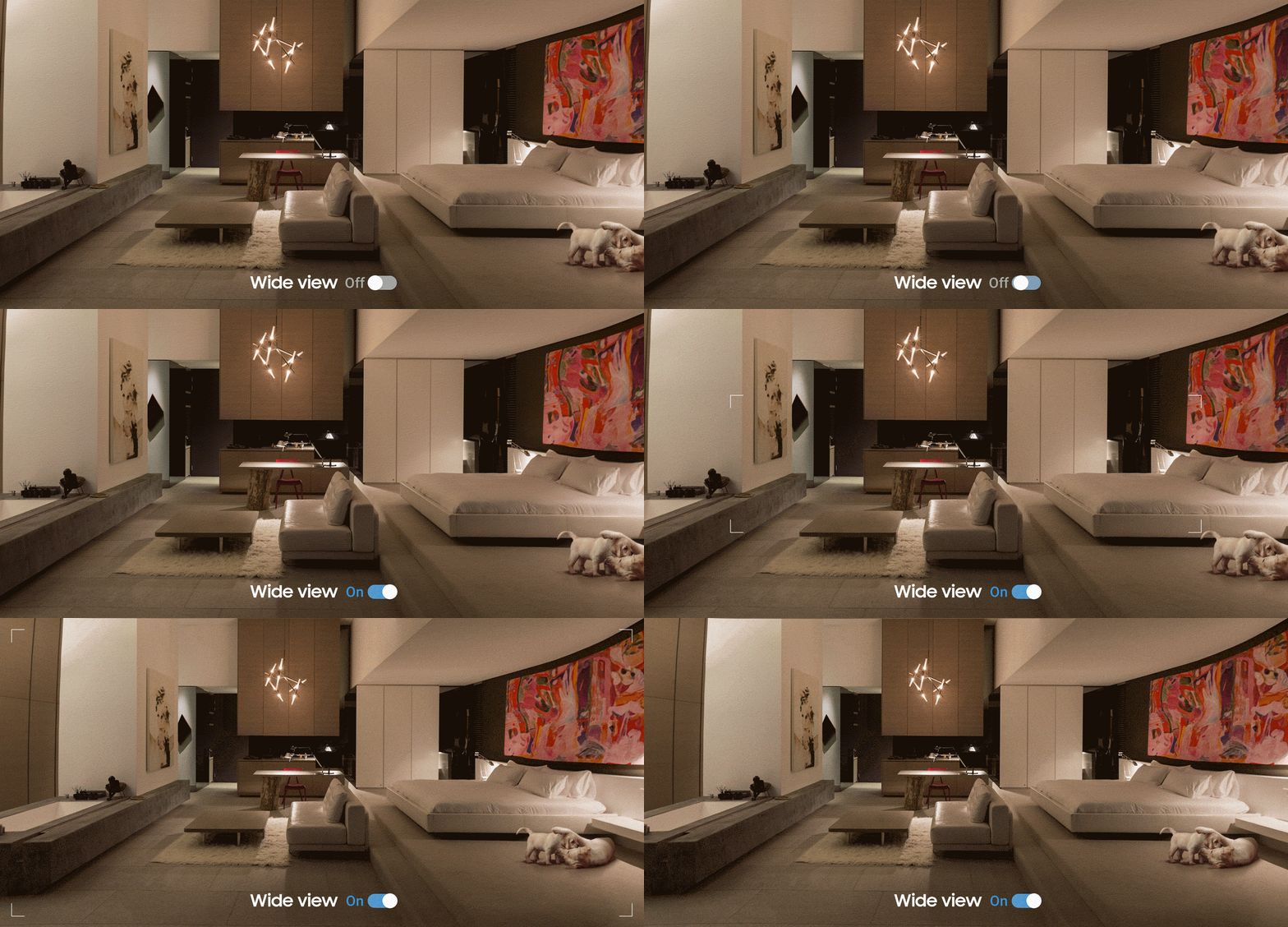
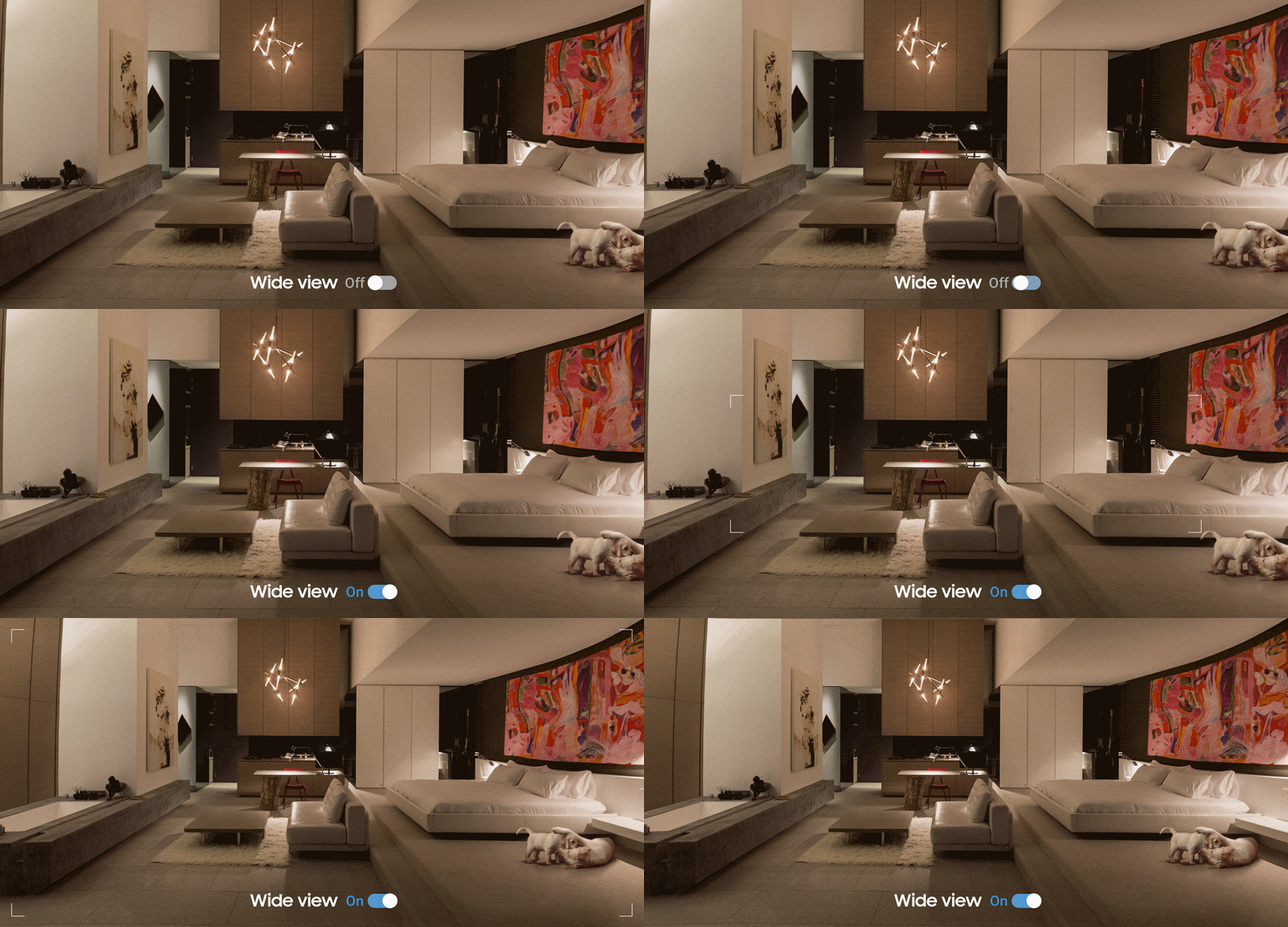
När det gäller säkerhet ska man hålla ett öga på det som är viktigt i varje läge. Tack vare 145 graders diagonal vidvinkel får du en mycket god täckning av allt som pågår i ditt hem när du inte är hemma.
Prata som om du vore på plats
Prata med dina nära och kära som om du själv vore hemma. Inbyggd mikrofon och högtalare med brusreducering gör att ni kan kommunicera tydligt och smidigt oavsett var du är.


Fånga enbart det väsentliga
Alltid på vakt så att du kan koppla av. SmartThings kamera kan upptäcka olika scenarier, som rök eller intrång, med hög precision och fånga varje detalj så att alla föremål går att urskilja tydligt. Det intuitiva meddelandesystemet varnar endast när det verkligen gäller, för att undvika falsklarm.


*Rökdetektering kräver en separat sensor.
Fri rörlighet med generös molnlagring
Semestra i trygg förvissning om att hemmet är säkrat. Med två SmartThings kameror och vår 24-timmars smarta molntjänst kan du kolla läget när som helst. Skaffa Premium och få upp till fem kameror plus 30 dagars inspelningar i molnet så kan du hålla ögonen på allt, oavsett var du är i världen.


Fullgott skydd
Säkerhet för allt från hårdvara till hushåll. Med Trusted Platform Module och sömlös SmartThings-integration har du ett smidigt, heltäckande skydd som skyddar det du håller kärt från oönskade blickar. Från firmware till dataöverföring, din integritet är helt skyddad.


Håll koll över flera enheter
Ha ögon överallt, även när du inte är där. Nu kan du se olika delar av hemmet på flera skärmar. På er Samsung TV eller på Samsung Family Hub-kylskåpet – nu kan ni se vad som pågår när som helst och var som helst. En i sanning sömlös upplevelse.


*SmartThings finns på '18 Samsung TV 7400-serien eller senare. Fjärrkontroll krävs, säljs separat.
Specifikationer
-
Färg
Vit
-
Upplösning
1080p (1920 x 1080), 720p (1280 x 720)
-
Dimension (BxHxD)
46,3 x 101 x 43,7 mm
-
Färg
Vit
-
Wi-Fi-version
Wi-Fi 802,11b/g/n, 2,4 GHz / 5 GHz
-
Sensor
1/2,7" CMOS
-
Upplösning
1080p (1920 x 1080), 720p (1280 x 720)
-
Synfält
145° diagonal
-
Ingångsspänning
100-240V AC, 50/60 HzV
-
Compatible Android OS (Samsung Device)
5 eller senare
-
Compatible Android OS (Others)
5 eller senare
-
Compatible iOS
10 eller senare
-
Two-way Audio
support
-
Rörelsedetektor
support
-
Night Vision
Built-in IR LEDs for night-time
-
Persondetektering
support
-
Audio Detection
support
Recensioner
SmartThings Kamera
Filter
Relevanssortering placerar de bästa recensionerna överst. Vi tar hänsyn till hur många positiva röster en recension fått, hur ny den är, bilder och andra faktorer som användare värdesätter när de läser recensioner.
Filter
75 Recensioner
2020-07-30
Kundsupport Samsung
Hej, Det är tråkigt att höra att du upplever problem med din Smartthings kamera. Vi rekommenderar att du kontaktar vår tekniska support så att vi kan försöka hjälpa dig vidare. Du kan nå oss här: https://www.samsung.com/se/info/contactus/
2020-07-30
2020-03-18
2025-04-18
2024-05-15
2024-03-01
2023-11-20
2023-09-02
2023-07-17
West Virginia
2021-11-18
samsungcare
I think I would be frustrated too if I couldn't use my newly purchase device too. I would recommend contacting our Smart Things team by calling (866)8132-404. I'm sure they will be able to assist you with this. ^Pat
2021-10-07
Sumter SC
2021-04-17
2021-04-15
2021-03-11
Orlando, FL
2021-03-11
2021-02-04
2021-02-04
Phoenix
2021-02-03
Kensington CT
2021-01-27
2021-01-23
2021-01-23
2021-01-14
2020-12-28
2020-12-09
2020-11-29
CA
2020-11-18
2020-11-09
2020-10-13
2020-09-22
2020-09-15
Goodyear, AZ
2020-08-11
Kansas
2020-04-25
Jacksonville, FL
2020-04-22
SE Minnesota, USA
2020-04-19
ut
2020-04-02
Atlanta, GA
Samsung Brand Ambassador
We apologize for the issues you have been experiencing with your SmartThings Camera! This is definitely not the experience we want our customers to have. When a device is not performing the way it should, a reset can often help resolve the issue. You can find the steps to reset the SmartThings Camera on our Support page here -- https://support.smartthings.com/hc/en-us/articles/360029965211-Set-up-and-connect-the-SmartThings-Cam. If a reset does not help, or if you have additional questions, please contact our dedicated SmartThings team at 1-866-813-2404 or support@smartthings.com. We would love the opportunity to assist you with your device! ~Samsung Brand Ambassador
2019-11-26
Frisco, TX
2019-11-13
NJ, USA
2019-10-17
FL
Samsung Brand Ambassador
We apologize for the difficulties you encountered setting up the SmartThings Cam! The SmartThings Camera does not require a Hub in order to connect. All you need is a WiFi network connection and the new SmartThings App on a compatible iOS or Android device. Please verify that you are using the new SmartThings App, which has the icon of a circle surrounded by five smaller circles. You can find helpful instructions for setting up the SmartThings Cam, as well as SmartThings Video, on our Support page here -- https://support.smartthings.com/hc/en-us/articles/360029965211. If you need additional assistance, or have questions, please reach out to our SmartThings team at 1-866-813-2404 or support@smartthings.com. We would be happy to help get your SmartThings Camera set up and working properly! ~Samsung Brand Ambassador
2019-10-12
Samsung Brand Ambassador
We're sorry to hear of the issues you have been experiencing with your SmartThings Cam! Sometimes when a device is acting up, a reset can help resolve the issues. You can find the steps to reset the SmartThings Cam on our Support page here -- https://support.smartthings.com/hc/en-us/articles/360029965211. If the reset does not help, or if you have additional questions, please reach out to our dedicated SmartThings team at 1-866-813-2404 or support@smartthings.com. We would love to help get your SmartThings Cam working properly! Thank you! ~Samsung Brand Ambassador
2019-10-02
New York
Samsung Brand Ambassador
We're sorry to hear of the issues you are experiencing with your SmartThings Cam! Please reach out to our SmartThings team for assistance at 1-866-813-2404 or support@smartthings.com. We look forward to hearing from you! ~Samsung Brand Ambassador
2019-09-29
Birmingham, Alabama
Samsung Brand Ambassador
Thank you for the feedback on the SmartThings Cam! We apologize for the issues you have experienced trying to set up your device. Please reach out to our SmartThings team directly for assistance. We can be reached at 1-866-813-2404 or support@smartthings.com. We look forward to hearing from you! ~Samsung Brand Ambassador
2019-09-12
2019-09-06
San Antonio, TX
Samsung Brand Ambassador
Thank you for your feedback on the SmartThings Cam! I am sorry to hear of the issues you are experiencing attempting to access recorded clips. Recorded clips are stored in the Cloud for 24 hours on the Basic (free) plan. You can access the clips in the SmartThings App under SmartThings Video for playback, within that 24 hour period. You can find more information about SmartThings Video on our Support page here -- https://support.smartthings.com/hc/en-us/articles/360029637752. If you have additional questions, or need assistance please reach out to our dedicated SmartThings team at 1-866-813-2404 or support@smartthings.com. Thank you! ~Samsung Brand Ambassador
2019-08-07
Tazewell,VA
2019-08-05
Boston, MA
2019-07-22
Greensboro, NC
Samsung Brand Ambassador
Thank you for your feedback regarding the SmartThings Cam! I’m sorry to hear of the issues you are experiencing with your SmartThings Cam device. We would love the opportunity to assist you with this matter and get your SmartThings Cam working the way it should! Please contact our dedicated SmartThings team at 1-866-813-2404 so we can gather more information. We look forward to hearing from you! ~Samsung Brand Ambassador
2019-07-22
New York
2019-07-06
Indianapolis,In
2019-07-06
Virginia Beach, VA
2019-07-06
Ohio
2019-07-05
Austin, TX
2019-07-05
LA
2019-07-04
Boston, MA
2019-07-03
New Orleans
2019-06-29
AR
2019-06-29
Miami,fl
2019-06-28
Minnesota
Samsung Brand Ambassador
Thank you for your feedback regarding the SmartThings Cam and I apologize for the issues you encountered during the setup process. We are continually updating and improving the customer experience, including what can be executed through Google Assistant and Amazon Alexa. The most current list of what SmartThings devices and commands can be handled through Google Assistant can be found here -- https://support.smartthings.com/hc/en-us/articles/214609826 – and the most current list for Amazon Alexa can be found here -- https://support.smartthings.com/hc/en-us/articles/207808076. If you have additional questions, please feel free to contact our dedicated SmartThings team at 1-866-813-2404. Thank you for being a Samsung customer! ~Samsung Brand Ambassador
2019-06-26
2019-06-26
KCMO
2019-06-25
2019-06-25
Pittsburgh , PA
2019-06-25
Ewing, NJ
2019-06-24
Austin, TX
2019-06-24
Milwaukee,wi
2019-06-22
Austin
2019-06-21
Palmyra, PA
2019-06-21
Austin
2019-06-21
Western NY
2019-06-21
Miami, Florida
2019-06-20
Chicago, IL
2019-06-20
Ky
2019-06-20
Minneapolis MN
2019-06-20
Colorado
2019-06-20
Home
2019-06-20
Annapolis
De här recensionerna hanteras av Bazaarvoice och följer Bazaarvoices autenticitetspolicy, som stöds av antibedrägeriteknik och mänsklig analys.
Information på
Effektiv ränta (APR) 0%, uppläggnings- eller administrativ avgift 0 kr. Prisexempel: 39 990 kr under 12 mån = 3 333 kr per månad.


