Keycap has come off of Samsung laptop keyboard
If a key has separated from your keyboard, you can easily replace the key yourself without any special tools, as long as all the pieces are available and undamaged.
Keycap has come off of Samsung laptop keyboard
1
Make sure you have all the parts.
The key assembly is comprised of the following pieces:
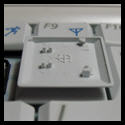
- The Keycap or Key

- The Plunger

- The Scissor Assembly

2
Prepare for the procedure.
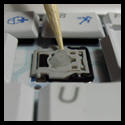
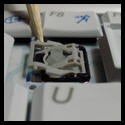
Make note of the position of the small clips on the keycap. These will attach to the scissor assembly. The small rubber plunger will push up on the bottom of the key.
If the scissor assembly is loose, take extra care in reattaching the assembly. Clip the lower part of the bar under the bottom rail, then snap the upper part over the top rail before lining up the keycap to reattach it.
3
Press the keycap into place.
Line up the clips with the scissor assembly and press the key into place. You may need to wiggle the key a little to get it to snap down correctly.
To replace the spacebar, apply even pressure to both ends of the spacebar, and then press down to reattach it.
4
Request service.
If the key doesn't snap into place or continues to come off, or if any of the parts are broken, visit our Support Center to request service.
Recommended Articles
Errors using Smart Switch on a Mac or PC
While using Smart Switch on a PC, you may encounter errors for several different reasons. This guide covers the most common errors that may occur.
Common Windows 11 issues and solutions for Samsung computers
As Windows 11 rolls out, we have identified several common issues affecting Samsung computers. In this guide, we'll outline these issues and provide actionable solutions to help you continue using your Samsung computer seamlessly with Windows 11. Â Important: If your issue is not listed here, contact Microsoft for more assistance.
Sound from Samsung PC is distorted or scratchy
If the sound on your Samsung PC is distorted or scratchy, you can try fixing it by adjusting the volume or checking if updates are available. Keep in mind that this also depends on the type of sounds or music youâ re listening to.
We're here for you
Contact Samsung Support
Contact us online through chat and get support from an expert on your computer, mobile device or tablet. Support is also available on your mobile device through the Samsung Members App.