Discord app support on Galaxy phones and tablets
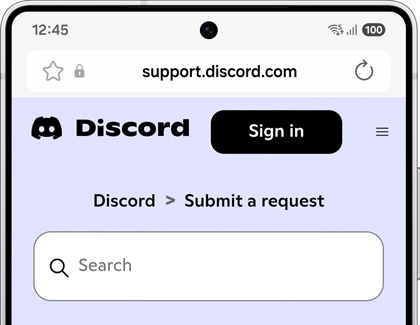
If you're experiencing issues with the Discord app on your Galaxy device, you can easily seek assistance through Discord's dedicated customer support channel.
Discord app support on Galaxy phones and tablets
How to submit your inquiry
- Log in to your Discord account: Visit the Discord support webpage while logged into your Discord account.

- Provide detailed information: Share specific details about the issue you're facing to receive a more accurate and helpful response.
Read more
Read less
Keep your app updated
To ensure optimal performance and access to the latest features, always download the latest version of the Discord app from the Google Play Store.
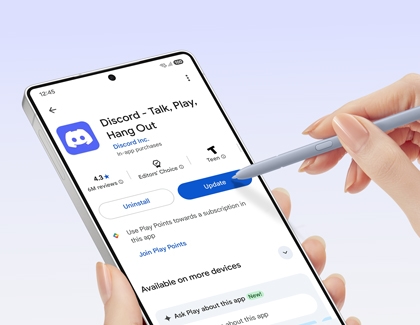
To update the Discord app, follow these steps:
- Open the Google Play Store.
Tap on the Google Play Store icon on your device's home screen or app drawer. - Access the Manage apps & device section.
Once in the Google Play Store, tap on your Profile icon in the top right corner, and then tap Manage apps & device. Next, tap the Manage tab at the top of the screen, and then tap Updates available. - Find Discord in the updates list.
Scroll through the list of apps with available updates. If an update is available for Discord, it will be displayed here. - Update the Discord app.
Tap the Update button next to the Discord app to download and install the latest version.
By following these steps, you can keep your Discord app up-to-date via the Google Play Store for optimal performance and access to new features.
Read more
Read less
Additional assistance
For further detailed inquiries or developer-specific support, we recommend contacting the app developer's customer support team directly.
By following these steps, you can quickly resolve any issues and continue enjoying seamless communication on your Galaxy devices.
Read more
Read less
Recommended Articles
Keycap has come off of Samsung laptop keyboard
If a key has separated from your keyboard, you can easily replace the key yourself without any special tools, as long as all the pieces are available and undamaged.
Samsung PC cooling fan noise
It's normal for the fan to get louder if the PC is working hard, and it should quiet down when your task is complete. Gaming and video rendering are notorious for pushing a computer as well. If the fan is running hard during normal use, there's a few things that can be done.
Samsung PC will not turn on or charge at all
If your Samsung PC will not turn on or show any indication of charging, don't worry, there are some methods you can try to fix the problem. You should check that you have a good power outlet and that any external monitors are properly connected, powered on, and on the correct source.
We're here for you
Contact Samsung Support
Contact us online through chat and get support from an expert on your computer, mobile device or tablet. Support is also available on your mobile device through the Samsung Members App.