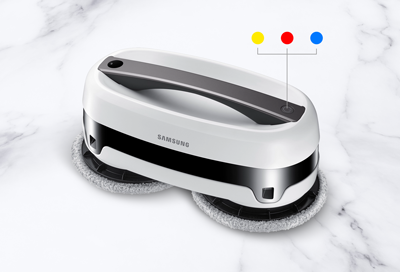
Are you charging your Jetbot Mop or cleaning with your Jetbot Mop?
Jetbot Mop LED indicator is blinking when charging
Jetbot Mop LED indicator is blinking when cleaning
Jetbot Mop LED indicator is blinking when charging
LED Color
- Blinking Yellow - Low battery level
- Blinking Blue - Medium battery level (above 80%)
- Blinking Red - There is a problem with the battery. Turn off and unplug the Jetbot Mop, and then contact the Support Center for service.
- LED is off - Full battery
Jetbot Mop LED indicator is blinking when cleaning
Blinking blue with alarm sounds
After 50 minutes of cleaning, the LED will blink blue and an alarm will sound.
- Let the main unit recharge until the battery is full. It is recommended to use the Jetbot Mop on a full battery.
- Replace the mops with clean mops, and then refill the water in the water supply kits.
- Press and hold the Operation button for 2 seconds to resume cleaning.
Solid yellow
The battery level is low. If this occurs when the main unit is cleaning in a dark place, it will move to a brighter area and then stop. You should charge the main unit’s battery before letting it clean again.
Blinking yellow
The Jetbot Mop has stopped cleaning in the middle of a cycle. This may happen if:
- The Jetbot Mop is stuck between obstacles, such as furniture.
- Something is caught in the mop, such as hair or carpet fibers.
Turn off the Jetbot Mop and check it. After removing any foreign substances, place the Jetbot Mop in a wide, open area away from obstacles, and then turn it on again to resume cleaning.
Blinking red
There is an issue with the battery. This can be caused by using something other than the provided charging adapter to charge the Jetbot Mop.
- Turn the Jetbot Mop off, and then turn it on again by pressing and holding the Operation button for 2 seconds.
- If the LED still blinks red, turn off the Jetbot Mop and contact the Support Center for service.
LED is off (when mop is unplugged)
The Jetbot Mop has been turned off. If the Jetbot Mop is not in use for more than 5 minutes, it will turn off automatically.