Differences between the Galaxy A17 5G, A27 5G, A37 5G, and A57 5G

Differences between the Galaxy A17 5G, A27 5G, A37 5G, and A57 5G
Compare the 2026 Galaxy A series
2026 A series: Display
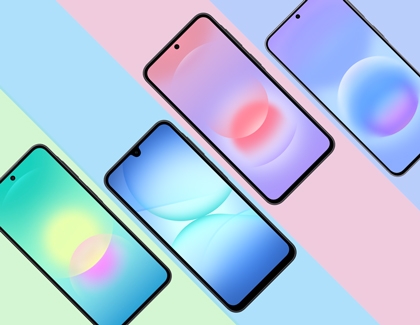
- Galaxy A17: 6.7" FHD+ Super AMOLED Infinity-U, 90Hz
- Galaxy A27: 6.7" FHD+ Super AMOLED Infinity-O, 120Hz
- Galaxy A37: 6.7" FHD+ Super AMOLED Infinity-O, 120Hz
- Galaxy A57: 6.7" FHD+ Super AMOLED Plus Infinity-O, 120Hz
2026 A series: Memory

The Galaxy A series offers a range of memory and storage options to support your everyday activities, from basic use to more demanding tasks, ensuring smooth performance and enough space for your apps, photos, and files.
- Galaxy A17: 4GB RAM with 128GB storage
- Galaxy A27: 6GB RAM with 128GB storage
- Galaxy A37: 6GB RAM with 128GB storage, or 8GB RAM with 256GB storage
- Galaxy A57: 8GB RAM with 128GB or 256GB storage
- The Galaxy A27 and A17 support external memory expansion with SD cards up to 2TB.
- The Galaxy A57 and A37 do not support external memory cards.
2026 A series: Battery
The Galaxy A series is equipped with reliable, long-lasting batteries designed to keep up with your daily routine, along with fast charging options to quickly power up your device when needed.
Galaxy A17:
- 5,000mAh
- Wired Super Fast Charging up to 25W
Galaxy A27:
- 5,000mAh
- Wired Super Fast Charging up to 25W
Galaxy A37:
- 5,000mAh
- Wired Ultra Fast Charging up to 45W
Galaxy A57:
- 5,000mAh
- Wired Ultra Fast Charging up to 45W
2026 A series: Camera
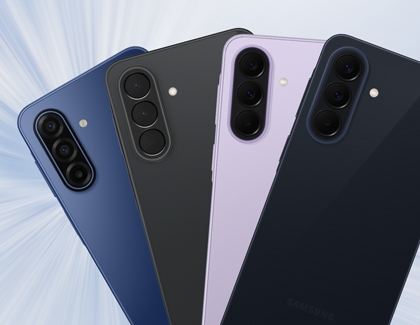
The Galaxy A series features versatile triple camera systems with advanced capabilities. Compare the camera specs below.
Galaxy A17:
- 50MP Main camera lens
- 5MP Ultra-Wide camera lens
- 2MP Macro camera lens
- FHD | @30fps video recording
- Digital Zoom up to 10x
- 13MP Selfie lens
Galaxy A27:
- 50MP Main camera lens
- 5MP Ultra-Wide camera lens
- 2MP Macro camera lens
- UHD 4K | @30fps video recording
- Digital Zoom up to 10x
- 12MP Selfie lens
Galaxy A37:
- 50MP Main camera lens
- 8MP Ultra-Wide camera lens
- 5MP Macro camera lens
- UHD 4K | @30fps video recording
- Quad Pixel, Digital Zoom up to 10x
- 12MP Selfie lens
Galaxy A57:
- 50MP Main camera lens
- 12MP Ultra-Wide camera lens
- 5MP Macro camera lens
- UHD 4K | @30fps video recording
- Quad Pixel, Digital Zoom up to 10x
- 12MP Selfie lens
2026 A series: Awesome Intelligence
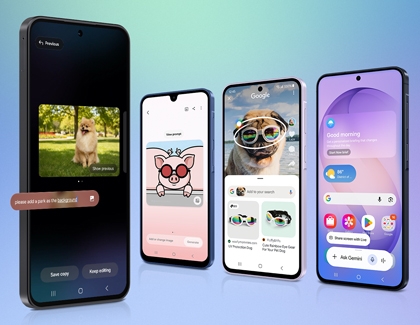
Certain AI features, such as Gemini and Circle to Search are now available on the Galaxy A17, A27, A37, and A57.
- Gemini: Provides seamless convenience by enabling hands-free voice or video chats to get answers, suggestions, and more.
- Circle to Search: Performs quick searches by circling objects or images that you find interesting. Galaxy AI will automatically provide search results tailored to your queries.
The features below are only available on the Galaxy A27, A37, and A57.
- Object Eraser: Instantly remove unwanted objects or photobombers from your photos with AI erase, a feature that automatically detects and suggests their removal.
- AI Select: AI Select is located in your device’s Edge panel and builds on the existing Smart Select feature. AI Select includes shortcuts for saving, editing, and interacting with text. You can also use it to generate AI drawings onto images.
- My Filters: Lets you create personalized camera filters by analyzing the colors and style of your favorite photos, so you can easily apply a consistent look to new pictures with just a tap.
- Edit Suggestion: Analyzes your pictures and provides editing suggestions to enhance them. The individual suggestions will vary depending on the image, or there may not be any suggestions at all.
Note: Features are limited on the Galaxy A27 and A37. - Read highlights aloud: Let your Galaxy device read web pages and text content aloud, allowing you to listen instead of reading for a more convenient and accessible browsing experience.
- Voice transcription: Effortlessly convert spoken words into accurate text in real-time. With support for multilingual transcription, this feature is perfect for meetings, note-taking, and seamless communication across languages.
The features below are only available on the Galaxy A57.
- Best face: Provides an easy way to capture the perfect group photo by analyzing multiple shots and selecting the best expressions, so everyone looks their best.
- Auto Trim: Automatically analyzes your videos and selects key moments to create a polished highlight reel, making it easy to edit engaging clips without manual trimming.
2026 A series: SIM card
The Galaxy A series supports flexible SIM options, including Dual SIM and eSIM, allowing you to easily manage multiple lines on a single device.
Insert the SIM card
To activate an eSIM instead of using a physical SIM card, please refer to our SIM cards for your Galaxy phone or tablet support guide for detailed instructions.

- Power off your phone and then insert the ejector tool that came with your device into the hole on the SIM card tray.
Important: Be careful not to insert the ejector tool into any of the microphone or speaker holes along the edge of your device. Look for the outline of the tray to make sure you're in the right place.
- Next, push the tool until the tray pops out.
- Carefully line up your SIM card with the smaller cutout on the tray.
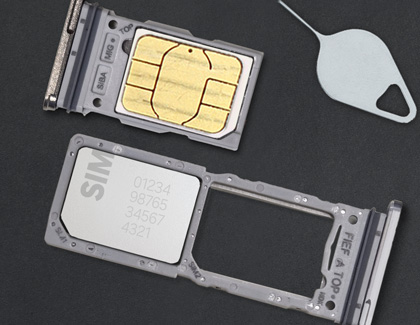
- Verify the card is flush with the tray, and then insert the SIM tray back into the slot on your device.
Note: The orientation of the metal contacts will vary by device. The SIM card will only fit correctly in one direction. It should be flush with the tray when correctly inserted.
- Now, power on your device and you're good to go! If you are prompted for an unlock code, contact the phone's original carrier.
Remove the SIM card

- Power off your phone and then insert the ejector tool that came with your device into the hole on the SIM card tray.
Important: Be careful not to insert the ejector tool into any of the microphone or speaker holes along the edge of your device. Look for the outline of the tray to make sure you're in the right place.
- Remove the SIM card from the tray, and then insert the SIM tray back into the slot.
2026 A series: Connectivity

The Galaxy A series offers reliable connectivity features to keep you connected, with support for the latest wireless technologies and essential connection options.
Galaxy A17
- USB: 2.0
- Bluetooth version: 5.3
- NFC support: Yes
- Wi-Fi: 802.11a/b/g/n/ac 2.4GHz+5GHz, VHT80
- Earjack: USB Type-C
Galaxy A27
- USB: 2.0
- Bluetooth version: 5.1
- NFC support: Yes
- Wi-Fi: 802.11a/b/g/n/ac 2.4 GHz + 5 GHz | VHT80
- Earjack: USB Type-C
Galaxy A37
- USB: 2.0
- Bluetooth version: 5.1
- NFC support: Yes
- Wi-Fi: 802.11a/b/g/n/ac/ax 2.4GHz+5GHz, HE80, MIMO, 1024-QAM
- Earjack: USB Type-C
Galaxy A57
- USB: 2.0
- Bluetooth version: 6
- NFC support: Yes
- Wi-Fi: 802.11a/b/g/n/ac/ax 2.4GHz+5GHz+6GHz, HE80, MIMO, 1024-QAM
- Earjack: USB Type-C
2026 A series: Audio and video

Galaxy A17 / Galaxy A27 / Galaxy A37 / Galaxy A57
- Speakers: 1
- Video Playing format: MP4, M4V, 3GP, 3G2, AVI, FLV, MKV, WEBM
- Audio Playing format: MP3, M4A, 3GA, AAC, OGG, OGA, WAV, AMR, AWB, FLAC, MID, MIDI, XMF, MXMF, IMY, RTTTL, RTX, OTA
2026 A series: Services and applications

The Galaxy A series includes a variety of services and applications designed to enhance your experience, with broad compatibility across Galaxy devices and essential Samsung features.
Galaxy A17
- Gear support: Galaxy Ring, Galaxy Buds Core, Galaxy Buds3 Pro, Galaxy Buds2 Pro, Galaxy Buds Pro, Galaxy Buds Live, Galaxy Buds+, Galaxy Buds3, Galaxy Buds2, Galaxy Buds, Galaxy Buds3 FE, Galaxy Buds FE, Galaxy Fit3, Galaxy Fit2, Galaxy Watch FE, Galaxy Watch Ultra, Galaxy Watch8, Galaxy Watch7, Galaxy Watch6, Galaxy Watch5, Galaxy Watch4, Galaxy Watch3, Galaxy Watch, Galaxy Watch Active2, Galaxy Watch Active
- SmartThings support: Yes
- Samsung Knox support: Yes (Knox Android 3.12, MDM Android 6.12)
- Samsung Pay: Yes
Galaxy A27
- Gear support: Galaxy Ring, Galaxy Buds Core, Galaxy Buds3 Pro, Galaxy Buds2 Pro, Galaxy Buds Pro, Galaxy Buds Live, Galaxy Buds+, Galaxy Buds3, Galaxy Buds2, Galaxy Buds, Galaxy Buds3 FE, Galaxy Buds FE, Galaxy Fit3, Galaxy Fit2, Galaxy Watch FE, Galaxy Watch Ultra, Galaxy Watch8, Galaxy Watch7, Galaxy Watch6, Galaxy Watch5, Galaxy Watch4, Galaxy Watch3, Galaxy Watch, Galaxy Watch Active2, Galaxy Watch Active
- SmartThings support: Yes
- Samsung Knox support: Yes (Knox Android 3.13, MDM Android 6.13)
- Samsung Pay: Yes
Galaxy A37
- Gear Support: Galaxy Ring, Galaxy Buds Core, Galaxy Buds3 Pro, Galaxy Buds2 Pro, Galaxy Buds Pro, Galaxy Buds Live, Galaxy Buds+, Galaxy Buds3, Galaxy Buds2, Galaxy Buds, Galaxy Buds3 FE, Galaxy Buds FE, Galaxy Fit3, Galaxy Fit2, Galaxy Watch FE, Galaxy Watch Ultra, Galaxy Watch8, Galaxy Watch7, Galaxy Watch6, Galaxy Watch5, Galaxy Watch4, Galaxy Watch3, Galaxy Watch, Galaxy Watch Active2, Galaxy Watch Active
- SmartThings Support: Yes
- Samsung Knox support: Yes (Knox Android 3.13, MDM Android 6.13)
- Samsung Pay: Yes
Galaxy A57
- Gear Support: Galaxy Ring, Galaxy Buds Core, Galaxy Buds3 Pro, Galaxy Buds2 Pro, Galaxy Buds Pro, Galaxy Buds Live, Galaxy Buds+, Galaxy Buds3, Galaxy Buds2, Galaxy Buds, Galaxy Buds3 FE, Galaxy Buds FE, Galaxy Fit3, Galaxy Fit2, Galaxy Watch FE, Galaxy Watch Ultra, Galaxy Watch8, Galaxy Watch7, Galaxy Watch6, Galaxy Watch5, Galaxy Watch4, Galaxy Watch3, Galaxy Watch, Galaxy Watch Active2, Galaxy Watch Active
- SmartThings Support: Yes
- Samsung Knox support: Yes (Knox Android 3.13, MDM Android 6.13)
- Samsung Pay: Yes

