Samsung PC displays Operating System Not Found error when booting
Samsung PC screen flickers
If your Windows laptop or tablet PC screen is flickering, displaying dead pixels, or has colored lines, you may need to update your drivers using Windows Update or Samsung Update. You can also try adjusting the screen resolution.
Samsung PC screen flickers
1
Update your graphics drivers.
Using Windows Update or Samsung Update, check for updates to the drivers for your device, and install them.
2
Adjust the refresh rate.
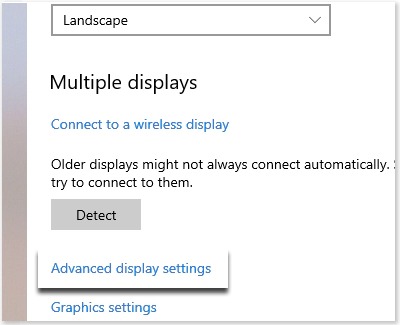
- Windows 10: Right-click the desktop and select Display Settings. Then, scroll down and click Advanced display settings. If the refresh rate listed does not match the maximum native refresh rate of the device, click Display adapter properties, select the Monitor tab, and adjust the refresh rate to the maximum supported by the monitor.

- Windows 11: Right-click the desktop and select Display settings. Then, scroll down and click Advanced display under Related settings. Click the drop-down menu next to "Choose a refresh rate" to adjust your refresh rate to the maximum supported by the monitor.
3
Request service.
If the screen continues to flicker after following the previous steps, visit our Support Center to request service.
Recommended Articles
Samsung PC turns on, but doesn't start or boot into Windows
If your PC won't boot up properly and Windows is not functioning, there are a few things you can try to resolve the issue. Start off by trying to boot into Safe Mode. If successful, you can identify and remove or fix the problem preventing you from booting normally, like uninstalling a new driver or program that's causing the issue. You can also tr
Blue or green screen error on Samsung PC
The sudden appearance of a full screen error can be a disconcerting experience, but thankfully these are usually isolated occurrences. Most of the time your PC will simply reboot and that's all it really needed.
We're here for you
Contact Samsung Support
Contact us online through chat and get support from an expert on your computer, mobile device or tablet. Support is also available on your mobile device through the Samsung Members App.