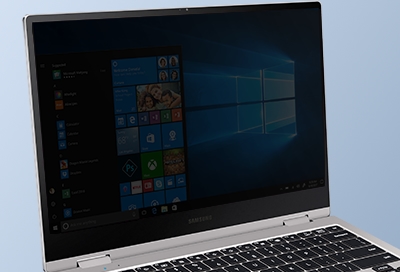
Samsung PC screen is too dark
Galaxy Chromebook will not connect to a wireless network
Many times, your Samsung Galaxy Chromebook may not connect to a wireless network because the laptop's wireless adapter was accidentally shut off. If the network you're trying to connect to has MAC filtering set up, the Chromebook's MAC address must be added to the network first. You may also need to reset your Chromebook if it is still unable to connect to a wireless network.

Galaxy Chromebook will not connect to a wireless network
Note
If your Chromebook is being used at work or school, contact your network administrator for support.
Note
- If your Chromebook only connects to Wi-Fi in Guest Mode, please refer to our other guide.
- Depending on the wireless network, you may need to speak with the network administrator.
Make sure you are able to connect another device, like a phone or another computer, to the wireless network.
- If you are unable to connect a different device to the network, make sure the router and modem are working.
- It may be necessary to unplug the router and modem for 15 seconds, and then plug them back in again. (Make sure the ethernet cable is firmly connected to both devices.)
Make sure Wi-Fi is turned on.
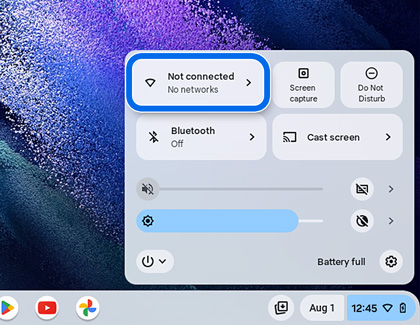
- From the desktop, select the Taskbar icon in the lower right corner. The wireless network status will be displayed.
- If "Not connected" is displayed below the Wi-Fi icon, select the Wi-Fi icon to turn on the wireless adapter.
Note
If you're using any accessories, unplug them from your Chromebook, and then plug them back in after the restart.
- Close any apps you have running.
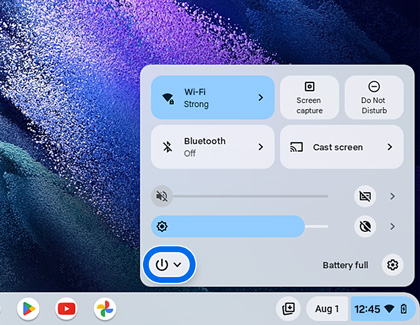
- Next, select the Taskbar icon in the bottom right corner, and then select the Power icon.
- When the system powers off, wait 30 seconds, and then press the Power button to turn your Chromebook back on.

Once the wireless adapter has been turned on, your Chromebook will search for available Wi-Fi networks. Select a network, enter the network password if applicable, and then select Connect. If you are still unable to connect to a wireless network, try another network.
Keep in mind only certain Wi-Fi networks will work with your Chromebook:
- Open networks that do not require a password to connect.
- Secured (password protected) networks that use WEP, Dynamic WEP, WPA-PSK, WPA-Enterprise, or WPA2-Enterprise settings. WPA2 or WPA3 are recommended, since they are more secure than WEP or WPA.
- Wi-Fi Standards: 802.11 a/b/g/n and 802.11ac for AC-equipped Chromebooks.
Find your MAC address.
Depending on the network, you may need to give your Chromebook's MAC address to the network administrator before you can connect to the wireless network.
To find the MAC address:
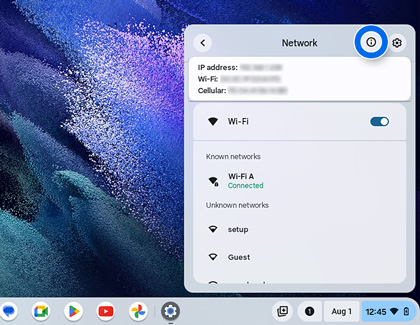
- From the desktop, select the Taskbar icon in the lower right corner, and then select the text that appears under the Wi-Fi icon.
- Select the Information (i) icon at the top of the box. The MAC address will be labeled "Wi-Fi."
If you are still unable to connect to a wireless network, visit Google Chrome Help or the Google Chromebook support page for additional assistance.
Note
If the Chromebook is being used at work or school, it cannot be reset. Contact your administrator for support.
Use the Advanced Settings menu:
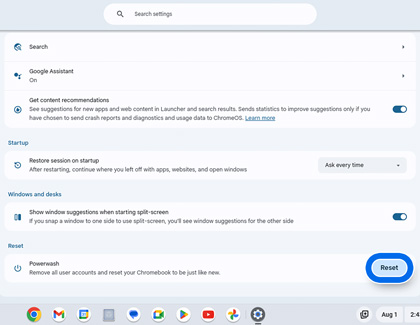
- Select the Taskbar in the lower right, and then select Settings.
- Select Advanced at the bottom.
- Scroll to the Reset settings section, then select Powerwash, and then select Reset.
- After the restart, select Powerwash when prompted, and then select Continue.
Use the shortcut keys:
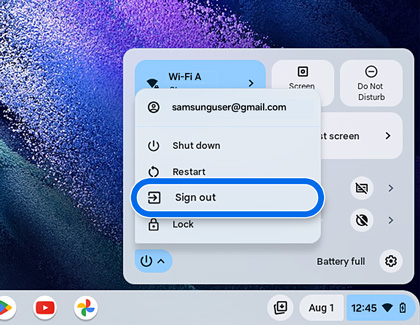
- Select the Taskbar in the lower right, then select the Power icon, and then select Sign out.
- Press and hold CTRL + ALT + SHIFT + R on the keyboard, and then select Restart.
- When prompted, select Powerwash, and then select Continue.
Sign into your Google account
Follow the on-screen prompts and sign into your Google account to set up the Chromebook. The account you sign in with after you reset your Chromebook will be the new owner account. If you are unable to sign into your Google account, please refer to the Google Account Help center. You can also use your Chromebook without adding a Google account. Select Browse as Guest to proceed.
Test your Chromebook to see if the issue has been resolved.
Recommended Articles
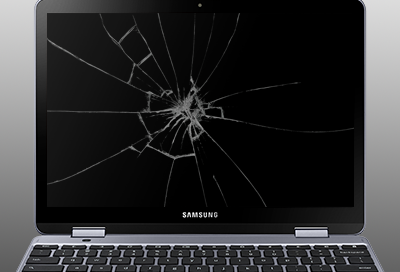
Physical damage on computer
Physical damage is not covered under warranty. Physical damage includes but is not limited to: liquid spills, cracks, and scratches to the screen, bezel, and accessories. If your PC has physical damage, we will be happy to repair or fix it, but the repair will be handled as an out of warranty repair and you will be charged for parts and labor. We r
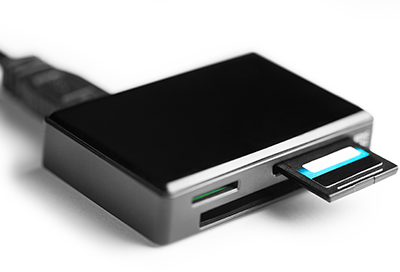
Samsung PC doesn't recognize SD card
First thing you should do is check that the SD card is good by testing it in another PC. If it works in another PC, then this guide will help resolve the issue on your first PC. If the SD card doesn't work in any other PC, then replace the SD card.
We're here for you
Contact Samsung Support
Contact us online through chat and get support from an expert on your computer, mobile device, or tablet. Support is also available on your mobile device through the Samsung Members App.

