85" Neo QLED QN1EF 4K Samsung Vision AI Smart TV (2025)


Gallery popup


Escanea el código QR con tu Smartphone y coloca la imagen del producto en donde quieras
{{upgradeResult.displayModelName}}
{{upgradeResult.discountText1}}
{{upgradeResult.description1}}
{{upgradeResult.description2}}
{{offerFinance.title}}
{{offerFinance.learnMoreCta.text}}{{offerFinance.description}}
{{galaxyForeverResult.displayModelName}}
{{galaxyForeverResult.discountText1}}
{{galaxyForeverResult.description1}}
{{galaxyForeverResult.description2}}
Bezel_Choose your color
Customizable bezels sold separately
Choose your skin color
Customizable skin sold separately
-
{{item.name}}
Sin existencias
Modern Type
-
{{item.name}}
Sin existencias
Beveled Type
-
{{item.name}}
Sin existencias
Skin color
-
{{item.name}}
Sin existencias
Bezel type

- Modern Type
The Frame's custom bezels magnetically click into place. Now, you can switch between styles in a snap.
Bezel type

- Beveled Type
The new Beveled type bezel design offers an elegant 45-degree angled inner edge bezel.
{{tradeIn.title}}
{{tradeIn.learnMoreCta.text}}{{tradeIn.description}}
{{tradeInResult.displayModelName}}
{{tradeInResult.discountText1}}
{{tradeInResult.discountText2}}
{{tradeInResult.discountText3}}
{{tradeInResult.discountText4}}
{{tradeInResult.discountText5}}
{{tradeInResult.discountText6}}
{{tradeInResult.specialDiscountText}}
{{tradeInResult.description}}
{{tradeInResult.contentText}}
BorrarDealer stock quantity
You can check the stock quantity for each region
Please select city
{{assuredBuyBack.title}}
{{newAssuredBuyBack.title}}
{{newAssuredBuyBack.learnMoreCta.text}}{{newAssuredBuyBack.description}}
Please select Samsung Assured Buyback or no coverage
{{care.title}}
{{care.learnMoreCta.text}}{{care.description}}
Selecciona Samsung Care+ o No para continuar
-
-
{{item.specialText}}
{{warrantyResult.displayModelName}}
{{warrantyResult.discountText1}}
{{warrantyResult.description1}}
{{warrantyVdResult.title}}
{{warrantyVdResult.priceDisplay}}
{{delivery.headline}}
{{delivery.errorMessage}}
{{deliveryResult.priorityText}}
{{deliveryResult.mainText}}
{{deliveryResult.subText}}
Standard installation charges may apply.Click here for more details.
{{deliveryResult.decText}}
{{item.disclaimer}}
{{tariffOptionResult.displayModelName}}
{{tariffOptionResult.discountText1}}
{{tariffOptionResult.description1}}
{{tariffOptionResult.description2}}
{{tariffOptionResult.description}}
{{tariffOptionResult.price}}
{{tariffOptionResult.disclaimer}}
{{embedAddon.title}}
{{embedAddon.description}}
-
{{item.name}}
{{item.modelCode}}
{{item.description}}
{{item.finalPrice}}
{{item.originalPrice}}{{item.savePrice}} Sin existencias
-
{{item.name}}
{{item.modelCode}}
{{item.description}}
- {{item.dotList1}}
- {{item.dotList2}}
- {{item.dotList3}}
{{item.finalPrice}}
{{item.originalPrice}}{{item.savePrice}} Sin existencias
{{message.item.tcCTAText}}
{{message.item.periodText}}
Destacados

Procesador NQ4 AI Gen2
Siente toda la potencia de la AI en 4K

Tecnología Quantum Matrix Slim
Experimenta un contraste nítido y preciso

Motion Xcelerator 144Hz
Consigue un movimiento fluido para juegos de hasta 144 Hz

AirSlim
Más elegante y delgada que nunca

[TUV] Pantalla Real Quantum Dot
Certificado como pantalla Real Quantum Dot con hoja Quantum Dot y LED azul aplicado de acuerdo con los estándares IEC.

[SGS] Sin cadmio
La hoja Quantum Dot que se utiliza en QLED TV ha recibido certificación por el cumplimiento de la directiva RoHS y se ha verificado que no contiene cadmio por el instituto de certificación global, SGS. *Este logotipo es una variación del logotipo original de SGS para fines de mercadotecnia.
Características
Escala tu experiencia con Samsung Vision AI


Características principales


Pregúntale lo que quieras a tu acompañante. Samsung Vision AI ya está aquí.
Samsung Vision AI Companion
La TV se convierte en una compañera inteligente con Vision AI Companion, que redefine la interacción con la pantalla. Respaldado por más de 20 años de experiencia en TV, Vision AI Companion ofrece respuestas dinámicas, enriquecidas y adaptadas al contexto, potenciadas por agentes de IA líderes como Gemini y Perplexity, todo sin interrumpir lo que se está viendo en pantalla. Se adapta perfectamente a las rutinas diarias, ya sea para ponerse al día con las novedades de la mañana, seguir momentos deportivos en vivo, encontrar excelentes lugares cercanos o descubrir más sobre el contenido que aparece en pantalla. Con IA, las funciones de imagen, sonido y generación de contenido están perfectamente conectadas y evolucionan continuamente.


El compañero que mejora tu vida


Un asistente de voz más inteligente
Bixby
Con inteligencia actualizada, Bixby será el centro de tu hogar. Puede procesar varios comandos a la vez captando mejor el contexto. Disfruta de conversaciones más fluidas, búsquedas más sencillas, reacciones más intuitivas y un control perfecto de los dispositivos.
* Se admiten comandos de voz y multigiro para 10 idiomas (US/UK/IN(en)/DE/FR/IT/ES/BR/MX/KR).* No se reconocen todos los acentos, dialectos y expresiones.* Q8F y superiores admiten micrófonos de campo lejano. Q7F y superiores admiten mandos a distancia de TV. U8000F necesita un mando a distancia móvil SmartThings.

Optimiza de forma inteligente la imagen y el sonido
Modo AI
El modo AI ofrece un menú de acceso rápido para ajustar la configuración adaptable de imagen y sonido, optimizando de forma inteligente tu experiencia, de acuerdo a tu entorno y el contenido que estás viendo.


Sonido optimizado y remasterizado
Adaptive Sound Pro
Escucha el sonido tal y como fue concebido, con voces claras y tonos equilibrados. El procesador de AI de tu pantalla reconoce diferentes sonidos, como diálogos y música de fondo, los optimiza según la acústica de tu habitación, antes de perfeccionarlos con la tecnología de remasterización de audio.
La experiencia puede variar en función del contenido y el entorno.

Crea tus propios fondos de pantalla con AI para que combinen con tu estado de ánimo
Generador de Fondos de pantalla
Elige las palabras clave para crear el ambiente que desees y deja que la AI haga su magia. Tu pantalla generará imágenes únicas y bellas que pueden cambiar la atmósfera de tu hogar.
*El número de intentos de generación permitidos por día puede estar limitado.

Conectado con tu mascota, aún fuera de casa
Pet Care
Tu pantalla puede detectar ruidos como ladridos a través de su micrófono y encender automáticamente el contenido favorito de tu mascota para calmarla. Tu Pantalla será el mejor amigo de tu mascota.
*La transmisión en tiempo real en dispositivos móviles es compatible con Android OS 11.0 y versiones superiores o iOS 16.0 y versiones superiores, y está disponible en pantallas Samsung Modelos 2025 y modelos posteriores. Solo funciona cuando la pantalla del televisor está apagada. *La pantalla debe estar conectada a una fuente de alimentación para utilizar esta función.* La pantalla y el dispositivo móvil deben estar conectados a SmartThings para enviar y recibir notificaciones.Siente toda la potencia de la AI en 4K
Procesador NQ4 AI Gen2
Nuestro procesador NQ4 AI Gen 2 utiliza la potencia de 20 redes neuronales de AI para optimizar la calidad de imagen y sonido. El resultado es un rendimiento extraordinario, ya sea con aplicaciones OTT, jugando tus videojuegos favoritos o viendo deportes.


Aumenta la resolución de todos tus contenidos a 4K
Escalado 4K AI
Mira tus contenidos favoritos con todo detalle. Nuestro procesador de AI puede tomar contenidos y mejorarlos hasta una resolución 4K gracias a sus 128 redes neuronales de AI, todo ello manteniendo una calidad de imagen nítida y fluida.


Calidad de imagen


Nuestra avanzada tecnología Mini LED
Quantum Mini LED
Experimente un contraste ultrafino con Quantum Mini LED, controlado con precisión por la tecnología Quantum Matrix Slim. Esta innovadora tecnología de retroiluminación con Quantum Mini LED ofrece un contraste nítido y preciso.


Más información Calidad de imagen


Expresión de Colores mejorada de forma inteligente
Color Booster Pro
La AI reconoce cada escena y mejora la expresión del color, para que tu experiencia visual sea más real y dinámica que nunca


Experimenta tu contenido 4K con colores más intensos y con detalles que te sorprenderán
Neo Quantum HDR
Disfruta de colores más intensos y precisos en resolución 4K. También puedes apreciar muchos más detalles, gracias al contraste más profundo realizado por el mapeo de tonos HDR10+ que se adapta dinámicamente de acuerdo a las características de cada escena.
* El rango de luminancia de Quantum HDR se basa en estándares de pruebas internas y está sujeto a cambios según las condiciones de visualización o las especificaciones.* Para QN80F de 50 pulgadas : HDR10+ (Adaptable).

Realza los contenidos para obtener una calidad de imagen similar a HDR
Remasterización HDR automática
Disfruta de luces brillantes, detalles nítidos y colores vibrantes. Nuestra pantalla utiliza algoritmos de aprendizaje profundo para remasterizar el contenido SDR estándar y optimizarlo para obtener una calidad similar a HDR.


Profundidad percibida como lo harían los ojos de una persona
Real Depth Enhancer
Real Depth Enhancer aumenta el contraste entre los objetos del primer plano y los del fondo, como la forma en que el ojo humano procesa la profundidad.


Auténtica Visualización de Color Validada por Pantone
Validado por Pantone
Como símbolo de fidelidad y confianza para los expertos del sector, ""PANTONE"" certifica la expresión precisa de 2.140 colores y 110 tonos de piel de reciente incorporación. Puedes estar seguro de que disfrutarás de una experiencia visual precisa y realista.
* Validación PANTONE recibida basada en la pantalla HDR.

Capta detalles en escenas oscuras
HDR Brightness Optimizer
Cuando hay luz natural brillante o luz ambiental en la habitación, nuestro procesador responde mejorando la visibilidad en las escenas oscuras. Así, siempre podrás disfrutar de imágenes HDR nítidas y vívidas con todos los pequeños detalles.
Colores reales, QLED real. No te mereces menos.
Colores vibrantes y precisos amplificados por la lámina Quantum Dot de Samsung sin cadmio.


Experiencia de juego


Movimiento fluido para juegos de hasta 144 Hz
Motion Xcelerator 144Hz
Disfruta de imágenes fluidas a velocidades increíblemente rápidas. Motion Xcelerator 144Hz ofrece una acción ultrasuave sin retrasos ni desenfoque de movimiento. Podrás disfrutar de imágenes nítidas y velocidades ultra rápidas para juegos VRR de hasta 4K 144 Hz.


*4K 144Hz sólo está disponible con juegos conectados a PC que admitan dichas especificaciones (se requiere tarjeta gráfica de PC).* El rendimiento puede variar.
Más sobre Experiencia de juego


Experimenta un juego sin interrupciones con optimización automática de ajustes controlada
AI Auto Game Mode
El Procesador identifica automáticamente el tipo de juego y ajusta la configuración garantizando el mayor rendimiento posible.
*El modo de juego automático AI está disponible para determinados juegos de consola y PC.

Afina la configuración de tus partidas mientras juegas
Game Bar
Optimiza aún más tu juego con Game Bar. Las pantallas Samsung te ofrecen un práctico menú en el juego para ajustes como FPS, input lag, zoom del minimapa y mucho más. También, te permite aplicar relaciones de aspecto ultraamplias de 21:9 y 32:9 para ampliar la vista en pantallas más grandes.
*Super Ultrawide GameView (21:9, 32:9) está disponible para determinados juegos de PC y consolas compatibles con pantallas ultrapanorámicas.* Es posible que algunos juegos no admitan esta función.* El modo de acercamiento de la barra de juegos no es compatible con determinadas frecuencias de actualización.* La interfaz de usuario de la barra de juegos está sujeta a cambios sin previo aviso.

Juegos HDR sin interrupciones, sin tirones y con baja latencia
FreeSync Premium
Certificado para AMD Freesync Premium Pro, permite jugar sin interrupciones y disfrutar de una auténtica experiencia HDR
*La experiencia de visualización puede variar según el tipo de contenido y la unidad de procesamiento gráfico, así como la velocidad de conexión a la red y los niveles de ping cuando se juega en la nube.Sonido


Pantalla y Barra de sonido orquestados en perfecta armonía
Q-Symphony
La tecnología Q-Symphony sincroniza el audio de la pantalla y de la barra de sonido para que se reproduzcan simultáneamente, sin silenciar los altavoces de ninguno de los dos dispositivos, logrando un sonido más armonioso.
*Comprueba la compatibilidad con Q-Symphony en las especificaciones del producto de la barra de sonido.* La barra de sonido se vende por separado.* La ubicación y el número de altavoces pueden variar según el modelo.

Tus oídos siguen el sonido; tus ojos siguen la acción
OTS Lite
Experimenta un sonido 3D de gran realismo con altavoces integrados que te ubican en el centro de la acción.


La mejora de voz con AI que permite captar el diálogo sin distracciones
Active Voice Amplifier Pro
Mejora el audio con AI, haciendo que los diálogos sean nítidos mediante el análisis de los sonidos de fondo, la claridad de la voz y el ruido ambiente para aislar las voces de otros sonidos. Disfruta de una experiencia de audio inigualable con diálogos nítidos incluso en entornos con distracciones.
One UI Tizen


Personaliza tu experiencia
One UI Tizen
One UI Tizen proporciona una experiencia de pantalla personalizada. Con Samsung Tizen OS, ofrece todas las últimas funciones innovadoras de Samsung. Tu experiencia también está protegida por Samsung Knox en todos los dispositivos SmartThings. Además, One UI Tizen será compatible con las actualizaciones de Tizen OS durante los próximos 7 años.


Disfruta de una nueva experiencia de pantalla durante 7 años


Más sobre One UI Tizen


Lleva las Galerías de Fama Mundial a tu sala
Art Store
Acceda a más de 3,000 obras de arte y fotografía de instituciones de renombre mundial en la Tienda de Arte. Desde clásicos preciados a obras maestras modernas. Descubre nuevas obras de arte con selecciones relevantes y oportunas que complementan cada estación, festividad y estado de ánimo.
*Se requiere suscripción a Art Store para acceder a toda la selección. Las obras de arte de la Tienda de Arte están sujetas a cambios sin previo aviso

Tu privacidad. Protegida.
Samsung Knox Security
Tu privacidad está segura en las pantallas Samsung. Tus datos confidenciales, como contraseñas y números PIN, están protegidas por múltiples capas de Software y Hardware. Los dispositivos IoT conectados se supervisan y las aplicaciones y sitios maliciosos se bloquean automáticamente.
* Samsung Knox Security se aplica a las pantallas Samsung con tecnología Tizen®, lanzados desde 2015.* La actualización del software de seguridad se proporciona durante tres años desde el lanzamiento del producto.* Se requiere la última actualización de software.

Mejora tu día con experiencias de estilo de vida exclusivas
Samsung Daily+
Encuentra aplicaciones y servicios para la salud, el trabajo y el estilo de vida en Samsung Daily+. Puedes acceder a SmartThings, Workout Tracker, karaoke y mucho más, todo en un mismo lugar.
*Samsung no es responsable de los servicios de terceros ni de los daños o pérdidas causados por los mismos.

Accede a información útil incluso con la pantalla apagada
Daily Board
Obtén información durante todo el día en tu pantalla, incluso cuando está apagada. Puedes personalizar tu Daily Board con widgets como El Clima, Notas, Música y mucho más. Daily Board también puede activarse en modo manos libres, mediante comandos de voz o detectando tu presencia cuando te acerques.
*Los widgets compatibles varían según la región y están sujetos a cambios sin previo aviso.SmartThings


Conecta y gestiona tus dispositivos inteligentes, todo desde tu pantalla
SmartThings
Con SmartThings tienes un Hub integrado en tu pantalla que te ayuda a conectar y controlar dispositivos inteligentes, incluso los que requieren compatibilidad con Matter y HCA.


Más sobre SmartThings


Control mediante gestos con tu Watch
Universal Gestures
Controla fácilmente tu pantalla con tu Smartwatch. Solo tienes que llevar tu Galaxy Watch y usar gestos con las manos, como pellizcar para seleccionar una opción o mover la muñeca de un lado a otro para pausar y reproducir.
* Las aplicaciones y servicios disponibles pueden variar y están sujetos a cambios sin previo aviso.* Solo compatible con Galaxy Watch4 y modelos posteriores, y Wear OS 5 y versiones superiores.

Ahorra energía con análisis inteligentes
AI Energy Mode
Ahorro de energía más fácil con SmartThings. Al activar el Modo de Energía AI, detecta automáticamente los niveles de luz ambiental y analiza los hábitos de uso para ajustar el brillo. Además, analiza cada escena del contenido para ajustar sutilmente el brillo cuando es posible, optimizando así el consumo de energía.
* La tasa de ahorro de energía puede variar según la región, el modelo, el tamaño, las condiciones de visualización y el tipo de contenido. * Los productos enviados en modo Eco tienen algunas funciones del modo AI Energy activadas por defecto, por lo que los niveles de ahorro de energía cuando el modo AI Energy está activado pueden parecer inferiores en comparación con el modo estándar.* El modo AI Energy no funciona con el modo Juego.* El ahorro de energía se basa en resultados de pruebas internas y puede variar en función del contenido que se visualice y de los niveles de brillo del entorno.

Controla tu pantalla desde tu smartphone
Quick Remote
A través de tu dispositivo móvil, puedes acceder a las principales funciones de Samsung Tizen TV, como medios, funciones, modo ambiente y menú. Quick Remote también puede actuar como control remoto de tu pantalla, permitiéndote cambiar de canal, ajustar el volumen y mucho más desde tu smartphone.
* Las notificaciones push para controles remotos móviles para pantallas están disponibles en (Mobile) Android OS 10.0 y versiones posteriores con (TV) 2020 pantallas Samsung y modelos posteriores, y funciona cuando el dispositivo móvil está cerca de la pantalla.* El acceso a funciones de Samsung Smart TV está disponible en (TV) 2024 pantallas Samsung y modelos posteriores con (Mobile) Android OS 10.0 y versiones posteriores o iOS 15.0 y versiones posteriores.

Sonido 3D espacial con los Galaxy Buds
360 Audio Mode
Sumérgete en la escena con un sonido fluido desde todos los ángulos. Las pantallas Samsung se vinculan a la perfección con los audífonos Galaxy Buds para ofrecer audio 3D multidireccional. Con el seguimiento de cabeza mejorado, incluso sincroniza la dirección del sonido con los movimientos de tu cabeza.
* El modo de audio Galaxy Buds 360 está disponible con Galaxy Buds2 Pro, Galaxy Buds2, Galaxy Buds Pro y Galaxy Live.

Transforma tu pantalla en un escenario de karaoke
Karaoke
Diviértete con tus amigos y familiares con la función de karaoke de Samsung Daily+. Incluso puedes conectar tu smartphone para usarlo como micrófono. No necesitas ningún equipo aparte: tu configuración para cantar ya está aquí.
* Requiere que la app SmartThings esté instalada en el dispositivo móvil y conectada a través de la misma red Wi-Fi que el televisor.* El micrófono móvil está optimizado solo para Galaxy S23 o modelos posteriores y iPhone 15 y superiores.* Debes descargar la app Karaoke de Tizen para utilizar la función Karaoke.* Se requiere una suscripción de pago adicional para este servicio después de 6 meses de uso gratuito. (Los usuarios pueden acceder a 5 canciones al día de forma gratuita sin suscripción).Diseño


Más elegante y delgada que nunca
AirSlim
Un diseño elegantemente delgado que se integra perfectamente en cualquier espacio.


Sustentabilidad


Recárgalo con Luz Solar
Control remoto SolarCell
Con un panel solar en la parte posterior, nuestro control remoto SolarCell se carga con luz solar y con luz ambiental, sin necesidad de pilas desechables. Y con funciones inteligentes como un micrófono integrado y un asistente de voz, este control remoto es innovador en más de un sentido.
*Para cargar el mando a distancia con energía solar, colócalo con el panel solar hacia arriba. Colócalo en el cuarto de estar con las luces encendidas o cerca de una ventana para que le dé la luz natural.* Si se agota la batería del mando a distancia, puedes cargarlo con un cable USB-C. Para comprobar el nivel de batería restante del mando a distancia, consulta el menú de la pantalla (Ajustes > General y privacidad > Ahorro de energía y alimentación > Batería disponible del control remoto).


Comparar modelos
Comparar características
-
85" Neo QLED QN1EF 4K Samsung Vision AI Smart ...
-
85" Neo QLED QN80F 4K Samsung Vision AI Smart ...
-
QN85QN1EFAPXPA85" Neo QLED QN1EF 4K Samsung Vision AI Smart ...
-
QN85QN80FAPXPA85" Neo QLED QN80F 4K Samsung Vision AI Smart ...


Especificaciones clave
-
Tipo de producto
NeoQLED
-
Tipo de producto
NeoQLED
-
![Screen size]()
Tamaño de pantalla
85"
-
![Screen size]()
Tamaño de pantalla
85"

-
Resolución
4K (3,840 x 2,160)
-
Resolución
4K (3,840 x 2,160)
-
Tecnología de movimiento
Motion Xcelerator 144Hz
-
Tecnología de movimiento
Motion Xcelerator 144Hz
-
![Picture Engine]()
Motor de imágenes
NQ4 AI Gen2 Processor
-
![Picture Engine]()
Motor de imágenes
NQ4 AI Gen2 Processor

-
Mejora de IA
4K AI Upscaling
-
Mejora de IA
4K AI Upscaling
-
Diseño
AirSlim
-
Diseño
Simple Chamfer
-
-
-
-
![Dolby Atmos Support]()
Dolby Atmos
Sí

-
Object Tracking Sound
OTS Lite
-
Object Tracking Sound
OTS Lite
Especificaciones
-
Pantalla
85"
-
Tipo de producto
NeoQLED
-
NeoQLED
-
Tamaño de pantalla
85"
-
Frecuencia de actualización
120Hz(Up to 144Hz)
-
Resolución
4K (3,840 x 2,160)
-
Motor de imágenes
NQ4 AI Gen2 Processor
-
HDR (Alto rango dinámico)
Neo Quantum HDR
-
HDR 10+
Sí (ADAPTIVE/ GAMING)
-
Mejora de IA
4K AI Upscaling
-
Contraste
Quantum Matrix Technology Slim
-
Ángulo de visión
Wide Viewing Angle
-
Microatenuación
Supreme UHD Dimming
-
Potenciador de contraste
Real Depth Enhancer
-
Tecnología de movimiento
Motion Xcelerator 144Hz
-
Calibración inteligente
Basic
-
Modo Cineasta (FMM)
Sí
-
Supersize Picture Enhancer
Sí
-
HDR Brightness Optimizer
Sí
-
Color Booster
Color Booster Pro
-
AI HDR Remastering
Auto HDR Remastering
-
EyeComfort Mode
Sí
-
Object Tracking Sound
OTS Lite
-
Q-Symphony
Sí
-
Salida de sonido (RMS)
20W
-
Tipo de altavoz
2CH
-
Active Voice Amplifier
Sí (Active Voice Amplifier Pro)
-
Sonido adaptable
Sí (Adaptive Sound Pro)
-
360 Audio
Sí
-
Sistema operativo
Tizen™ Smart TV
-
Bixby
Sí
-
Interacción de voz de campo lejano
Sí
-
Navegador web
Sí
-
SmartThings Hub / Matter Hub / IoT-Sensor Functionality / Quick Remote
Sí
-
Multi Device Experience
TV to Mobile, Mobile to TV, TV initiate mirroring, Sound Mirroring, Wireless TV On, Tap View
-
Visión múltiple
upto 2 videos
-
Apple AirPlay
Sí (w/o Cuba)
-
Storage Share
Sí
-
Generative Wallpaper
Sí
-
Karaoke Mic
Sí
-
Modo de juego automático (ALLM)
Sí
-
Game Motion Plus
Sí
-
Ecualizador negro dinámico
Sí
-
VRR
Sí
-
Sonido envolvente
Sí
-
Vista súper ultraamplia para juegos
Sí
-
Zoom de minimapa
Sí
-
FreeSync
FreeSync Premium
-
HGiG
Sí
-
AI Auto Game Mode
Sí
-
Transmisión digital
ISDB-T/DVB-T/ATSC
-
Sintonizador análogo
Sí (Trinorma)
-
Soporte principal para televisor
Sí
-
HDMI
4
-
USB
2 x USB-A
-
HDMI (alta velocidad de fotogramas)
4K 144Hz (for HDMI 1/2/3/4)
-
Ethernet (LAN)
1
-
Salida para audio digital (Óptico)
1
-
Entrada para RF (Entrada terrestre y de cable)
1/1(Common Use for Terrestrial)/0
-
Wi-Fi
Sí (Wi-Fi 5)
-
Bluetooth
Sí (5.3)
-
Anynet+ (HDMI-CEC)
Sí
-
HDMI Audio Return Channel
eARC
-
Diseño
AirSlim
-
Tipo de bisel
3 Bezel-less
-
Color delantero
BLACK
-
Tipo de soporte
AERO LINEAR
-
Color del soporte
BLACK
-
Art Store
Sí
-
POP integrado
Sí
-
EPG
Sí
-
PVR extendido
Sí
-
IP Control
Sí
-
Idioma en pantalla
Local Languages
-
Accesibilidad-Guía de voz
US English, Mexico Spanish, Canada French
-
Low Vision Support
Magnification, Audio Description, Zoom Menu and Text, High Contrast, SeeColors, Color Inversion, Grayscale, Auto Picture Off
-
Hearing Impaired Support
Closed Caption (Subtitle), Multi-output Audio, Sign Language Zoom
-
Motor Impaired Support
Slow Button Repeat, Remote Control App. for All
-
Sensor ecológico
Sí
-
Fuente de alimentación
AC100-240V~ 50/60Hz
-
Consumo de energía (máx.)
320 W
-
Apagado automático
Sí
-
Ahorro automático de energía
Sí
-
Tamaño del paquete (ancho x alto x prof.)
2059 x 1200 x 171 mm
-
Ajustar medida con soporte (anch. x alt. x prof.)
1901.7 x 1142.3 x 365.6 mm
-
Ajustar medida sin soporte (anch. x alt. x prof.)
1901.7 x 1086.5 x 26.9 mm
-
Soporte (básico) (anch. x prof.)
1420 x 365.6 mm
-
Soporte (mínimo) (anch. x prof.)
370 x 365.6 mm
-
Especificaciones de VESA
600 x 400 mm
-
Peso del paquete
53.1 kg
-
Peso del equipo con soporte
41.5 kg
-
Peso del equipo sin soporte
40.7 kg
-
Modelo de control remoto
TM2360E
-
Soporte de montaje en pared de ajuste delgado
Sí
-
Manual para usuarios
Sí
-
Montaje en pared delgado Full Motion (Y22)
Sí
-
Soporte de cámara web
Sí
-
Zigbee / Thread Module
Built-In
-
Cable de alimentación
Sí
Reseñas
85" Neo QLED QN1EF 4K Samsung Vision AI Smart TV (2025)
- Los clientes elogian cómo el televisor se convierte en una obra de arte cuando está apagado, sorprendiendo a los visitantes.
- Muchos destacan la calidad de imagen excepcional con 4K, negros profundos y colores vibrantes en películas y videojuegos.
- Reviewers aprecian la plataforma inteligente intuitiva, carga rápida de aplicaciones y configuración sencilla.
- Algunos mencionan problemas con el diseño del soporte mural y obstrucción de puertos de cable.
- A pesar de preocupaciones menores, la mayoría considera que es el mejor televisor que han poseído.
Reseñas con imágenes y videos
Filtros
El orden por relevancia coloca las mejores reseñas en la parte superior. Consideramos aspectos como los votos útiles, la reseña más reciente, imágenes y otros rasgos que los lectores buscan en sus reseñas.
Filtros
2,008 Reseñas
2022-04-28


Operations
Thank you, The Frame Fan! We love to hear positive feedback and we’re delighted you’re enjoying your new Samsung TV.
2021-11-10
Charlotte, NC

2021-04-26
Strasbourg


2026-07-18


Samsung
Hola, Daha. A continuación te brindamos algunos consejos que te ayudarán a mejorar la calidad en tus fotos: -Asegúrate de que el lente de la cámara esté limpio antes de tomar fotografías. -Mantén el dispositivo estable o utiliza ambas manos para reducir el movimiento. -Toca la pantalla para enfocar el sujeto antes de capturar la imagen. -Aprovecha la luz natural siempre que sea posible y evita el contraluz. -Utiliza el nivel de zoom recomendado (óptico) para conservar la mejor calidad de imagen. -Activa la resolución más alta disponible cuando desees obtener el máximo nivel de detalle. -Mantén el software del dispositivo y la aplicación Cámara actualizados a la versión más reciente. -Evita el uso de protectores o accesorios que puedan cubrir parcial o totalmente el lente. -Si las fotografías se toman en condiciones de poca luz, permite que el dispositivo permanezca inmóvil durante unos segundos para obtener mejores resultados. -Prueba los diferentes modos de la cámara, como Retrato, Noche o Pro, según el escenario. Si la calidad de las fotografías continúa sin ser la esperada en todas las condiciones de uso, es recomendable realizar un diagnóstico desde Samsung Members > Ayuda > Diagnóstico > Cámara para verificar el correcto funcionamiento del hardware. ¡Saludos!
2026-07-12
León guanajuato


2026-01-03


2021-07-11
Beauvais


service clients Samsung
"Bonjour, Merci pour votre fidélité et d’avoir pris le temps de partager votre expérience avec la TV The Frame 65'' QLED 2021. N’hésitez pas à faire usage de la “ fonction ART “ lorsque votre téléviseur est en veille afin de profiter de l’affichage d’une oeuvre d’art : https://www.samsung.com/fr/lifestyle-tvs/the-frame/art-mode/ Sachez que Samsung met à votre disposition des solutions & astuces afin de vivre une expérience Samsung complète : https://www.samsung.com/fr/support/model/QE65LS03TAUXXC/ Vous retrouverez aussi les expériences d’utilisateurs comme vous dans la communauté Samsung que nous vous invitons à rejoindre : https://eu.community.samsung.com/t5/t%C3%A9l%C3%A9visions/bd-p/fr-tv Nous restons à votre écoute. Morgan, Service clients Samsung "
2026-07-06
Puebla


2022-05-01


Operations
Thank you, Martino! We love to hear positive feedback and we’re delighted you’re enjoying your new Samsung Frame TV.
2026-10-12
Nazca peru


2021-12-30
Miami, Fl


2026-05-23


2021-03-25

2021-10-15
Beverley


2025-12-07
Metuchen NJ

Samsung Specialist
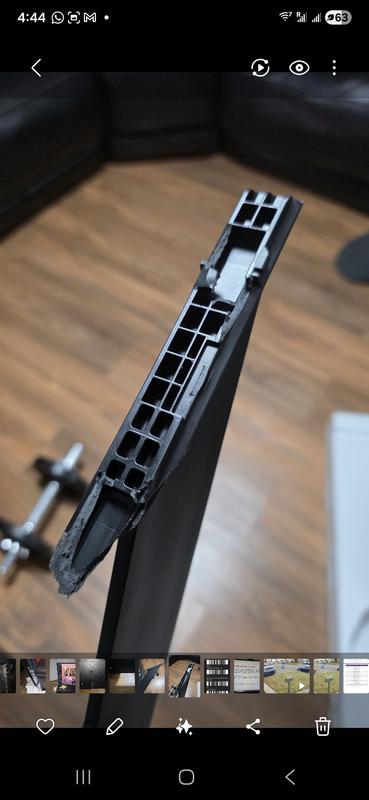
ASIK, Thank you for sharing your concerns. Please know that the QN1EF TV's stand was solidly designed and extensively tested for stability. If it seems wobbly or looks crooked, please ensure the legs are installed correctly: “R” on the right, “L” on the left. The legs should slant outward toward the edges of the TV, and you should hear a “click” once they’re fully inserted. Samsung’s limited warranty covers manufacturer defects, but does not extend to damage during delivery, installation, or improper handling. You can find more details by entering your model number here: https://www.samsung.com/us/support/legal/LGL10000312/#standard-limited-warranty Should you have further questions or concerns, please reach Samsung Support at 1-800-SAMSUNG, available daily from 8AM - 12AM EST. You can also chat with a LiveChat agent by clicking the ‘Support’ link on our website for: • Live Chat • Manuals, Software, & Warranty Info • Creating a Service ticket ~ Samsung Specialist
2024-08-30


Service Clients Samsung
Bonjour, Merci pour votre retour et d'avoir partagé votre expérience avec nous. Nous sommes heureux que vous appréciez la qualité de l'image de votre téléviseur. Concernant le mode Art, nous sommes navrés de cette mauvaise expérience. Nous vous invitons à prendre contact avec l’un de nos collaborateurs qui sera en mesure de trouver une solution adaptée à votre situation : https://www.samsung.com/fr/support/contact/ Nous espérons avoir l'occasion de vous fournir une expérience plus satisfaisante à l'avenir. Cordialement, Yael, Service Clients Samsung
2025-11-29
Seattle, WA

Samsung Specialist
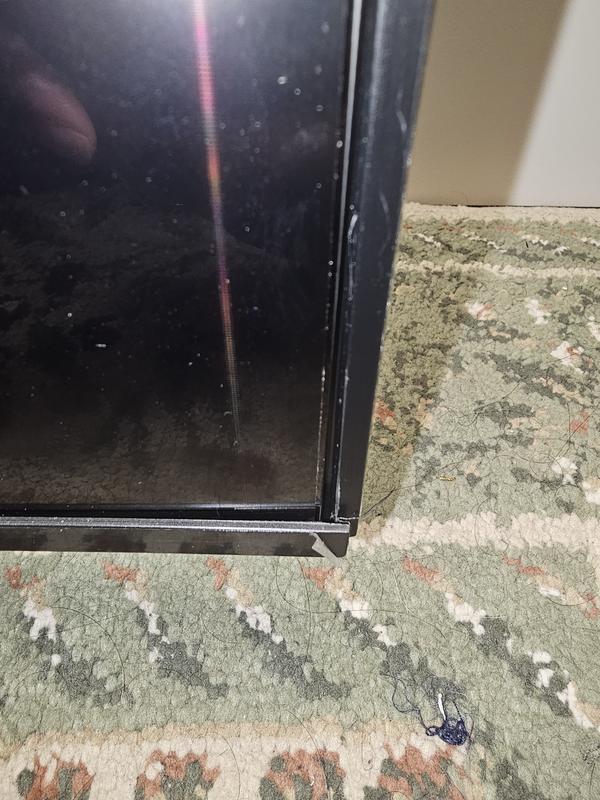
Hi, We’re sorry to hear that your TV arrived with damage. While every unit is packaged carefully for transit, incidents can still occur during handling and delivery. Please reach out to our support team as soon as possible so we can review your case and guide you through the steps to get this resolved quickly. At your earliest convenience, please contact us at 1-800-SAMSUNG, available daily from 8AM - 12AM EST. You can also chat with a LiveChat agent by clicking the ‘Support’ link on our website for: • Live Chat • Manuals, Software, & Warranty Info • Creating a Service ticket ~ Samsung Specialist
2021-04-20
Nicholasville


Samsung Brand Ambassador
Robynkeene: I am happy to hear that you are enjoying your new 2021 Frame QLED TV and appreciate you sharing your experience with mounting your TV. With style in spades, The Frame transforms to art when you're not watching TV. Choose from the Samsung Collection or upload your own pieces to reflect your personality. From iconic classics to modern marvels and stunning photography, Art Store gives you access to an ever-broadening range of art. Your experience with the YouTube TV app has been shared with our product teams. Please make sure that Auto Update is turned on so that your apps can stay current with the latest updates and patches. Navigate to the Settings within the App Store, and set Auto Update to: On. Should you have questions or need further assistance, you can reach us at 1-800-SAMSUNG (ask for TVs), available 8AM -12AM EST, 7 days a week. Or text HELP to 62913. For additional support resources, visit us on the Samsung website and click on the ‘Support’ link in the upper right corner of the homepage for: 1) More ‘Contact Us’ options – LiveChat, Facebook, Twitter, Samsung Community, Samsung Members app 2) Manuals & Software 3) Warranty Info 4) Product Registration: For access to easy warranty support, convenient opt-in to special promos and offers, faster troubleshooting and service, and quick notification of system updates. ~ Samsung Solutions
2022-05-24
Burton on Trent


2026-10-07
Tampico, Tamaulipas


Costumer Sevice
Hola, PII. Gracias por compartir tu opinión. Queremos asegurarnos de que recibas la asistencia que necesitas. Por favor, ingresa al siguiente enlace: [https://www.samsung.com/mx/support/#contact](https://www.sa msung.com/mx/support/#contact) y selecciona el canal de tu preferencia. De esta manera, podremos entender mejor tu situación y ofrecerte la mejor solución posible. Estamos aquí para apoyarte y resolver todas tus dudas. ¡Esperamos tu contacto!
2021-09-07
Orleans


2025-12-10
Colombia


Performance Team
Muchas gracias por tu atención. Tus comentarios son muy importantes para nosotros. ¡Esperamos que tengas una experiencia maravillosa con tu nuevo Samsung! ¡Estamos a tu disposición!
2026-06-16


2026-06-06
Mexico


2021-04-03
Chicago, IL


Samsung Brand Ambassador
JMC128: Thank you for sharing the photo of your gallery wall. Your setup with the Frame TV is absolutely beautiful! Within Art Mode, there are Photo Filters, various border styles and color mats to match your images or surroundings, as well as settings to adjust brightness & color tone. Should you ever have questions or need help, you can reach us at 1-800-SAMSUNG (ask for TVs), available 8AM -12AM EST, 7 days a week. Or text HELP to 62913. For additional support resources, visit us on the Samsung website and click on the ‘Support’ link in the upper right corner of the homepage for: 1) More ‘Contact Us’ options – LiveChat, Facebook, Twitter, Samsung Community, Samsung Members app 2) Manuals & Software 3) Warranty Info 4) Product Registration: For access to easy warranty support, convenient opt-in to special promos and offers, faster troubleshooting and service, and quick notification of system updates. ~ Samsung Solutions
2024-11-15
La plata argentina


2021-03-26


Samsung Brand Ambassador
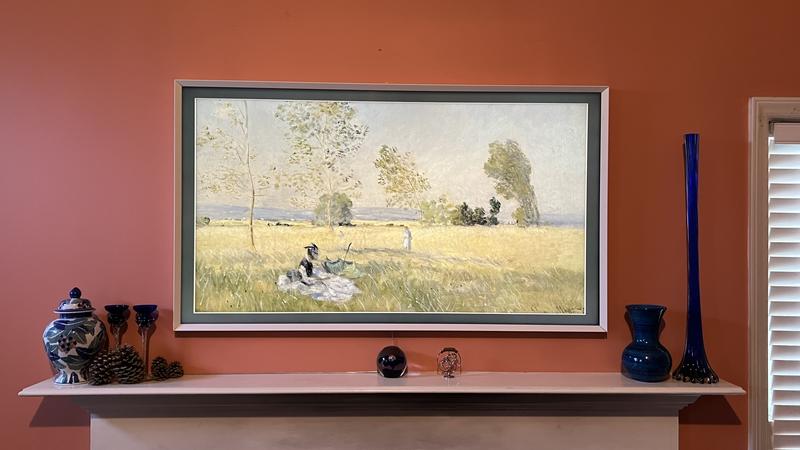
Jason: Thank you for sharing your photos and experience with mounting your 2021 Frame TV. The TV mounted over your fireplace looks fantastic! Elevate your space to make The Frame your own by enhancing it with different frame styles and color options. Within Art Mode, there are Photo Filters, various border styles and color mats to match your images or surroundings, as well as settings to adjust brightness & color tone. Should you ever have questions or need help, you can reach us at 1-800-SAMSUNG (ask for TVs), available 8AM -12AM EST, 7 days a week. Or text HELP to 62913. For additional support resources, visit us on the Samsung website and click on the ‘Support’ link in the upper right corner of the homepage for: 1) More ‘Contact Us’ options – LiveChat, Facebook, Twitter, Samsung Community, Samsung Members app 2) Manuals & Software 3) Warranty Info 4) Product Registration: For access to easy warranty support, convenient opt-in to special promos and offers, faster troubleshooting and service, and quick notification of system updates. ~ Samsung Solutions
2026-07-12
México


Costumer Service
Hola, Gracias por compartir tu opinión. Queremos asegurarnos de que recibas la asistencia que necesitas. Por favor, ingresa al siguiente enlace: [https://www.samsung.com/mx/support/#contact](https://www.sa msung.com/mx/support/#contact) y selecciona el canal de tu preferencia. De esta manera, podremos entender mejor tu situación y ofrecerte la mejor solución posible. Estamos aquí para apoyarte y resolver todas tus dudas. ¡Esperamos tu contacto!
2026-05-21
Lima Perú


2021-04-20
Round Rock


2022-07-13
Lima


2026-05-20
México


2026-07-10
Lima, Perú


2021-03-22
Jacksonville, FL


Samsung Brand Ambassador
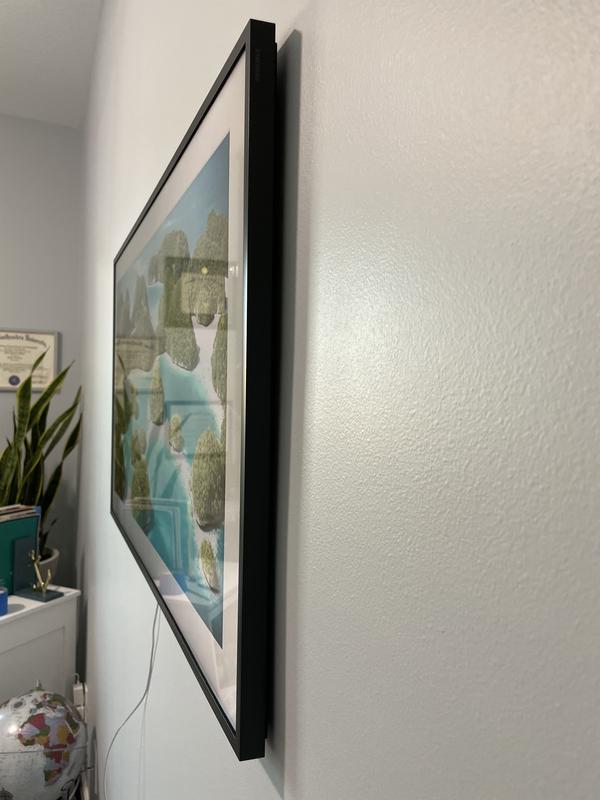
Mark: Thank you for sharing your installation experience of Samsung’s new 2021 Frame TV and including a photo of your mounted TV. It looks fantastic! and you were able to keep your space looking clean and tidy with the One Invisible Connection and hidden One Connect Box. When watching TV, SpaceFit Sound is able to self-calibrate to optimize the sound based on your room’s acoustics. Should you need assistance with features or usage, please contact Samsung Customer Support via any of the below options: 1-800-SAMSUNG (ask for TVs), available 8AM -12AM EST, 7 days a week Text HELP to 62913 Samsung Members App Or visit us on the Samsung website and click on the ‘Support’ link in the upper right corner of the homepage for: 1) Contact Us Options (LiveChat, Remote Support, Facebook, Twitter) 2) Product Support 3) Manuals and Downloads 4) Warranty Info 5) Product Registration: Registering your product gives you access to easy warranty support, convenient opt-in to special promos and offers, faster troubleshooting and service, and quick notification of system updates 6) Samsung Community: A great resource for getting help from Samsung moderators and customers and more 7) …and more product, repair, order, and care options ~ Samsung Solutions
2021-05-11
TOMS RIVER


2022-07-29
Leeds


Samsung Support
Your Frame TV is itself a work of art, whether you're watching a film or series, or having it turn a room in your house into your own private gallery, even without the addition of one the stylish bezels available. The 100% colour volume powered by the Quantum Dot technology boosts the picture of everything you watch to 4K quality, and the AI sound ensures every single word, or piece of action, is crystal clear.
^DB at Samsung Support
2026-11-03
Olavarría Pcia Bs As Argentina


2026-07-14
Lübbenau


Samsung Service Team
Hallo, vielen Dank für deine gute Bewertung unseres Samsung Produkts. Deine Begeisterung erfreut uns sehr und wir sind glücklich zu lesen, dass dir unser Produkt gefällt. Wir schätzen, dass du dir die Zeit für die Rezension genommen hast.
2026-01-16
Regensburg


Samsung Service Team
Hello, thanks for sharing your experience. We understand how frustrating that must be, especially given the Neo QLED expectations. Your feedback on the local dimming performance is important, and we’ll make sure it’s forwarded to the responsible team for closer review.
2026-07-16
Bogotá


2022-06-18


Operations
Hi Vizo, thank you for sharing your feedback. At Samsung.ca, we always aim to satisfy our valued customers and would love to help. Please feel free to contact us at 1-800-SAMSUNG or via live chat on our website (http://www.samsung.com/ca/support/) for assistance. Thanks!
2025-05-02
2025-11-13


2026-11-20
Medellin, Colombia


2021-07-09
Operations
Hi there, thank you for your detailed review. We are sorry to hear you're disappointed with our service process, and we truly hope your next experience is a better one. Please, do not hesitate to contact us at 1-800-SAMSUNG or use the live chat on our website (http://www.samsung.com/ca/support/) so that we can better assist you. Thanks. M.L
2026-11-15
Ciudad de Buenos Aires


2026-07-06
México


2021-06-10


2026-11-02


2026-07-16
Frankfurt am Main


Samsung Service Team
Hallo, wir danken dir, dass du dir die Zeit genommen hast, diese Rezension zu schreiben. Jedes Feedback, wie dieses, hilft uns weiter! Wir schätzen Kunden wie dich und hoffen, dass du uns noch lange treu bleibst.
2026-06-23


2021-07-23
2026-11-10
Mexico puebla


2021-04-14
BRIDGEPORT


2022-03-30


Operations
Hi Maria, thank you for the 5-star review! We love to hear positive feedback and we’re delighted to know you're satisfied with your new Samsung Smart TV. ML
2021-12-05
CA
Samsung Brand Ambassador
Michelle, Thank you for sharing the issues you are experiencing when mounting your Frame TV. So we can better understand the problems you are experiencing and provide you with assistance, please contact Samsung Customer Support at 1-800-SAMSUNG (ask for TVs), available 8AM - 12AM EST, 7 days a week. For additional support resources, visit us on the Samsung website and click on the ‘Support’ link in the upper right corner of the homepage for: 1) Chat with Us/Product Help: To begin a chat or find solutions, choose ‘TVs & Home Theater’ and select your model & topic. 2) Manuals, Software, & Warranty Info We hope to hear from you. ~ Samsung Specialist
2026-09-17


Costumer Sevice
Muchas gracias por tu atención. Tus comentarios son muy importantes para nosotros. ¡Aprovecha al máximo tu nuevo equipo Samsung! Consulta tips de uso para tus productos o contáctanos para conocer más sobre tus nuevos productos en [https://www.samsung.com/mx/support/]
2026-07-11
Mexico


2026-10-24
Colombia


2026-06-03
Maicao, La Guajira


2022-12-01
manchester


Samsung Support
We're sure that once you've had a chance to experience everything that your new The Frame QLED 4K Smart TV can do that you'll be loving it even more, but it's great to see that it's already off to a great start.
^DB at Samsung Support
2026-05-26
Peru


2026-05-20
Estado de México chalco


2026-10-15
Ciudad de México


2021-04-30
Fort Lauderdale


Samsung Brand Ambassador
Ayokana: Thank you for purchasing Samsung’s new 2021 Frame TV and for your review. I am happy to hear setup was easy and that you are enjoying the realistic picture quality delivered to your screen with our Quantum Dot technology which powers over a billion brilliant shades of vivid and lifelike colors that stay true regardless of the scene’s brightness. The Frame transforms into a beautiful work of art when you’re not watching TV. Activate the built-in motion sensor so whenever you walk into the room, your TV displays one of your favorite selections. If you have any questions about features, settings, etc., Samsung Customer Support is here to help. You can reach us at 1-800-SAMSUNG (ask for TVs), available 8AM -12AM EST, 7 days a week. Or text HELP to 62913. For additional support resources, visit us on the Samsung website and click on the ‘Support’ link in the upper right corner of the homepage for: 1) More ‘Contact Us’ options – LiveChat, Facebook, Twitter, Samsung Community, Samsung Members app 2) Manuals & Software 3) Warranty Info 4) Product Registration: For access to easy warranty support, convenient opt-in to special promos and offers, faster troubleshooting and service, and quick notification of system updates. ~ Samsung Solutions
2021-04-19
2021-07-24
2025-11-21


2021-10-02
2021-04-20


2021-04-20
Round Rock


Samsung Brand Ambassador
aortega88: I am happy to hear that you are enjoying Samsung’s new beautiful and sleek 2021 Frame TV. Showcase art, photos, TV, and movies in stunning 4K resolution on a display with customizable bezels to enhance your décor. For the 65” Frame, they come in Modern Teak, Modern White, and Modern Brown. We appreciate you sharing your user experience and thoughts on the interface and will share that feedback with our product teams. Should you have questions or need further assistance, you can reach us at 1-800-SAMSUNG (ask for TVs), available 8AM -12AM EST, 7 days a week. Or text HELP to 62913. For additional support resources, visit us on the Samsung website and click on the ‘Support’ link in the upper right corner of the homepage for: 1) More ‘Contact Us’ options – LiveChat, Facebook, Twitter, Samsung Community, Samsung Members app 2) Manuals & Software 3) Warranty Info 4) Product Registration: For access to easy warranty support, convenient opt-in to special promos and offers, faster troubleshooting and service, and quick notification of system updates. ~ Samsung Solutions
2025-11-09
Performance Team
Muchas gracias por tu atención. Tus comentarios son muy importantes para nosotros. ¡Aprovecha al máximo tu nuevo equipo Samsung! Consulta tips de uso para tus productos o contáctanos para conocer más sobre tus nuevos productos en [https://www.samsung.com/mx/support/]
2021-10-05
Samsung Brand Ambassador
Hi Justin, Thank you for purchasing the Frame TV and for your feedback. I am very sorry you are experiencing issues running out of storage space for art, apps, and updates. Here are some things you can try: 1) Go to Settings > Support> Device Care > Start Device Care This service checks memory and frees up unused cached memory and closes background apps. 2) Remove apps you no longer need. From the Home screen, go to Apps > Settings > delete your apps from here 3) Turn automatic updates on. Select Settings > Support > Software Update, then select Auto Update. Please check to see if you are running the latest firmware version. Using your TV's remote, navigate to Settings, and select Support. Select Software Update, and then select Update Now. New updates will be downloaded and installed on your TV. Updates usually take a few minutes; please do not turn off the TV until the update is complete. When the update is finished, the TV will restart automatically. You may want to enable automatic updates for convenience. Select Settings > Support > Software Update, then select Auto Update. I hope these tips help! Should you ever have questions or need help, please call us at 1-800-SAMSUNG (ask for TVs), available 8AM - 12AM EST, 7 days a week. For additional support resources, visit us on the Samsung website and click on the ‘Support’ link in the upper right corner of the homepage for: 1) Contact Us: For additional Chat & Text options, choose ‘TVs & Home Theater’ and select your model & topic. 2) Manuals, Software, & Warranty Info ~ Samsung Specialist
2021-03-20
CALIFORNIA


Samsung Brand Ambassador
Hi! Thank you for purchasing Samsung’s new 2021 Frame TV. I am happy to hear setup was easy and that you are enjoying the realistic picture quality delivered to your screen with our Quantum Dot technology which powers over a billion brilliant shades of vivid and lifelike colors that stay true regardless of the scene’s brightness. The Frame transforms into a beautiful work of art when you’re not watching TV. Activate the built-in motion sensor so whenever you walk into the room, your TV displays one of your favorite selections. Should you need assistance with features or usage, please contact Samsung Customer Support via any of the below options: 1-800-SAMSUNG (ask for TVs), available 8AM -12AM EST, 7 days a week Text HELP to 62913 Samsung Members App Or visit us on the Samsung website and click on the ‘Support’ link in the upper right corner of the homepage for: 1) Contact Us Options (LiveChat, Remote Support, Facebook, Twitter) 2) Product Support 3) Manuals and Downloads 4) Warranty Info 5) Product Registration: Registering your product gives you access to easy warranty support, convenient opt-in to special promos and offers, faster troubleshooting and service, and quick notification of system updates 6) Samsung Community: A great resource for getting help from Samsung moderators and customers and more 7) …and more product, repair, order, and care options ~ Samsung Solutions
2025-05-24
2021-10-18
Nashville, TN
Samsung Brand Ambassador
CL77, Thank you for choosing The Frame TV and for sharing your experience with the motion sensor. Please ensure the motion sensor (located at the bottom of the TV) is not blocked, as this can prevent the sensor from working properly. Some additional things to consider when using Motion Sensor: 1) If the surrounding area is too dark or bright, the motion sensor may not work normally. 2) The performance of the motion sensor may be affected by the installation environment (height, tilt, obstacles). 3) If the clothes you wear or your skin color is similar to the surrounding shading, the motion sensor may not work properly. 4) The TV responds to all visual changes around it (lights, displays, dogs, out-of-window changes, and other occurrences). 5) You can adjust the response level by adjusting the sensitivity of the motion detector. Go to: Home > Art > Settings > Motion Detector If you are still experiencing issues with the motion sensor not working properly, please contact Samsung Customer Support and a representative will gladly assist you. You can reach us at 1-800-SAMSUNG (ask for TVs), available 8AM - 12AM EST, 7 days a week. For additional support resources, visit us on the Samsung website and click on the ‘Support’ link in the upper right corner of the homepage for: 1) Contact Us: For additional Chat & Text options, choose ‘TVs & Home Theater’ and select your model & topic. 2) Manuals, Software, & Warranty Info ~ Samsung Specialist
2026-02-25
México

Performance Team
Muchas gracias por tu atención. Tus comentarios son muy importantes para nosotros. ¡Aprovecha al máximo tu nuevo equipo Samsung! Consulta tips de uso para tus productos o contáctanos para conocer más sobre tus nuevos productos en [https://www.samsung.com/mx/support/]
2022-05-03


2025-10-16

2026-04-10
Samsung AU
Thank you for your detailed review! We’re thrilled you’re enjoying the picture quality, refresh rate, and customisation options. We also appreciate your helpful tips around reflections and sound setup—great insights for other users. Enjoy your TV!
2021-04-20
Nicholasville


2021-12-13
Detroit, MI


Samsung Brand Ambassador
Hi Brian, Thank you for choosing The Frame TV and for your review. Please know the Samsung Collection not only refers to the pre-loaded artwork, but the Art Store as well. The Art Store gives you access to over 1,400 classic and modern masterpieces, as well as stunning digital art and photography from galleries around the world. Additionally, Samsung has partnered with Xbox to bring stunning new artwork to our Art Store Collection, allowing you to further personalize your setup with art from Halo, Gears of War, Fallout and more. When you subscribe to The Art Store Membership, you can use the Art Store unlimitedly and enjoy various art works and replace them with new ones according to your preferences. Navigate to Art Store > Membership and follow the on-screen instructions to complete your subscription. You can also subscribe to the Art Store using the SmartThings app as well. I hope this helps! Should you ever have questions or need help, please call us at 1-800-SAMSUNG (ask for TVs), available 8AM - 12AM EST, 7 days a week. For additional support resources, visit us on the Samsung website and click on the ‘Support’ link in the upper right corner of the homepage for: 1) Chat with Us/Product Help: To begin a chat or find solutions, choose ‘TVs & Home Theater’ and select your model & topic. 2) Manuals, Software, & Warranty Info ~ Samsung Specialist
2022-04-22
Grenoble
service clients Samsung
Bonjour Anthal, Merci de nous avoir fait part de votre avis concernant la Smart TV The Frame 75"" QLED 2021. Sachez que vous pouvez diffuser vos propres photos sur le téléviseur, pour cela, n’hésitez pas à cliquer sur le lien suivant : https://www.samsung.com/fr/support/tv-audio-video/comment-transferer-des-photos-depuis-un-support-de-stockage-externe-vers-la-tv-frame/ De plus, profitez de toutes les fonctionnalités de votre appareil, en consultant notre page dédiée aux solutions et astuces : https://www.samsung.com/fr/support/model/QE75LS03AAUXXC/#tips Enfin, nous vous invitons à rejoindre la communauté Samsung, vous y trouverez les conseils des autres utilisateurs comme vous : https://eu.community.samsung.com/t5/t%C3%A9l%C3%A9visions/bd-p/fr-tv Nous restons à votre disposition, Alex, service clients Samsung
2021-06-10
Bridgeport


2021-06-20


service clients Samsung
"Bonjour droux, Nous vous remercions d’avoir partagé votre avis concernant la TV The Frame 65'' QLED 2021.Votre retour est important pour apporter les améliorations nécessaires au sein de nos équipes. Savez vous que le téléviseur The Frame est fourni avec une mémoire de stockage intégrée qui vous permet de stocker jusqu’à 1 200 images? Vous pouvez également envoyer vos photos au téléviseur The Frame via votre téléphone ou une clé USB, et afficher vos propres œuvres. Vous trouverez ici les informations qui vous aideront à partager votre contenu sur l’écran de votre téléviseur : https://www.samsung.com/fr/support/tv-audio-video/comment-ajouter-mon-televiseur-a-l-application-smartthings/ Sachez que Samsung mets à votre disposition de nombreuses solutions et astuces afin de vous aider dans l’utilisation de votre appareil , n’hésitez pas à les consulter : https://www.samsung.com/fr/support/model/QE65LS03AAUXXC/ Nous vous invitons aussi à rejoindre la communauté Samsung , vous pourrez y partager votre expérience mais aussi trouver des conseils de la part de nombreux utilisateurs comme vous : https://eu.community.samsung.com/t5/t%C3%A9l%C3%A9visions/bd-p/fr-tv Nous restons à votre disposition. Alex, Service clients Samsung "
2022-01-10
Operations
ATownsend, thanks so much for your kind words! We sincerely appreciate your feedback and will share this with our team. We hope you enjoy many years of great entertainment with your Samsung TV!
2021-07-23
2021-07-26
Burbank, Ca
Samsung Brand Ambassador
Derek, Thank you for choosing The Frame QLED TV and taking the time to share your experience with your TV's response time and app functionality. These issues may be related to your network connection and quality. We suggest you try the following: 1. Use 5G Wi-Fi if possible 2. Try wired LAN if available 3. Try repositioning the router so there are no obstacles between your TV and the router Please also be sure you are running the latest firmware. You can check to see what software version your TV is using and if there is an available update through the settings on your TV. Go to: Settings > Support > Software Update. You may want to enable automatic updates for conveniences. Go to Settings > Support > Software Update, then select Auto Update. Additionally, to optimize the smart TV performance, please try Device Care option under the Support Menu. Go to Settings > Support> Device Care > Start Device Care. This improves your apps performance as it frees up unused cached memory and closes background apps. If the issue persists, please also try cold booting your TV by holding down the power button on your remote for 5+ sec until the TV turns off and on again, deleting and downloading the apps again, and completing full reset of Smart Hub to correct the issue. I hope these tips help! Should you ever have questions or need help, please call us at 1-800-SAMSUNG (ask for TVs), available 8AM -12AM EST M-F (9AM – 6PM EST Sat). Or text HELP to 62913. For additional support resources, visit us on the Samsung website and click on the ‘Support’ link in the upper right corner of the homepage for: 1) More ‘Contact Us’ options – LiveChat, Facebook, Twitter, Samsung Community, Samsung Members app 2) Manuals & Software 3) Warranty Info 4) Product Registration: For access to easy warranty support, convenient opt-in to special promos and offers, faster troubleshooting and service, and quick notification of system updates. Thank you for choosing Samsung, we hope to hear from you. ~ Samsung Specialist
2025-05-24
Medellín


Social Media.
Hola, Leonardo.👋 Esperamos que disfrutes al máximo tu nuevo Televisor Smart 75”.🖥️💙
2026-07-17
SamsungAU
We appreciate you sharing your experience with us and we will pass your feedback onto the relevant team. We will use this feedback to better our services for a better experience in the future. If you do need any assistance in the future, you can reach out to our support team. You can reach them here: https://www.samsung.com/au/support/contact
2021-07-01
2021-10-18
Clamart


service clients SAMSUNG
"Bonjour mc92, Merci beaucoup de votre retour concernant la TV The Frame 50'' QLED 2021. A la page 107 du manuel suivant , vous trouverez les manipulations nécessaires pour personnaliser les chaînes de votre téléviseur : https://downloadcenter.samsung.com/content/UM/202109/20210910124253866/OSNDVBEUA-7.2.0_EM_OSCAR_EU_FRA_210910.0.pdf En cas de besoin, nos collaborateurs sont aussi là pour vous accompagner. N’hésitez pas à les contacter : https://www.samsung.com/fr/support/contact/ Sachez que Samsung met à votre disposition différentes astuces et solutions : https://www.samsung.com/fr/support/model/QE50LS03AAUXXC/ Nous vous invitons aussi à rejoindre la communauté Samsung, afin de partager votre expérience et retrouver les conseils de nombreux utilisateurs comme vous : https://eu.community.samsung.com/t5/t%C3%A9l%C3%A9visions/bd-p/fr-tv Nous restons à votre disposition, Alex, service clients Samsung "
2021-09-15
2022-02-25
Rancho Cordova, Ca


2021-11-22
Paris
service clients SAMSUNG
"Bonjour KETO, Nous vous remercions d’avoir pris le temps de nous laisser un avis concernant la Smart TV The Frame 65'' QLED 2021, Sachez que vous pouvez réduire la consommation d’énergie de votre téléviseur grâce à certains paramètres que vous trouverez à la page 132 de votre manuel: https://downloadcenter.samsung.com/content/UM/202109/20210910124253866/OSNDVBEUA-7.2.0_EM_OSCAR_EU_FRA_210910.0.pdf Afin de profiter au mieux de votre Smart TV, n’hésitez pas à consulter notre page dédiée aux solutions et astuces: https://www.samsung.com/fr/support/model/QE65LS03AAUXXC/#tips Enfin, partagez votre expérience avec d’autres utilisateurs en rejoignant la communauté Samsung: https://eu.community.samsung.com/t5/t%C3%A9l%C3%A9visions/bd-p/fr-tv Nous restons à votre disposition, Alex, service clients Samsung "
2021-07-23
2022-12-09
Rhode Island


2021-07-23
2025-12-30


2026-07-15
Samsung AU
Thank you for sharing your feedback. We're sorry to hear the picture quality hasn't met your expectations, especially after being a long-time Samsung TV owner. We understand how disappointing this must be. We'd like the opportunity to help review your picture settings and investigate the concerns you've raised. Please contact our support team via https://www.samsung.com/au/support/contact so we can assist you further.
Estas reseñas son gestionadas por Bazaarvoice y cumplen la Política de autenticidad de Bazaarvoice, que está respaldada por análisis humano y tecnología contra el fraude.
Más información en
* Una característica principal puede diferir de aquella descrita en las especificaciones técnicas.