How do I Hide & Unhide Albums in my Gallery?
Are you mysteriously missing albums that you don't remember deleting? Perhaps you've accidentally hidden the Album? Follow the below guide to learn how to Hide and Unhide albums saved in your Gallery app. If you would like to completely remove certain albums or pictures from your Gallery out our guide Moving or Copying Files into Secure Folder.
Please Note: This guide is designed for Australian variant Galaxy devices, if you have an international device and require further support click here to get in touch with your Samsung subsidiary.
1
Launch the  Gallery app
![Launch Gallery app]()
 Gallery app

2
Select Albums
![Select albums]()
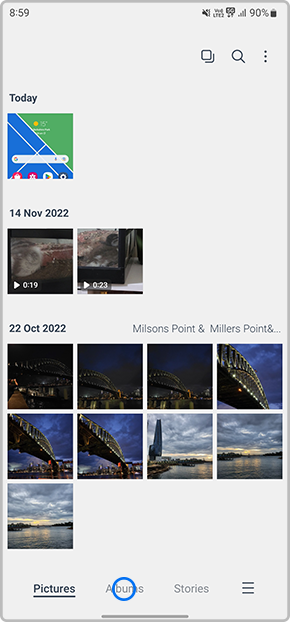
3
Then tap on View all
![Select View all]()

4
Select  Menu
Menu
![Tap on three dots]()
 Menu
Menu

5
Tap on Hide albums
![Select Hide albums]()

6
Toggle on/off the albums you would like to hide or unhide
![Tap on the albums you would like to hide or unhide]()


Contact Info
Contact us
For support buying a product, help with an order or technical product support
WhatsApp
![]()
![]()


It's now even easier to get in contact with Samsung Customer Care, now on WhatsApp.
Troubleshoot and book a repair
Support for your mobile devices, home appliances, TV and computing products
