Set a real-time weather lock screen wallpaper on your Samsung Galaxy
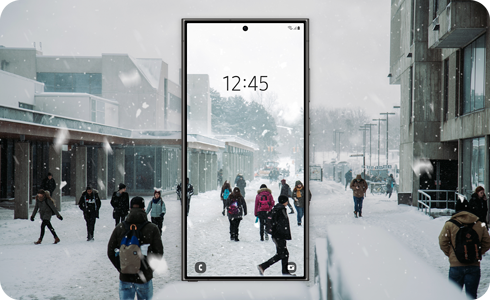
The real-time weather lock screen wallpaper feature lets your Samsung Galaxy apply weather effects to your lock screen photo based on local weather conditions. For example, if it is raining or snowing outside, matching weather effects will appear on your lock screen image to create a more immersive and personalized experience.
Note: Information provided applies to Samsung mobile devices sold in Canada. Available screens and settings may vary by wireless service provider, software version and device model.
Use Photo ambient wallpaper on a Samsung Galaxy device running One UI 8 to display weather and lighting effects that reflect local conditions on your lock screen. One UI 8 was first introduced on the Galaxy Z Fold7, Galaxy Z Flip7, Galaxy Z Flip7 FE, Galaxy S25 FE, Galaxy Tab S11 Ultra and Galaxy Tab S11. As the update continues to roll out, more Samsung Galaxy devices will support One UI 8 and access its latest AI-powered features.

Here’s a list of devices that were released with One UI 8 or are expected to receive the update:
- Galaxy S phones: S26, S26+, S26 Ultra, S25 FE, S25 Edge, S25 Ultra, S25+, S25, S24 Ultra, S24+, S24, S24 FE, S23 Ultra, S23+, S23, S23 FE, S22 Ultra, S22+, S22, and S21 FE
- Galaxy Z phones: Z Fold7, Z Flip7, Z Flip7 FE, Z Fold6, Z Flip6, Z Fold5, Z Flip5, Z Fold4, and Z Flip4
- Galaxy Tab S tablets: Tab S11 Ultra, Tab S11, Tab S10 Ultra, Tab S10+, Tab S10 FE+, Tab S10 FE, Tab S9 Ultra, Tab S9+, Tab S9, Tab S9 FE+, Tab S9 FE, Tab S8 Ultra, Tab S8+, and Tab S8
- Galaxy A phones: A56 5G, A54 5G, A53 5G, A36 5G, A35 5G, A26 5G, A25 5G, A16 5G, and A15 5G
Note: Your Samsung Galaxy device must be running One UI 8 or a later version to use this feature. If your device appears in the list but has not yet received the update, the feature may not be available. Software update schedules vary by model, country and carrier. For carrier-branded devices, software updates are released in coordination with the carrier.
You can use a personal photo stored in the Gallery app as lock screen wallpaper and add weather effects that match local weather conditions.
Note: Location services must be enabled so your Samsung Galaxy can detect local weather conditions and apply matching weather effects to the lock screen wallpaper. To verify, open the Settings menu and select Location.


Step 1. Touch and hold an empty area of the Home screen.


Step 2. Tap Wallpaper and style.


Step 3. Tap Change wallpapers.


Step 4. Tap Photo ambient under the Create with AI category.


Step 5. Tap Try now, then select a photo for your lock screen.


Step 6. Adjust the photo's position on the screen.


Step 7. Tap the Play icon to preview the weather effects on the lock screen wallpaper.


Step 8. Tap Done to apply the weather effects to the lock screen wallpaper.
Note:
- Available weather effects: Weather effects are available for selected weather conditions and may not match every type of weather.
- Changes may take time: Changes based on the time of day and weather conditions may not appear immediately.
- Best photo results: For best results, use a clear outdoor photo taken during the day. Weather effects may be less noticeable on dark or indoor photos.

Thank you for your feedback!
Please answer all questions.
RC01_Static Content : Hide call number function