"Samsung's AI-powered upscaling converts 1080P and 4K content into a better version for the QN800D."
“The gaming performance is great with the benefit of upscaling, high refresh rates and an AI-powered game mode."
Samsung's AI-powered 8K processor creates one of our best 8K experiences. Our 8K AI Upscaling technology powered by 256 AI neural networks transforms content into near-8K picture quality. Our NQ8 AI Gen2 Processor optimizes both picture and sound to deliver a near-8K experience whether you are streaming movies, playing your favourite video games, or watching live sports.
Compared to 2024 Neo QLED 4K (NQ4 AI Gen2)
* Viewing experience may vary according to types of content and format.
** 8K upscaling may not apply to PC connection and Game Mode.
8K AI Upscaling
Upscale content into near-8K experience with 256 AI neural networks
Our 8K AI Upscaling technology powered by 256 AI neural networks transforms content into near-8K resolution. Our NQ8 AI Gen2 Processor enables one of the sharpest and smoothest picture qualities of any Samsung TV.
* Viewing experience may vary according to types of content and format.
** 8K upscaling may not apply to PC connection and Game Mode.
Quantum Matrix Technology Pro
Ultra fine contrast in 8K that brings every hidden detail
The powerful evolution of Neo QLED 8K comes with a backlight dimming technology that precisely controls our proprietary Quantum Mini LEDs. Witness exquisite details expressed in both the darkest black to the purest white with x1.5 more lighting zones than regular Quantum Matrix Technology.
Samsung Tizen OS
Upscale your entertainment with Samsung Tizen OS
Samsung Tizen OS upscales your entertainment with the latest apps and services including Samsung TV Plus with 200+ free live TV channels and Gaming Hub with cloud gaming services (no console required), Daily+ where you can easily manage your daily activities, and SmartThings where you can control your smart devices from your TV. Samsung Tizen OS secures your privacy and personal information via Samsung Knox Security.
* Content and services may vary by region and are subject to change without notice. Agreement to Smart Hub Terms and Conditions and Privacy Policy is required before use. Some content and services require registration and subscription.
** Requires Samsung account.
*** You will need a Samsung Account to access the full range of Samsung Tizen OS features. If you choose not to login in, you will only be able to connect to terrestrial TV(applicable to devices with tuners only) and external devices, e.g. via HDMI. You may need a separate device (e.g., PC or mobile) to create a Samsung Account.
EXTENSIVE FREE CONTENT
Access 800+ free channels including Samsung TV Plus premium channels
Enjoy news, sports, movies, entertainment, music, kids’ shows and more. With new content continuously added, there’s always more to explore!
* Channel number including channels provided by Samsung TV Plus and third-party apps counts are current as of May, 2024 for each country.
** Channels vary by country and are subject to change without notifications.
*** Requires Samsung account.
**** Downloading apps, signing up, and logging in may be required to access channels provided by third-parties.
Picture Quality
Three architectural details of an Italian landmark are transformed into an exquisite 8K resolution. Then, a ripple starts from the center of the scene and spreads out to all the edges, revealing the entire scene in pristine \"8K Association Certified\" quality.
Real 8K Resolution
See details within the details
Feel the power of every frame with 33 million pixels and ultimate clarity at a resolution four times higher than 4K.
* 8K Resolution is defined as having 7,680 x 4,320 pixels. Native 8K content based on current 8K streaming, connectivity and
decoding standard.
** Future and certain party standards not guaranteed or may require additional device/adapter purchase.
AI Motion Enhancer
Sharpens and smooths the motion of objects and text with NQ8 AI Gen2 Processor
Our NQ8 AI Gen2 processors leverage AI to sharpen and smooth out the motion of text. This takes watching live sports to another level.
* Viewing experience may vary according to types of content and format.
** AI Motion Enhancer does not apply to PC connection and Game Mode.
A car is running with lights on through a forest. There is a comparison between SDR and HDR 10+ quality in terms of brightness and intensity.
Neo Quantum HDR 8K+
Extreme brilliance with lifelike colours in 8K
Experience an extravaganza of lifelike colours across the spectrum powered by Neo Quantum HDR 8K+ that applies HDR10+ dynamic tone mapping, adapting to each scene's characteristics for both a richer dynamic range and a colour brilliance in near-8K resolution.
* The range of Quantum HDR luminance is based on internal testing standards and subject to change according to viewing conditions or specifications.
Anti Reflection
Minimizes glare to reduce unwanted distractions
Our critically acclaimed Anti Reflection technology minimizes the glare caused by reflected light, enabling you to enjoy crystal clear picture quality.
* Image simulated for illustrative purposes only.
Depth Enhancer Pro
Enjoy 3D-like and realistic images inspired by the human eye
Depth Enhancer Pro detects areas where a person's eye would typically focus and enhances the depth accordingly. It precisely optimizes numerous blocks of mini LEDs and increases foreground contrast so you can enjoy 3D-like and realistic pictures at home.
* Viewing experience may vary according to types of content and format.
Auto HDR Remastering
Enjoy near-HDR picture quality even with SDR content
Transform SDR content into near-HDR quality by using deep learning algorithms. By learning the differences between SDR and HDR, the algorithms convert SDR content into near-HDR quality with brighter highlights, more vibrant colours and clearer details.
* SDR deep learning algorithms enhance content to near-HDR picture quality. Based on laboratory testing. Viewing experience may vary according to types of content and format.
PANTONE Validated
Enjoy authentic colour validated by PANTONE
PANTONE validation certifies the accurate expression of 2,030 PANTONE colours and 111 newly added skin tones. So you can enjoy an accurate, true-to-life viewing experience.
* Received certification from Pantone in December 29, 2021
Gaming Experience
Gaming Hub
Where gaming comes together
Gaming Hub now acts as a convenient conduit to your favourite cloud gaming platforms, console games and standalone apps. It displays recommendations for other games across platforms, saving you time so you can speed-run the game selection process.
* Gaming Hub is available in limited countries, with app availability differing by country.
** Accessing Gaming Hub is free of charge. Subscription may be required to access content offered by game-stream providers on the Gaming Hub platform.
*** A separate controller may be required depending on the specific game in Gaming Hub.
**** You will need a Samsung Account to access our network-based smart services. If you choose not to log in, you will only get connection to terrestrial TV (applicable to devices with tuners only) and external devices, e.g. via HDMI.
Motion Xcelerator 165Hz
Boost your motion clarity for the content you love up to 4K 165Hz
With exceptional motion enhancements at 4K 165Hz, Motion Xcelerator 165Hz delivers amazing performance, creating consistently crisp visuals and blazing-fast speeds. Samsung’s unique dynamic refresh technology Motion Xcelerator 165Hz provides differentiated motion performance to support VRR games up
* 4K 165Hz is only available with PC connected games that support such specifications (PC graphic card required). Performance may vary.
An action game is playing onscreen, with the Game bar onscreen at the bottom. The player selects Game Genre, Virtual Aim Point, Screen Ratio, then Minimap Zoom. The First Descendant game logo is on the top.
Game Bar
Optimize your gaming experience
Check and control game settings quickly. Now you can easily view the status of your settings - FPS (Frames Per Second), HDR (High Dynamic Range) and VRR (Variable Refresh Rate). Optimize response time or screen ratio, as well as the game picture mode, without having to leave your goal.
* Super Ultrawide GameView (21:9, 32:9) is available for certain PC and console games supporting ultrawide screens. Screen resolution change from external device may be required.
** Some game titles may not support this feature.
*** Game Bar's Zoom-in mode is not supported in some refresh rates.
**** Game Bar UI is subject to change without prior notice.
Scattered scenes from games with one main scene front and center. \"RPG\" is detected as its genre, as it is then scanned into optimal settings by Samsung's AI technology. Then the screen changes and \"Racing\" is detected as the genre of \"Kart Rider Drift\" as it is also scanned into optimal settings.
AI Auto Game Mode
Experience seamless gaming with AI-driven automatic setting optimization
Let your TV automatically detect your game settings, delivering a unique setting for each game type.
* Availability may vary according to game content and format.
Hue Sync
Enjoy immersive lighting that syncs with your viewing and gaming experiences
Immerse yourself in dynamically tailored environments created by smart lights that automatically sync with any of your onscreen content.
* Smart light sold separately.
** Certain regions only.
*** Samsung account required. Additional installation of the Philips Hue Sync app and paid subscription are required.
SmartThings
Using SmartThings, an icon of the built-in hub on Samsung TV connects to other icons of various connected home devices in a living room, such as the AC, lights, oven, robot vacuum and air purifier.
Built-in SmartThings Hub
Connect your smart devices with your TV
Built-in SmartThings Hub lets you fully enjoy enhanced connectivity with devices that are compatible to Matter and HCA (Home Connectivity Alliance).
360 Audio mode
Incredible three-dimensional listening experience with Galaxy Buds
When paired with Galaxy Buds, 360 Audio Mode makes your TV sound even more realistic than with traditional headphones. Spatial sound and enhanced head tracking deliver an incredible three-dimensional listening experience.
* Available with Galaxy Buds 360 audio (Galaxy Buds Live/ Buds Pro/ Buds2 / Buds2 Pro).
SmartThings on Samsung TV shows a 3D Map View of a home with various connected devices. It shows the light is on, TV is on SmartThings Mode, refrigerator has its door closed and air purifier is on Auto mode. The energy levels can also be seen for each device on the screen.
3D Map View
Your TV as the control center of your home and IoT devices
Manage your home by intuitively monitoring and controlling your appliances and IoT devices from a 3D map of your house.
* Image is simulated and for illustration purposes only.
** Available technology, functions and features may vary by country, service provider, network environment or product, and are subject to change without notice. Requires a Wi-Fi, Bluetooth or other wireless network connection and login to Samsung account. Connected devices are sold separately. Use of calm technology requires agreement to both SmartThings' and the auto-registered device's privacy notices.
*** UI is subject to change without prior notice.
Multi View
Watch up to 4 pieces of content simultaneously on one screen
Watch what's on your TV and your mobile on the same screen at the same time. Whether it's live stats for sports or tutorial videos for games, simply connect your phone and multi-screen. You can also enjoy multiple shows from multiple sources simultaneously on a layout of your choice.
* Number of available views and supported apps/sources depends on the TV model and can be updated without notice. Requires Samsung account.
** Supports Android OS and iOS based smartphones in Q70D↑ models.
*** Multi View for mobile is available on Android 4.2 version or higher. For iOS devices, AirPlay is supported on iOS 12.3 or later.
**** The actual UI may differ from the image shown.
Samsung Daily+
Samsung Daily+
Manage your daily activities and lifestyle through Samsung Tizen OS
Through Samsung Tizen OS’s open app ecosystem, Daily+ enables you to easily manage your daily activities and lifestyle from the comfort of your TV. Daily+ includes apps and services like SmartThings and Workspace.
* Samsung is not responsible for any third-party services, and is not liable for any damages or losses caused by any third-party services.
** Available service and the UI are subject to change without notice.
SmartThings
Your home butler
Let SmartThings detect, connect and display all the devices present around your screen. With built-in hub, now you can fully enjoy enhanced connectivity without additional devices. Also, intuitively see and simply control devices at a glance with Samsung unique 3D Map View UI. In addition to this, utilize your screen as an IoT sensor to care for your loved ones and expand your TV’s role to managing your home.
* Available technology, functions and features may vary by country, service provider, network environment or product, and are subject to change without notice.
** Requires a Wi-Fi, Bluetooth or other wireless network connection and login to Samsung account.
*** Connected devices are sold separately.
**** Use of calm technology requires agreement to both SmartThings' and the auto registered device's privacy notices.
***** UI is subject to change without prior notice.
Samsung Health
Easily access health and wellness content with Samsung Health on your TV
Master your exercise with camera-powered coaching, keep track of your daily stats synced from the Samsung Health application, and access content from leading fitness and mindfulness industry partners in one place.
* Service is available in US, CA, KR, UK and IE.
** Smart Trainer support devices, partners and content may vary by country. Availability of service is subject to change without prior notice.
*** Additional payment may be required to use certain Samsung Health services. The service requires the user to be logged in to the same Samsung account on TV as well as mobile device.
**** Syncing of health data requires a compatible mobile device or wearable with support for Samsung Health. Sold separately.
***** Camera sold separately.
Sound
Only sound from the Soundbar was activated when Q-Symphony was off, but sound from both the TV and Soundbar turned on when Q-Symphony turned on.
Q-Symphony
TV and soundbar orchestrated in amazing harmony
Surround yourself with sound from TV and soundbar orchestrated in harmony. Q-Symphony uniquely allows TV and soundbar speakers to operate simultaneously for an amazing surround effect, without muting TV speakers.
* Check for Q-Symphony compatibility on soundbar product specifications.
** Soundbar sold separately.
A boat is making a circular motion on the water. OTS+ technology is tracking the action of the boat as it moves.
OTS+
Dynamic, realistic sound that tracks every action
With 4.2.2ch built-in speakers and AI-powered action-tracking sound, you can experience vividly realistic 3D audio that puts you in the middle of the action.
Active Voice Amplifier Pro
AI-powered voice enhancement allows an incredible audio experience
AI-powered voice enhancement technology analyzes background sounds, voice clarity and ambient noise to isolate voices. Enjoy an incredible audio experience, even where there is background noise.
* This feature can be activated in the TV Menu > Intelligent Mode > Active Voice Amplifier Pro. The default setting of Active Voice Amplifier Pro is Off.
Soundwaves beneath the TV change in shape as the TV sound adapts to the dialogue, orchestra and soccer game being displayed.
Adaptive Sound Pro
Experience amazing sound with remastering and intelligent processing
Adaptive Sound Pro optimizes sound by considering characteristics of both the room and its audio content. Experience improved voice clarity and vivid yet balanced sound just as the creators intended, thanks to the unique audio remastering technology that uses neural processing to extract and process
* This feature can be activated in the TV Menu > Intelligent Mode > Adaptive Sound Pro. The default setting of Adaptive Sound Pro is Off.
Security & Sustainability
Samsung Knox Security
Your Privacy. Secured. On Samsung TVs
Feel at ease with a multi-layered security solution shielding your data, such as pin codes and passwords. Even Home IoT devices connected to your TV are secured. Regular updates further protect your TV from harmful attacks.
*UI is subject to change without prior notice.
** Samsung Knox applies to Samsung TVs powered by Tizen, launched since 2015.
*** Security software update is guranteed for at least three years from TV product laucnh.
**** Latest TV software update is required.
Relumino mode
Entertainment made accessible
Relumino mode is a visual aid solution designed for people with low vision. It dynamically emphasizes the edges in the on-screen elements and improves the contrast and colour.
* Relumino Mode works on sources provided through DTV and HDMI only. It does not work on other sources, e.g.,OTTs.
SolarCell Remote
Remote controller charged with sunlight and indoor lighting
Now you don't need to use disposable batteries. The SolarCell remote has a solar panel on its back that uses both indoor and outdoor light for charging.
* To charge the remote with solar energy, set the TV remote down with the solar panel facing up.
** Place it in your living room while your lights are turned on, or you can place it near a window where it will soak in natural sunlight.
*** The design and button layout of the SolarCell remote may vary by regions.
**** If the remote's battery is drained, it would need to be charged with a USB-C cable.
***** Please refer to the TV Menu (Settings - General Settings - Power & Energy Saving - Available Remote Battery) to check the remaining battery level of the remote control.
When AI Energy Mode is off, the surroundings around the TV appear bright. A smartphone screen displaying AI Energy Mode pops up, and it switches from Off to On. With adaptive brightness and AI Energy Mode activated, the energy level decreases significantly, and the scale shifts from day to night.
AI Energy Mode
Energy saving with AI Energy mode and SmartThings
With AI Energy Mode, you can conserve power. Surrounding light levels are automatically detected and analyzed to adjust the brightness, reducing overall power consumption.
* Energy saving rate may vary by regions, models, sizes, viewing conditions or types of content.
** Products shipped in Eco Mode have some AI Energy Mode functions enabled by default, so energy saving levels by turning on AI Energy Mode may appear lower compared to Standard Mode.
*** AI Energy Mode does not work with Game Mode.
**** Energy savings based on internal test results and may vary depending on content being displayed and surrounding brightness levels.
Design
A close up of the Infinity One side profile is highlighted by a thin light tracing the slim edge. A zoom out reveals the entire side profile of QN800D.
Infinity One Design
The beauty found in minimalism
Enjoy an elegant immersive viewing experience. This gorgeous Infinity One Design will take you to the next level with its slim profile.
The One Connect Box is on a table. Its various ports on the back are zoomed in. The Attachable Slim One Connect box is attached to the Neo QLED TV.
Attachable Slim One Connect
A clutter-free solution that attaches to your TV
Whatever your installation environment, Attachable One Connect helps you to minimize cable clutter.
TV to Mobile, Mobile to TV, TV initiate mirroring, Sound Mirroring, Wireless TV On, Tap View
Multi-View
upto 4 videos
Ambient Mode
Ambient Mode+
Multi Control
Yes
Auto Game Mode (ALLM)
Yes
Game Motion Plus
Yes
Dynamic Black EQ
Yes
Surround Sound
Yes
Super Ultra Wide Game View
Yes
Mini Map Zoom
Yes
FreeSync
FreeSync Premium Pro
Hue Sync
Yes (US Only)
HGiG
Yes
Gaming Hub
Yes (KR, US, CA, BR, GB, FR, DE, IT, ES, MX, AU)
Digital Broadcasting
(US) ATSC 3.0 (Canada) ATSC/ClearQAM
Analog Tuner
Yes
HDMI
4
USB
3 x USB-A, 1 x USB-C
HDMI (High Frame Rate)
8K 60H z, 4K 165 Hz (for HDMI 1/2/3/4)
Ethernet (LAN)
1
Digital Audio Out (Optical)
1
RF In (Terrestrial / Cable input / Satellite input)
1/1 (Common Use for Terrestrial)/0
Ex-Link ( RS-232C )
1
Wi-Fi
Yes (Wi-Fi 6E)
Bluetooth
Yes (BT5.3)
HDMI Audio Return Channel
eARC
One Connect Box
One Connect (Y24 8K)
Design
Infinity One
Bezel Type
4 Bezel-less
Front Colour
GRAPHITE BLACK
Stand
SLIM OC STAND
Stand Colour
TITAN BLACK
9:16 Screen Support
Yes (Need Auto Rotating Accessory, Compatible Model Only)
ConnectShare™
Yes
Accessibillity - Voice Guide
US English, Mexico Spanish, Canada French, Finnish, German, Greek, Hungarian, Italian, Norwegian, Polish, Portugal Portuguese, Romanian, Slovak, Swedish, Czech, Danish, Dutch, Korean
Low Vision Support
Audio Subtitles (AU,KR,UK,US Only), Relumino, Magnification, Audio Description, Zoom Menu and Text, High Contrast, SeeColors, Color Inversion, Grayscale, Picture Off
Hearing Impaired Support
Closed Caption (Subtitle), Multi-output Audio, Caption Position, Sign Language Zoom, Separate Closed Caption, Sign Language Guide, Auto Caption Position
Now you get innovative smartphone with right tariff plan.
Der Anschlusspreis und monatlicher Tarifpreis werden vom jeweiligen Netzanbieter eingezogen. Du zahlst jetzt nur den einmaligen Gerätepreis.
Check the availabbility
1 of 3
Wrong address
Unfortunately, we cannot make you a DSL offer for the address you have checked.The address you have given is not unique, please choose from the address suggestions.
Empfohlene Adresse
Please provide a valid postcode
Please enter correct information again.
Please provide a valid street
Please enter correct information again.
Please provide a valid house number
Please enter correct information again.
Additional information placeholder
Please enter correct information again.
Please provide a valid city
Please enter correct information again.
*Required fields
Informationen zur Verarbeitung Deiner personenbezogenen Daten findest Du in unserer Datenschutzerklärung.
Pay monthly phone contracts
Buy your phone along with an inclusive monthly network plan and pay monthly*
Choose your network
Choose from a range of networks and inclusive monthly plans to get started with your new Galaxy phone straight away.
Pay Monthly
Pay for your phone and an inclusive bundle of calls, texts and data in one easy-to-manage monthly fee.
Next steps
You will be redirected to our trusted partner, A1 Comms Ltd (trading as Mobileshop), to purchase your phone and setup your monthly plan.
Select your new Samsung Galaxy device and the eligible device you want to trade in.
02
Determine value
Answer a few simple questions to determine the estimated trade-in value of your eligible device. The estimated trade-in value will be applied to the purchase price of your new Samsung Galaxy device at time of checkout.
03
Ship your eligible trade-in device
Once your new Samsung Galaxy device has shipped, you’ll receive an email with shipping instructions and a pre-paid shipping label for your trade-in device. Carefully follow the instructions and use the pre-paid shipping label to ship your trade-in device. Your trade-in device shipment will take approximately 2 to 3 business days and you will receive a confirmation email once the device is received.
04
Confirmation of condition of trade-in device
Once we have received your trade-in device and the condition has been verified, the final trade-in value will be determined. If the final trade-in value differs from the estimated trade-in value, at our sole discretion, you may be offered an adjusted trade-in value by email which will also describe the next steps in the process. The device condition assessment will take approximately 5-10 business days and you will receive a confirmation email once completed.
Enter your IMEI (if you have a Bluetooth device, enter the serial number)
Find your IMEI or serial number
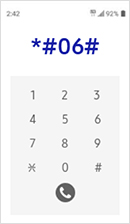
To quickly locate the IMEI, enter * # 06 # on your LTE device. Otherwise, go to your device settings, check the device itself or device packaging to locate the IMEI or serial number.
Enter your IMEI or serial number (Note: to trade-in a phone, you must enter a valid 15-digit IMEI)
Incorrect
Correct
We were unable to confirm your IMEI or serial number. Please try one of the following options:
*Actual trade-in value may differ from estimated trade-in value for various reasons. Not all international devices are eligible for the trade-in program. See trade-in program FAQs for accepted international devices. International trade-in devices are subject to a reduction in estimated trade-in value.
Help us to further validate your trade-in device
How would you like to validate your trade-in device?
trade-in apply validation-check input title
Please enter a valid IMEI or Serial number
Correct
How do I find my IMEI number?
To quickly locate the IMEI, enter * # 06 # on your LTE device. Otherwise, go to your device settings or check the device packaging to locate the IMEI
How do I find my serial number?
Go to your device settings, check the device itself or device packaging to locate the serial number. Please enter the Serial Number without any spaces or special characters (e.g. / , -, #, :, @, ~, ^).
Action required
Find my iPhone is enabled on your device. This feature must be disabled and your device must be factory reset before your trade-in device is mailed in. If Find My iPhone is not disabled, your will not be eligible for trade-in
To apply the estimated trade-in value to your purchase, read and accept the terms and conditions of the program included below.
Get the latest TV every 3 years. Purchase a new qualifying TV through the Upgrade Program and sell the old TV back to us for a guaranteed residual value. {1}
Upgrade after 3 years and let us purchase the old TV back from you to a guaranteed resisdual value
Sell your TV to a Samsung partner without buying a new TV and ending the program
Keep the TV and end the program
Description Disclaimer
Pick renewal period
How long would you like before deciding whether to renew or upgrade your product?
For a purchase price of 23,000 kr and 44 installments of 557 kr over 44 months, the fixed effective interest rate is 13.9%. The total amount to be paid is 24,508 kr.
Borrowing costs money!
If you cannot repay the debt on time, you risk a payment default. This may lead to difficulties in renting housing, signing contracts, and obtaining new loans. For support, contact budget and debt counseling in your municipality. Contact details are available at konsumentverket.se.
Terms and Conditions
* Required field
Return & Cancel
Warranty
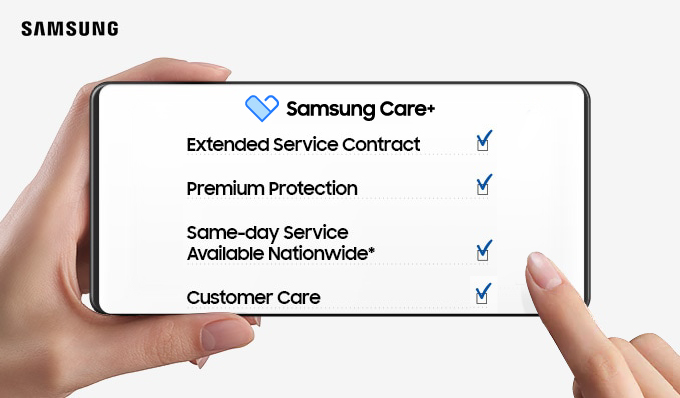
Here’s what’s covered
Hardware repairs
Get fast, convenient repairs using genuine Samsung parts, from our authorized technicians.
Mechanical malfunction or defects
If your device is experiencing a mechanical malfunction or defect, including battery failure, we'll repair it. There are no limits for service requests due to mechanical malfunction or defects, provided they are not protected by the manufacturer's warranty. A service fee applies to all service requests.
Up to 2 service requests for physical & liquid damage
Make up to two service requests for physical or liquid damage within two years. A service fee applies to all service requests.
Get fast, convenient repairs using genuine Samsung parts, from our authorized technicians.
Mechanical malfunction or defects
If your device is experiencing a mechanical malfunction or defect, including battery failure, we'll repair it. There are no limits for service requests due to mechanical malfunction or defects, provided they are not protected by the manufacturer's warranty. A service fee applies to all service requests.
Up to 2 service requests for physical & liquid damage
Make up to two service requests for physical or liquid damage within two years. A service fee applies to all service requests.