How to Use Auto Clean on a Samsung Air Conditioner
 Please Note: The information on this page is for Australian products only. Models, sequences, error codes or settings will vary depending on location and/or where the product had been purchased. To be redirected to your local support page please click here.
The auto-clean function automatically cleans and dries the inside of the air conditioner indoor unit. In order to keep the air conditioner in optimum condition and to maintain the purity of the air in your home, it is important to regularly clean the indoor unit, filters, and external exchanger.
Watch the video below to learn how to use Auto Clean or scroll further down for written step-by-step instructions.
Once Auto clean is selected, it is always activated whenever the air conditioner turns off.
Auto clean runs for 10 to up to 30 minutes depending on internal dry conditions. The indoor unit display shows the cleaning progress from 1% to 99%.
If you start another function while Auto clean is progressing, Auto clean pauses and will resume when the other function stops.
When Auto clean completes, the air conditioner turns off.
Auto clean does not run after Fan mode.
Note: The design or functions of your Air Conditioner may vary from the models in this guide. Please consult your User Manual for more information.
To activate Auto clean, press the Options button on your remote for at least 3 seconds.

The indoor unit display will then show:
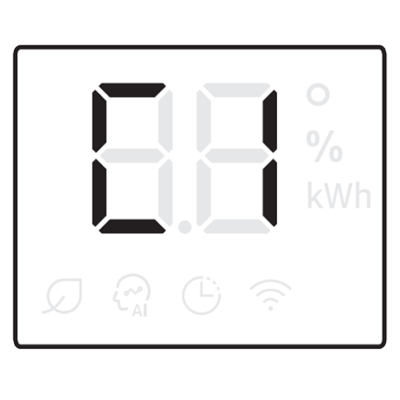
If the air conditioner is off, Auto clean will start immediately.
If the air conditioner is running, Auto clean starts as soon as the air conditioner turns off.
Alternative Method:
You can also access auto clean from the options menu.
Step 1


Press options button on the AC remote.
Step 2


Use the arrow buttons to go through the options.
Step 3


Select Clean from the mode options.
Step 4


Press set to activate Auto Clean.
Note: Remote layout may vary depending on specific model. Refer to your User Manual for more information.
Deactivating the auto clean function disables the function entirely. Meaning the cleaning cycle will not automatically run in the future.
Press the Options button on your remote for at least 3 seconds.
Alternative Method:
Step 1
Press options button on the AC remote.
Step 2
Use the arrow buttons to go through the options.
Step 3
Select Clean from the mode options.
Step 4
Press set to cancel Auto Clean.
Cancelling the function will interrupt and stop the currently running Auto clean cycle.
To cancel auto clean while it is running, press the power button on the remote control twice within 20 seconds.

Note: Cancelling Auto Clean midway does not deactivate it. Please consult the steps for Deactivating Auto Clean above if you wish to do so.

For further assistance, please contact our Chat Support team. To find your Samsung product's User Manual, head to Manuals & Downloads.
Thank you for your feedback!
Please answer all questions.
Contact Info
Contact us
WhatsApp
![]()
![]()

