How to Register your Samsung TV
Registering your products gives you faster support and access to all of the services for your registered products in one account. Your account offers the following additional advantages:
- Product details are immediately available to Samsung Customer Service so that documents can be found easily and queries can be processed more quickly
- Download the latest manuals, FAQs and instructions
- Find online solutions to your concerns by creating a service request yourself
- Track your service status online
There are 3 ways to register your TV with your Samsung Account. Follow the steps below to learn how.
 Please Note: The information on this page is for Australian products only. Models, sequences or settings will vary depending on location and/or where the product had been purchased. To be redirected to your local support page please click here.
Follow the steps listed below to register your Samsung TV.
 Settings and then All Settings
Note: Images were taken from a 2024 model TV. Depending on the model of your TV, sequences and steps may vary.
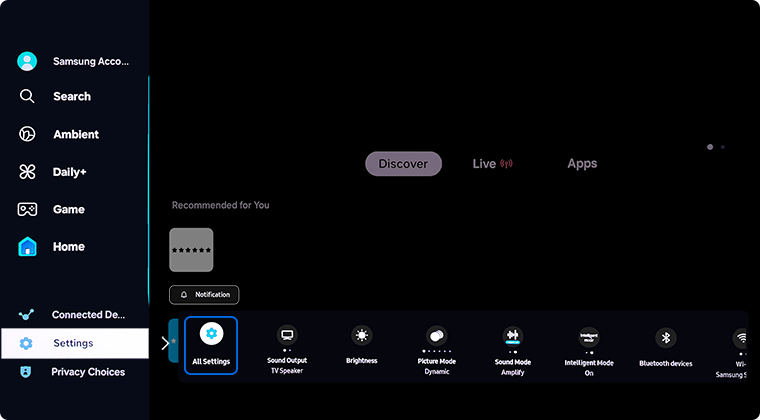
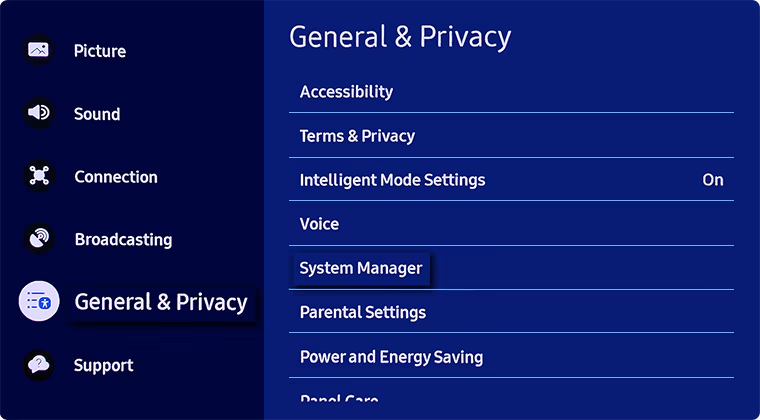
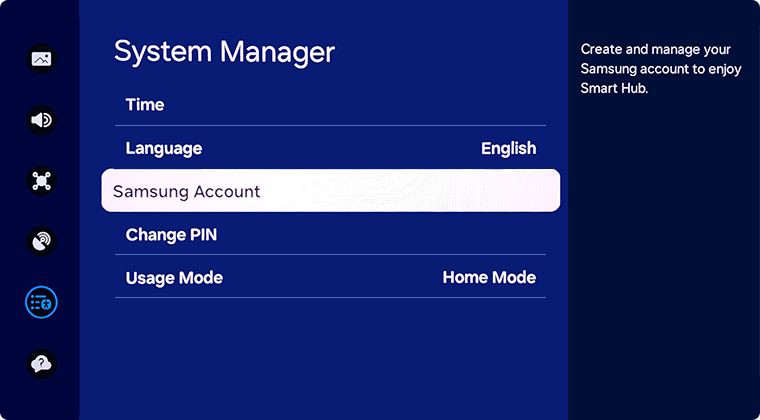
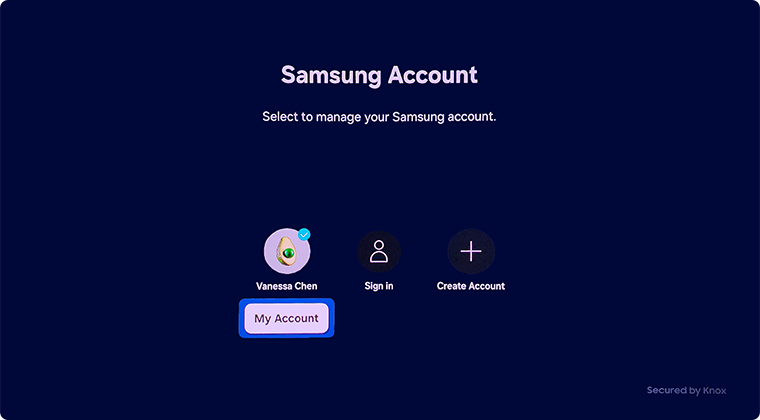
Note: Select 'Sign In' to sign in to additional Samsung Accounts.


 > Product Registration


Note: If you do not already have a Samsung Account, check the page on How to Create a Samsung Account.


Note: Check the page How to Find the Serial Number and Model Number of your Samsung TV to locate these details on your product.

Install the Samsung Members app and sign in to your Samsung Account to register your Samsung products. Follow the steps below to learn how.


1. Launch the Samsung Members app


2. Tap on Support


3. Select Register


4. Select how you would like to register your product. In this case, we will select Enter Info


5. Tap on TV


6. Add in your TV's model and serial number. If you need help locating your TV's details, follow our guide How to find the serial number


7. Add in your Purchase Date and a photo of your Proof of Purchase. Then select Register


8. Once the product has been registered you will be able to view it within My Products
Note:
- You will need to sign into your Samsung Account to register any of your Samsung Products through the Samsung Members. If you do not have a Samsung Account or are unsure of the username or password, head to the Samsung Account Login page to locate or create your account.
- The QR code, barcode, model number and serial number is typically on a sticker on the side or back of the product or packaging. You can also find your TV's details through in your TV's settings:
Settings > Support > About this TV.
Note:
- The device screenshots and menu may vary depending on the device model and software version.
- You can also register your product on the Samsung website.
For further assistance, please contact our Chat Support. To find your Samsung product's User Manual, head to Manuals & Downloads.
 This product should be mounted to a wall or other suitable surface to avoid serious injury. Find out more here.
Contact Info
Contact us
WhatsApp
![]()
![]()


