
30" 6.3 cu. Ft. Smart Electric Slide-in Range


Gallery popup


Please scan the QR Code with your mobile device and you can virtually see how the device will look in your home.
{{upgradeResult.displayModelName}}
{{upgradeResult.discountText1}}
{{upgradeResult.description1}}
{{upgradeResult.description2}}
{{offerFinance.title}}
{{offerFinance.learnMoreCta.text}}{{offerFinance.description}}
{{galaxyForeverResult.displayModelName}}
{{galaxyForeverResult.discountText1}}
{{galaxyForeverResult.description1}}
{{galaxyForeverResult.description2}}
Choose your colour
Customizable bezels sold separately
Choose your skin colour
Customizable skin sold separately
-
{{item.name}}
Out Of Stock
Modern style
-
{{item.name}}
Out Of Stock
Beveled style
-
{{item.name}}
Out Of Stock
Skin colour
-
{{item.name}}
Out Of Stock
Bezel style

- Modern style
The Frame's custom bezels magnetically click into place. Now, you can switch between styles in a snap.
Bezel style

- Beveled style
The new Beveled style bezel design offers an elegant 45-degree angled inner edge bezel.
{{tradeIn.title}}
{{tradeIn.learnMoreCta.text}}{{tradeIn.description}}
{{tradeInResult.displayModelName}}
{{tradeInResult.discountText1}}
{{tradeInResult.discountText2}}
{{tradeInResult.discountText3}}
{{tradeInResult.discountText4}}
{{tradeInResult.discountText5}}
{{tradeInResult.discountText6}}
{{tradeInResult.specialDiscountText}}
{{tradeInResult.description}}
{{tradeInResult.contentText}}
DeleteDealer stock quantity
You can check the stock quantity for each region
Please select city
{{assuredBuyBack.title}}
{{newAssuredBuyBack.title}}
{{newAssuredBuyBack.learnMoreCta.text}}{{newAssuredBuyBack.description}}
Please select Samsung Assured Buyback or no coverage
{{care.title}}
{{care.learnMoreCta.text}}{{care.description}}
Please select Samsung Care+ or No to continue
-
{{item.specialText}}
-
{{warranty.title}}
{{warranty.description}}
{{warrantyResult.displayModelName}}
{{warrantyResult.discountText1}}
{{warrantyResult.description1}}
{{warrantyVd.title}}
{{warrantyVd.description}}
{{warrantyVdResult.title}}
{{warrantyVdResult.priceDisplay}}
{{delivery.headline}}
{{delivery.errorMessage}}
{{deliveryResult.priorityText}}
{{deliveryResult.mainText}}
{{deliveryResult.subText}}
Standard installation charges may apply.Click here for more details.
{{deliveryResult.decText}}
{{item.disclaimer}}
{{tariffOptionResult.displayModelName}}
{{tariffOptionResult.discountText1}}
{{tariffOptionResult.description1}}
{{tariffOptionResult.description2}}
{{tariffOptionResult.description}}
{{tariffOptionResult.price}}
{{tariffOptionResult.disclaimer}}
{{embedAddon.title}}
{{embedAddon.description}}
-
{{item.name}}
{{item.modelCode}}
{{item.description}}
{{item.finalPrice}}
{{item.originalPrice}}{{item.savePrice}} Out Of Stock
-
{{item.name}}
{{item.modelCode}}
{{item.description}}
- {{item.dotList1}}
- {{item.dotList2}}
- {{item.dotList3}}
{{item.finalPrice}}
{{item.originalPrice}}{{item.savePrice}} Out Of Stock
{{message.item.tcCTAText}}
{{message.item.periodText}}
Features
More stylish look,
more ways to cook
Bring more style, convenience and flexibility to your kitchen. It adds a modern, built-in look by simply sliding in between cabinets.


Wifi Connectivity
Save time and do much more with Wi-Fi Connectivity. Simply monitor and control the oven using the SmartThings App*. You can preheat or turn it off and check and adjust the cooking temperature and time.
* Available on Android and iOS devices. A Wi-Fi connection and a Samsung Account are required.


* Available on Android and iOS devices. A Wi-Fi connection and a Samsung Account are required.
Voice Control
Control the oven with your voice. Using a voice assistant*, such as Samsung Bixby**, Amazon Alexa or Google Assistant, you can simply say what you want the oven to do and it will do it. You can easily turn it on/off, select functions and change settings, even if you’re busy doing other things.


* A Wi-Fi connection is required
** Bixby is Samsung’s brand of artificial intelligence (AI) / Internet of Things (IoT) voice assistant. A Samsung Account is required.
More joyful, less burdensome cooking
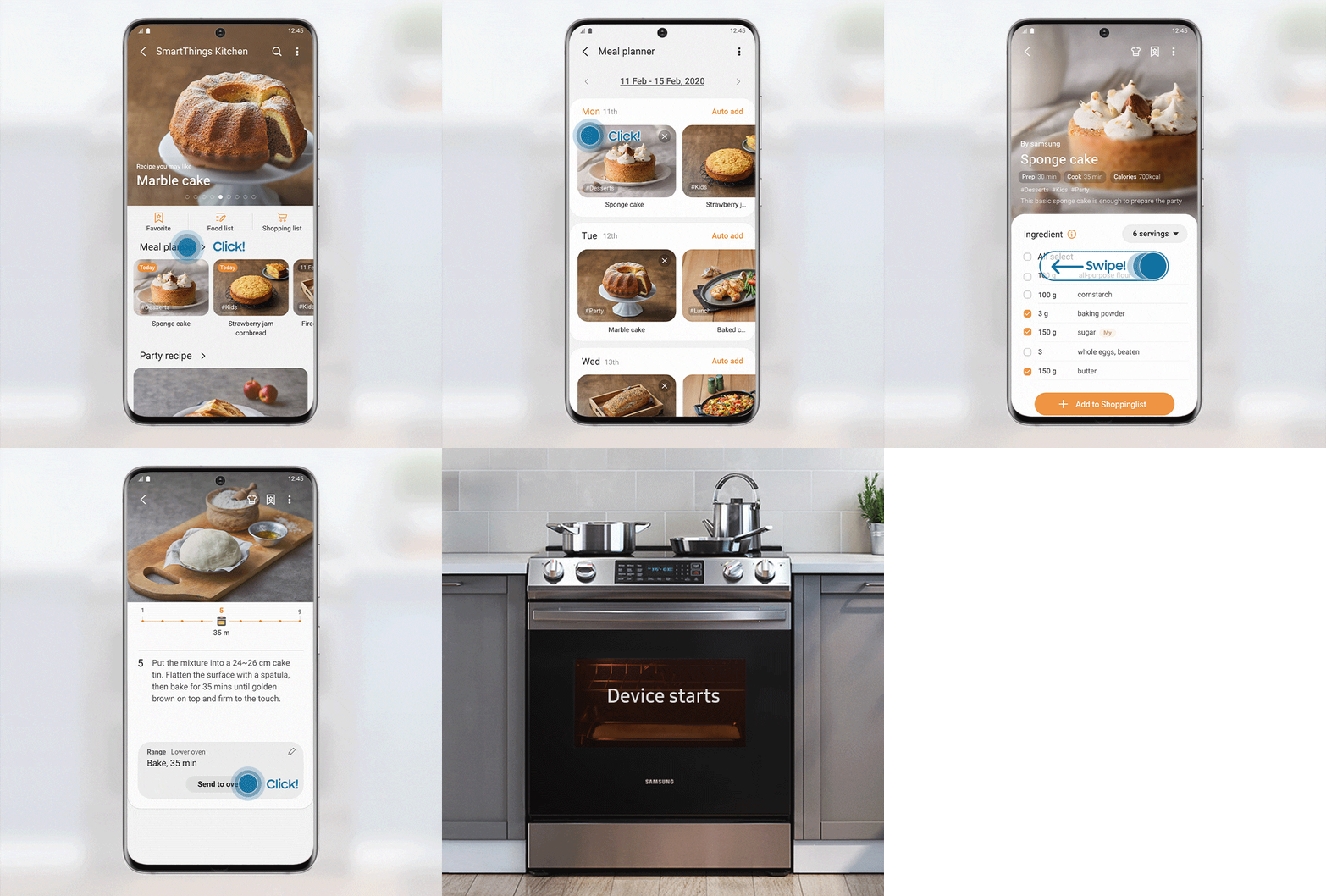
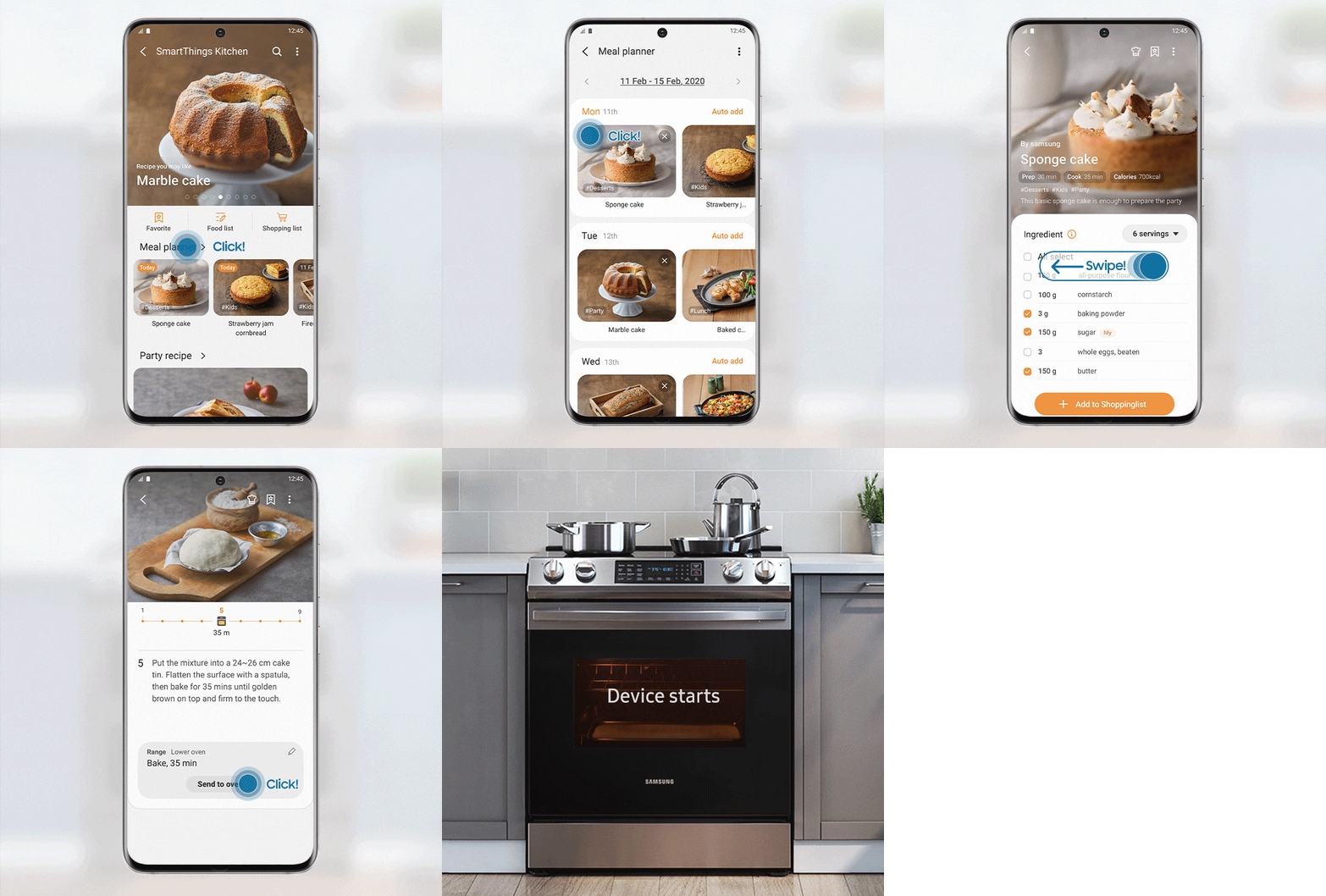
SmartThings Cooking
Make your kitchen experience less stressful. SmartThings Cooking saves time and makes cooking more seamless. It can recommend personalized recipes, generate weekly meal plans, and you can even control your appliances using recipe instructions.
Fingerprint Resistant Finish
A special Fingerprint Resistant Finish prevents surfaces from becoming covered in unsightly fingerprints and other marks and smudges. And any fingerprints or marks can be quickly wiped away if they appear.


Branded In-home Repair Service
More choice and flexibility service repair options.
Samsung Certified Technicians will set up a service time around your available schedule. Our skilled, experienced, and trained technicians will examine and repair your appliance in the comfort and safety of your home. Samsung’s Branded Technicians will arrive at your home with the appropriate PPE equipment, respectfully disinfecting your appliance before and after repairs and ultimately providing you with excellent customer service.
Learn more
To schedule a Branded In-home Repair, contact us via Chat, text WECARE (932 273), or call 1-800-SAMSUNG, to schedule an appointment.
* Samsung Branded In-home service is currently available in Montreal, Toronto, Cambridge, London, Windsor, and Vancouver with plans to expand into Edmonton, Calgary, Ottawa, and Winnipeg later in 2022.


* Samsung Branded In-home service is currently available in Montreal, Toronto, Cambridge, London, Windsor, and Vancouver with plans to expand into Edmonton, Calgary, Ottawa, and Winnipeg later in 2022.
Specifications
-
Installation Type
Slide In
-
Number of Burner
5 EA
-
Installation Type
Slide In
-
Cavity Type
Single
-
Oven Capacity
6.3 cu. ft.
-
Drawer Capacity
0.9 cu. ft.
-
Oven Colour
Dark Blue
-
Control Type (Oven)
Glass Touch(↕)
-
Control Type (Cooktop)
Knob
-
Display Type
LED
-
LED Color
Ice Blue
-
Soft Closing Door
No
-
Self Clean
Yes
-
Steam Clean
Yes
-
Wi-Fi Connection
Yes
-
Bread Proof
100°F (40°C)
-
Favorite Cook
App
-
Keep Warm
Yes
-
Clock
Yes
-
Timer
Yes
-
Numeric Pad
No
-
Child Safety Lock
Yes
-
Hidden Bake Element
Yes
-
Interior Light (Position)
1 Incandescent 40W / Back
-
Light (Lamp) On/Off
Yes
-
Sound on/off
Yes
-
Setting (Clock System Option (12H/24H))
No
-
Delay Start
Yes
-
Sabbath Mode
Yes
-
Number of Burner
5 EA
-
Heating Element 1
6"/9" - 3000W
-
Heating Element 2
6" - 1200W
-
Heating Element 3
6"/9" - 3000W
-
Heating Element 4
6" - 1200W
-
Heating Element 5
Warm Zone (100W)
-
Hot Surface Indicator
Yes
-
Convection
Thermal
-
Bake (Single)
175°F (80°C) - 550°F (285°C)
-
Variable Broil (Low-High) (Single)
Low - High
-
Bake Element
3000W
-
Broil Element
4200W
-
Type
Storage
-
Warm. Drawer Handle
No
-
Net Size (W x H x D)
(760.4) x (914.4 ~ 933.45) x (728.66)
-
Shipping Size (W x H x D)
839.8 x 1060.45 x 769.9 mm
-
Net Weight (kg)
165.6 lb / 75.1 kg
-
Shipping Weight
85.5 kg
-
Number of Rack Positions
7
-
Gliding Rack
No
-
Wire Rack (EA)
2
-
Split Rack
No
-
Partition
No
-
Meat Probe
No
-
Anti-Tip Device
Yes
-
Steam Tray
No
-
WiFi Embedded
Yes
-
Bluetooth
No
-
SmartThings App Support
Yes
Reviews
30" 6.3 cu. Ft. Smart Electric Slide-in Range
- Customers appreciate the range's features like fast heating, even cooking, and energy efficiency
- Many report issues with the quality and durability, particularly with the glass cooktop and control knobs
- Some experienced problems like scratches, cracks, and broken knobs within the first few years of use
- There are concerns about the sensitivity of the controls, which can lead to unintentional activation of the burners, posing a potential safety risk
- The product seems to have appealing features but widespread quality and reliability concerns
Reviews with images & videos
Filters
Relevancy sort puts the best reviews at the top. We look at things like helpfulness votes, latest review, pictures and other traits that readers look for in their reviews.
Filters
432 Reviews
2024-03-28
![[D] Alternative Text](https://photos-us.bazaarvoice.com/photo/2/cGhvdG86c2Ftc3VuZy1lbl9jYQ/deca70d8-f561-57aa-bcb6-70306378e529)
![[D] Alternative Text](https://photos-us.bazaarvoice.com/photo/2/cGhvdG86c2Ftc3VuZy1lbl9jYQ/a6c97071-3604-51a4-802c-262cffeffeee)
Samsung Support Team
Hello, thank you for reaching out. We're here to help. Could you please tell us more about the situation? Get in touch at 1-800-SAMSUNG or via live chat on our website (http://www.samsung.com/ca/support/).
2023-05-16
![[D] Alternative Text](https://photos-us.bazaarvoice.com/photo/2/cGhvdG86c2Ftc3VuZy1lbl9jYQ/a8c257fc-8bf3-5242-9002-a378e8a64192)
![[D] Alternative Text](https://photos-us.bazaarvoice.com/photo/2/cGhvdG86c2Ftc3VuZy1lbl9jYQ/a57053a1-7442-569b-b323-37a86328ecaa)
Samsung Support Team
Hello, thank you for your review. We are here to help. Please contact us at 1-800-SAMSUNG or via live chat on our website (http://www.samsung.com/ca/support/) for assistance. Thanks again, we look forward to hearing from you.
2023-10-21
![[D] Alternative Text](https://photos-us.bazaarvoice.com/photo/2/cGhvdG86c2Ftc3VuZy1lbl9jYQ/702e855f-5d23-5194-87a2-ff6615a5e98e)
![[D] Alternative Text](https://photos-us.bazaarvoice.com/photo/2/cGhvdG86c2Ftc3VuZy1lbl9jYQ/26d6793b-e76e-5e15-8243-f169ac673ff9)
Samsung Support Team
Hello, thank you for sharing your feedback. At Samsung.ca, we always aim to satisfy our valued customers and would love to help. Please feel free to contact us at 1-800-SAMSUNG or via live chat on our website (http://www.samsung.com/ca/support/) for assistance. Thanks!
2021-12-21
Kirkland, WA
2020-10-12
2020-09-01
portland, or
2023-11-18
Samsung Support Team
Hello, thank you for your review and feedback. We will pass your comments along to our store staff. If there is anything we can do to improve your experience, please feel free to let us know by contacting us at 1-800-SAMSUNG or via live chat on our website (http://www.samsung.com/ca/support/). Thanks again.
2023-03-06
![[D] Alternative Text](https://photos-us.bazaarvoice.com/photo/2/cGhvdG86c2Ftc3VuZy1lbl9jYQ/224fd50c-faa2-5029-b973-b3cea2855dc6)
![[D] Alternative Text](https://photos-us.bazaarvoice.com/photo/2/cGhvdG86c2Ftc3VuZy1lbl9jYQ/a9fcad61-3f65-53db-b52e-cdde74a946d3)
Operations
Hi there, thank you for reaching out. We're here to help. Could you please tell us more about the situation? Get in touch at 1-800-SAMSUNG or via live chat on our website (http://www.samsung.com/ca/support/)
2024-11-15
![[D] Alternative Text](https://photos-us.bazaarvoice.com/photo/2/cGhvdG86c2Ftc3VuZy1lbl9jYQ/00a464f3-84ad-5d42-8e3e-5a3d5b8a008e)
![[D] Alternative Text](https://photos-us.bazaarvoice.com/photo/2/cGhvdG86c2Ftc3VuZy1lbl9jYQ/1dc1beb9-d011-5ee6-890d-57e6b238b739)
Samsung Support Team
Hello, thank you for your review and feedback. We will pass your comments along to our store staff. If there is anything we can do to improve your experience, please feel free to let us know by contacting us at 1-800-SAMSUNG or via live chat on our website (http://www.samsung.com/ca/support/). Thanks again.
2022-07-13
Indiana
2025-01-28
Florida, USA
SEA Care
Hi there, Thank you very much for your observation of our range. Rest assured that we are working to improve our products and services with the help of your reviews. Have a great day, -Ernest-
2024-03-31
![[D] Alternative Text](https://photos-us.bazaarvoice.com/photo/2/cGhvdG86c2Ftc3VuZy1lbl9jYQ/c512dc83-804f-5909-82d9-7a176f151084)
![[D] Alternative Text](https://photos-us.bazaarvoice.com/photo/2/cGhvdG86c2Ftc3VuZy1lbl9jYQ/f3b2fe97-107e-590f-af9d-f874b1d9fff5)
Samsung Support Team
Hello, thank you for your review. We are here to help. Please contact us at 1-800-SAMSUNG or via live chat on our website (http://www.samsung.com/ca/support/) for assistance. Thanks again, we look forward to hearing from you.
2020-10-26
Molalla
2020-12-09
Samsung Care
We take this concern very seriously and would like to do everything that we can to help resolve this issue. Ensuring our customer's safety is our utmost concern. We would need to gather more information on your situation. Please contact us by using one of the methods below. ^Pat 1. Facebook Messenger: http://m.me/samsungsupport 2. Twitter: https://twitter.com/messages/compose?recipient_id=18768513 Use this ticket number: 1142721615
2021-02-21
2020-10-15
2021-12-18
![[D] Alternative Text](https://photos-us.bazaarvoice.com/photo/2/cGhvdG86c2Ftc3VuZy1lbl9jYQ/33eae8a6-c07c-5475-9b0e-a5c088103b2d)
![[D] Alternative Text](https://photos-us.bazaarvoice.com/photo/2/cGhvdG86c2Ftc3VuZy1lbl9jYQ/71483578-83b2-50de-814e-c56347294b45)
Operations
Thanks for bringing this to our attention, Tracy. Could you give us a call at 1-800-SAMSUNG or use the live chat on our website (www.samsung.com/ca/support)? We’d love to help, but will need a little more detail about the issue.
2020-12-04
![[D] Alternative Text](https://photos-us.bazaarvoice.com/photo/2/cGhvdG86c2Ftc3VuZy1lbl9jYQ/b60bb43f-cf98-5da1-a42d-d5f917a9da10)
![[D] Alternative Text](https://photos-us.bazaarvoice.com/photo/2/cGhvdG86c2Ftc3VuZy1lbl9jYQ/f6378596-59d0-501f-8c0b-20f05064ea86)
2021-05-06
Edmonton, AB
Samsung Care
Thank you for sharing your experience. I realize this is a tough decision if you want to continue with a repair. We encourage customers to share their feedback. Even though it may not always be easy to hear, feedback is extremely valuable whether negative, positive, or indifferent. Can try contacting other service centers in your area for a 2nd opinion. Just use the link below. ^Pat https://www.samsung.com/us/support/service/locations/
2020-08-26
Richfield
2023-04-30
Georgia
Samsung Customer Care
Good day, We aim for your range to work at its best performance. Let's get some information to maximize the potential of your range's knobs. The knobs on the Samsung ranges are designed to meet the requirements set by international standards, which require a two-factor mechanism. Please check the link below for tips. Range knobs accidentally turn on the cooktop too easily: https://www.samsung.com/us/support/troubleshooting/TSG01203557/ Click the word on the link we have provided, "cooktop knob covers." highlighted in blue, to view the product, as you can optionally purchase this for additional protection. We have also included the link to your range's user manual. See page 8 for important safety instructions: "Use only dry potholders (last bullet).": https://downloadcenter.samsung.com/content/UM/202212/20221230142421957/NE63A6511_AA_01_EN_MES_CFR.pdf Should you need support in the future, please feel free to get back to us via the following options: 1. Facebook Messenger: http://m.me/Samsungsupport 2. Twitter: https://twitter.com/messages/compose?recipient_id=18768513 3. Samsung Community: https://us.community.Samsung.com/t5/Samsung-Community/ct-p/us Please provide us with this reference number, 1145742744, to help our team pull up your information when you message us. Have a great day. -John
2020-08-28
texas
2020-11-15
Baraboo, WI.
2023-08-11
Samsung Support Team
Hello, thank you for your review. We are here to help. Please contact us at 1-800-SAMSUNG or via live chat on our website (http://www.samsung.com/ca/support/) for assistance. Thanks again, we look forward to hearing from you.
2024-02-21
2026-06-18
![[D] Alternative Text](https://photos-us.bazaarvoice.com/photo/2/cGhvdG86c2Ftc3VuZy1lbl9jYQ/a803e453-35ce-5bb8-b687-f27403b3c331)
![[D] Alternative Text](https://photos-us.bazaarvoice.com/photo/2/cGhvdG86c2Ftc3VuZy1lbl9jYQ/c5a369cb-89a3-5a2f-a5dd-6f33f00db4f3)
Samsung CS
Hello J German, We appreciate you sharing your experience with us. We’re sorry to hear that you experienced challenges with your product and will share this feedback to our relevant teams. If you would like to provide additional feedback or discuss this ticket further, our email support will be happy to assist by visiting https://www.samsung.com/ca/support/emailsupport and choosing ‘Email General Support’ and providing the Subject Line: Samsung Review Case – Samsung Smart Electric Slide-in Range Thank you, Samsung Customer Care
2020-09-04
Honeoye Falls
2020-12-02
Samsung Care
I understand where you are coming from and we're happy you took the time to share your experience with us. I see we are still working on fixing your fridge with our service repair. If you have any questions about the process, please feel free to contact us using the information below. ^Pat 1. Facebook Messenger: http://m.me/samsungsupport 2. Twitter: https://twitter.com/messages/compose?recipient_id=18768513 this is your ticket number: 1142692115
2021-01-16
Samsung Care
I can understand this experience has you on edge and rightfully so. This would be tough for anybody to go through. Thank you for sharing this with us. I hope we can have this solved for you as soon as possible. For assistance, please reach out to our Social Media team using the link below. ^Pat 1. Facebook Messenger: http://m.me/samsungsupport 2. Twitter: https://twitter.com/messages/compose?recipient_id=18768513 This is your ticket number: 1142857235
2022-02-01
Massachusetts
Customer Care
Good Day, We always place a high priority on your safety, Becky. We appreciate you informing us about the knobs on the range. The knobs on Samsung ranges are designed to meet the requirements set by international standards, which require a two-factor mechanism. All ranges with knobs must meet this standard, and Samsung is no exception. Learn more from these details. Range knobs accidentally turn on the cooktop too easily: https://www.samsung.com/us/support/troubleshooting/TSG01203557/ Should you require further assistance, please feel free to get back to us via the following options: 1. Facebook Messenger: http://m.me/samsungsupport 2. Twitter: https://twitter.com/messages/compose?recipient_id=18768513 3. Samsung Community: https://us.community.samsung.com/t5/Samsung-Community/ct-p/us When you message us, please provide us with this reference number 1145667025, to help our team pull up your information. Have a great day! ^Chrystel
2021-01-05
NC
Samsung Care
We appreciate you bringing this to our attention. If the unit is unresponsive, you can try resetting the range by turning off the circuit breaker to the range for a few minutes. And if you are looking for ways to avoid accidentally turning on the range, you can try Know covers. You can find them in the link below. ^Pat https://www.samsung.com/us/support/troubleshooting/TSG01203557/
2020-10-09
Lawrenceville
2022-08-19
![[D] Alternative Text](https://photos-us.bazaarvoice.com/photo/2/cGhvdG86c2Ftc3VuZy1lbl9jYQ/ec462394-76f9-5296-8ddf-06df159516b2)
![[D] Alternative Text](https://photos-us.bazaarvoice.com/photo/2/cGhvdG86c2Ftc3VuZy1lbl9jYQ/fb928e8c-5c4a-5f5f-bb8f-e08cb133b740)
Operations
Hi , thank you for reaching out. We're here to help. Could you please tell us more about the situation? Get in touch at 1-800-SAMSUNG or via live chat on our website (http://www.samsung.com/ca/support/)
2024-03-16
2021-03-20
Coram, New York
Samsung Care
I'm sorry to hear this. Joanne, if there is anything we can do to help, please don't hesitate to reach back out to us directly by using the information below. We may be able to get a 2nd opinion from a technician. ^Pat 1. Facebook Messenger: http://m.me/samsungsupport 2. Twitter: https://twitter.com/messages/compose?recipient_id=18768513 Use this ticket number: 1143102942
2025-07-31
Harvey Louisiana
![[D] Alternative Text](https://img.youtube.com/vi/lka7XbBs_-Q/hqdefault.jpg)
SEA Care
Hi there, Your safety is our utmost priority when you're using your range. Let us help you. We provided a link below where you can request a free knob lock for your range model. Please follow the steps and requirements to start the request. Request Free Knob Locks or Covers for Recall of Slide-In Electric Ranges https://www.samsung.com/us/support/range-knob-kit/ Should you need more assistance, please feel free to get back to us via the following options: 1. Facebook Messenger: http://m.me/samsungsupport 2. Twitter: https://twitter.com/messages/compose?recipient_id=18768513 3. Samsung Community: https://us.commuity.samsung.com/t5/Samsung-Community/ct-p/us 4. Samsung Customer Care: 1-800-7267864 (1800-SAMSUNG) Please provide us with this reference number (1150209636) when you message us so our team can retrieve your information. Thank you. -Kimberly
2021-01-06
2021-02-12
Orangevale,CA
Samsung Care
I understand you are frustrated with the repair. No matter what, we will be here to help. If you run into any other problems, please be sure to reach out to us using the information below. ^Pat 1. Facebook Messenger: http://m.me/samsungsupport 2. Twitter: https://twitter.com/messages/compose?recipient_id=18768513 Use this ticket number: 1142959360
2020-09-24
2020-08-25
Fort Worth, TX
2020-12-18
SC
2020-09-02
Stephens City
2021-11-01
Connecticut
samsungcare
You bring up some important points about the range and it's features. We appreciate you for taking the time to tell us about your experience because you are a valued member of the Samsung family your experience matters to us. If you would like some covers to go over your knobs to make sure the range is not accidentally turned on. You can use the link below to location some knob covers. ^Pat https://www.samsung.com/us/support/troubleshooting/TSG01203557/
2020-09-08
SAINT AUGUSTINE
2023-05-25
Samsung Customer Care
Hello Nonny, Thank you for choosing Samsung for your range needs. We are saddened that you no longer have the product and would love to work with you in the future. Please visit www.Samsung.com or one of our partners to explore products that better fit your needs. Have a great day. -John
2020-09-06
Monroe NC
2020-09-02
Kyle
2020-09-17
Clarksville, TN
Samsung Care
We would be more than happy to look into this for you. Please reach out to us by using the information below. ^Pat 1. Facebook Messenger: http://m.me/samsungsupport 2. Twitter: https://twitter.com/messages/compose?recipient_id=18768513
2021-02-06
Indianapolis, IN
Samsung Care
Maybe we could be better to assist you with our Social Media team. Please feel free to contact us by using the information below. ^Pat 1. Facebook Messenger: http://m.me/samsungsupport 2. Twitter: https://twitter.com/messages/compose?recipient_id=18768513 this is your ticket number: 1142944967
2020-11-03
2024-10-04
Kannapolis, NC
SEA Care
Mark, your opinion matters to us, and we appreciate you taking the time to write down all the details of your experience with your range's safety lock. We continually improve our products, and your feedback is vital to that process. You can also check this video to learn how to use the range safety lock. Installing Knob Locks (Slide-in Electric Range) | Samsung US https://www.youtube.com/watch?v=uvXBke54fTQ Should you need more assistance, please feel free to get back to us via the following options: 1. Facebook Messenger: http://m.me/Samsungsupport 2. Twitter: https://twitter.com/messages/compose?recipient_id=18768513 3. Samsung Community: https://us.community.Samsung.com/t5/Samsung-Community/ct-p/us When you message us, please provide us with this reference number (1147577727) to help our team pull up your information. Have a great day. ^Camille
2025-08-23
Killeen, Texas
2021-02-24
Brownsville Ky
Samsung Care
Hello, thank you for reaching out to us and leaving us your feedback about the range. I understand your concern. To aid with that, we have knob covers that will improve not accidentally turning the range on. I hope this helps! ^Pat https://www.samsung.com/us/support/troubleshooting/TSG01203557/
2020-12-02
2020-08-30
SAINT AUGUSTINE
2023-01-18
Burr Hill Virginia r
Samsung Care
Hello there. We want you to love your oven. Let's go ahead and check the temperature. Whether your oven is too hot, not hot enough, takes too long, or doesn't get hot, it can cause many issues. Please check these links for details. Samsung oven temperature issues https://www.samsung.com/us/support/troubleshooting/TSG01204529/ Adjust the temperature while cooking in your Samsung. https://www.samsung.com/us/support/answer/ANS00061025/ Ovens may gradually become out of calibration when they're older, and often you can allow for this by adjusting your recipes. Please check these links for details. Calibrate your oven's temperature - Samsung https://www.samsung.com/us/support/answer/ANS00049012/ Should you ever need more assistance, please feel free to get back to us via the following options: 1. Facebook Messenger: http://m.me/samsungsupport 2. Twitter: https://twitter.com/messages/compose?recipient_id=18768513 3. Samsung Community: https://us.community.samsung.com/t5/Samsung-Community/ct-p/us When you message us, please provide us with this reference number (1145375603) to help our team pull up your information. Thank you for being a valued customer of Samsung. Have a great day. ^Camille
2023-01-03
Branch, Louisiana
Samsung Care
We all know a fine working range knob is needed to cook food, Tiffany. Let's go ahead and provide details on where we can get a replacement for the broken knob and the control panel. The display on your oven is intended to light up only the functions you need at any particular moment. Please check this link for details. Samsung range or wall oven panel is blank, blinking, or partially or incorrectly displayed https://www.samsung.com/us/support/troubleshooting/TSG01110183/ You can Contact our Samsung Parts Team at (800) 627-4368, Mon - Fri 9:00 AM ~ 6:30 PM EST. They can assist you in checking the availability and compatibility of the knob for your range. Should you ever need more assistance, please feel free to get back to us via the following options: 1. Facebook Messenger: http://m.me/samsungsupport 2. Twitter: https://twitter.com/messages/compose?recipient_id=18768513 3. Samsung Community: https://us.community.samsung.com/t5/Samsung-Community/ct-p/us When you message us, please provide us with this reference number (1145323421) to help our team pull up your information. Thank you for being a valued customer of Samsung. Have a great day. ^Camille
2022-01-03
Rapid city, SD
2020-12-04
Florida
2022-10-26
Ontario, ORegon
2020-12-19
2023-04-21
Miami, FL
2021-07-13
Utah
2020-11-02
Portland
2023-09-26
Holiday Island, AR
2023-04-21
Kansas City, MO
2020-11-21
2022-11-24
2024-11-07
2022-01-17
Green Valley, AZ
2023-09-05
Fort Lauderdale, Florida
SEA Care
We consider the insights you shared about the range and wish to aid you with this, Trina Elissa. I have shared the manual to enable the "Oven Lock" function for the touchpad not to be activated accidentally. Kindly turn to page 28 for instructions. User manual: https://downloadcenter.samsung.com/content/UM/202103/20210322170107572/NE63T811_AA_DG68-01212A-04_EN-MES-CFR_210315.pdf If you wish to purchase a replacement dial knob for the oven, please visit the link below for further reference. Samsung DG94-03500W Assembly Knob: https://samsungparts.com/products/dg94-03500w Should you require further assistance, please feel free to get back to us via the following options: 1. Facebook Messenger: http://m.me/samsungsupport 2. Twitter: https://twitter.com/messages/compose?recipient_id=18768513 3. Samsung Community: https://us.community.samsung.com/t5/Samsung-Community/ct-p/us When you message us, please provide us with this reference number 1146251645, to help our team pull up your information. Have a great day! ^Chrystel
2022-01-19
Andover, MA
samsungcare
Thank you for sharing your feedback with us. We always enjoy hearing the Pros and the Cons our customers leave in their review. You cover some important concerns. We will forward this information to the appropriate channel. ^Pat
2023-12-25
Samsung Support Team
Hello, thank you for your review. We are here to help. Please contact us at 1-800-SAMSUNG or via live chat on our website (http://www.samsung.com/ca/support/) for assistance. Thanks again, we look forward to hearing from you.
2021-11-01
Saco, me
samsungcare
A very nice looking Slide-in range! Thanks for sharing! ^Pat
2024-07-30
Texas
SEA Care
Hi there, We understand the importance of ensuring your range's oven does not inadvertently turn on. Let's get the information you need to have peace of mind. The link below provides the best option for avoiding accidentally turning on the oven. Please refer to page 29(oven lock) of the user manual. User manual: https://downloadcenter.samsung.com/content/UM/202311/20231122164039184/01._DG68_01212A_05_IB_FULL_NE63T811_AA_EN_230922.pdf Should you need more assistance with the range, please feel free to get back to us via the following options: 1. Facebook Messenger: http://m.me/Samsungsupport 2. Twitter: https://twitter.com/messages/compose?recipient_id=18768513 3. Samsung Community: https://us.community.Samsung.com/t5/Samsung-Community/ct-p/us Please provide us with this reference number (1147391526) to help our team pull up your information when you message us. Have a great day, -Ernest-
2020-08-28
2020-12-21
2020-11-13
Missouri
2023-11-24
2020-11-16
2021-01-13
Arizona
2024-01-19
Shawnee Mission, KS
2022-11-02
Sarasota, FL
Samsung Care
We're pleased that you're utilizing our electric range, KarlH! Let's get your range back on track! To help you with the temperature, I recommend using the link below: https://www.samsung.com/us/support/troubleshooting/TSG01001952/ I have shared your model's user manual for the Baking information. Turn to page 33 for reference: https://downloadcenter.samsung.com/content/UM/202103/20210322170107572/NE63T811_AA_DG68-01212A-04_EN-MES-CFR_210315.pdf If you have questions or inquiries, please feel free to get back to us via the following options for assistance: 1. Facebook Messenger: http://m.me/samsungsupport 2. Twitter: https://twitter.com/messages/compose?recipient_id=18768513 3. Samsung Community: https://us.community.samsung.com/t5/Samsung-Community/ct-p/us When you message us, please provide us with this reference number 1145120225, to help our team pull up your information. Have a great day. ^Chrystel
2020-10-16
2020-09-28
Richmond
2023-12-23
Wind lake l, wisconsin
Samsung Care
We understand how frustrating it is having to experience all this with your range, AshG. Let us assist. The link below explains what to do when range knobs turn on too easily. It also includes other links to cooktop knob covers for reference. Samsung Range knobs may be activated by inadvertent push and turn: https://www.samsung.com/us/support/troubleshooting/TSG01203557/ Here is a link containing information about correcting the oven temperature. Select the bullet point similar to what you're experiencing with the oven for the troubleshooting steps. Samsung oven temperature issues: https://www.samsung.com/us/support/troubleshooting/TSG01204529/ We have also provided a link with detailed instructions on the most effective method to clean an electric cooktop. The guide also includes another link that recommends the appropriate cookware and cleaning products and a video to watch from beginning to end. Clean and care for your Samsung electric cooktop: https://www.samsung.com/us/support/answer/ANS00060833/ To help you maintain the finish and the glass cooktop, we have included a user manual with instructions on pages 43 and 45-46. Here is the link for your convenience. https://downloadcenter.samsung.com/content/UM/202311/20231122164039184/01._DG68_01212A_05_IB_FULL_NE63T811_AA_EN_230922.pdf Should you need more assistance, please feel free to get back to us via the following options: 1. Facebook Messenger: http://m.me/samsungsupport 2. Twitter: https://twitter.com/messages/compose?recipient_id=18768513 3. Samsung Community: https://us.commuity.samsung.com/t5/Samsung-Community/ct-p/us Please provide us with this reference number (1146675286) to help our team pull up your information when you message us. Thank you. -Angelica
2023-04-26
Samsung Customer Care
Good day, Thank you for sharing your insights. Let's get some information to maximize the potential of your range's knobs. Ranges and some cooktops come with a Child Lock feature. This will not prevent the knobs from turning on the cooktop. Although all knobs must be made this way to meet international standards, third-party products are available to address this issue. Please click the link below for tips. Range knobs accidentally turn on the cooktop too easily: https://www.samsung.com/us/support/troubleshooting/TSG01203557/ You also have the option to purchase a cooktop knob cover. Click the word on the above link I have provided, "cooktop knob covers." highlighted in blue, to view the product. We have also included the link to your range's user manual. See page 8 for important safety instructions: "Use only dry potholders (6th bullet)": https://downloadcenter.samsung.com/content/UM/202103/20210322170107572/NE63T811_AA_DG68-01212A-04_EN-MES-CFR_210315.pdf Should you need support in the future, please feel free to get back to us via the following options: 1. Facebook Messenger: http://m.me/Samsungsupport 2. Twitter: https://twitter.com/messages/compose?recipient_id=18768513 3. Samsung Community: https://us.community.Samsung.com/t5/Samsung-Community/ct-p/us Please provide us with this reference number, 1145727427, to help our team pull up your information when you message us. Have a great day. -John
2021-02-13
Dover, DE
Samsung Care
Thanks for leaving your feedback. I recommend reaching out to our Smarts Things department. they would be able to assist with this concern. ^Pat SmartThings- (866)8132-404
2024-08-22
SEA CARE
We understand how this experience affected your confidence in Samsung appliances. Allow us to assist you, JimL. Kindly browse the link below. It'll show you recommendations and steps to rectify the oven fan's performance. Samsung oven fan is making a noise, not working, or won't turn off : https://www.samsung.com/us/support/troubleshooting/TSG01001942/ Should you require further assistance, please feel free to get back to us via the following options: 1. Facebook Messenger: http://m.me/samsungsupport 2. Twitter: https://twitter.com/messages/compose?recipient_id=18768513 3. Samsung Community: https://us.community.samsung.com/t5/Samsung-Community/ct-p/us When you message us, please provide us with this reference number 1147467987, to help our team pull up your information. Have a great day! ^Chrystel
2020-12-21
Miami, Florida
2022-01-03
2020-09-21
Samsung Care
Thanks for leaving your feedback. It's always great to hear from our customers. You address some important concerns. For better assistance with them, you can try contacting our Smart Things department using the number below. They can go over ways for you to disconnect your range from Wi-Fi when you are not using it. ^Pat (866)8132-404
2021-12-09
Operations
Hi Baban, we're sorry to hear you're disappointed with your new electric stove. We always aim to satisfy our valued customers by taking the time to understand their individual situations, and we're sorry to hear our stove doesn't meet your expectations. Please do not hesitate to give us a call at 1-800-SAMSUNG or use the live chat on our website (www.samsung.com/ca/support) if you need any assistance. M.L
2023-07-06
Felton, California
2022-01-18
St Cloud, MN
2020-10-12
Kissimmee
2020-12-14
Houston, TX
2021-11-18
Teaneck, NJ
2023-01-19
Boca Raton, FL
2023-04-04
Pikeville, KY
These reviews are managed by Bazaarvoice and comply with the Bazaarvoice Authenticity Policy, which is supported by anti-fraud technology and human analysis. Details at
https://www.bazaarvoice.com/trustmark/User manual & downloads
* Key feature may different from Key Spec


