Which Samsung Galaxy Watch is best for you?


The best smartwatch is the one that fits your lifestyle. Start with smartphone compatibility, then think about the design you like, how you’ll use it, and the features that matter most to you.
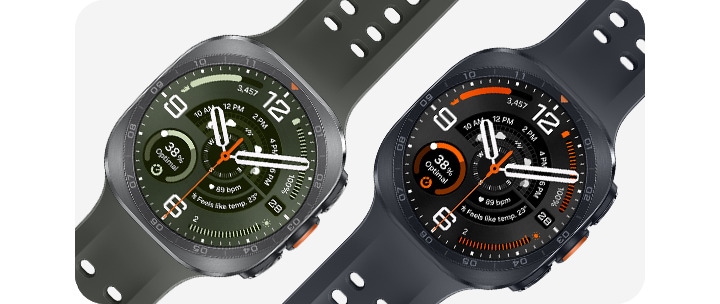
For everyday wear, Galaxy Watch9 delivers the right mix of comfort, smart features, health insights, and fitness tracking. For adventurers and athletes, Galaxy Watch Ultra2 takes things further with a more durable design, extended battery life, and tools built for endurance and outdoor activities.
Galaxy Watch9 or Galaxy Watch Ultra2: quick answer
|
What are you looking for? |
Recommended Galaxy Watch |
|
Best all-round Samsung smartwatch |
|
|
Everyday wellness and sleep tracking |
|
|
More compact option for smaller wrists |
|
|
Larger display with an everyday design |
|
|
Outdoor activities and endurance training |
|
|
More rugged construction |
|
|
Greater battery capacity for longer activities |

Galaxy Watch9 vs. Galaxy Watch Ultra2: What’s the difference?
Both models support everyday notifications, apps, Samsung Health, Google Gemini⁶ and dual-frequency GPS. The most meaningful differences are size, construction, battery capacity and specialized outdoor capabilities.
| table product |


|


|
|---|---|---|
| Feature | Galaxy Watch9 |
Galaxy Watch Ultra2 |
| Best for | Everyday wellness, fitness, sleep and connectivity |
Outdoor activities, endurance training and demanding environments |
| Size | 40 mm or 44 mm |
47 mm |
| Material | Aluminum |
Titanium applied to parts of the frame²⁰ |
| Display brightness | Up to 3,000 nits |
Up to 5,000 nits⁴ |
| Battery capacity | Up to 445 mAh on the 44 mm model¹ |
800 mAh² |
| Usage with Always On Display | Up to 30 hours |
Up to 60 hours³ |
| Memory and storage | 2 GB + 32 GB |
2 GB + 64 GB |
| Connectivity | Bluetooth or Bluetooth + LTE |
Bluetooth + LTE |
| Durability | 5 ATM, IPX8, IP6X and MIL-STD-810H¹⁴ |
10 ATM, IPX8/IPX9K, IP6X and EN13319-certified depth tracking¹⁶˒¹⁷ |
| Distinct outdoor features | Everyday workouts, running, cycling and activity tracking |
Trail running, cycling sensor connectivity, route guidance, diving information and safety tools |
| table item cta |
|
|
How to choose the right Galaxy Watch for you
Before choosing a model, narrow the decision using four factors: smartphone compatibility, watch size, connectivity and the activities you use your watch for most.
Check smartphone compatibility
Galaxy Watch9 and Galaxy Watch Ultra2 are designed for compatible Android smartphones. Pairing with a Galaxy smartphone provides the most integrated experience, and some Samsung Health or Galaxy ecosystem features may require a compatible Samsung Galaxy smartphone.5


Choose the right watch size
|
Your preference |
Suggested model |
What to consider |
|
Smaller, lighter fit |
Galaxy Watch9 40 mm |
More compact for daily and overnight wear. |
|
Larger everyday display |
Galaxy Watch9 44 mm |
More screen space and greater battery capacity than the 40 mm model. |
|
Largest, rugged design |
Galaxy Watch Ultra2 47 mm |
Prioritizes visibility, durability and battery capacity over a compact profile. |
Decide between Bluetooth and LTE
|
Connection |
Best suited to |
How it works |
|
Bluetooth |
People who usually carry their phone |
Uses a nearby compatible smartphone for supported calls, messages, notifications and synchronized information. |
|
LTE21 |
People who want more independence from their phone |
Uses a supported mobile network when the paired phone is not nearby. An eligible carrier and compatible mobile plan are required. |
Galaxy Watch9 is available in Bluetooth and LTE configurations. Galaxy Watch Ultra2 includes LTE connectivity.
Match battery and durability to your routine
Galaxy Watch9 is the practical choice for everyday wellness, sleep, general fitness, recreational running and gym use. Galaxy Watch Ultra2 is built for more demanding activities, with features that are better suited for longer training sessions, outdoor visibility, route guidance, rugged conditions and specialized cycling or diving needs. 14,16
Actual battery life depends on model, settings, network connection, app use and activity tracking. Always On Display, LTE, GPS and continuous workout tracking can increase power consumption.


Best Galaxy Watch by lifestyle and activity
Think about the activities you do most often, not just the specs on paper, to find the Galaxy Watch that fits your routine best.
| table product |
|
|
|---|---|---|
| Lifestyle or activity | Recommended model |
Why it is the stronger fit |
| Everyday use | Galaxy Watch9 |
A lighter all-round option with 40 mm and 44 mm sizes, Bluetooth or LTE, notifications, apps and Samsung Health insights. |
| Sleep and wellness | Galaxy Watch9 |
Its lighter fit is better suited to daily and overnight wear. Sleep Coaching, Energy Score, Vitals and Fitness Index help organize sleep and activity insights.7,8,9,10,11 |
| Recreational running | Galaxy Watch9 |
Running Coach12, GPS tracking and Daily Cardio Load13 support guided training and recovery within an everyday design. |
| Trail or endurance running | Galaxy Watch Ultra2 |
Greater battery capacity, a brighter display, rugged construction and GPX route guidance19 better suit longer routes and challenging terrain.2,4,15 |
| Everyday cycling | Galaxy Watch9 |
Tracks rides and general fitness while remaining comfortable for daily use. |
| Longer or advanced cycling | Galaxy Watch Ultra2 |
Connects with compatible cycling sensors18 and provides a larger, brighter display for outdoor training. |
| Gym workouts | Galaxy Watch9 |
The lighter design and broad workout support make it the practical choice for strength and cardio sessions. |
| Outdoor adventures | Galaxy Watch Ultra2 |
Titanium construction, dual-frequency GPS, higher display brightness and specialized trail, cycling and diving features support demanding environments.4,15,16,17,20 |
| Students | Galaxy Watch9 |
Notifications, reminders, calendar information, fitness tracking and Gemini6 can help support busy routines. |
| Smaller wrists | Galaxy Watch9 40 mm |
The most compact option in the current range while retaining the core Watch9 smart, wellness and fitness experience. |
| table item cta |
|
|
Galaxy Watch offers for students
Students can enjoy savings on select Galaxy Watch models through the Samsung Student Offers Program, with additional offers available during Back to School. Eligible models, savings, offer dates and terms may vary.


What can you do with a Galaxy Watch?
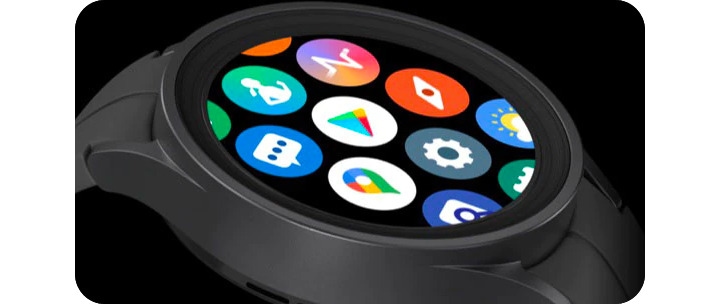
Connected to a compatible Android smartphone, Galaxy Watch9 and Galaxy Watch Ultra2 can help you stay connected, handle quick tasks and access your favourite apps right from your wrist.
Stay connected
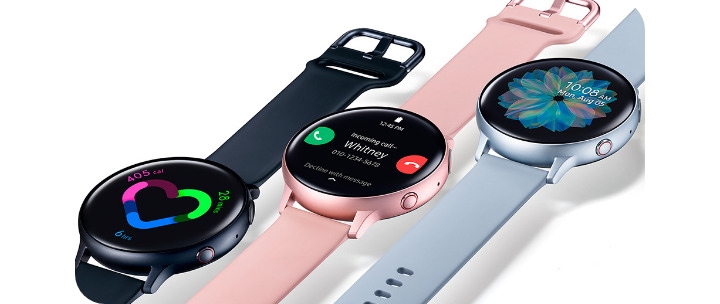
View notifications, check messages and make or answer supported calls from your wrist. LTE models can access supported mobile features away from the paired phone with an eligible plan.


Get help from Google Gemini
Use voice assistance to find information, create reminders and complete supported actions across compatible apps.


Navigate and pay
Use Google Maps for directions and Samsung Wallet22 for supported contactless payments.


Listen and control media
Control Spotify, YouTube Music and other supported media; offline features may depend on the app and subscription.


Control devices and photos
Use SmartThings with compatible connected devices and Camera Controller with a compatible Galaxy smartphone.


Track fitness and wellness
Use Samsung Health, Strava and other compatible apps to record activities and review progress.


How Galaxy Watch works with the Galaxy ecosystem
A Galaxy Watch works best when paired with a compatible Samsung Galaxy smartphone. The Galaxy Wearable app makes it easy to manage your watch settings, while Samsung Health syncs supported sleep, activity and workout data so you can view your progress on a larger screen.23
Should you upgrade from an older Galaxy Watch?
An upgrade is worth considering when a newer model addresses something you notice in your everyday use, whether that’s longer battery life, better outdoor visibility, improved performance, greater comfort or access to features that fit your needs.
|
Your current watch |
What to consider |
|
Galaxy Watch8 |
A recent model that may already meet most everyday needs. Compare the specific Watch9 updates with the features you use before upgrading. |
|
Galaxy Watch7 or earlier |
Watch9 may provide a more noticeable improvement in performance, display visibility, wellness insights and smart features. |
|
Galaxy Watch Classic |
Watch9 offers a lighter everyday design, but anyone who prefers a physical rotating bezel should compare the designs in person. |
|
Standard Galaxy Watch |
Consider Ultra2 if your needs have shifted toward endurance training, outdoor navigation, specialized activities or greater battery capacity. |
|
Galaxy Watch Ultra |
Compare the specific Ultra2 updates with your current Ultra. An upgrade may be less essential if the existing model continues to meet your outdoor needs. |
Choose Galaxy Watch9 as your upgrade if you:
• Want a lighter everyday watch in a 40 mm or 44 mm size.
• Prioritize updated wellness insights, smart assistance and everyday comfort.
• Use your watch mainly for notifications, sleep, general fitness and daily routines.
Choose Galaxy Watch Ultra2 as your upgrade if you:
• Regularly participate in outdoor or endurance activities.
• Need greater battery capacity, outdoor visibility or route guidance. ¹⁹
• Will use specialized trail-running, cycling¹⁸ or diving features. ¹⁷
Keep your current watch if it remains comfortable, holds enough charge for your routine and supports the apps and features you use most.
Frequently asked questions
-
Which Samsung Galaxy Watch is best?Galaxy Watch9 is the best all-round option for most users. Galaxy Watch Ultra2 is better suited to outdoor enthusiasts and endurance athletes who prioritize ruggedness, battery capacity and specialized training features.
-
Is Galaxy Watch compatible with non-Samsung Android phones?Galaxy Watch9 and Galaxy Watch Ultra2 can connect to compatible Android smartphones. Some Samsung Health and Galaxy ecosystem features may require a compatible Samsung Galaxy smartphone.⁵
-
Can Galaxy Watch be used with iOS devices?Galaxy Watch9 and Galaxy Watch Ultra2 are designed for compatible Android smartphones and are not compatible with iOS devices.
-
Does an LTE Galaxy Watch require a mobile plan?LTE service requires an eligible carrier and compatible mobile plan and may involve an additional monthly cost. Bluetooth may be sufficient if you normally keep your phone nearby.
-
Should I choose the 40 mm or 44 mm Galaxy Watch9?Choose 40 mm for a smaller, lighter fit. Choose 44 mm for a larger display and greater battery capacity. Both sizes provide the same core Watch9 experience.
-
How often does a Galaxy Watch need to be charged?Charging frequency depends on the model, settings and use. Always On Display, LTE, GPS, apps and continuous workout tracking can consume additional power.1 Galaxy Watch Ultra2 has greater battery capacity for longer activities.2,3
-
What apps can you use on a Galaxy Watch?Supported apps can include Samsung Health, Google Maps, Samsung Wallet, SmartThings, Spotify, YouTube Music, Strava and other compatible productivity, navigation, entertainment and fitness apps.23
-
Are student offers available on Samsung Galaxy Watches?Yes. Eligible students may access savings on select Galaxy Watch models through the Samsung Student Offers Program. Additional Back-to-School offers may be available during the campaign period. Eligible products, savings, dates and terms vary, so check the current offer pages for details.
1. Typical capacity is 390 mAh (20 % increase compared to previous Galaxy Watch8 40 mm) for 40 mm size, 445 mAh (10 mAh increase compared to previous Galaxy Watch8 44 mm) for 44 mm size. Battery life is based on results from internal lab tests for typical usage pattern scenarios conducted by Samsung. Actual battery life may vary depending on different usage patterns, device models or the battery manufacturer.
2. Battery life is based on results from internal lab tests for typical usage pattern scenarios conducted by Samsung. Actual battery life may vary depending on different usage patterns, device model or the battery manufacturer. Typical value tested under third party laboratory condition. Typical value is the estimated average value considering the deviation in battery capacity among the battery samples tested under IEC 61960 standard. Typical capacity is 800 mAh (35 % increase compared to previous Galaxy Watch Ultra). Actual battery life may vary depending on network environment, usage patterns and other factors.
3. In normal battery mode, when Power saving mode or Exercise power saving mode is off, battery life is up to 60 hours with Always On Display enabled and up to 80 hours with Always On Display disabled.
4. Based on market research of globally released smartwatches as of June 2026. The 5,000-nit specification refers to the localized peak brightness achieved under high ambient light, and full-screen brightness may differ. Actual brightness may vary or be limited depending on environmental factors, device temperature, and usage conditions.
5. Compatible smartphones and available features may vary by country/region, carrier or device.
6. Only one voice assistant (Bixby or Gemini) can be set to wake using this feature. Gemini mobile app available on select devices, languages, and countries. Requires compatible Wear OS watch to be connected to a compatible device. Results may vary. Internet connection and set up may be required. Features may differ depending on subscription and account. Google and Gemini are trademarks of Google LLC. Users must manually enable Raise to Talk in the settings on Galaxy Watch9. Once enabled, the device may increase battery consumption compared to standard operation when the feature is disabled. Actual battery life may vary depending on usage.
7. Sleep tracking features are intended for general wellness and fitness purposes only. Not intended for use in detection, diagnosis, treatment of any medical condition or sleep disorder. The measurements are for your personal reference only. Please consult a medical professional for advice.
8. Vitals on Galaxy Watch9 is available on Android phones (Android 13 or above) and requires the Samsung Health app v7.0 or above. Samsung account login required. Vitals requires at least 7 nights of sleep data, and wearing a Galaxy Watch during sleep is necessary. Vitals is for wellness only, not for the diagnosis or treatment of any medical condition. If you're concerned about your health, be sure to see a medical professional.
9. Energy Score is available on Android phones (Android 13.0 or above) and requires Samsung Health app (v6.27 or above). Samsung account login is required. Service is only available when user registers their Galaxy Watch (Galaxy Watch4 or later released Galaxy Watch Series) or Galaxy Ring through their Samsung account. Service availability may vary by country or region. Intended for general wellness and fitness purposes only. Not intended for use in detection, diagnosis, treatment of any medical condition or diseases. The measurements are for your personal reference only. Please consult a medical professional for advice. Accuracy of results is not guaranteed.
10. Sleep Coaching is available on Android phones (Android 13 or above) and requires Samsung Health application version 6.24 or later. Samsung account login required. Sleep coaching requires sleep data for at least 7 days. Intended for general wellness and fitness purposes only. Not intended for use in detection, diagnosis, treatment of any medical condition or diseases. The measurements are for your personal reference only. Please consult a medical professional for advice. Accuracy of results is not guaranteed.
11. Fitness Index on Galaxy Watch9 is available on Android phones (Android 13 or above) and requires the Samsung Health app v7.0 or above. Samsung account login required. To use the feature, BIA and VO2Max each need to be measured at least once, along with 2 days of activity records and step count data.
12. Running coach program is available on Android phones (Android 13 or above) and require Samsung Health app (V6.30 or above). Samsung account login required. Service is only available with Galaxy Watch8 Series or later released Galaxy Watch Series. To use Running coach program, user needs to take a running level test and get a level before starting the coach program. Not intended for use in detection, diagnosis, treatment of any medical condition or diseases. Before starting an exercise program, please consult a medical professional for advice. Accuracy of results is not guaranteed.
13. Daily Cardio Load on Galaxy Watch9 is available on Android phones (Android 13 or above) and requires the Samsung Health app v7.0 or above. Samsung account login required. To use the feature, at least 7 days of activity records are required, while 28 days of continuous wear is recommended for optimal accuracy. Please note that values may increase in daily situations where heart rate rises, such as during tension, anxiety or stress.
14. Galaxy Watch9 has a water resistance rating of 50 meters according to the ISO22810 standard. The test was conducted in fresh water. Galaxy Watch9 is also water resistant with an IPX8 rating based on the lab test conditions for submersion in up to 1.5 meters fresh water for up to 30 minutes. It is not suitable for high-pressure water activities and diving. It may be used for shallow-water activities like swimming in a pool or ocean. Water resistance is not a permanent condition and can diminish over time. Refer to the user manual for further information, including care/use instructions. Galaxy Watch9 is dust resistant with an IP6X rating based on the lab test conditions by a third party: 2 kg of talc powder (max. diameter of 0.05 mm) per cubic meter was blown into a test chamber housing the device (air pressure within device kept below surrounding air) for 2 hours. Dust resistance may vary by actual usage conditions. Galaxy Watch9 has obtained MIL-STD-810H Certification: high/low temperature, altitude, humidity, immersion, salt fog, dust, vibration, drop, etc. MIL-STD-810H is a standardized form of testing designed by the U.S. Military to accurately assess device limitations. Real world usage may vary by specific environmental conditions used in the testing. Extreme conditions not guaranteed.
15. Trail run on Galaxy Watch Ultra2 is available on Android phones (Android 13 or above) and requires the Samsung Health app (v7.0 or above). Samsung account login required. Service only available with Galaxy Watch Ultra2. GPS accuracy may vary depending on network environment and other factors. Internet connection required to increase GPS accuracy or to view outdoor exercise results along with the route map. GPS function can be used on LTE models without paired smartphone. Non-LTE models require Bluetooth connection to paired smartphone. To improve GPS accuracy, go to Settings > Location > Location accuracy > Improve Location Accuracy.
16. Ultra2 water resistance, durability and depth certification
Galaxy Watch Ultra2 has a water resistance rating of 100 meters according to the ISO22810 standard. The test was conducted in 5 % salt water and 4 ppm chlorine water. Galaxy Watch Ultra2 is also water resistant with an IPX8 rating based on the lab test conditions for submersion in up to 1.5 meters of freshwater for up to 30 minutes and an IPX9K rating based on the lab test conditions for water resistance against powerful water jets. Galaxy Watch Ultra2 has obtained EN13319, which is a standard applicable to instruments measuring water depth by the environmental pressure as used by divers and also the dive time in certain condition. Water resistance is not a permanent condition and can diminish over time. If it's been exposed to seawater, rinse it in freshwater and dry after use. Refer to the user manual for further information, including care/use instructions. Galaxy Watch Ultra2 is dust resistant with an IP6X rating based on the lab test conditions by a third party: 2 kg of talc powder (max. diameter of 0.05 mm) per cubic meter was blown into a test chamber housing the device (air pressure within device kept below surrounding air) for 2 hours. Dust resistance may vary by actual usage conditions. Galaxy Watch Ultra2 withstands temperatures ranging from -20°C to 55°C while being worn on the wrist, based on results from internal lab tests conducted by Samsung. Actual performance may vary depending on the environment where it is used. In very high or low temperatures, charging may be blocked, certain functions may be automatically terminated or unavailable, or the watch may shut down automatically for safety. Additionally, battery performance can be adversely affected at low temperatures.
17. Galaxy Watch Ultra2 tracks depth, water temperature and elapsed dive time. NDL (No-Decompression Limit) tracking is not supported out of the box. Full dive computer capabilities may require a separate app download (release date to be announced). Always carry a secondary device and follow safe diving protocols.
18. Cycle accessory connection is available on the Samsung Health app (v7.0 or above) and is exclusively supported on Galaxy Watch Ultra2. This service supports connections for Power Meters, Speed Sensors, and Cadence Sensors during Outdoor Bike, Indoor Bike, and Mountain Biking exercises. Support for other accessories, such as Smart Trainers, is not available. Connection compatibility may vary for certain third-party or minor brand products.
19. Provided when GPX format route file is imported for hiking and cycling and route is set as target under Samsung Health settings.
20. Titanium is partially applied to the front and back cover areas of the metal frame, excluding the display and physical buttons. The remaining parts of the frame are a mix of plastic and other materials.
21. LTE availability depends on your country/region and carrier.
22. Availability of Samsung Wallet and its features may vary by country/region, device model, carrier and firmware version and are subject to change.
23. App and feature availability may vary by watch, smartphone, operating system, country/region, service provider and subscription.
