Audio issues on Galaxy Buds when playing music

If your Samsung earbuds have no or low volume, or poor sound quality on one or both buds, there may be a couple reasons why. You might be wearing the earbuds incorrectly, or the buds could have accumulated dust or debris. Additionally, the audio quality could be affected by outdated software, a low battery, and several other things. Try the steps below to resolve the issue.

Audio issues on Galaxy Buds when playing music

No or low sound even when set to high

  1. Adjust the volume settings on your phone. If the volume is set to high on the phone and the sound output is still low, there may be separate volume controls on your buds. To control the volume on the earbuds themselves, you will need to set up touchpad commands. You should also check the media volume limiter settings.
  2. Check the Bluetooth range between the earbuds and your phone. Make sure to use the earbuds and your device within 30 feet of each other and avoid using the devices near obstructions that can block the signal.
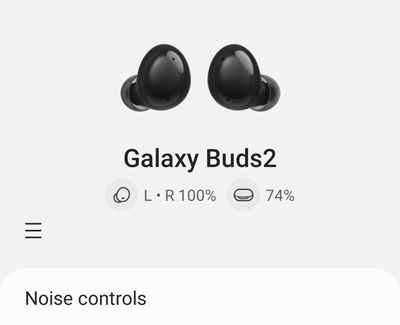
  3. Check the battery level. If the earbuds have a low battery, it may be necessary to charge the earbuds. You can check the battery level in the Bluetooth settings menu on your phone, just select your connected buds.
  4. Inspect the earbuds for dirt and damage.
    • Be sure to regularly clean the earbuds. The build-up of dust, earwax, or other debris in the microphone can also make you sound muffled.
    • Check the air ducts and speakers to make sure they are clean.
    • Inspect for a cracked or lifted case, and broken, bent, or loose parts.
    • If you see obvious damage, cracks, or small chips on the earbuds, this means that the earbuds have suffered from an external impact. This can impair the earbuds and their functions.
    • The earbuds are not impervious to water damage in any situation. Exposure to water, liquids, or chemicals can cause damage or issues with the earbuds.
      Note: Damaged earbuds are not covered under warranty. You will need to purchase replacement earbuds.
  5. Turn off battery optimization for the audio app. If the earbuds are connected to an Android phone or tablet, navigate to Settings on the device and then tap Apps. Search for and select the audio app you are playing. Tap Battery, and then select Unrestricted.
  6. Restart both your phone and earbuds. If this doesn't work, you can then try resetting your earbuds. Instructions for restarting and resetting can be found in our guide.
  7. Check for software updates to the earbuds. You can check for software updates through the Galaxy Wearable app or through a PC.
  8. If the earbuds still sound low or play no sound after all the steps have been performed, service is required. Please call us at 1-800-SAMSUNG to request service.
Read less

Audio sounds bad or off

  1. Check the audio output from the app on your phone by first disconnecting your earbuds and playing audio from the phone's speaker. If the issue continues, check for an app update or try clearing the app's data
  2. Check your phone's sound settings. Open Settings and check if you have any sound settings enabled, such as sound personalization or Dolby Atmos. These settings could affect your music's sound quality.
    Note: Dolby atmos may be called 360 audio in your earbuds settings
  3. Check your Bluetooth range. Make sure to use the earbuds and your device within 30 feet of each other. The necessary distance may vary depending on the environment and the earbud model. Avoid using the device near obstructions that can block the Bluetooth signal, such as walls, routers, electrical equipment, or electromagnetic waves.
  4. Make sure you are wearing the earbuds correctly. For example, if you are wearing the wrong size tips for your ears, it can cause sound leaks and make for a poor audio experience.
  5. Check the earbuds' battery level. Low battery life can lead to a decreased audio quality. You can see their battery life either in the Bluetooth settings menu or the Galaxy Wearable app, depending on your software.

    Battery information for Galaxy earbuds
  6. Inspect the earbuds for dirt or damage. 
    • Be sure to regularly clean the earbuds. The build-up of dust, earwax, or other debris in the microphone can also make you sound muffled.
    • Check the air ducts and speakers to make sure they are clean.
    • Inspect for a cracked or lifted case, and broken, bent, or loose parts.
    • If you see obvious damage, cracks, or small chips on the earbuds, this means that the earbuds have suffered from an external impact. This can impair the earbuds and their functions.
    • The earbuds are not impervious to water damage in any situation. Exposure to water, liquids, or chemicals can cause damage or issues with the earbuds.
  7. Restart your phone and the earbuds. 
  8. Check for earbud software updates. 
  9. If you are still having trouble, you can request service. Please call us at 1-800-SAMSUNG to request service.
Read less

One earbud sounds quieter than the other

  1. Make sure you are wearing the earbuds correctly. For example, if you are wearing the wrong size tips for your ears, it can cause sound leaks and make for a poor audio experience. It's possible that your ear canals are different sizes and need different tips.
  2. Check your sound settings. If your audio app has a balance setting, you can adjust it to balance the sound between buds. 
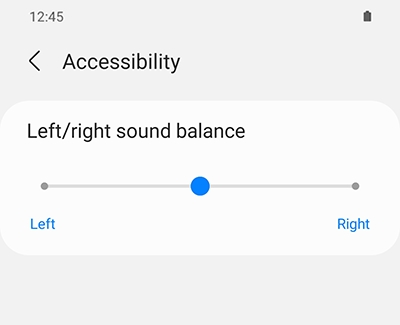
  3. Check your sound accessibility settings. Navigate to the earbud settings, tap accessibility, and then move the balance slider to the left or right until the volume is equal.

  4. Clean the earbuds and ear tips. Debris like dust, earways, or oil can affect the sound quality. Check the air ducts and speakers to make sure they're clean, too.
  5. Recouple the earbuds. Place both earbuds in the charging case and close it. Wait at least seven seconds and then remove both buds from the case.
  6. Check the earbuds' battery level. Low battery life can lead to a decreased audio quality. You can see the battery life of the earbuds either in the bluetooth settings for them or the Galaxy Wearable app, depending on what software you have.
    Battery information for Galaxy earbuds
  7. Restart your phone and the earbuds.
  8. Check for earbud software updates. 
  9. If you are still having trouble, you can request service. Please call us at 1-800-SAMSUNG to request service.
Read less
Was this content helpful?
We're here for you

Contact Samsung Support

Contact us online through chat and get support from an expert on your computer, mobile device or tablet. Support is also available on your mobile device through the Samsung Members App.
auto-contact_us-pc-2x auto-contact_us-pc-2x