Autofill Water Jug Does Not Fill
 Please Note: The information on this page is for Australian products only. Models, sequences, error codes or settings will vary depending on location and/or where the product had been purchased. To be redirected to your local support page please click here.
The Autofill water feature on selected Samsung fridges allows you to have not only water, but lets you add infusions like fruit and tea in the water jug.
For tips on how to Use and Maintain your Autofill Water Jug, you can check out our FAQ Here.
If you find that your Autofill water jug is not filling, you can try the simple self-troubleshooting steps below.

Note:
- An alert message will appear on the control panel if there is a leak.
- In case of a leak, open the rubber cap underneath the water jug compartment so that the leaked water drains.
Troubleshooting Steps:
Dispense water from the water dispenser to ensure that the water line is connected. If your water line is not connected properly, water will not dispense.

The autofill compartment contains a water level sensor which needs to be wiped dry and clean. Then, assemble and place the water jug back into its fridge compartment.
*If the front side of the water jug has too much moisture, the water pitcher may not fill completely.

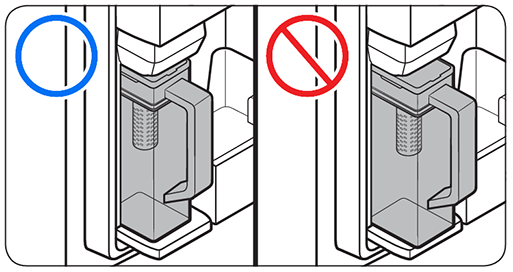
If the jug isn't aligned correctly in the holder, the water will not dispense into it.
On regular fridges: Touch and hold 'Auto Water Fill' on the control panel until ON lights up. On some models, this is a secondary function of the Fridge button and is called Autofill Pitcher (3 sec). To activate it, just touch and hold the Fridge button for 3 seconds.
On Family Hub fridges: Enable the Auto Water Fill feature using the Family Hub's panel. Tap 'Apps', and then tap 'Fridge Manager'. Tap 'Fridge Settings', and then tap 'Auto Water Fill'.
For further assistance, please contact our Chat Support. To find your Samsung product's User Manual, head to Manuals & Downloads.
Contact Info
Contact us
WhatsApp
![]()
![]()


