Intel Manageability SKU Privilege Escalation
● Issue Summary
- https://security-center.intel.com/advisory.aspx?intelid=INTEL-SA-00075&languageid=en-fr
● Mitigation guidance
- Please check if your system is vulnerable
● Target Model List
|
NP200B4C-A01MX |
NP400B4C-EG1CN |
NP400B5C-S05CN |
NP600B4B-S02CN |
NP600B5B-S01TR |
|
NP200B4C-BB1BR |
NP400B4C-S01CH |
NP600B4B-A01CL |
NP600B4B-S02MX |
NP600B5B-S01UK |
|
NP200B4C-EG1CN |
NP400B4C-S01CN |
NP600B4B-A01UK |
NP600B4C-A01FR |
NP600B5B-S01US |
|
NP200B4C-S01CN |
NP400B5C-A01FR |
NP600B4B-A01US |
NP600B4C-A01MX |
NP600B5B-S02CN |
|
NP200B5C-A01AE |
NP400B5C-A01IT |
NP600B4B-A02CH |
NP600B4C-A01RU |
NP600B5B-S02ES |
|
NP200B5C-A01IN |
NP400B5C-A01PL |
NP600B4B-AA1IL |
NP600B4C-A01US |
NP600B5B-S02FR |
|
NP200B5C-A02AE |
NP400B5C-A01UK |
NP600B4B-AD1BR |
NP600B4C-AA1IL |
NP600B5B-S02UK |
|
NP200B5C-S01AE |
NP400B5C-A01ZA |
NP600B4B-AZ1BE |
NP600B4C-BB1BR |
NP600B5B-S03FR |
|
NP400B4C-A01CO |
NP400B5C-A02FR |
NP600B4B-AZ1DE |
NP600B4C-EG1CN |
NP600B5B-S03UK |
|
NP400B4C-A01DE |
NP400B5C-A02IT |
NP600B4B-AZ1ES |
NP600B4C-S01CN |
NP600B5C-H01DE |
|
NP400B4C-A01ES |
NP400B5C-A02SE |
NP600B4B-AZ1FR |
NP600B5B-A01UK |
NP600B5C-S01BE |
|
NP400B4C-A01FR |
NP400B5C-A02UK |
NP600B4B-AZ1RO |
NP600B5B-AZ1DE |
NP600B5C-S01CH |
|
NP400B4C-A01IL |
NP400B5C-A02ZA |
NP600B4B-AZ1UK |
NP600B5B-AZ1GR |
NP600B5C-S01CN |
|
NP400B4C-A01IT |
NP400B5C-A03DE |
NP600B4B-AZ1ZA |
NP600B5B-AZ1ID |
NP600B5C-S01SE |
|
NP400B4C-A01MX |
NP400B5C-A04DE |
NP600B4B-AZ2DE |
NP600B5B-AZ1PT |
NP600B5C-S01UK |
|
NP400B4C-A01PL |
NP400B5C-FDCRU |
NP600B4B-H01FR |
NP600B5B-AZ1TR |
NP600B5C-S02BE |
|
NP400B4C-A01RU |
NP400B5C-H01DE |
NP600B4B-H01IT |
NP600B5B-AZ3DE |
NP600B5C-S02DE |
|
NP400B4C-A01SE |
NP400B5C-H02DE |
NP600B4B-HC1DE |
NP600B5B-HC1DE |
NP600B5C-S02SE |
|
NP400B4C-A01UK |
NP400B5C-S01IT |
NP600B4B-HC2DE |
NP600B5B-HC2DE |
NP600B5C-S03DE |
|
NP400B4C-A02CN |
NP400B5C-S01ZA |
NP600B4B-S01CN |
NP600B5B-HC3DE |
|
|
NP400B4C-A02CO |
NP400B5C-S02CH |
NP600B4B-S01DE |
NP600B5B-S01CN |
|
|
NP400B4C-A02ES |
NP400B5C-S03CN |
NP600B4B-S01MX |
NP600B5B-S01DE |
|
|
NP400B4C-A02IT |
NP400B5C-S04CN |
NP600B4B-S01TR |
NP600B5B-S01NL |
- If your system is vulnerable, please update ME FW by using update tool.
● How to update ME in Samsung vPro and SMB systems
The step can be skipped and go to next step if provisioning is not applied to your PC
- Step 2) Download Discovery tool and Install it.
Discover Tool URL : https://downloadcenter.intel.com/download/26755
- Step 3) Run Intel-SA-00075-GUI.exe
Intel-SA-00075-GUI.exe requires .NET Framework.
If System does NOT have it, install it and run discover tool again.
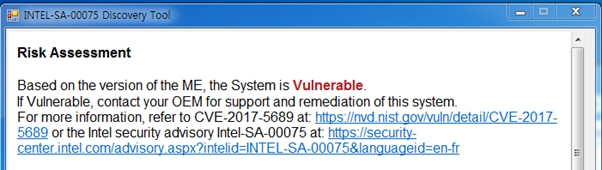
- Step 4) Check Risk Assessment.
If it shows “Not Vulnerable” like below, system is safe.
You don’t have to update ME F/W. Go to Step 11
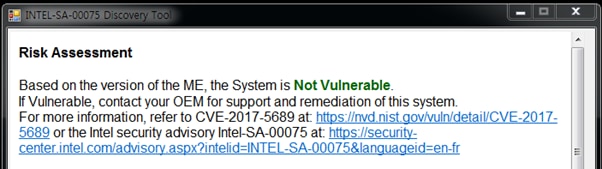
If it shows “Vulnerable” like below, your system is NOT safe.
You have to update ME F/W. Go to Step 5
- Step 5) Stop LMS(Local Management Service)
How to stop LMS
1. Execute cmd to open DOS box.
2. Input ‘sc config LMS start= disabled’ and then click Enter key.
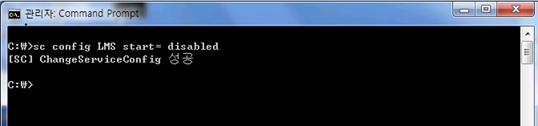
3. Reboot system.
- Step 6) Download Samsung ME update Package tool from URL below.
http://orcaservice.samsungmobile.com/filedownloader.aspx?Type=PATCH&filename=BASW-A1297A01.ZIP
- Step 7) Unzip ME update package (BASW-A1297A01.ZIP) downloaded, and then Run MeFirmwareUpdateHelper.exe
You can see Intel ME firmware version of current and to be updated
Select OK, then the update will start
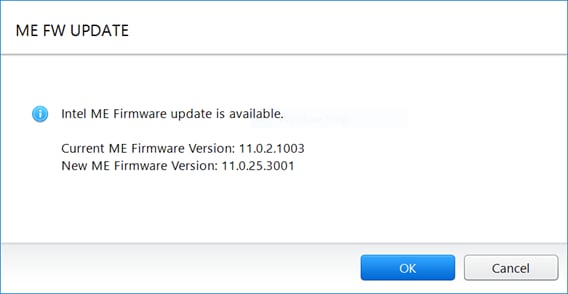
Don’t touch the PC while the update is in progress
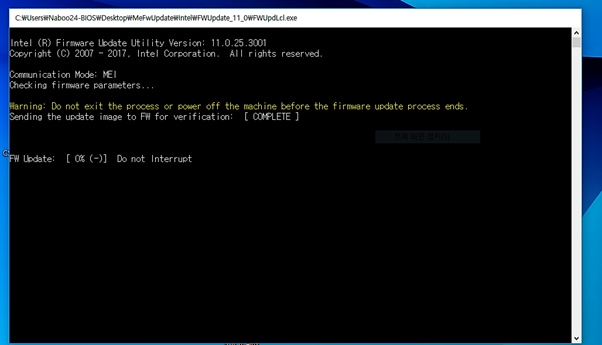
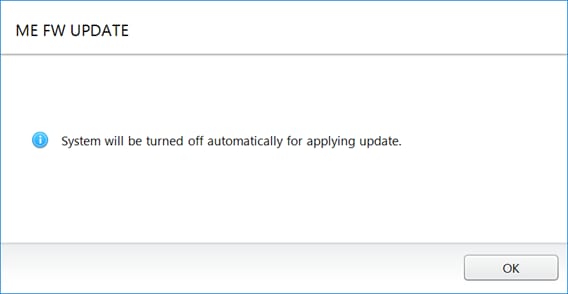
- Step 8) When the update is finished, following message will be displayed
Select OK, then system will be turned off. After then, turn on the system
- Step 9) Run LMS
How to run LMS
1. Execute cmd to open DOS box.
2. Input ‘sc config LMS start= auto’ and then click Enter key.
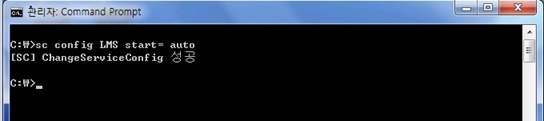
3. Reboot system.
- Step 10) Do provisioning if you want to use vPro function.
Ask your IT manager to set provisioning
- Step 11) The-End
- FAQ)
#1. Please check if Intel discovery tool works well.
If .NET Framework is not installed on the system, it will not work.
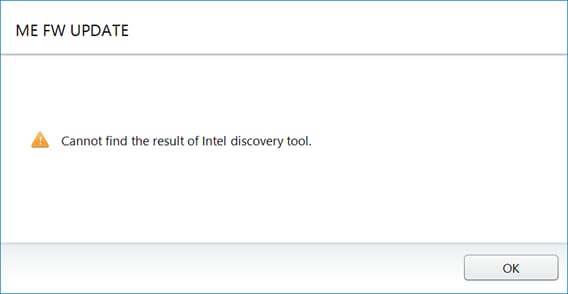
#2. If the system is not the target of this firmware update or update is already completed, following message will be displayed.
You can see this message also if Intel discovery tool cannot get ME firmware status, please check the “Vulnerable” or “NOT Vulnerable” status with Intel discovery tool.
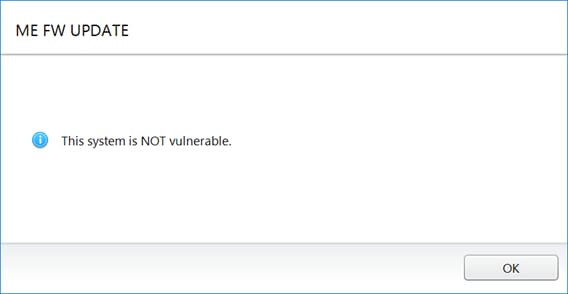
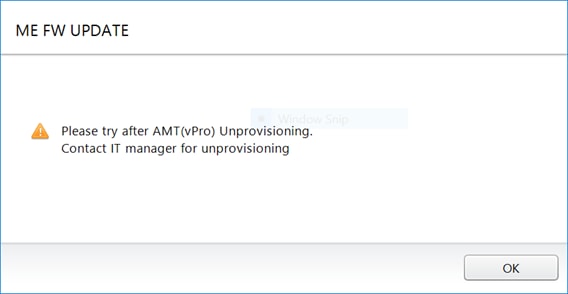
#3) In case of AMT(vPro) provisioned system, you should do unprovisioning first.
You can see this message from MeFirmwareUpdateHelper.exe on provisioned system
Product Registration
Quick-and-easy product registration..
Receive up-to-date personalised services and tips.
Enter your Serial Number/IMEI
Quick-and-easy product registration.

Product registration is almost complete!!
You've entered a valid S/N or IMEI. Now select the model of your product.
Galaxy Book3 Ultra
SM-G996BZKGEUA
Serial Number: R3CR508WNAH
The device you are currently using does not support the camera function.
Please try again with a different device.