Insert schema for page here
Insert Video schema for page here
What are AI Camera Phones?


In the past few years, AI (Artificial Intelligence) is starting to appear in technology everywhere. Our latest innovations have transitioned from smartphones to AI phones, designed to be more than just a phone but a smart digital assistant to your everyday life. One area where AI is new to is your camera – but even that is changing.
Camera quality is forever advancing, with sharper focus and more mega pixels developing by the year. AI is entering the arena to bring intelligent improvements, better performance, and instant personalised edits to make every shot scroll-stopping. But what exactly is AI assistance doing in your phone camera?
What is an AI camera?
Put simply, an AI camera is a camera in which artificial intelligence is providing a helping hand. That means using machine learning in order to automatically identify what the subject of your picture is and adjusting its settings so that it looks its best. For everyday users, this means brightening in low-light conditions, blurring backgrounds on Portrait1 mode, and recognising smiles to capture the best take. This means instant professional-quality results every time.
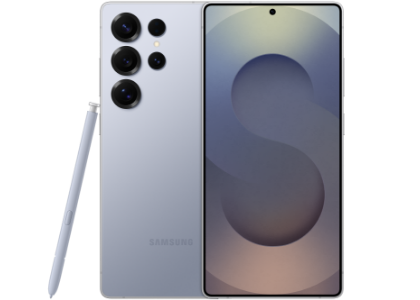
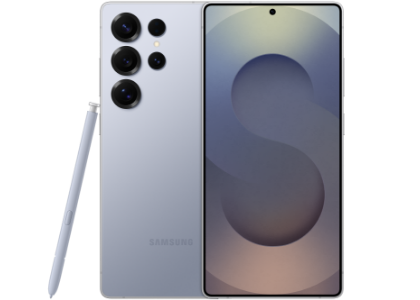
The latest Samsung Galaxy release, the Samsung Galaxy S26 & S26 Plus as well as Galaxy S26 Ultra, features an AI Camera powered by Galaxy AI2 and the AI Image Signal Processor.
What does AI do in the Galaxy S26 Ultra camera?
Galaxy S26 Ultra’s camera is truly next level thanks to Galaxy AI and its advanced ProVisual Engine, ensuring that every pic is turned into a pro shot. The massive 200MP camera and super-wide f/1.4 aperture are just the start – an array of AI smarts is on hand to ensure every take looks its best.
AI Image Signal Processor
Capture micro-details right down to individual hair strands and unique textures with the AI Image Signal Processor, making your Galaxy S26 Ultra the go-to selfie snapper. Plus, it can automatically recognise the difference between subjects and backgrounds, avoiding smudged edges for a crisp shot, every time.


Photo Assist
We’ve rolled your post-production suite into a unique AI experience with Photo Assist3, helping to perfect every shot with ease. You won’t need to spend hours editing photos to give your pic that extra lift – add, remove and edit specific objects within your pictures in just a few taps. And you can even enter your own prompts to create your own digital looks and effects.


Creative Studio
Create the perfect look and feel for your photos with just a quick prompt with Creative Studio, great for ensuring a consistent aesthetic for your social shots. Plus, make your image truly yours with intelligently recommended templates, including wallpapers and stickers, to apply to your best snaps.


Nightography Video
Nightography Video has also been improved on the Galaxy S26 Ultra’s AI Camera to immortalise every great evening in stunning, cinematic detail4. Revisit that recording of a spontaneous moment with friends or your favourite artist in concert in stunning clarity time and time again.


Audio Eraser
Loud concert neighbours? Miss that punchline thanks to a loud cough in the crowd? Remove unwelcome distortion and crowd noise with Audio Eraser5, making sure you don’t miss what really matters.


- 1. Results may vary depending on light condition, subject and/or shooting conditions.
- 2. Samsung account login is required for certain AI features. Galaxy AI features are provided for free. Future releases may include additional advanced features that are offered as part of a paid subscription plan. Different terms may apply for AI features provided by third parties.
- 3. Requires network connection and Samsung account login. A visible watermark is overlaid on the saved image to indicate it was generated by Galaxy AI. Accuracy of output not guaranteed.
- 4. Results may vary depending on light condition, subject and/or shooting conditions.
- 5. Samsung account login required. Six types of sound can be detected; voices, music, wind, nature, crowd and noise. Results may vary depending on audio source & condition of the video.
How can I edit photos with AI on my phone?
The Samsung Galaxy S26 Ultra’s AI camera allows you to perfect your images with a few taps, rolling a complex team of photo editors into one. The enhanced Photo Assist can be your editor, retoucher, and even director for scroll-stopping shots every time. You can remove objects, change their angle, pull them into focus, apply filters, and more.
Find out more on how to use Photo Assist on your Galaxy Devices in our guide.
How do I use Galaxy AI camera features?
Travel shots
Whether you’re on safari or a city break, capture memories clearer than ever thanks to your AI Camera. Relive moments in breathtaking clarity with minute details only the AI Image Signal Processor can catch. No need for changing settings or lenses either, with instant and automatic adjustments depending on what’s in frame.


Moments with friends
Your phone is sure to be the group’s selfie choice thanks to the 200MP camera in the Galaxy S26 Ultra. Photo Assist ensures everyone looks their best in every photo, so there will be no group chat squabbles after the meet up. And you can capture details right down to hair strands and clothing textures with AI-enhanced lens.


Social media snaps
Galaxy S26 Ultra is ready to capture the moment as your go-to selfie snapper. Plus, curate your own filters and vibes with Creative Studio in just a few taps, making editing snaps a breeze before they make it to the feed.


Live concerts
Make sure every recording of your favourite artist is worth revisiting with Nightography Video. Capture every backflip, stage dive and guitar solo in stunning clarity, while removing unwelcome distortion and crowd noise with Audio Eraser.


What is the difference between the camera in Galaxy S26 series vs Galaxy S25 Ultra?
The newest Samsung Galaxy smartphone release, Galaxy S26 & S26+ as well as Galaxy S26 Ultra, is stocked with leveled-up AI Camera capabilities, including new features like Nightography Video, Audio Eraser, and the all-new front-camera AI Image Signal Processor. The new lenses on the 5x zoom and 200MP main camera bring distant scenes up close with ease.
-
Rear Camera
-
Front Camera
-
Camera AI


-
Rear Camera :
Ultra Wide: 50 MP F1.9
Wide: 200 MP F1.4 Optical Quality 2x
Tele1: 10 MP F2.4
3x optical zoom1
Tele2: 50 MP F2.9
5x optical zoom
Optical Quality 10x -
Front Camera :
12MP F2.2
AI Image Signal Processor - Camera AI : ProVisual Engine, Photo Assist2


-
Rear Camera :
Ultra Wide: 12 MP F2.2
Wide: 50 MP F1.8 Optical Quality 2x
Tele1: 10 MP F2.4
3x optical zoom1 - Front Camera : 12 MP F2.2
- Camera AI : ProVisual Engine, Photo Assist2


-
Rear Camera :
Ultra Wide: 12 MP F2.2
Wide: 50 MP F1.8 Optical Quality 2x
Tele1: 10 MP F2.4
3x optical zoom1 - Front Camera : 12 MP F2.2
- Camera AI : ProVisual Engine, Photo Assist2
-
Rear Camera :
Ultra Wide: 50 MP F1.9
Wide: 200 MP F1.7 Adaptive Pixel Optical Quality 2x
Tele1: 50 MP F3.4
5x optical zoom1
Optical Quality 10x
Tele2: 10 MP F2
3x optical zoom - Front Camera : 12 MP F2.2
- Camera AI : Next Gen ProVisual Engine
- 1. Optical quality zoom is enabled by the Adaptive Pixel sensor. 3x distance is optical zoom. 2x distance is optical quality zoom.
- 2. Requires network connection and Samsung account login. A visible watermark is overlaid on the saved image to indicate it was generated by Galaxy AI. Accuracy of output not guaranteed.
Why is an AI smartphone camera best for editing photos?
Your AI Camera makes getting the perfect brightness, composition, and timing a breeze thanks to not only the AI-Image Signal Processor but also Galaxy AI Photo Assist. The right settings are applied automatically, meaning faces pop, movement is minimised, and edges are crisp no matter what the circumstance. Plus, perfect your shots with the ultimate handheld post-production suite to make every snap comes to life. Remove unwanted visual and audio distractions with ease in just a few taps, too, so you can revisit your camera roll to relive perfect moments time and time again.


Is Galaxy S26 series the best smartphone for social media content?
The AI Smarts behind the Galaxy S26 Ultra make it the perfect companion for curating a consistent, quality social media feed. Save hours of time on post-snap edits with Creative Studio, helping to adjust settings mid shot and also making adjustments quick and easy before they’re ready for the feed. For content creators, this can save a wealth of time better spent capturing more! Say goodbye to photobombers, blurry selfies, or post-concert frustration – you can rely on the Galaxy S26 Ultra for perfected pictures every time.


So, is an AI camera phone worth it for everyday photography?
If you want quality, immediately shareable, picture-perfect shots every time, then the Galaxy S26’s AI camera is your perfect everyday photo companion. It offers convenient, time-saving edits and ensures no take is a bad take, meaning you don’t need to worry about photography settings or editing techniques. Focus on the moment and trust that your camera has the details covered with the new Samsung Galaxy S26 Ultra or Galaxy S26.
Most common questions
Explore answers to frequent queries below.


