How to choose the best Samsung tablet for you?


In between a laptop and a smartphone, tablets are the perfect portable computer that lets you do more on the go without hulking a heavy laptop around. Whether you want a tablet for everyday use, completing work tasks, playing games or unleashing your creative impulses, there’s a Samsung tablet for you. But how do you pick which one?
There’s a lot to choose from when it comes to deciding which tablet model to buy. In this guide, we’ve outlined what features to look for in across the Samsung tablet range.
How do I decide what tablet to buy?
Choosing the right tablet for you depends very much on what you’re going to use it for. Key things to consider when deciding which tablet to buy are screen size, storage space, battery life and connectivity, as these factors will be affected by what you want to use it for. We have listed all the key components and features to look for when comparing different tablet models to help you decide the best tablet for you.
What tablet size should I choose?
The right tablet size depends on how you'll use it: choose a compact 8-inch tablet for portability and one-handed use, or a medium 8-11 inch tablet for a better balance of screen space and portability. Like smartphones, laptops, and TVs, tablet screens are measured diagonally from corner to corner and expressed in inches.
The best tablets for movie watching or working on are usually ones with larger screens. If this is what you are looking for, tablets with screen sizes above 11 inches are recommended. For example, the Samsung Galaxy Tab S12+ has a stunning 12.6 inch Dynamic AMOLED 2X display featuring 1600nits brightness, making video streaming not only immersive but crystal clear. While the Samsung Galaxy Tab S12 Ultra with its extra large 14.6 inch Dynamic AMOLED 2X screen delivers a truly cinematic experience, perfect for losing yourself in action-packed games and bingeable series.


What is a good screen resolution for a tablet?
A good tablet resolution is Full HD (1920 x 1080) or higher, with QHD (2560 x 1600) or higher ideal if you'll be watching a lot of video or doing detailed work like photo editing. The key thing to remember is the higher the tablet resolution, the sharper what's showing on the screen will be.
For example, the Galaxy Tab S12+ has a resolution of 2800 x 1752, while the Galaxy Tab S12 Ultra ensures you never miss a single detail on screen with its impressive resolution of 2960 x 1848.
One thing to keep in mind is that higher screen resolutions require more powerful processors, which can affect battery life. When comparing tablets with high screen resolutions, it’s important to look for ones with a strong battery to avoid frequent charging.
How much storage do I need for a tablet?
For everyday tasks like checking emails, scrolling through Instagram and streaming videos, 64GB to 128GB of storage should be enough. For gamers and digital creators, however, more storage capacity will be needed. Some mobile games can take up more than 1GB, and so can creative apps like Clip Studio Paint, Adobe Lightroom, and Sketchbook. If you are an avid gamer, you should look for at least 256GB of storage space or tablets with expandable storage.
The Galaxy Tab S12+ offers up to 512GB with a microSD slot for further expansion, while the Galaxy Tab S12 Ultra goes up to 1TB of internal storage, 16GB of RAM, and up to 2TB more via microSD*.
*MicroSD card sold separately


*MicroSD card sold separately
| table product |


|


|


|


|
|---|---|---|---|---|
| Storage Options | 256 GB, 512 GB, 1 TB |
256 GB, 512 GB |
128 GB, 256 GB, 512 GB |
256 GB, 512 GB, 1 TB |
|
External Memory Support |
MicroSD (Up to 2TB) |
MicroSD (Up to 2TB) |
MicroSD (Up to 2TB) |
MicroSD (Up to 2TB) |
| table item cta |
|
|
|
|
Connectivity: Do I need 5G on my tablet?
You only need 5G on your tablet if you regularly use it away from WiFi and want the fastest possible connection; otherwise, a WiFi-only or 4G tablet will cover most needs. WiFi-only tablets allow you to connect to the internet through a WiFi connection, making them ideal for use at home, work or university. If you ever need to connect quickly, you can also use your phone data via a mobile hotspot connection.
However, if you love watching your favourite shows while waiting for the train or reading your favourite book on the way to work, a tablet model with 5G connectivity is perfect for you. Your tablet will have its own data contract, letting you get online independently of your phone's mobile data plan. While 4G tablets are suitably fast, 5G is around 100 times faster than 4G*, meaning faster downloads, quicker uploads and fewer delays. The Samsung tablet range offers both 4G and 5G models, including the latest Galaxy Tab S11 and Galaxy Tab S10 FE series.
*Data plan sold separately


*Data plan sold separately
What is the best battery life for a tablet?
The average battery life of most tablets is around 3 to 10 hours, so look for a model that can last a full day without needing to recharge. The Samsung Galaxy Tab S11, with its 8400mAh battery1, provides enough power for a full day of tasks and streaming. The Galaxy Tab S12 Ultra has an 11,600mAh battery2, suited to heavier use such as gaming or creative projects. For a more budget-friendly option, the Galaxy Tab S10 FE+ has a 10,090mAh battery1, and all three models support Super Fast Charging 2.0 (45W)3.
- 1. Typical value is the estimated average value considering the deviation in battery capacity among the battery samples tested under IEC61960 standard. Rated (minimum) capacity is 8,160mAh for Galaxy Tab S11.
- 2. Typical value is the estimated average value considering the deviation in battery capacity among the battery samples tested under IEC61960 standard. Rated (minimum) capacity is 11,374 mAh for Galaxy Tab S12 Ultra.
- 3. Super Fast Charging 2.0 available with a 45W charger (sold separately)


- 1. Typical value is the estimated average value considering the deviation in battery capacity among the battery samples tested under IEC61960 standard. Rated (minimum) capacity is 8,160mAh for Galaxy Tab S11.
- 2. Typical value is the estimated average value considering the deviation in battery capacity among the battery samples tested under IEC61960 standard. Rated (minimum) capacity is 11,374 mAh for Galaxy Tab S12 Ultra.
- 3. Super Fast Charging 2.0 available with a 45W charger (sold separately)
| table product |
|
|


|


|


|
|---|---|---|---|---|---|
| Battery Capacity (mAh, Typical) | 8,400 | 11,600 | 8000 | 10,090 | 5,100 |
| table item cta |
|
|
|
|
|
What features should I look for in a tablet?
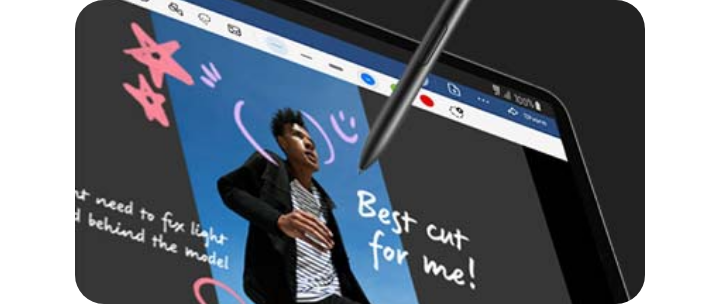
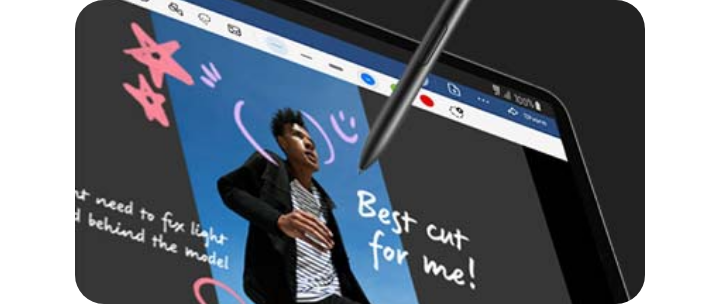
As well as those listed above, it’s worth looking at what extra innovative features a tablet comes with. For example, the Samsung Samsung Galaxy S12 range all come with an S Pen included as standard, as well as Fingerprint Scanner and Face Recognition functionality.
If you're looking for a tablet for studying or for work, you'll also want to make sure your tablet has keyboard connectivity. The latest range of Galaxy Tabs offer a range of accessories to elevate your tablet as a productivity tool.


Which is the best Samsung tablet for you?
The best Samsung tablet for you depends on your priorities, whether that's screen size, battery life, storage, or connectivity. The Samsung tablet range covers all of these, from large tablets with immersive screens to powerful batteries and smooth refresh rates, so you can compare models side by side to find the right fit.
Samsung Tablets Range
- Galaxy Tab S12 series
- Galaxy Tab S11 series
- Galaxy Tab S10 FE series
- Galaxy Tab S10 series
- Galaxy Tab A11 Series


What is the best tablet for everyday use?
When it comes to choosing a tablet for simple, everyday tasks, the Samsung Galaxy Tab A11 LTE is the best tablet for you. This affordable tablet has a medium-sized 8.7-inch wide display, suited to browsing social media, checking emails, and watching videos. The Octa-Core processor with up to 4GB RAM and 128GB storage covers most everyday needs, and you can add up to 2TB of additional storage with a Micro SD card*. The 5,100mAh battery is enough to get you through the day, especially with 15W Fast Charging**, letting you power up quickly.
- *MicroSD card sold separately
- **Charger sold separately.


What is the best tablet for movie watching?
The Samsung Galaxy Tab S12 range is the best choice for watching films and shows, thanks to its large, high-quality displays. A large screen is an essential feature for watching TV shows and films, so opt for a model with a display above 11 inches. The Samsung Galaxy Tab S12+ features an 12.6-inch Dynamic AMOLED 2X display, while the Galaxy Tab S12 Ultra has an extra-large 14.6-inch Dynamic AMOLED 2X display, offering a more immersive viewing experience on the go. Both displays bring vibrant colours and deep blacks, similar to what you'd expect from an OLED TV.
What is the best tablet for drawing?
The Galaxy Tab S12 range are the best Samsung tablets for drawing, thanks to their large screens, included S Pen, and pre-installed creative software. Both tablets have large screens that show digital art in detail, and both come with Clip Studio Paint* pre-installed, so you can start sketching straight away. You can also use your Samsung smartphone** as an artist palette while using the entire Tab S12+ screen as your canvas. The S Pen is included as standard, giving artists and designers a stylus that tracks precise, detailed movement.
- *Clip Studio Paint membership required. 6-month free trial for first-time users.
- **Selected Galaxy smartphones only.
What is the best tablet for gaming?
The Galaxy Tab S12+ and Galaxy Tab S12 Ultra are the best Samsung tablets for gaming, thanks to their large displays, powerful processing, and 120Hz refresh rates. A large screen lets you see games in full detail, and both tablets have 12.6-inch and 14.6-inch Dynamic AMOLED 2X displays respectively, with clear detail and vibrant colours.
Gaming tablets also need strong processing power and smooth visuals to keep up with fast-action games. The Samsung Galaxy Tab S12 Ultra, with its 16GB RAM and up to 1TB storage, provides smooth performance and enough space for your favourite games. The 120Hz refresh rate on both tablets also makes fast movements fluid and responsive.


What’s the best tablet for productivity?
The Galaxy Tab S12 Ultra is the best tablet for productivity, thanks to its large 14.6-inch display, S Pen, and Multi Window multitasking. A large screen helps you view details clearly, whether you're working on documents or attending virtual meetings. With Multi Window, you can run up to three apps on the screen at once, and all Galaxy Tab S12 tablets come with the S Pen as standard, so you can take notes using Samsung Notes during a video call or while brainstorming.
If you work on the go, staying connected matters. With 5G connectivity*, the Galaxy Tab S12 range offers a fast, reliable connection for browsing and calls. Video calls also use Google Meet, an Ultra Wide front-facing camera that adapts to who's speaking, and three microphones for clearer audio. You can further boost productivity by pairing your tablet with a keyboard to take notes or draft emails on the go.
If you're still unsure which tablet is right for you, visit our 'what is the best tablet for work' guide for more information.
*Data plan sold separately


Is it worth getting a tablet?
A tablet is worth getting if you want a portable device for browsing, streaming, note-taking, or creative work without the size of a laptop or the small screen of a phone. It's a good middle ground between the two, offering a larger display for reading, watching and drawing, while still being light enough to carry around. If you're still deciding, visit our Samsung Tablets Comparison to find the best model for you.
Frequently Asked Questions
-
How long do laptops last compared to tablets?Laptops and tablets typically last a similar amount of time, around 3 to 5 years, though this depends on usage, build quality, and how well the battery holds up over time. Tablets tend to have simpler components and fewer moving parts than laptops, which can mean less mechanical wear, but both device types will usually need replacing once the battery degrades significantly or the software is no longer supported with updates.
-
What is the best tablet for seniors?The Samsung Galaxy Tab A11 LTE is a good tablet for seniors, thanks to its straightforward interface, lightweight design, and affordable price point. Its 8.7-inch display is large enough for comfortable reading and video calls without being too bulky to hold, and features like adjustable text size and Samsung's accessibility settings can make everyday use easier.
-
What is the best tablet for sketching?The Galaxy Tab S12+ and Galaxy Tab S12 Ultra are well-suited to sketching, thanks to the included S Pen and pre-installed Clip Studio Paint* software. The S Pen tracks precise, detailed strokes, making it suitable for both quick sketches and more detailed line work, while the large Dynamic AMOLED 2X displays show fine detail clearly as you draw.
*Clip Studio Paint membership required. 6-month free trial for first-time users.
-
Are tablets good for university students?Tablets can be a good option for university students, particularly for note-taking, reading lecture materials, and light research on the go. A tablet with an S Pen, such as the Galaxy Tab S12 range, allows students to write and annotate directly on documents using apps like Samsung Notes, while a keyboard accessory can turn a tablet into a more laptop-like device for typing essays. However, for heavier tasks like video editing or running specialist software, a laptop may still be a better fit depending on the course of study.


Most common questions
Explore answers to frequent queries below.


