

See the Highlights


Circle to Search


Large Display


Intelligent Notes with S Pen
Feel seen with an iconic look
Get inspired and express yourself with the sleek, AI-powered Galaxy Tab S10 FE and Tab S10 FE+ with S Pen. Light-tone accents across details in the design add a touch of cool for a head-turning look. Grab yours in Grey, Silver or Blue.
*Colour and model availability may vary depending on country, region or carrier.

Grey


Silver


Blue
Circle to Search with Google without switching apps
Circle it, find it on the big screen
Search any image, video, or text on your screen. Circle, highlight, scribble, or tap to pinpoint what you're curious about, no screenshots necessary.


*Circle to Search is a trademark of Google LLC. Sequences shortened and simulated. Results for illustrative purposes only.*Service availability may vary by country, language, device model.*Requires internet connection.*Users may need to update Android and Google app to the latest version.*Works on compatible apps and surfaces.*Results may vary depending on visual matches.*Accuracy of results is not guaranteed.
Get Homework help
Study smarter on your Tab with Google. Just circle study content on the screen and find explainers, videos and results from the web for math, history, chemistry, biology, physics and more — all within one app window.


Get Homework help
Study smarter on your Tab with Google. Just circle study content on the screen and find explainers, videos and results from the web for math, history, chemistry, biology, physics and more — all within one app window.


Get Homework help
Study smarter on your Tab with Google. Just circle study content on the screen and find explainers, videos and results from the web for math, history, chemistry, biology, physics and more — all within one app window.


Get Homework help
Study smarter on your Tab with Google. Just circle study content on the screen and find explainers, videos and results from the web for math, history, chemistry, biology, physics and more — all within one app window.


Screen as wide as your imagination
Dream big on the wide 10.9" Galaxy Tab S10 FE, or go even bigger with the massive 13.1" Tab S10 FE+ — the largest screen ever on a Galaxy Tab FE Series.


*Model availability may vary depending on country, region or carrier.*Measured diagonally, Galaxy Tab S10 FE+'s screen size is 13.1" in the full rectangle and 13.0" accounting for the rounded corners. Galaxy Tab S10 FE's screen size is 10.9" in the full rectangle and 10.8" accounting for the rounded corners. Actual viewable area is less due to the rounded corners and the camera hole.
Power up with fast performance
Create, study and game away with the super-smooth performance of the Exynos 1580 processor. Experience AI-driven innovation with handy productivity features. Multitask seamlessly with large memory on both models and store what you love with up to 2TB microSD card support.


*MicroSD card sold separately.*Availability of 256GB storage option may vary depending on country, region or carrier and actual storage availability may vary depending on pre-installed software.
Display so lit. Picture so smooth
Check out the high-res, clear display with crisp details and fluid 90Hz visuals. Vision Booster makes sure your views stay bright even outdoors with up to 800 nits in High Brightness Mode. Keep vibing with your onscreen content, thanks to low blue light for extra eye comfort.


*Galaxy Tab S10 FE and Tab S10 FE+ have maximum brightness of 600 nits and outdoor brightness of 800 nits in High Brightness Mode.*The display used in Galaxy Tab S10 FE and Tab S10 FE+ has received the "Low Blue Light" certification from SGS based on its ability to reduce some of the blue light emission from the screen. More information of this certification can be found on www.sgs.com/performance.*Low Blue Light certification is under 9.9% (test from SGS).
Slim. Light. Fits just right
Take your hustle on the go with Galaxy Tab S10 FE or Tab S10 FE+. Thin and lightweight, it fits effortlessly into your dynamic lifestyle — and your bag, so you can carry your work and fun anywhere.


Level up your S Pen notetaking
Solve Math
Struggling with a complex math formula? No problem — just note it down with S Pen and Solve Math will automatically solve it for you.


Handwriting Help
This intelligent feature lets you quickly fix messy handwritten notes — straighten lines, make spacing even, align letters and correct letter shapes in an instant.


- *Solve Math feature runs on-device and does not require an internet connection, but requires Samsung Account login. Incorrect handwriting recognition may lead to inaccurate calculations.*Solve Math usage requires turning on the feature in Samsung Notes app. To turn on, select 'More Options' menu, then tap 'Turn on Math Solver'.
- *Handwriting Help feature runs on-device and does not require an internet connection, but requires Samsung Account login.
One press. The key to AI
Tap once on Galaxy AI key to instantly access your AI world. Customise the button with your preferred AI assistant to simplify your flow and get smart help in a flash.


*Book Cover Keyboard and Book Cover Keyboard Slim sold separately. Available for Galaxy Tab S10 FE and Tab S10 FE+.*Features and keyboard layout may vary by country, language and device model.*App shortcuts can be assigned for select apps only.*Pressing Alt + Galaxy AI Key provides the option to switch the AI assistant to Bixby or Gemini.*A network connection is required to use Bixby or Gemini. To launch Gemini using Galaxy AI Key, Google Assistant needs to be updated to Gemini.*Samsung account login may be required to use certain Galaxy AI features.*Samsung does not make any promises, assurances or guarantees as to the accuracy, completeness or reliability of the output provided by AI features.*Availability of Galaxy AI features may vary depending on the region/country, OS/One UI version, device model, and phone carrier.
13MP camera bumps up the resolution
Get ready for a dose of photo and video epicness in hi-res. The upgraded 13MP rear camera captures your world with more clarity and detail, making your shots stand out.


*Galaxy Tab S10 FE and Tab S10 FE+ feature an upgraded 13MP rear camera compared to Galaxy S9 FE with a 8MP rear camera and Tab S9 FE+ with a 8MP and 8MP Ultra Wide rear camera.
Go outdoors. Stay protected
With IP68-rated water and dust resistance, Galaxy Tab S10 FE and Tab S10 FE+ with S Pen are ready to follow you on your next outdoor adventure.
*Galaxy Tab S10 FE, Tab S10 FE+ and the included S Pen are rated IP68 under IEC standard 60529. Based on lab test conditions submersion in up to 1.5 meters of freshwater for up to 30 minutes (IP68). Not advised for beach or pool use. Water and dust resistance of device is not permanent and may diminish over time because of normal wear and tear.*Dust resistance rating is tested under lab conditions by a third party: 2kg of talc powder (max. diameter of 0.05mm) per cubic meter was blown into a test chamber housing the device (air pressure within device kept below surrounding air) for 2 hours. Rated IP6X. Dust resistance may vary by actual usage conditions.


*Galaxy Tab S10 FE, Tab S10 FE+ and the included S Pen are rated IP68 under IEC standard 60529. Based on lab test conditions submersion in up to 1.5 meters of freshwater for up to 30 minutes (IP68). Not advised for beach or pool use. Water and dust resistance of device is not permanent and may diminish over time because of normal wear and tear.*Dust resistance rating is tested under lab conditions by a third party: 2kg of talc powder (max. diameter of 0.05mm) per cubic meter was blown into a test chamber housing the device (air pressure within device kept below surrounding air) for 2 hours. Rated IP6X. Dust resistance may vary by actual usage conditions.
Get a personalised home overview
Check your home status with a bird's eye view summary on the Home Insight widget. The dashboard gives you key information about your home based on connected sensors and devices. Explore your space using a 3D map and get personalised AI suggestions.


*The Home Insight widget is available through Smart Things app.*The availability of technology, functions, features and services may vary by country, service provider, network environment or product, and may change without notice.*All devices must be connected to Wi-Fi or other wireless network, and registered with a single Samsung Account.*SmartThings features and specifications may vary depending on the product and region/country.*The maximum number of devices that can be connected to SmartThings is 300 per location. However, the maximum number of devices that can be connected may be limited depending on the user’s network environment. Up to 10 locations per account can be used, up to 20 rooms per location, and up to 20 members can be invited per account by the administrator who registered the location.*Some features of Home Insight are currently available only in Korea and the USA.*Available on Android 9.0 or later, with at least 6GB of memory, and iOS devices released in 2018 or later running iOS 15 or later.*Map creation using hand drawings is only available on Android devices.*Only available when using a Samsung Jet Bot robot vacuum cleaner that is registered in the SmartThings App.
Galaxy Spotlight apps. Create like a pro
Unlock more creativity on Galaxy Tab S10 FE and Tab S10 FE+ with pro-grade apps. Get inspired with LumaFusion, Goodnotes, Clip Studio Paint, Noteshelf 3, Sketchbook and Picsart.
*App availability and the terms of service may vary by country and region.


*App availability and the terms of service may vary by country and region.
*Check the details below about Galaxy Spotlight apps usage.*Clip Studio Paint membership required. Clip Studio Paint app comes pre-installed in select markets. The app can be downloaded from Galaxy Store and comes with a 6-month free trial for first-time users. Once the free trial period ends, paid subscription to a monthly or annual usage plan is required for continuous use. A 20% discount is available on the first subscription.*Goodnotes app requires a separate download from Galaxy Store and comes with a 1-year free full version. Once the free full version period ends, an additional purchase is required for continuous use. App availability and the terms of service may vary by country and region.*LumaFusion app is preloaded as stub, requiring users to click the icon and complete the purchase from Galaxy Store. All Galaxy device users can get a 50% discount when purchasing from Galaxy Store and receive a 1-month free Creator Pass subscription. 50% discount promotion limited until Nov 30, 2025.*Noteshelf 3 app requires a separate purchase for a Premium plan upgrade. A 30% discount on the upgrade is available only via Galaxy Store.*Picsart and Sketchbook apps require a separate download from Google Play Store. Additional features may require a separate purchase.


Meet your next Galaxy Buds


Dynamic wide-range speaker for rich, full audio


Iconic in metal. Shaped for all-day comfort


Hear every layer come alive
Devices sold separately.

Super Clear Call, even in noise
Devices sold separately.

Designed for ease, crafted for beauty


Iconic in metal. Shaped for all-day comfort


Timeless colours for every tune


Designed for ease, crafted for beauty
Check that Galaxy Buds4 is properly in place through the translucent cover. Charge wirelessly and simply take it anywhere — its compact, lightweight design makes it easy to carry.
Wireless charger and cable sold separately.

Let your music stay in place effortlessly
Backed by global ear data, Galaxy Buds4 is shaped with a computational design that enhances wearability. Galaxy Buds4 stay snugly in your ears, whether you're indoors or outdoors.
Based on global ear data research conducted by Samsung Design Innovation Centre.

Easy pinch, easy controls
Now with the upgraded Pinch Control, you can manage your media or control the volume with just your index finger — no need to reach for your phone.


Balanced clear sound, all around


Dynamic wide-range speaker for rich, full audio
Enjoy beautifully balanced sound on Galaxy Buds4 powered by an 11 mm wide-range speaker, delivering rich sound from solid, controlled bass to clear, detailed highs.


Hear every layer come alive
Hear every layer come alive with extended bit depth and high sampling rates. Samsung Seamless Codec (SSC) supports 24-bit / 96 kHz audio to preserve the original sound with vast amount of information, while optimised data transmission control enables a stable listening experience with reduced audible artefacts or dropouts. Turn on the Ultra High Quality Audio (UHQ) option on your Galaxy smartphone and rediscover your favourite songs in full detail.


Devices sold separately.Ultra High Quality Audio (UHQ) up to 24-bit / 96 kHz is available on Galaxy S26 Series, S25 Series, S24 Series, S23 Series, Z Fold7, Z Flip7, Z Fold6, Z Flip6, Z Fold5, Z Flip5 and Tab S11 Series, Tab S10 Series, Tab S9 Series with One UI 6.1.1 or above. Additional devices may be supported in the future.UHQ is off by default and can be configured directly in the phone settings for devices running One UI 8.0 and later. For devices running on earlier versions of One UI, configurations can be found in the Galaxy Wearable app.
Rich sound adjusted your way
Take a step closer to stable, everyday audio. Customise bass, treble and tone with the 9-Band Equaliser to match your preference, creating a sound signature tailored just for you. Galaxy Buds4 also optimises sound adaptively to your ear shape and wearing style, ensuring a consistent listening experience as your ears perceive it — even when you adjust the volume.


Devices sold separately.
Super Clear Call, even in noise
Your voice is clearly captured by 6 microphones positioned around your head, intelligently isolating it from the background sound with advanced Deep Neural Network (DNN). The exceptionally clean voice signal is transmitted with pure effortlessness through Super Wideband (SWB) up to 16 kHz between your Galaxy Buds4 and Galaxy smartphone. Hear and be heard, loud and clear — even in noisy moments.


Devices sold separately.Super wideband (SWB) call is available on Galaxy S26 Series, S25 Series, Z Fold7, Z Flip7, Z Fold6, Z Flip6, A56, Tab S11 Series and Tab S10 Series with One UI 6.1.1 or above. Additional devices may be supported in the future. Super wideband call is available regardless of the call app. SWB may not be supported depending on the mobile network between devices. Each earbud contains three microphones (six in total across the device). The advanced DNN technology processes audio independently on each earbud, with no interaction between them.
Surround yourself in sound
Expand your soundstage from stereo into a grand orchestral hall or a large arena, placing you at the centre of a live performance with a single touch. Feel instruments and vocals in three dimensions, and experience the atmosphere enveloping you in music.


360 Audio is only available on Samsung Galaxy smartphones and Galaxy Tab devices with Android One UI version 3.1 or later, and selected Samsung TV models. Supported Samsung TV models include: Neo QLED 8K (QN900D, QN800D), Neo QLED 4K (QN95D, QN90D, QN87D, QN85D), OLED (S95D, S90D, S85D), QLED (Q80D, Q70D). Support for 360 Audio and head tracking may vary depending on the application and content.
Deeper immersion that adapts with you


Dive into your personal soundscape
With its quality sound system, Galaxy Buds4 achieves precise noise control. Distractions fade in real-time as the Active Noise Cancelling (ANC) algorithm instantly processes and adapts to your ear shape and fit. Tune in to immersive sound wherever you are.


Listen to music while staying connected
Manage your listening experience your way. Galaxy Buds4 adjusts the levels of ANC and ambient sounds in real-time, adapting to your environment — whether you’re sensitive to noise or prefer more blending. Stay more immersed in the music while remaining connected to the world around you.


Keep in sync with the Galaxy Ecosystem
Devices sold separately.

Simple connection. Straight to the tunes
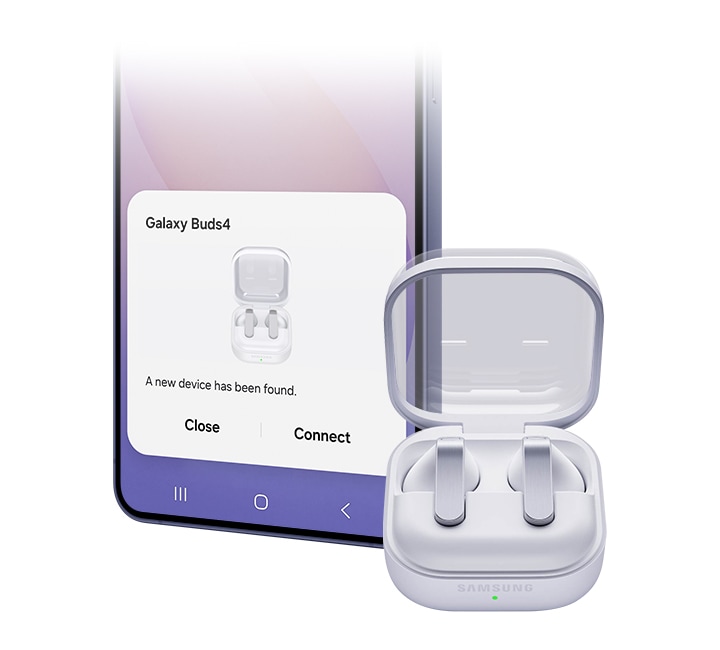
Just open the Charging Case and you’re all set — as simple as that. No apps, no downloads and of course, no hassle. Your Galaxy smartphone and Galaxy Tab detect Galaxy Buds4 for easy pairing.
Devices sold separately. Bluetooth must be turned on to pair Galaxy Buds4 with Galaxy smartphone and Galaxy Tab. UnifiedMgr module may need to be downloaded based on the version of One UI. For devices running on One UI versions below 8.0, Galaxy Wearable app needs to be downloaded. Connecting Samsung Galaxy Buds4 as Bluetooth Audio is available regardless of OS but to configure advanced settings on the Galaxy Wearable app, Samsung Galaxy Buds4 must be paired with a smartphone with Android 12.0 or above and minimum 1.5 GB Memory. Samsung Account login is required to activate and change the Galaxy Buds4 settings on the Galaxy Wearable app.

Devices sold separately. Bluetooth must be turned on to pair Galaxy Buds4 with Galaxy smartphone and Galaxy Tab. UnifiedMgr module may need to be downloaded based on the version of One UI. For devices running on One UI versions below 8.0, Galaxy Wearable app needs to be downloaded. Connecting Samsung Galaxy Buds4 as Bluetooth Audio is available regardless of OS but to configure advanced settings on the Galaxy Wearable app, Samsung Galaxy Buds4 must be paired with a smartphone with Android 12.0 or above and minimum 1.5 GB Memory. Samsung Account login is required to activate and change the Galaxy Buds4 settings on the Galaxy Wearable app.
Now one in One UI
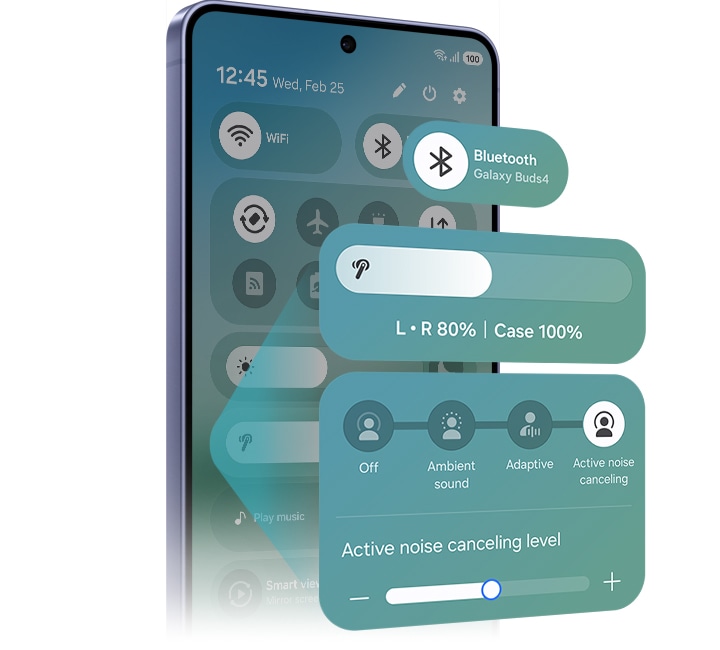
The evolved One UI 8.5 creates a deep connection between your Galaxy Buds and Galaxy smartphone, almost like a duet. Control has never been more intuitive — manage features from the device settings, without downloading a separate app. From the Quick Panel, you can easily access features and also set and save sound preferences for each app.
Devices sold separately. Samsung Account login is required to activate and change Galaxy Buds4 settings. For devices running on One UI 8.0 or later, settings can be configured directly in the phone settings. For devices running on earlier versions, configurations can be found in the Galaxy Wearable app. Additionally, to use the Galaxy Wearable app, Samsung Galaxy Buds4 must be paired with a smartphone running Android 12.0 or above with at least 1.5 GB of memory. Galaxy Wearable app is not supported on iOS. Connecting Samsung Galaxy Buds4 as Bluetooth Audio is available regardless of the OS.

Devices sold separately. Samsung Account login is required to activate and change Galaxy Buds4 settings. For devices running on One UI 8.0 or later, settings can be configured directly in the phone settings. For devices running on earlier versions, configurations can be found in the Galaxy Wearable app. Additionally, to use the Galaxy Wearable app, Samsung Galaxy Buds4 must be paired with a smartphone running Android 12.0 or above with at least 1.5 GB of memory. Galaxy Wearable app is not supported on iOS. Connecting Samsung Galaxy Buds4 as Bluetooth Audio is available regardless of the OS.


Personal AI translator in your ear
Break language barriers with a personal AI translator in your ear. Fully engage in the moment with Galaxy AI powered interpreter — hear it through Galaxy Buds4 and read it on your Galaxy smartphone. Galaxy AI steps in to ensure clear communication across different languages.


Devices sold separately.Interpreter is available on smartphone devices with Galaxy AI features included, running on One UI 6.1.1 or later.Galaxy Buds4 supports Galaxy AI features such as Interpreter and Live Translate when paired with compatible Samsung Galaxy devices. Availability of Galaxy AI features may vary by device model. Samsung Account login may be required to use certain Samsung AI features. Samsung does not make any promises, assurances or guarantees as to the accuracy, completeness or reliability of the output provided by AI features. Supported languages (Regions) are Arabic, Bahasa Indonesia, Chinese Simplified, Chinese Traditional (Hong Kong, Taiwan), Dutch, English (Australia, India, United Kingdom, United States), French (Canada, France), German, Hindi, Italian, Japanese, Korean, Polish, Portuguese (Brazil, Portugal), Romanian, Russian (Russian Federation), Spanish (Mexico, Spain, United States), Swedish, Thai, Turkish, Vietnamese, Tagalog, Gujarati. More languages will be added in future updates.
Your AI, hands-free
Ask for assistance with just your voice ― no phone-pulling required. Simply speak to AI agents such as Bixby to get answers to questions or manage tasks instantly without slowing you down.


Voice wake-up is off by default, and can be configured directly in the phone settings for devices running One UI 8.0 and later. For devices running on earlier versions of One UI, configurations can be found in the Galaxy Wearable app.Bixby is supported on most Samsung Galaxy smartphones and Galaxy Tab devices. Bixby provides real-time answers on devices running on One UI 8.5 or later. Service availability may vary by country, service provider, device model and OS version.Bixby supports 9 languages: Korean, English, German, French, Italian, Spanish, Portuguese, Chinese (Simplified) and Japanese.
Just nod and shake
Intuitive nods and shakes let you respond quickly, from answering calls to talking to Bixby, without lifting a hand. Get what you need effortlessly, even in situations where your hands are busy or when it’s not an ideal time to speak.


Head Gesture is off by default, and can be configured directly in the phone settings for paired devices running One UI 8.5 and later.Supported apps may vary by country. Gestures can be set by the user.
Switch instantly between Galaxy devices
Auto Switch shifts your audio to the most pressing task at hand. Take a call on your Galaxy smartphone while focusing on your creative project on your Galaxy Tab or Galaxy Book. Jump right back to where you left off, the instant you hang up. The experience is seamless across your Galaxy devices.


Devices sold separately.Auto Switch feature is only available on Samsung Galaxy Book series with One UI 6.0 Book or later, Samsung Galaxy smartphones and Galaxy Tab devices with One UI 4.1.1 or later and Galaxy Watch4 series or later. Samsung Galaxy devices must be logged in to Samsung Account to enable the Auto Switch feature. Auto Switch feature for Samsung TV is only available on Samsung TVs launched Feb ’22 or later after getting a firmware update from Jul ’22. Auto Switch with TV is only available for making and receiving phone calls.


Pair up with our all-new AI phone
Pair Galaxy S26 and S26+ with Galaxy Watch8 to your everyday life to spark excitement ― from listening to quality audio with an improved codec and stable Bluetooth 6.1 connection, to paying more attention to your sleep quality and cardio health.


Frequently Asked Question
Galaxy Buds4 Pro has an enhanced 2-way Speaker and a Dual Amplifier to reproduce Hi-Fi sound thats true to the original recording. It also comes with 3 sets of silicone ear tips in different sizes for sound delivery with less distortion. Features such as Voice Detect and Siren Detect are supported on Galaxy Buds4 Pro. Galaxy Buds4, on the other hand, is optimised for everyday listening. It produces balanced & clear sound in studio quality, bringing you closer to your favourite artists.
Adaptive Noise Control, Voice Detect and Siren Detect are off by default, and can be configured directly in the phone settings for devices running One UI 8.0 and later. For devices running on earlier versions of One UI, configurations can be found in the Galaxy Wearable app.
In the box, you'll find a pair of your chosen Galaxy Buds4, a Charging Case and the Quick Start Guide. USB Type-C cable is not included.
Galaxy Buds4 comes in two classic colours, White and Black. With timeless colours that never go out of style, Galaxy Buds4 blends into your outfit for any occasion.
Yes, Galaxy Buds4 Charging Case support wireless charging. Wireless charging pad is not included in the box and is sold separately.
No. The Charging Case for each Buds is shaped differently, making it incompatible between the two models.
You can use Pinch Control on Galaxy Buds4 using your index finger. First, wear the earbuds and try the following actions. Pinch once (Single pinch) to play or pause the track, answer or end a call and stop using features such as Read Notifications Aloud. Pinch twice (Double pinch) to play the next track. Pinch three times (Triple pinch) to play the previous track. Pinch and hold to turn on the preset feature or decline a call. Swipe up or down using your index finger to adjust the volume.
Samsung Seamless Codec (SSC) Ultra High Quality (UHQ) Audio Option allows you to listen to audio in full detail, with rich audio information. You can turn on SSC - UHQ option when Galaxy Buds4 Series is paired with an eligible Galaxy device. The audio is delivered in extended 24-bit bit depth and 96 kHz sampling rate.
Ultra High Quality Audio (UHQ) up to 24-bit / 96 kHz is available on Galaxy S26 Series, S25 Series, S24 Series, S23 Series, Z Fold7, Z Flip7, Z Fold6, Z Flip6, Z Fold5, Z Flip5 and Tab S11 Series, Tab S10 Series, Tab S9 Series with One UI 6.1.1 or above. Additional devices may be supported in the future.UHQ is off by default and can be configured directly in the phone settings for devices running One UI 8.0 and later. For devices running on earlier versions of One UI, configurations can be found in the Galaxy Wearable app.
SSC - UHQ supports up to 24-bit / 96 kHz and is available on Galaxy smartphones such as Galaxy S26 Series, S25 Series, S24 Series, S23 Series, Z Fold7, Z Flip7, Z Fold6, Z Flip6, Z Fold5 and Z Flip5. It's also available on Galaxy Tab S11 Series, Tab S10 Series and Tab S9 Series with One UI 6.1.1 or above. More devices may be supported in the future.
UHQ is off by default and can be configured directly in the phone settings for devices running One UI 8.0 and later. For devices running on earlier versions of One UI, configurations can be found in the Galaxy Wearable app.
Galaxy Buds4 Series isolates your voice input through an advanced Deep Neural Network (DNN) technology. The conversation between the caller and receiver is delivered through Super Wideband (SWB) up to 16 kHz, making the call crystal clear.
Each earbud contains three microphones (six in total across the device). The advanced DNN technology processes audio independently on each earbud, with no interaction between them.
To connect your Galaxy Buds4 to your Galaxy device, just open the Charging Case and the earbuds will automatically start pairing. A pop-up screen will appear on the Galaxy device. Tap Connect and the pairing is complete.
Bluetooth must be turned on to pair Galaxy Buds4 with Galaxy smartphone and Galaxy Tab. UnifiedMgr module may need to be downloaded based on the version of One UI. For devices running on One UI versions below 8.0, Galaxy Wearable app needs to be downloaded. Connecting Samsung Galaxy Buds4 as Bluetooth Audio is available regardless of OS but to configure advanced settings on the Galaxy Wearable app, Samsung Galaxy Buds4 must be paired with a smartphone with Android 12.0 or above and minimum 1.5 GB Memory. Samsung Account login is required to activate and change the Galaxy Buds4 settings on the Galaxy Wearable app.
You can control Galaxy Buds4 based on the version of One UI on your Galaxy device. On Galaxy devices running on One UI 8.0 or later, certain features can be controlled from the Quick Panel or you can manage Galaxy Buds4 in more detail from your phone's device settings without downloading any additional apps. For Galaxy devices running on earlier versions of One UI, configurations can be found in the Galaxy Wearable app.
Galaxy Buds4 can be connected to iOS devices but cannot be controlled through the device as Galaxy Wearable app is not supported.
The Interpreter feature in Galaxy Buds4 allows you to keep listening. Your speech is delivered to your Samsung Galaxy smartphone to be interpreted and played through its speakers. Your opponent's speech is delivered to Samsung Galaxy smartphone to be interpreted, but will be played through the Galaxy Buds4 Series.
Interpreter is available on smartphone devices with Galaxy AI features included, running on One UI 6.1.1 or later.Galaxy Buds4 supports Galaxy AI features such as Interpreter and Live Translate when paired with compatible Samsung Galaxy devices. Availability of Galaxy AI features may vary by device model. Samsung Account login may be required to use certain Samsung AI features. Samsung does not make any promises, assurances or guarantees as to the accuracy, completeness or reliability of the output provided by AI features. Supported languages (Regions) are Arabic, Bahasa Indonesia, Chinese Simplified, Chinese Traditional (Hong Kong, Taiwan), Dutch, English (Australia, India, United Kingdom, United States), French (Canada, France), German, Hindi, Italian, Japanese, Korean, Polish, Portuguese (Brazil, Portugal), Romanian, Russian (Russian Federation), Spanish (Mexico, Spain, United States), Swedish, Thai, Turkish, Vietnamese, Tagalog, Gujarati. More languages will be added in future updates.
Auto Switch allows you to switch seamlessly between your devices. For instance, you can take incoming calls while you're working on a creative project on your Galaxy Tab or Galaxy Book. Once the call is over, you can go right back to your project effortlessly.
Auto Switch feature is only available on Samsung Galaxy Book series with One UI 6.0 Book or later, Samsung Galaxy smartphones and Galaxy Tab devices with One UI 4.1.1 or later and Galaxy Watch4 series or later. Samsung Galaxy devices must be logged in to Samsung Account to enable the Auto Switch feature. Auto Switch feature for Samsung TV is only available on Samsung TVs launched Feb ’22 or later after getting a firmware update from Jul ’22. Auto Switch with TV is only available for making and receiving phone calls.
Compare Galaxy Buds


Your key to instant AI access
The Galaxy AI Key gives you easy access to AI-powered assistant, Bixby or Gemini. Simply tap the dedicated key and let your AI assistant handle your query — it's that simple to get things done.


*Image simulated for illustrative purposes.**Galaxy AI key function available on Galaxy Tab S10 Series and Tab S9 Series models.***On Galaxy Tab S9 and Tab S9 FE Series devices, One UI 7.0 or above is required to support the Galaxy AI key function. It may require One UI update.****A network connection is required to use Bixby or Gemini.*****Service availability may vary by country, language, device model. Requires Google Account login. Users may need to download or update Google Gemini app to the latest version. Gemini is a trademark of Google LLC. Gemini opt-in is rolling out to select devices and countries — opt in to Gemini from your Google Assistant or by downloading the Gemini app. Accuracy of results is not guaranteed. Feature availability and functionality may vary depending on certain apps, content and device settings.
Slim and lightweight design


Accentuate the shape of your tablet with the slim and light Book Cover Keyboard Slim. It installs in a snap — all you have to do is wrap it around your tablet like a book cover and magnets will hold it in place. There's even a compartment to hold your S Pen for convenience.
*Image simulated for illustrative purposes.


*Image simulated for illustrative purposes.
A comfortable keyboard experience
Pair your tablet with the Book Cover Keyboard Slim to type documents or emails with accuracy. Combined with DeX mode, the keyboard delivers a convenient PC-like experience.
*Features and keyboard layout may vary by model or type of language.


*Features and keyboard layout may vary by model or type of language.
Enhance your productivity with wireless sharing
With Wireless Keyboard Sharing, you can easily connect to your other Galaxy devices and smoothly type or navigate on them. Switch between devices with ease and take control of your phone as you would on your tablet.


*Products sold separately.**Image simulated for illustrative purposes. Actual UX/UI may vary.***Wireless Keyboard Sharing is supported on Galaxy smartphones running One UI 3.1 or above and Galaxy Tab devices running One UI 2.5 or above, connected to the Book Cover Keyboard via POGO.****To enable Wireless Keyboard Sharing, both devices must be logged in to the same Samsung account. Performance may vary depending on user network environment.*****Up to 3 devices can be registered for Wireless Keyboard Sharing.******Wireless Keyboard Sharing can be turned on/off in Settings > General Management > Physical Keyboard > Wireless Keyboard Sharing.
Supercharge your devices
The 45W Power Adapter is your companion for rapid charging and high efficiency. Designed with precision to seamlessly integrate with your Samsung Galaxy devices, this power adapter ensures that your device stays powered up wherever your day takes you.


* Super Fast Charging (SFC) 2.0 requires a USB Power Delivery (PD) 3.0 compatible device supporting Direct Charging. Devices lacking USB PD 3.0 standard or Direct Charging will charge slower than SFC speed. Charging speed varies based on usage patterns, conditions, connected devices, and other factors. Charging performance may be affected by device model, cable quality, and environment. To optimise results, use genuine Samsung 5A cables provided in the original packaging. Compatibility with additional devices can expand over time.
Power down with standby power
The 45W Power Adapter boasts low standby power consumption, below 5mw, reducing unnecessary standby power. Smart IC technology helps reduce power consumption during standby.


* Low standby power consumption, ensuring consumption remains below 5mW when not in active use.
Versatile compatibility
Designed to work seamlessly with USB-C enabled devices, this adapter is your all-in-one solution. Fast charge your tablet, smartphone, or any USB-C enabled gadget—enjoy optimal charging speeds.


* PD (Power Delivery) 3.0 is the USB Implementers Forum, Inc (USB-IF) standard for quick charging over USB-C. PDO (Power Data Objects) charging supports high-speed charging with set voltage and current. PPS (Programmable Power Supply) Fast charging adjusts voltage and current in real-time based on device charging status, providing high power (Added USB PD 3.0 Standard). Compatible with standard USB Type-C cables. For optimal results, use genuine Samsung 5A cables provided in the original packaging.
Power your devices safely
The 45W Power Adapter provides protection against overcurrent, overheating and short circuits, providing a worry-free charging experience. Power your devices safely, knowing they're protected.


Specifications
-
Rear Camera - Resolution
13.0 MP
-
Weight (g)
497
-
CPU Speed
2.9GHz, 2.6GHz, 1.9GHz
-
CPU Speed
2.9GHz, 2.6GHz, 1.9GHz
-
CPU Type
Octa-Core
-
Size (Main_Display)
277.0mm (10.9" full rectangle) / 275.1mm (10.8" rounded corners)
-
Resolution (Main Display)
2304 x 1440 (WUXGA+)
-
Technology (Main Display)
TFT
-
Colour Depth (Main Display)
16M
-
Yes
-
Rear Camera - Resolution
13.0 MP
-
Rear Camera - Auto Focus
Yes
-
Front Camera - Resolution
12.0 MP
-
Rear Camera - Flash
No
-
Video Recording Resolution
UHD 4K (3840 x 2160)@30fps
-
Memory_(GB)
8
-
Storage (GB)
128
-
Available Storage (GB)
106.2
-
External Storage Support
MicroSD (Up to 2TB)
-
USB Version
USB 2.0
-
Location Technology
GPS, Glonass, Beidou, Galileo, QZSS
-
Earjack
USB Type-C
-
MHL
No
-
Wi-Fi
802.11a/b/g/n/ac/ax 2.4GHz+5GHz, HE80, MIMO, 1024-QAM
-
Wi-Fi Direct
Yes
-
Bluetooth Version
Bluetooth v5.3
-
NFC
No
-
Bluetooth Profiles
A2DP, AVRCP, DI, HAP, HFP, HID, HOGP, HSP, OPP, PAN, PBAP, PBP, TMAP
-
PC Sync.
Smart Switch (PC version)
-
Android
-
Form Factor
Tablet
-
Accelerometer, Fingerprint Sensor, Gyro Sensor, Geomagnetic Sensor, Hall Sensor, Light Sensor
-
Dimension (HxWxD, mm)
165.8 x 254.3 x 6.0
-
Weight (g)
497
-
Video Playback Time (Hours, Wireless)
Up to 20
-
Battery Capacity (mAh, Typical)
8000
-
Removable
No
-
Video Playing Format
MP4, M4V, 3GP, 3G2, AVI, FLV, MKV, WEBM
-
Video Playing Resolution
UHD 4K (3840 x 2160)@60fps
-
Audio Playing Format
MP3, M4A, 3GA, AAC, OGG, OGA, WAV, AMR, AWB, FLAC, MID, MIDI, XMF, MXMF, IMY, RTTTL, RTX, OTA
-
Gear Support
Galaxy Buds3 Pro, Galaxy Buds2 Pro, Galaxy Buds Pro, Galaxy Buds Live, Galaxy Buds+, Galaxy Buds3, Galaxy Buds2, Galaxy Buds, Galaxy Buds FE
-
Mobile TV
No
-
SmartThings Support
Yes
-
Security Update Period (Valid until)
30 April 2032
-
Bluetooth Version
Bluetooth v6.1
-
Sensors
Accelerometer, Gyro Sensor, Hall Sensor, Pressure Sensor, Proximity Sensor, Touch Sensor, VPU(Voice Pickup Unit)
-
Earbud Weight (g)
4.6
-
Number of MIC
6
-
Speaker
1-way
-
Ambient Sound
Yes
-
Adaptive Noise Control
Yes
-
Active Noise Cancellation
Yes
-
360 Audio
Yes
-
Audio Codec
AAC, SBC, SSC(Samsung Seamless Codec), SSC-UHQ, LC3
-
Adaptive EQ
Yes
-
Adaptive ANC
Yes
-
Super Wide Band
Yes
-
Bluetooth Version
Bluetooth v6.1
-
Bluetooth Profiles
A2DP, AVRCP, HFP, PBP, TMAP
-
LE Audio
Yes
-
Auto Switch
Yes
-
Accelerometer, Gyro Sensor, Hall Sensor, Pressure Sensor, Proximity Sensor, Touch Sensor, VPU(Voice Pickup Unit)
-
Earbud Dimension (HxWxD, mm)
30.5 x 18.3 x 19.3
-
Earbud Weight (g)
4.6
-
Case Dimension (HxWxD, mm)
51 x 28.3 x 51
-
Case Weight (g)
45.1
-
Durability
IP54
-
Talk Time (Hours, ANC On)
Up to 3.5
-
Total Talk Time (Hours, ANC On)
Up to 18
-
Music Play Time (Hours, ANC On)
Up to 5
-
Total Music Play Time (Hours, ANC On)
Up to 24
-
Talk Time (Hours, ANC Off)
Up to 4
-
Total Talk Time (Hours, ANC Off)
Up to 20
-
Music Play Time (Hours, ANC Off)
Up to 6
-
Total Music Play Time (Hours, ANC Off)
Up to 30
-
Power Required for Charging (Min ~ Max, W)
2.5 ~ 4.5
-
Earbud Battery Capacity (mAh, Typical)
45
-
Case Battery Capacity (mAh, Typical)
515
-
Samsung Find
Yes
-
Bixby Voice Wake-up
Yes
-
Neck Stretch Reminder
Yes
-
Compatible Models
Galaxy Tab S9, Galaxy Tab S9 FE, Galaxy Tab S10 FE, Galaxy Tab S10 Lite
-
Interface
POGO
-
Keys Quantity
65
-
Dimension (WxHxD)
255.5x168.9x14.0 mm
-
Weight
281.1 g
-
Book Cover Keyboard Slim — AI Key
-
Black
-
Compatible Models
• Super Fast Charging : Galaxy S10 5G, Galaxy Note10, Galaxy Z Fold2, Galaxy Z Flip3 & Later / Galaxy A90 5G, A80, A70, A52, A33, A23, A05, A15 & Later / Galaxy M31s, M51, M62, M23, M53, M14 & Later / Galaxy Tab S7 & Later • Super Fast Charging 2.0 : Galaxy Note 10+, Galaxy S20 Ultra, Galaxy S22+, Galaxy S22 Ultra, Galaxy S23+, Galaxy S23 Ultra, Galaxy S24+, Galaxy S24 Ultra, Galaxy S25+, Galaxy S25 Ultra / Galaxy A36, A56 & Later / Galaxy Tab S7 & Later
-
Features
Super Fast Charging 2.0 max. 45W, PD 3.0 PDO/PPS max. 45W, Low Standby Power Consumption( <5mW )
-
Interface
USB-C
-
Packaging Contents
Power Adapter
-
Dimension (WxHxD)
48 x 75.6 x 28 mm
-
Weight
100.1 g
-
Input Voltage
100-240 V
-
Output Voltage (Max, Normal Charge)
5 V
-
Output Voltage (Max, Fast Charge)
PDO : 9 V, 15 V, 20 V / PPS : 5.0-20.0 V
-
Output Current (Max, Normal Charge)
3 A
-
Output Current (Max, Fast Charge)
PDO : 3 A(9 V, 15 V), 2.25 A(20 V) / PPS : 2.25 A(5.0-20.0 V)
User manual & Downloads Product information sheet
Solutions & Tips
- Which type of charger does my Galaxy device accept?
- What are the features of the Galaxy Tab S10 FE+ and S10 FE?
- I can't unlock my Samsung Galaxy device
- How do I transfer my data from my old Android phone to my new one?
- I smashed my screen and can't use the touchscreen. Is there any way to access my data?