


Iconic in metal. Shaped for all-day comfort


Timeless colours for every tune


Designed for ease, crafted for beauty
Check that Galaxy Buds4 is properly in place through the translucent cover. Charge wirelessly and simply take it anywhere — its compact, lightweight design makes it easy to carry. 3


Let your music stay in place effortlessly
Backed by global ear data, Galaxy Buds4 is shaped with a computational design that enhances wearability. Galaxy Buds4 stay snugly in your ears, whether you're indoors or outdoors. 4


Easy pinch, easy controls
Now with the upgraded Pinch Control, you can manage your media or control the volume with just your index finger — no need to reach for your phone.


Balanced clear sound, all around


Dynamic wide-range speaker for rich, full audio
Enjoy beautifully balanced sound on Galaxy Buds4 powered by an 11 mm wide-range speaker, delivering rich sound from solid, controlled bass to clear, detailed highs.


Hear every layer come alive
Hear every layer come alive with extended bit depth and high sampling rates. Samsung Seamless Codec (SSC) supports 24-bit / 96 kHz audio to preserve the original sound with vast amount of information, while optimised data transmission control enables a stable listening experience with reduced audible artefacts or dropouts. Turn on the Ultra High Quality Audio (UHQ) option on your Galaxy smartphone and rediscover your favourite songs in full detail.5


Rich sound adjusted your way
Take a step closer to stable, everyday audio. Customise bass, treble and tone with the 9-Band Equaliser to match your preference, creating a sound signature tailored just for you. Galaxy Buds4 also optimises sound adaptively to your ear shape and wearing style, ensuring a consistent listening experience as your ears perceive it — even when you adjust the volume.6


Super Clear Call, even in noise
Your voice is clearly captured by 6 microphones positioned around your head, intelligently isolating it from the background sound with advanced Deep Neural Network (DNN). The exceptionally clean voice signal is transmitted with pure effortlessness through Super Wideband (SWB) up to 16 kHz between your Galaxy Buds4 and Galaxy smartphone. Hear and be heard, loud and clear — even in noisy moments.7


Surround yourself in sound
Expand your soundstage from stereo into a grand orchestral hall or a large arena, placing you at the centre of a live performance with a single touch. Feel instruments and vocals in three dimensions, and experience the atmosphere enveloping you in music.8


Deeper immersion that adapts with you


Dive into your personal soundscape
With its quality sound system, Galaxy Buds4 achieves precise noise control. Distractions fade in real-time as the Active Noise Cancelling (ANC) algorithm instantly processes and adapts to your ear shape and fit. Tune in to immersive sound wherever you are.


Listen to music while staying connected
Manage your listening experience your way. Galaxy Buds4 adjusts the levels of ANC and ambient sounds in real-time, adapting to your environment — whether you’re sensitive to noise or prefer more blending. Stay more immersed in the music while remaining connected to the world around you.


Keep in sync with the Galaxy Ecosystem9


Simple connection. Straight to the tunes
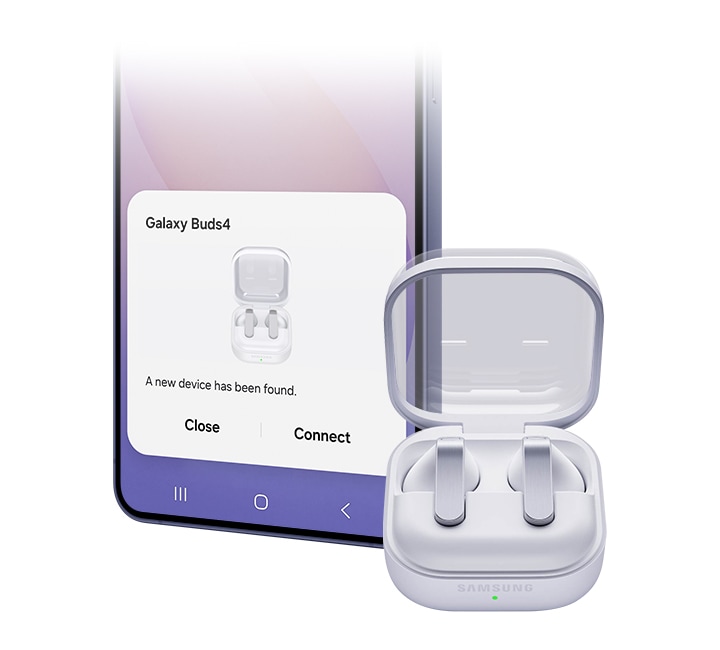
Just open the Charging Case and you’re all set — as simple as that. No apps, no downloads and of course, no hassle. Your Galaxy smartphone and Galaxy Tab detect Galaxy Buds4 for easy pairing.10

Now one in One UI
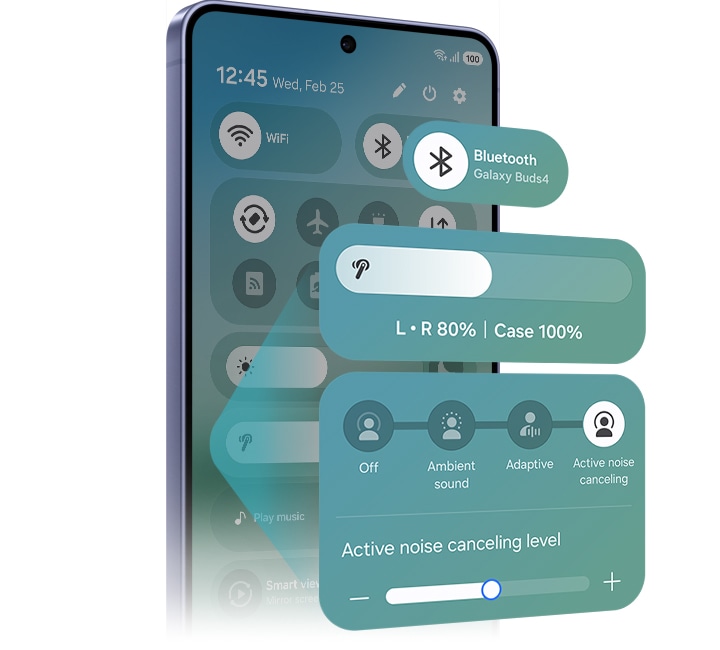
The evolved One UI 8.5 creates a deep connection between your Galaxy Buds and Galaxy smartphone, almost like a duet. Control has never been more intuitive — manage features from the device settings, without downloading a separate app. From the Quick Panel, you can easily access features and also set and save sound preferences for each app.11



Personal AI translator in your ear
Break language barriers with a personal AI translator in your ear. Fully engage in the moment with Galaxy AI powered interpreter — hear it through Galaxy Buds4 and read it on your Galaxy smartphone. Galaxy AI steps in to ensure clear communication across different languages.12


Your AI, hands-free
Ask for assistance with just your voice ― no phone-pulling required. Simply speak to AI agents such as Bixby to get answers to questions or manage tasks instantly without slowing you down.13


Just nod and shake
Intuitive nods and shakes let you respond quickly, from answering calls to talking to Bixby, without lifting a hand. Get what you need effortlessly, even in situations where your hands are busy or when it’s not an ideal time to speak.14


Switch instantly between Galaxy devices
Auto Switch shifts your audio to the most pressing task at hand. Take a call on your Galaxy smartphone while focusing on your creative project on your Galaxy Tab or Galaxy Book. Jump right back to where you left off, the instant you hang up. The experience is seamless across your Galaxy devices.15


Pair up with our all-new AI phone
Pair Galaxy S26 and S26+ with Galaxy Watch8 to your everyday life to spark excitement ― from listening to quality audio with an improved codec and stable Bluetooth 6.1 connection, to paying more attention to your sleep quality and cardio health.


Frequently Asked Question
Galaxy Buds4 Pro has an enhanced 2-way Speaker and a Dual Amplifier to reproduce Hi-Fi sound thats true to the original recording. It also comes with 3 sets of silicone ear tips in different sizes for sound delivery with less distortion. Features such as Voice Detect and Siren Detect are supported on Galaxy Buds4 Pro. Galaxy Buds4, on the other hand, is optimised for everyday listening. It produces balanced & clear sound in studio quality, bringing you closer to your favourite artists.17
In the box, you'll find a pair of your chosen Galaxy Buds4, a Charging Case and the Quick Start Guide. USB Type-C cable is not included.
Galaxy Buds4 comes in two classic colours, White and Black. With timeless colours that never go out of style, Galaxy Buds4 blends into your outfit for any occasion.
Yes, Galaxy Buds4 Charging Case support wireless charging. Wireless charging pad is not included in the box and is sold separately.
No. The Charging Case for each Buds is shaped differently, making it incompatible between the two models.
You can use Pinch Control on Galaxy Buds4 using your index finger. First, wear the earbuds and try the following actions. Pinch once (Single pinch) to play or pause the track, answer or end a call and stop using features such as Read Notifications Aloud. Pinch twice (Double pinch) to play the next track. Pinch three times (Triple pinch) to play the previous track. Pinch and hold to turn on the preset feature or decline a call. Swipe up or down using your index finger to adjust the volume.
Samsung Seamless Codec (SSC) Ultra High Quality (UHQ) Audio Option allows you to listen to audio in full detail, with rich audio information. You can turn on SSC - UHQ option when Galaxy Buds4 Series is paired with an eligible Galaxy device. The audio is delivered in extended 24-bit bit depth and 96 kHz sampling rate.18
SSC - UHQ supports up to 24-bit / 96 kHz and is available on Galaxy smartphones such as Galaxy S26 Series, S25 Series, S24 Series, S23 Series, Z Fold7, Z Flip7, Z Fold6, Z Flip6, Z Fold5 and Z Flip5. It's also available on Galaxy Tab S11 Series, Tab S10 Series and Tab S9 Series with One UI 6.1.1 or above. More devices may be supported in the future.19
Galaxy Buds4 Series isolates your voice input through an advanced Deep Neural Network (DNN) technology. The conversation between the caller and receiver is delivered through Super Wideband (SWB) up to 16 kHz, making the call crystal clear.20
To connect your Galaxy Buds4 to your Galaxy device, just open the Charging Case and the earbuds will automatically start pairing. A pop-up screen will appear on the Galaxy device. Tap Connect and the pairing is complete.21
You can control Galaxy Buds4 based on the version of One UI on your Galaxy device. On Galaxy devices running on One UI 8.0 or later, certain features can be controlled from the Quick Panel or you can manage Galaxy Buds4 in more detail from your phone's device settings without downloading any additional apps. For Galaxy devices running on earlier versions of One UI, configurations can be found in the Galaxy Wearable app.22
The Interpreter feature in Galaxy Buds4 allows you to keep listening. Your speech is delivered to your Samsung Galaxy smartphone to be interpreted and played through its speakers. Your opponent's speech is delivered to Samsung Galaxy smartphone to be interpreted, but will be played through the Galaxy Buds4 Series.23
Auto Switch allows you to switch seamlessly between your devices. For instance, you can take incoming calls while you're working on a creative project on your Galaxy Tab or Galaxy Book. Once the call is over, you can go right back to your project effortlessly.24
Compare Galaxy Buds


Specifications
-
Bluetooth Version
Bluetooth v6.1
-
Sensors
Accelerometer, Gyro Sensor, Hall Sensor, Pressure Sensor, Proximity Sensor, Touch Sensor, VPU(Voice Pickup Unit)
-
Earbud Weight (g)
4.6
-
Number of MIC
6
-
Speaker
1-way
-
Ambient Sound
Yes
-
Adaptive Noise Control
Yes
-
Active Noise Cancellation
Yes
-
360 Audio
Yes
-
Audio Codec
AAC, SBC, SSC(Samsung Seamless Codec), SSC-UHQ, LC3
-
Adaptive EQ
Yes
-
Adaptive ANC
Yes
-
Super Wide Band
Yes
-
Bluetooth Version
Bluetooth v6.1
-
Bluetooth Profiles
A2DP, AVRCP, HFP, PBP, TMAP
-
LE Audio
Yes
-
Auto Switch
Yes
-
Accelerometer, Gyro Sensor, Hall Sensor, Pressure Sensor, Proximity Sensor, Touch Sensor, VPU(Voice Pickup Unit)
-
Earbud Dimension (HxWxD, mm)
30.5 x 18.3 x 19.3
-
Earbud Weight (g)
4.6
-
Case Dimension (HxWxD, mm)
51 x 28.3 x 51
-
Case Weight (g)
45.1
-
Durability
IP54
-
Talk Time (Hours, ANC On)
Up to 3.5
-
Total Talk Time (Hours, ANC On)
Up to 18
-
Music Play Time (Hours, ANC On)
Up to 5
-
Total Music Play Time (Hours, ANC On)
Up to 24
-
Talk Time (Hours, ANC Off)
Up to 4
-
Total Talk Time (Hours, ANC Off)
Up to 20
-
Music Play Time (Hours, ANC Off)
Up to 6
-
Total Music Play Time (Hours, ANC Off)
Up to 30
-
Power Required for Charging (Min / Max, W)
2.5 ~ 4.5
-
Earbud Battery Capacity (mAh, Typical)
45
-
Case Battery Capacity (mAh, Typical)
515
-
Samsung Find
Yes
-
Bixby Voice Wake-up
Yes
-
Neck Stretch Reminder
Yes
Reviews
Galaxy Buds4
- Customers praise exceptional sound quality with deep bass, crystal-clear clarity, and powerful noise cancellation that blocks ambient noise effectively
- Reviewers commend premium build, sleek design, and lightweight form factor that feels expensive and looks elegant
- Most users report seamless connectivity and stable performance with full-day battery life even with active noise cancellation enabled
- Some customers report fit issues, noting the earbuds slip during head movements or physical activity, with a few experiencing ear fatigue
- Several find pinch-based touch controls responsive and appreciate the compact, transparent charging case design
Reviews with images & videos
Filters
Relevancy sort puts the best reviews at the top. We look at things like helpfulness votes, latest review, pictures and other traits that readers look for in their reviews.
Filters
80 Reviews
2026-09-01
2026-08-24
Emsworth
![[D] Alternative Text](https://photos-us.bazaarvoice.com/photo/2/cGhvdG86c2Ftc3VuZy1lbl9nYg/d28838c9-62eb-508e-8b2d-bceedf3efb8d)
![[D] Alternative Text](https://photos-us.bazaarvoice.com/photo/2/cGhvdG86c2Ftc3VuZy1lbl9nYg/19cc9e92-2f86-55ac-a440-8e25cbe99835)
Samsung
While it's great to see that you have found the best way to wear the Buds4 for you, it's a shame that they are currently undergoing a repair. We're sure that once it is complete, you will once again be able to enjoy the incredible sound these Buds are capable of. We put great amounts of research into the development of these Buds to ensure that the fit would work for the large majority of our users. Please make sure that you are wearing them correctly, as shown on the following link from our US colleagues: https://www.samsung.com/us/support/answer/ANS10007667/ Please note that the fit will impact the sound quality you receive. If you require any further support with your Buds once they are returned to you, please reach out to our Support Teams. You can find their contact details and operating hours here: https://www.samsung.com/uk/support/contact/ We're here to make sure that you can thoroughly enjoy your Buds. ^SK at Samsung Support
2026-08-10
Samsung
We're really happy to hear that you're loving your Buds4, Joe, but sorry to hear that the right earbud is muted. We'd love to resolve this for you. Firstly, we recommend checking the sound balance by opening the Galaxy Wearable app on your phone and going to Accessibility or Sound settings, and ensuring the Left/Right sound balance slider is in the centre. Next, clean your earbud using a clean, dry brush or a cotton swab, carefully removing any buildup from the mesh. Ensure your software is fully up to date within the Wearable app at Earbud settings > Earbud software update > Download and install. The following link contains more steps for you to go through: https://www.samsung.com/uk/support/mobile-devices/what-to-do-when-sound-is-not-heard-from-one-side-of-your-samsung-galaxy-buds-series/ We hope this information is helpful, and if the issue remains, please reach out to our friendly Support Teams, who can further assist. You can find our contact details and opening times here: https://www.samsung.com/uk/support/contact/ ^EW at Samsung Support
2026-08-07
Internal Support Team
Hi Sean. While it's great that you are enjoying the crystal clear sound of the Buds4, it's a shame that you aren't finding the battery life to be substantial. Please make sure that the charging connectors on the Buds themselves and the charging case are clean and free from debris or damage. For further support, please reach out to Samsung Support Teams. You can find their contact details and operating hours here: https://www.samsung.com/uk/support/contact/
2026-07-14
Samsung
While it's great to see that you have been enjoying incredible sound quality, we're disheartened to see that you have been struggling with the fit of your Galaxy Buds4. We put great amounts of research into the development of these Buds to ensure that the fit would work for the large majority of our users. Please make sure that you are wearing them correctly, as shown on the following link from our US colleagues: https://www.samsung.com/us/support/answer/ANS10007667/ For further support with your Buds, please reach out to our Support Teams. You can find their contact details and operating hours here: https://www.samsung.com/uk/support/contact/ We're here to make sure that you can thoroughly enjoy your Buds, and will certainly take on board your feedback regarding the available accessories. ^SK at Samsung Support
2026-07-09
Holywell, North Wales
![[D] Alternative Text](https://photos-us.bazaarvoice.com/photo/2/cGhvdG86c2Ftc3VuZy1lbl9nYg/a4b3e0a4-b1b1-55f8-b1e1-2e2f48ba4117)
![[D] Alternative Text](https://photos-us.bazaarvoice.com/photo/2/cGhvdG86c2Ftc3VuZy1lbl9nYg/79adb4b5-4398-5260-8ee0-6ed6810c4375)
Samsung
We're so pleased to hear that you're loving your Buds3 and Buds4, Andy. Thanks for taking the time to share your review, and keep enjoying! ^EW at Samsung Support
2026-07-02
Samsung
We are disheartened to see you are not enjoying your Buds4. Based on global ear data and with the sleek brushed metal blade design, we have worked hard to make sure all of our Buds fit every customer, however, all ears are different which can make this difficult. If you wish to have the silicone tips, you may prefer our amazing Buds4 Pro which include these and come with three different sizes to give you the perfect fit. Your feedback is greatly appreciated, and we'll take this on board to help improve our products in the future. ^LB at Samsung Support
2026-06-13
Internal Support Team
Hi Toto. We're sorry to hear that you've been experiencing noise during calls while using your Galaxy Buds4. Thanks to Super Clear Call technology, the Galaxy Buds4 are designed to deliver clear conversations even in noisy environments. To help ensure you're getting the best possible performance from both Super Clear Call and Active Noise Cancelling, we recommend checking that your earbuds are being worn correctly. The following video provides guidance on achieving the optimal fit for the best experience: https://www.youtube.com/watch?v=WsczOvTmj_E If you need any further assistance in getting the most from your Galaxy Buds4, please don't hesitate to get in touch with Samsung. You can find contact details and opening hours here: https://www.samsung.com/uk/support/contact/
2026-06-12
London
![[D] Alternative Text](https://photos-us.bazaarvoice.com/photo/2/cGhvdG86c2Ftc3VuZy1lbl9nYg/608819a9-ee37-5dae-9b70-deca15f9a330)
![[D] Alternative Text](https://photos-us.bazaarvoice.com/photo/2/cGhvdG86c2Ftc3VuZy1lbl9nYg/740a5528-4113-5de0-906a-17a7914402a6)
Samsung
We are over the moon to see you are loving your new Buds4, Md Sajon! Thanks to the sleek brushed metal blade design, these will not only look perfect, they will feel perfect for years to come! Along with the 11mm Dynamic Driver with 1-way speaker and 3 microphones, you'll get the outstanding sound that you deserve! Enjoy! ^LB at Samsung Support
2026-05-31
Samsung
We're saddened to hear that you have been struggling to wear your Galaxy Buds4 comfortably, Rodie, as they appear to slip out easily when you're moving around. The Galaxy Buds4 are designed with an ergonomic shape to provide a secure and comfortable fit, allowing you to enjoy your favourite music wherever you go. You can find some useful guidance on how to achieve the best fit and get the most from them in this support article from our colleagues overseas: https://www.samsung.com/us/support/answer/ANS10007667/ We hope the information provided in the guide helps you enjoy the best possible experience with your new earbuds. ^CL at Samsung Support
2026-05-31
Durham, UK
Samsung
We're disheartened to hear that your Galaxy Buds4 have not been as comfortable or secure in your ears as you expected, Dee. The Galaxy Buds4 have been designed with a computationally optimised shape to enhance comfort and wearability, helping them remain secure whether you're at home or on the move. You can find some useful guidance on how to wear them correctly for the best fit and listening experience here: https://www.samsung.com/uk/audio-sound/galaxy-buds/galaxy-buds4-white-sm-r540nzwaeub/ You may also find the following guide helpful for ensuring a strong and stable connection between your phone and earbuds, allowing you to enjoy your music with the best possible sound quality and minimal interruptions: https://www.samsung.com/us/support/troubleshoot/TSG10001339/ We hope these guides prove useful and help you enjoy the best possible experience with your Galaxy Buds4. ^CL at Samsung Support
2026-05-18
Samsung
We are disheartened to hear that your new Galaxy Buds4, which you received as a complimentary item with your purchase, have not fully met your expectations in terms of design and sound quality, Padja. The Galaxy Buds4 feature a compact, lightweight design that has been specifically developed to enhance sound quality while ensuring a comfortable and secure fit. Wearing them correctly is very important in order to enjoy the powerful audio experience they are designed to deliver. You can find a useful step-by-step guide from our colleagues overseas on how to wear them correctly for the best possible experience here: https://www.samsung.com/us/support/answer/ANS10007667/ You can also watch our official video guide on how to pair, set up, and customise the sound settings for a more immersive and personalised listening experience here: https://www.youtube.com/watch?v=T5n8o6A0Lp0&t=122s If you need any further assistance with getting the most out of your Galaxy Buds4, we are always here to help. Our full contact details and operating hours can be found on our Contact Us page here: https://www.samsung.com/uk/support/contact/ ^CL at Samsung Support
2026-05-17
2026-05-14
2026-05-14
2026-05-08
Wiltshire
Samsung
While it's great to see that you are enjoying the updated case design, incredible sound and Active Noise Cancellation, it's a shame that you aren't fully pleased with your upgrade to the Buds4. Though the Galaxy Buds Live were a fantastic model, we've worked hard to ensure that the design of our current offering is comfortable and secure for the large majority of our users, and that they provide a stylish look. It's disheartening to see that this hasn't been the case for you. We would recommend checking the fit of your Buds, and making sure that you are wearing them correctly. This handy guide from our colleagues abroad will help you do this: https://www.samsung.com/us/support/answer/ANS10007667/ As for the Pinch action, we're disappointed to see that you aren't finding this to be user-friendly. It was our intention to provide our users with a simple and easy way to control their Buds while wearing them, so we're sorry to read that you have not found this to be reflective of your experience. If there's anything we can help with, please don't hesitate to reach out. You can find the contact details and operating hours of our Support Teams here: https://www.samsung.com/uk/support/contact/ With further use, we're sure that these epic Buds will earn five full stars, Judi. ^SK at Samsung Support
2026-05-04
2026-04-25
2026-04-24
2026-04-12
Samsung
It's fantastic to hear that you love Samsung products, but we're sorry to learn that your Galaxy Buds4 aren't fitting and that the Pinch Control isn't working well. We'd love to help with this and to ensure that you're having the best experience possible with your earbuds. Your earbuds are designed for a comfortable and secure fit with excellent sound, and to achieve this, you will need to ensure the blade is angled slightly so that the microphone on the bottom is pointing towards your mouth. You can adjust the earbuds by rotating them forward and backwards until the fit feels right. The following link from our US colleagues provides further guidance: https://www.samsung.com/us/support/answer/ANS10007667/ The next link has further information on fit: https://www.samsung.com/uk/support/mobile-devices/wearing-the-galaxy-buds/ The stem has a special engraved area for the Pinch Control. Use a single pinch to play, pause or answer calls, double pinch for the next track, and triple pinch for the previous track. You can also pinch and hold to switch noise controls or to decline calls. The following video from our YouTube channel contains an excellent guide on how to effortlessly control your Buds4: https://www.youtube.com/watch?v=4xhi6g1lAnM We hope this information is helpful, and if you need further assistance, please don't hesitate to reach out to our Support Teams who are always happy to help. You can find contact details and opening times here: https://www.samsung.com/uk/support/contact/ ^EW at Samsung Support
2026-04-04
2026-03-31
2026-03-28
London
![[D] Alternative Text](https://photos-us.bazaarvoice.com/photo/2/cGhvdG86c2Ftc3VuZy1lbl9nYg/bf912bb2-e452-567c-8cf5-baf0d3f73cd7)
![[D] Alternative Text](https://photos-us.bazaarvoice.com/photo/2/cGhvdG86c2Ftc3VuZy1lbl9nYg/86920910-df6f-5cf3-9fde-65563c31ea01)
CX
We're sorry to hear that you accidentally purchased the Buds4 instead of the Buds4 Pro, Sam. Please reach out to our Support Teams so that we can assist. You can find contact details and opening times here: https://www.samsung.com/uk/support/contact/ ^EW at Samsung Support
2026-03-23
Scotland
Samsung
We’re so sorry to read that your Galaxy Buds4 didn’t meet your expectations, especially with them falling out during workouts. We understand how important a secure and comfortable fit is — particularly during exercise — and we truly regret that this hasn’t lived up to what you expected. We can assure you that we work with great care and precision when designing our buds. We rely on exceptional customer satisfaction and continuously work towards achieving the perfect fit to support active lifestyles and everyday comfort. Your experience matters to us, and we’re grateful you brought this to our attention. We’ll be sure to pass this feedback on to the relevant team to review internally. If you ever require any help in the future, you can get in touch with us directly via the link below, where our operating times and contact details will be shown: http://www.samsung.com/uk/support/contact/ We truly value your feedback, as it helps us continue improving our products for our valued customers. ^HB at Samsung Support
2026-09-07
eCommerce Department
Boa tarde. Agradecemos o seu comentário. Lamentamos que a sua experiência com o equipamento não esteja a corresponder às suas expectativas. O seu feedback é muito importante para nós e ajuda-nos a continuar a melhorar os nossos produtos e serviços. Obrigado por partilhar a sua experiência connosco.
2026-09-07
Service clients Samsung
Bonjour Kurohyo51, Merci beaucoup! Nous sommes ravis que vous appréciiez nos Galaxy Buds4! Vous pouvez ajuster les mini-oreillettes à la forme de vos oreilles en suivant nos recommandations : • Si le capteur tactile n’est pas en contact avec votre oreille, la mini-oreillette risque de ne pas fonctionner. Si vous n’entendez pas un son vous informant que les mini-oreillettes sont détectées, retirez-les de vos oreilles, puis remettez-les ou passez à des embouts ajustés à vos oreilles. • En raison de la nature des mini-oreillettes, elles peuvent se détacher ou tomber de vos oreilles lorsqu’elles sont portées (Galaxy Buds4). • Si les mini-oreillettes ne sont pas positionnées correctement dans vos oreilles, certaines fonctions, comme les appels téléphoniques, risquent de ne pas fonctionner. Utilisez une paire d’embouts adaptés à vos oreilles et positionnez correctement les mini-oreillettes (Galaxy Buds4 Pro). • Si l’embout se coince dans le petit espace à l’extérieur de la mini-oreillette ou n’est pas inséré correctement, la qualité audio peut être réduite et les modes de contrôle du bruit peuvent ne pas fonctionner correctement. Assurez-vous que l’embout est correctement inséré dans la mini-oreillette (Galaxy Buds4 Pro). • Respectez toutes les consignes de sécurité et directives formulées par le personnel compétent dans les lieux où l’utilisation d’appareils mobiles est interdite, comme par exemple dans les avions et les hôpitaux. 1. Prenez chaque mini-oreillette et retirez-les verticalement de l’étui de chargement. 2. Vérifiez le sens de chaque mini-oreillette. 3. Insérez les mini-oreillettes dans vos oreilles en orientant les marques de direction imprimées vers vous, et orientez le microphone situé à la base des mini-oreillettes vers votre bouche. 4. Ajustez les mini-oreillettes en les tournant vers la gauche ou la droite pour les mettre en place confortablement dans vos oreilles. Les capteurs tactiles détectent automatiquement que vous portez les mini-oreillettes lorsque vous les mettez en place. Les mini-oreillettes émettent ensuite un son afin de vous informer qu’elles ont bien été détectées. Découvrez également les conseils de notre communauté Samsung sur le fonctionnement de votre produit sur: https://www.samsung.com/fr/apps/samsung-members/ Cordialement Charlie, Service clients Samsung
2026-09-06
Service clients Samsung
Bonjour olivier85340, Nous notons vos remarques sur les fonctionnalités de nos Galaxy Buds4. Nous sommes désolés d'apprendre que votre expérience n'a pas été aussi satisfaisante que nous l'aurions souhaité. Vous pouvez ajuster les mini-oreillettes à la forme de vos oreilles en suivant nos recommandations : • Si le capteur tactile n’est pas en contact avec votre oreille, la mini-oreillette risque de ne pas fonctionner. Si vous n’entendez pas un son vous informant que les mini-oreillettes sont détectées, retirez-les de vos oreilles, puis remettez-les ou passez à des embouts ajustés à vos oreilles. • En raison de la nature des mini-oreillettes, elles peuvent se détacher ou tomber de vos oreilles lorsqu’elles sont portées (Galaxy Buds4). • Si les mini-oreillettes ne sont pas positionnées correctement dans vos oreilles, certaines fonctions, comme les appels téléphoniques, risquent de ne pas fonctionner. Utilisez une paire d’embouts adaptés à vos oreilles et positionnez correctement les mini-oreillettes (Galaxy Buds4Pro). • Si l’embout se coince dans le petit espace à l’extérieur de la mini-oreillette ou n’est pas inséré correctement, la qualité audio peut être réduite et les modes de contrôle du bruit peuvent ne pas fonctionner correctement. Assurez-vous que l’embout est correctement inséré dans la mini-oreillette (Galaxy Buds4 Pro). • Respectez toutes les consignes de sécurité et directives formulées par le personnel compétent dans les lieux où l’utilisation d’appareils mobiles est interdite, comme par exemple dans les avions et les hôpitaux. 1. Prenez chaque mini-oreillette et retirez-les verticalement de l’étui de chargement. 2. Vérifiez le sens de chaque mini-oreillette. 3. Insérez les mini-oreillettes dans vos oreilles en orientant les marques de direction imprimées vers vous, et orientez le microphone situé à la base des mini-oreillettes vers votre bouche. 4. Ajustez les mini-oreillettes en les tournant vers la gauche ou la droite pour les mettre en place confortablement dans vos oreilles. Les capteurs tactiles détectent automatiquement que vous portez les mini-oreillettes lorsque vous les mettez en place. Les mini-oreillettes émettent ensuite un son afin de vous informer qu’elles ont bien été détectées. Découvrez également les conseils de notre communauté Samsung sur le fonctionnement de votre produit sur: https://www.samsung.com/fr/apps/samsung-members/ Nous espérons avoir l'opportunité de vous fournir une expérience plus positive à l'avenir. Cordialement Charlie, Service clients Samsung
2026-09-06
Service clients Samsung
Bonjour MiruBunni3, Merci pour avoir fait le choix d'un produit Samsung ! Nous sommes enchantés de constater votre satisfaction à l'égard de nos Galaxy Buds4! N'oubliez pas de profiter des dernière nouveautés de cette année en vous connectant sur notre site Samsung: https://www.samsung.com/fr/ Nous espérons vous revoir très prochainement ! Cordialement Charlie, Service clients Samsung
2026-09-03
Service clients Samsung
Bonjour benstraz, Merci beaucoup! Nous sommes ravis que vous appréciiez nos Galaxy Buds4! Nous tenons à vous assurer que vos commentaires sur le boitier de charge des écouteurs ont bien été pris en compte dans notre démarche d'amélioration continue. Nous sommes déterminés à nous améliorer et espérons avoir l'opportunité de vous fournir une expérience plus positive à l'avenir. N'hésitez pas à visiter notre site Samsung pour découvrir les nouveautés de cette année: https://www.samsung.com/fr/ Cordialement Alex, Service clients Samsung
2026-09-02
Service clients Samsung
Bonjour Carabosse14, Merci beaucoup d'avoir choisi un produit Samsung ! Nous espérons que votre expérience avec nos Galaxy Buds4 continueront à vous apporter satisfaction. Nous partageons avec vous quelques conseils afin d'ajuster les mini-oreillettes à la forme de vos oreilles : • Si le capteur tactile n’est pas en contact avec votre oreille, la mini-oreillette risque de ne pas fonctionner. Si vous n’entendez pas un son vous informant que les mini-oreillettes sont détectées, retirez-les de vos oreilles, puis remettez-les ou passez à des embouts ajustés à vos oreilles. • En raison de la nature des mini-oreillettes, elles peuvent se détacher ou tomber de vos oreilles lorsqu’elles sont portées (Galaxy Buds4). • Si les mini-oreillettes ne sont pas positionnées correctement dans vos oreilles, certaines fonctions, comme les appels téléphoniques, risquent de ne pas fonctionner. Utilisez une paire d’embouts adaptés à vos oreilles et positionnez correctement les mini-oreillettes (Galaxy Buds4 Pro). • Si l’embout se coince dans le petit espace à l’extérieur de la mini-oreillette ou n’est pas inséré correctement, la qualité audio peut être réduite et les modes de contrôle du bruit peuvent ne pas fonctionner correctement. Assurez-vous que l’embout est correctement inséré dans la mini-oreillette (Galaxy Buds4 Pro). • Respectez toutes les consignes de sécurité et directives formulées par le personnel compétent dans les lieux où l’utilisation d’appareils mobiles est interdite, comme par exemple dans les avions et les hôpitaux. 1. Prenez chaque mini-oreillette et retirez-les verticalement de l’étui de chargement. 2. Vérifiez le sens de chaque mini-oreillette. 3. Insérez les mini-oreillettes dans vos oreilles en orientant les marques de direction imprimées vers vous, et orientez le microphone situé à la base des mini-oreillettes vers votre bouche. 4. Ajustez les mini-oreillettes en les tournant vers la gauche ou la droite pour les mettre en place confortablement dans vos oreilles. Les capteurs tactiles détectent automatiquement que vous portez les mini-oreillettes lorsque vous les mettez en place. Les mini-oreillettes émettent ensuite un son afin de vous informer qu’elles ont bien été détectées. Découvrez également les conseils de notre communauté Samsung sur le fonctionnement de votre produit sur: https://www.samsung.com/fr/apps/samsung-members/ Cordialement Alex, Service clients Samsung
2026-08-31
Service clients Samsung
Bonjour Bene49, Nous notons vos remarques sur les fonctionnalités de nos Galaxy Buds4. Nous regrettons que le produit ne vous ait pas apporté satisfaction. Suivez nos recommandation pour ajuster les mini-oreillettes à la forme de vos oreilles : • Si le capteur tactile n’est pas en contact avec votre oreille, la mini-oreillette risque de ne pas fonctionner. Si vous n’entendez pas un son vous informant que les mini-oreillettes sont détectées, retirez-les de vos oreilles, puis remettez-les ou passez à des embouts ajustés à vos oreilles. • En raison de la nature des mini-oreillettes, elles peuvent se détacher ou tomber de vos oreilles lorsqu’elles sont portées (Galaxy Buds4). • Si les mini-oreillettes ne sont pas positionnées correctement dans vos oreilles, certaines fonctions, comme les appels téléphoniques, risquent de ne pas fonctionner. Utilisez une paire d’embouts adaptés à vos oreilles et positionnez correctement les mini-oreillettes (Galaxy Buds4 Pro). • Si l’embout se coince dans le petit espace à l’extérieur de la mini-oreillette ou n’est pas inséré correctement, la qualité audio peut être réduite et les modes de contrôle du bruit peuvent ne pas fonctionner correctement. Assurez-vous que l’embout est correctement inséré dans la mini-oreillette (Galaxy Buds4 Pro). • Respectez toutes les consignes de sécurité et directives formulées par le personnel compétent dans les lieux où l’utilisation d’appareils mobiles est interdite, comme par exemple dans les avions et les hôpitaux. 1. Prenez chaque mini-oreillette et retirez-les verticalement de l’étui de chargement. 2. Vérifiez le sens de chaque mini-oreillette. 3. Insérez les mini-oreillettes dans vos oreilles en orientant les marques de direction imprimées vers vous, et orientez le microphone situé à la base des mini-oreillettes vers votre bouche. 4. Ajustez les mini-oreillettes en les tournant vers la gauche ou la droite pour les mettre en place confortablement dans vos oreilles. Les capteurs tactiles détectent automatiquement que vous portez les mini-oreillettes lorsque vous les mettez en place. Les mini-oreillettes émettent ensuite un son afin de vous informer qu’elles ont bien été détectées. Découvrez également les conseils de notre communauté Samsung sur le fonctionnement de votre produit sur: https://www.samsung.com/fr/apps/samsung-members/ Cordialement Charlie, Service clients Samsung
2026-08-24
Service clients Samsung
Bonjour gyr22, Merci de partager vos impressions sur nos Galaxy Buds4. Nous regrettons que votre expérience n'ait pas été à la hauteur de vos attentes. Pour vous aider avec le problème que vous avez rencontré, nous partageons avec vous le lien vers le guide de l'utilisateur de vos Galaxy Buds4 ( à partir de la page 8): https://downloadcenter.samsung.com/content/UM/202602/20260227135327512/SM-R540_R640_UG_Open_Fre_Rev.1.0_260223.pdf Si ces conseils ne résolvent pas le problème, nous vous recommandons de contacter notre service clientèle sur: https://www.samsung.com/fr/support/contact afin que nous puissions examiner plus en détail votre situation et trouver une solution adaptée. Nous restons à votre disposition. Cordialement Alex, Service clients Samsung
2026-08-23
Service clients Samsung
Bonjour tatane03, Merci de partager vos impressions sur nos Galaxy Buds4. Nous regrettons que votre expérience n'ait pas été à la hauteur de vos attentes. Nous partageons avec vous quelques conseil afin de mieux ajuster les mini-oreillettes à la forme de vos oreilles : • Si le capteur tactile n’est pas en contact avec votre oreille, la mini-oreillette risque de ne pas fonctionner. Si vous n’entendez pas un son vous informant que les mini-oreillettes sont détectées, retirez-les de vos oreilles, puis remettez-les ou passez à des embouts ajustés à vos oreilles. • En raison de la nature des mini-oreillettes, elles peuvent se détacher ou tomber de vos oreilles lorsqu’elles sont portées (Galaxy Buds4). • Si les mini-oreillettes ne sont pas positionnées correctement dans vos oreilles, certaines fonctions, comme les appels téléphoniques, risquent de ne pas fonctionner. Utilisez une paire d’embouts adaptés à vos oreilles et positionnez correctement les mini-oreillettes (Galaxy Buds4 Pro). • Si l’embout se coince dans le petit espace à l’extérieur de la mini-oreillette ou n’est pas inséré correctement, la qualité audio peut être réduite et les modes de contrôle du bruit peuvent ne pas fonctionner correctement. Assurez-vous que l’embout est correctement inséré dans la mini-oreillette (Galaxy Buds4 Pro). • Respectez toutes les consignes de sécurité et directives formulées par le personnel compétent dans les lieux où l’utilisation d’appareils mobiles est interdite, comme par exemple dans les avions et les hôpitaux. 1. Prenez chaque mini-oreillette et retirez-les verticalement de l’étui de chargement. 2. Vérifiez le sens de chaque mini-oreillette. 3. Insérez les mini-oreillettes dans vos oreilles en orientant les marques de direction imprimées vers vous, et orientez le microphone situé à la base des mini-oreillettes vers votre bouche. 4. Ajustez les mini-oreillettes en les tournant vers la gauche ou la droite pour les mettre en place confortablement dans vos oreilles. Les capteurs tactiles détectent automatiquement que vous portez les mini-oreillettes lorsque vous les mettez en place. Les mini-oreillettes émettent ensuite un son afin de vous informer qu’elles ont bien été détectées. Découvrez également les conseils de notre communauté Samsung sur le fonctionnement de votre produit sur: https://www.samsung.com/fr/apps/samsung-members/ Nous espérons avoir l'opportunité de vous fournir une expérience plus positive à l'avenir. Cordialement Alex, Service clients Samsung
2026-08-23
Service clients Samsung
Bonjour SebyAfr, Merci beaucoup pour votre retour positif! Votre recommandation est très appréciée. Visitez notre site pour découvrir les dernières nouveautés et complétez votre écosystème Samsung: https://www.samsung.com/fr/ Nous espérons vous revoir très prochainement ! Cordialement Charlie, Service clients Samsung
2026-08-13
![[D] Alternative Text](https://photos-us.bazaarvoice.com/photo/2/cGhvdG86c2Ftc3VuZy1mcl9mcg/b1abbeaf-5fd8-594a-84a3-7ac7fc286bd2)
![[D] Alternative Text](https://photos-us.bazaarvoice.com/photo/2/cGhvdG86c2Ftc3VuZy1mcl9mcg/8fdc4f3b-9541-5361-8438-2df064dd0ab6)
Service clients Samsung
Bonjour Annie Wafo, Merci beaucoup d'avoir choisi un produit Samsung ! Votre note positive est très appréciée par nos équipes. Visitez notre site Samsung pour découvrir les dernières nouveautés de cette année: https://www.samsung.com/fr/ Cordialement Alex, Service clients Samsung
2026-08-11
Service clients Samsung
Bonjour Havilland, Merci pour avoir fait le choix d'un produit Samsung ! Nous sommes enchantés de constater votre satisfaction à l'égard de nos Galaxy Buds4! N'oubliez pas de profiter des dernière nouveautés de cette année en vous connectant sur notre site Samsung: https://www.samsung.com/fr/ Nous espérons vous revoir très prochainement ! Cordialement Charlie, Service clients Samsung
2026-08-09
Service clients Samsung
Bonjour DANG T, Merci de partager vos impressions sur nos Galaxy Buds4. Nous regrettons que votre expérience n'ait pas été à la hauteur de vos attentes. Ajustez les mini-oreillettes à la forme de vos oreilles en suivant nos recommandations : • Si le capteur tactile n’est pas en contact avec votre oreille, la mini-oreillette risque de ne pas fonctionner. Si vous n’entendez pas un son vous informant que les mini-oreillettes sont détectées, retirez-les de vos oreilles, puis remettez-les ou passez à des embouts ajustés à vos oreilles. • En raison de la nature des mini-oreillettes, elles peuvent se détacher ou tomber de vos oreilles lorsqu’elles sont portées (Galaxy Buds4). • Si les mini-oreillettes ne sont pas positionnées correctement dans vos oreilles, certaines fonctions, comme les appels téléphoniques, risquent de ne pas fonctionner. Utilisez une paire d’embouts adaptés à vos oreilles et positionnez correctement les mini-oreillettes (Galaxy Buds4 Pro). • Si l’embout se coince dans le petit espace à l’extérieur de la mini-oreillette ou n’est pas inséré correctement, la qualité audio peut être réduite et les modes de contrôle du bruit peuvent ne pas fonctionner correctement. Assurez-vous que l’embout est correctement inséré dans la mini-oreillette (Galaxy Buds4 Pro). • Respectez toutes les consignes de sécurité et directives formulées par le personnel compétent dans les lieux où l’utilisation d’appareils mobiles est interdite, comme par exemple dans les avions et les hôpitaux. 1. Prenez chaque mini-oreillette et retirez-les verticalement de l’étui de chargement. 2. Vérifiez le sens de chaque mini-oreillette. 3. Insérez les mini-oreillettes dans vos oreilles en orientant les marques de direction imprimées vers vous, et orientez le microphone situé à la base des mini-oreillettes vers votre bouche. 4. Ajustez les mini-oreillettes en les tournant vers la gauche ou la droite pour les mettre en place confortablement dans vos oreilles. Les capteurs tactiles détectent automatiquement que vous portez les mini-oreillettes lorsque vous les mettez en place. Les mini-oreillettes émettent ensuite un son afin de vous informer qu’elles ont bien été détectées. Découvrez également les conseils de notre communauté Samsung sur le fonctionnement de votre produit sur: https://www.samsung.com/fr/apps/samsung-members/ Cordialement Charlie, Service clients Samsung
2026-08-03
Service clients Samsung
Bonjour hracin, Nous vous remercions d’avoir partagé votre avis. Nous regrettons les problèmes que vous avez rencontrés avec nos Galaxy Buds4. Ajustez les mini-oreillettes à la forme de vos oreilles, en suivant nos recommandations: • Si le capteur tactile n’est pas en contact avec votre oreille, la mini-oreillette risque de ne pas fonctionner. Si vous n’entendez pas un son vous informant que les mini-oreillettes sont détectées, retirez-les de vos oreilles, puis remettez-les ou passez à des embouts ajustés à vos oreilles. • En raison de la nature des mini-oreillettes, elles peuvent se détacher ou tomber de vos oreilles lorsqu’elles sont portées (Galaxy Buds4). • Si les mini-oreillettes ne sont pas positionnées correctement dans vos oreilles, certaines fonctions, comme les appels téléphoniques, risquent de ne pas fonctionner. Utilisez une paire d’embouts adaptés à vos oreilles et positionnez correctement les mini-oreillettes (Galaxy Buds4 Pro). • Si l’embout se coince dans le petit espace à l’extérieur de la mini-oreillette ou n’est pas inséré correctement, la qualité audio peut être réduite et les modes de contrôle du bruit peuvent ne pas fonctionner correctement. Assurez-vous que l’embout est correctement inséré dans la mini-oreillette (Galaxy Buds4 Pro). • Respectez toutes les consignes de sécurité et directives formulées par le personnel compétent dans les lieux où l’utilisation d’appareils mobiles est interdite, comme par exemple dans les avions et les hôpitaux. 1. Prenez chaque mini-oreillette et retirez-les verticalement de l’étui de chargement. 2. Vérifiez le sens de chaque mini-oreillette. 3. Insérez les mini-oreillettes dans vos oreilles en orientant les marques de direction imprimées vers vous, et orientez le microphone situé à la base des mini-oreillettes vers votre bouche. 4. Ajustez les mini-oreillettes en les tournant vers la gauche ou la droite pour les mettre en place confortablement dans vos oreilles. Les capteurs tactiles détectent automatiquement que vous portez les mini-oreillettes lorsque vous les mettez en place. Les mini-oreillettes émettent ensuite un son afin de vous informer qu’elles ont bien été détectées. Découvrez également les conseils de notre communauté Samsung sur le fonctionnement de votre produit sur: https://www.samsung.com/fr/apps/samsung-members/ Nous espérons avoir l'opportunité de vous fournir une expérience plus positive à l'avenir. Cordialement Charlie, Service clients Samsung
2026-08-02
Service clients Samsung
Bonjour Makkusu, Vos mots positifs sont grandement appréciés, merci ! Nous sommes ravis d'apprendre que vous appréciiez la qualité sonore de nos Galaxy Buds4 ! N'hésitez pas à faire un tour sur notre site Samsung pour voir les nouveautés de l'année: https://www.samsung.com/fr/ Nous espérons vous revoir très prochainement ! Cordialement Charlie, Service clients Samsung
2026-07-31
Service clients Samsung
Bonjour SimBout, Nous vous remercions d’avoir partagé votre avis. Nous sommes navrés de cette mauvaise expérience avec vos Galaxy Buds4. Voici comment utiliser de manière optimale la fonction de suppression active de bruit de vos écouteurs: https://www.samsung.com/fr/support/mobile-devices/how-can-i-use-the-active-noise-canceling-feature-on-galaxy-buds-live/ Découvrez également les conseils de notre communauté Samsung sur le fonctionnement de votre produit sur: https://www.samsung.com/fr/apps/samsung-members/ Nous espérons avoir l'opportunité de vous fournir une expérience plus positive à l'avenir. Cordialement Alex, Service clients Samsung
2026-07-30
![[D] Alternative Text](https://photos-us.bazaarvoice.com/photo/2/cGhvdG86c2Ftc3VuZy1mcl9mcg/7a8e32c4-4891-5f88-b18f-2dd218d6cbd0)
![[D] Alternative Text](https://photos-us.bazaarvoice.com/photo/2/cGhvdG86c2Ftc3VuZy1mcl9mcg/46f077d2-8605-5745-9740-510b845c02c9)
Service clients Samsung
Bonjour Valdj06, Nous vous remercions d’avoir partagé votre avis. Votre satisfaction est notre moteur et nous encourage à nous améliorer constamment afin de vous offrir une expérience d'excellence et de qualité. N'hésitez pas à faire un tour sur notre site Samsung pour voir les nouveautés de l'année: https://www.samsung.com/fr/ Nous espérons vous revoir très prochainement ! Cordialement Alex, Service clients Samsung
2026-07-21
Service clients Samsung
Bonjour morticia, Merci de partager vos impressions sur nos Galaxy Buds4. Nous regrettons que votre expérience n'ait pas été à la hauteur de vos attentes. Ajustez les mini-oreillettes à la forme de vos oreilles en suivant nos recommandations : • Si le capteur tactile n’est pas en contact avec votre oreille, la mini-oreillette risque de ne pas fonctionner. Si vous n’entendez pas un son vous informant que les mini-oreillettes sont détectées, retirez-les de vos oreilles, puis remettez-les ou passez à des embouts ajustés à vos oreilles. • En raison de la nature des mini-oreillettes, elles peuvent se détacher ou tomber de vos oreilles lorsqu’elles sont portées (Galaxy Buds4). • Si les mini-oreillettes ne sont pas positionnées correctement dans vos oreilles, certaines fonctions, comme les appels téléphoniques, risquent de ne pas fonctionner. Utilisez une paire d’embouts adaptés à vos oreilles et positionnez correctement les mini-oreillettes (Galaxy Buds4 Pro). • Si l’embout se coince dans le petit espace à l’extérieur de la mini-oreillette ou n’est pas inséré correctement, la qualité audio peut être réduite et les modes de contrôle du bruit peuvent ne pas fonctionner correctement. Assurez-vous que l’embout est correctement inséré dans la mini-oreillette (Galaxy Buds4 Pro). • Respectez toutes les consignes de sécurité et directives formulées par le personnel compétent dans les lieux où l’utilisation d’appareils mobiles est interdite, comme par exemple dans les avions et les hôpitaux. 1. Prenez chaque mini-oreillette et retirez-les verticalement de l’étui de chargement. 2. Vérifiez le sens de chaque mini-oreillette. 3. Insérez les mini-oreillettes dans vos oreilles en orientant les marques de direction imprimées vers vous, et orientez le microphone situé à la base des mini-oreillettes vers votre bouche. 4. Ajustez les mini-oreillettes en les tournant vers la gauche ou la droite pour les mettre en place confortablement dans vos oreilles. Les capteurs tactiles détectent automatiquement que vous portez les mini-oreillettes lorsque vous les mettez en place. Les mini-oreillettes émettent ensuite un son afin de vous informer qu’elles ont bien été détectées. Si ces conseils ne résolvent pas le problème, nous vous recommandons de contacter notre service clientèle sur: https://www.samsung.com/fr/support/contact afin que nous puissions examiner plus en détail votre situation et trouver une solution adaptée. Nous espérons avoir l'opportunité de vous fournir une expérience plus positive à l'avenir. Cordialement Alex, Service clients Samsung
2026-07-19
Service clients Samsung
Bonjour JeffHD, Merci de partager vos impressions sur nos Galaxy Buds4. Nous regrettons que votre expérience n'ait pas été à la hauteur de vos attentes. Ajustez les mini-oreillettes à la forme de vos oreilles. • Si le capteur tactile n’est pas en contact avec votre oreille, la mini-oreillette risque de ne pas fonctionner. Si vous n’entendez pas un son vous informant que les mini-oreillettes sont détectées, retirez-les de vos oreilles, puis remettez-les ou passez à des embouts ajustés à vos oreilles. • En raison de la nature des mini-oreillettes, elles peuvent se détacher ou tomber de vos oreilles lorsqu’elles sont portées (Galaxy Buds4). • Si les mini-oreillettes ne sont pas positionnées correctement dans vos oreilles, certaines fonctions, comme les appels téléphoniques, risquent de ne pas fonctionner. Utilisez une paire d’embouts adaptés à vos oreilles et positionnez correctement les mini-oreillettes (Galaxy Buds4 Pro). • Si l’embout se coince dans le petit espace à l’extérieur de la mini-oreillette ou n’est pas inséré correctement, la qualité audio peut être réduite et les modes de contrôle du bruit peuvent ne pas fonctionner correctement. Assurez-vous que l’embout est correctement inséré dans la mini-oreillette (Galaxy Buds4 Pro). • Respectez toutes les consignes de sécurité et directives formulées par le personnel compétent dans les lieux où l’utilisation d’appareils mobiles est interdite, comme par exemple dans les avions et les hôpitaux. 1. Prenez chaque mini-oreillette et retirez-les verticalement de l’étui de chargement. 2. Vérifiez le sens de chaque mini-oreillette. 3. Insérez les mini-oreillettes dans vos oreilles en orientant les marques de direction imprimées vers vous, et orientez le microphone situé à la base des mini-oreillettes vers votre bouche. 4. Ajustez les mini-oreillettes en les tournant vers la gauche ou la droite pour les mettre en place confortablement dans vos oreilles. Les capteurs tactiles détectent automatiquement que vous portez les mini-oreillettes lorsque vous les mettez en place. Les mini-oreillettes émettent ensuite un son afin de vous informer qu’elles ont bien été détectées. Découvrez également les conseils de notre communauté Samsung sur le fonctionnement de votre produit sur: https://www.samsung.com/fr/apps/samsung-members/ Cordialement Charlie, Service clients Samsung
2026-07-16
![[D] Alternative Text](https://photos-us.bazaarvoice.com/photo/2/cGhvdG86c2Ftc3VuZy1mcl9mcg/334be24e-6f52-5a8e-adf3-12611b8ef155)
![[D] Alternative Text](https://photos-us.bazaarvoice.com/photo/2/cGhvdG86c2Ftc3VuZy1mcl9mcg/39ce3d32-6d09-52ff-9acb-1c59e79bb70f)
Service clients Samsung
Bonjour Cmarley, Nous vous remercions d’avoir partagé votre avis. Nous regrettons que votre expérience n'ait pas été à la hauteur de vos attentes. Ajustez les mini-oreillettes à la forme de vos oreilles en suivant nos recommandations : • Si le capteur tactile n’est pas en contact avec votre oreille, la mini-oreillette risque de ne pas fonctionner. Si vous n’entendez pas un son vous informant que les mini-oreillettes sont détectées, retirez-les de vos oreilles, puis remettez-les ou passez à des embouts ajustés à vos oreilles. • En raison de la nature des mini-oreillettes, elles peuvent se détacher ou tomber de vos oreilles lorsqu’elles sont portées (Galaxy Buds4). • Si les mini-oreillettes ne sont pas positionnées correctement dans vos oreilles, certaines fonctions, comme les appels téléphoniques, risquent de ne pas fonctionner. Utilisez une paire d’embouts adaptés à vos oreilles et positionnez correctement les mini-oreillettes (Galaxy Buds4 Pro). • Si l’embout se coince dans le petit espace à l’extérieur de la mini-oreillette ou n’est pas inséré correctement, la qualité audio peut être réduite et les modes de contrôle du bruit peuvent ne pas fonctionner correctement. Assurez-vous que l’embout est correctement inséré dans la mini-oreillette (Galaxy Buds4 Pro). • Respectez toutes les consignes de sécurité et directives formulées par le personnel compétent dans les lieux où l’utilisation d’appareils mobiles est interdite, comme par exemple dans les avions et les hôpitaux. 1. Prenez chaque mini-oreillette et retirez-les verticalement de l’étui de chargement. 2. Vérifiez le sens de chaque mini-oreillette. 3. Insérez les mini-oreillettes dans vos oreilles en orientant les marques de direction imprimées vers vous, et orientez le microphone situé à la base des mini-oreillettes vers votre bouche. 4. Ajustez les mini-oreillettes en les tournant vers la gauche ou la droite pour les mettre en place confortablement dans vos oreilles. Les capteurs tactiles détectent automatiquement que vous portez les mini-oreillettes lorsque vous les mettez en place. Les mini-oreillettes émettent ensuite un son afin de vous informer qu’elles ont bien été détectées. Découvrez également les conseils de notre communauté Samsung sur le fonctionnement de votre produit sur: https://www.samsung.com/fr/apps/samsung-members/ Nous espérons avoir l'opportunité de vous fournir une expérience plus positive à l'avenir. Cordialement Alex, Service clients Samsung
2026-07-05
Service clients Samsung
Bonjour Leandroo, Merci d'avoir partagé votre point de vue sur nos Galaxy Buds4. Nous tenons à vous assurer que vos commentaires ont été pris en compte dans notre démarche d'amélioration continue. Si vous avez d'autres suggestions spécifiques pour améliorer votre expérience, nous vous encourageons à les partager sur notre communauté: https://www.samsung.com/fr/apps/samsung-members/ Nous sommes déterminés à nous améliorer et espérons avoir l'opportunité de vous fournir une expérience plus positive à l'avenir. Cordialement Alex, Service clients Samsung
2026-06-28
![[D] Alternative Text](https://photos-us.bazaarvoice.com/photo/2/cGhvdG86c2Ftc3VuZy1mcl9mcg/9aea92ba-971c-5000-ad46-f1947583b75b)
![[D] Alternative Text](https://photos-us.bazaarvoice.com/photo/2/cGhvdG86c2Ftc3VuZy1mcl9mcg/080b655f-e703-5578-a78a-0efa1a00f3f7)
Service clients Samsung
Bonjour AntoninHY, Merci de partager vos impressions sur nos Galaxy Buds4. Nous regrettons que votre expérience n'ait pas été à la hauteur de vos attentes. Si vous n’arrivez pas à utiliser les commandes gestuelles des mini-oreillettes, vous trouverez dans le manuel suivant dès la page 24 nos différentes recommandations : https://downloadcenter.samsung.com/content/UM/202602/20260227135327512/SM-R540_R640_UG_Open_Fre_Rev.1.0_260223.pdf Découvrez également les conseils de notre communauté Samsung sur le fonctionnement de votre produit sur: https://www.samsung.com/fr/apps/samsung-members/ Cordialement Charlie, Service clients Samsung
2026-06-23
Service clients Samsung
Bonjour FSAU, Nous regrettons le dysfonctionnement que vous avez rencontré avec nos Galaxy Buds4. Nous souhaitons vous apporter notre assistance pour surmonter les difficultés spécifiques que vous avez rencontrées. Ajustez les mini-oreillettes à la forme de vos oreilles. • Si le capteur tactile n’est pas en contact avec votre oreille, la mini-oreillette risque de ne pas fonctionner. Si vous n’entendez pas un son vous informant que les mini-oreillettes sont détectées,retirez-les de vos oreilles, puis remettez-les ou passez à des embouts ajustés à vos oreilles. • En raison de la nature des mini-oreillettes, elles peuvent se détacher ou tomber de vos oreilles lorsqu’elles sont portées (Galaxy Buds4). • Si les mini-oreillettes ne sont pas positionnées correctement dans vos oreilles, certaines fonctions, comme les appels téléphoniques, risquent de ne pas fonctionner. Utilisez une paire d’embouts adaptés à vos oreilles et positionnez correctement les mini-oreillettes (Galaxy Buds4 Pro). • Si l’embout se coince dans le petit espace à l’extérieur de la mini-oreillette ou n’est pas inséré correctement, la qualité audio peut être réduite et les modes de contrôle du bruit peuvent ne pas fonctionner correctement. Assurez-vous que l’embout est correctement inséré dans la mini-oreillette (Galaxy Buds4 Pro). • Respectez toutes les consignes de sécurité et directives formulées par le personnel compétent dans les lieux où l’utilisation d’appareils mobiles est interdite, comme par exemple dans les avions et les hôpitaux. 1. Prenez chaque mini-oreillette et retirez-les verticalement de l’étui de chargement. 2. Vérifiez le sens de chaque mini-oreillette. 3. Insérez les mini-oreillettes dans vos oreilles en orientant les marques de direction imprimées vers vous, et orientez le microphone situé à la base des mini-oreillettes vers votre bouche. 4. Ajustez les mini-oreillettes en les tournant vers la gauche ou la droite pour les mettre en place confortablement dans vos oreilles. Les capteurs tactiles détectent automatiquement que vous portez les mini-oreillettes lorsque vous les mettez en place. Les mini-oreillettes émettent ensuite un son afin de vous informer qu’elles ont bien été détectées. Découvrez également les conseils de notre communauté Samsung sur le fonctionnement de votre produit sur: https://www.samsung.com/fr/apps/samsung-members/ Nous espérons avoir l'opportunité de vous fournir une expérience plus positive à l'avenir. Cordialement Alex, Service clients Samsung
2026-06-21
Service clients Samsung
Bonjour Lau9, Vos mots positifs nous motivent à poursuivre notre quête de l'excellence, merci infiniment ! Nous vous recommandons de visiter notre site Samsung pour découvrir les nouveautés de cette année: https://www.samsung.com/fr/ Cordialement Charlie, Service clients Samsung
2026-06-17
![[D] Alternative Text](https://photos-us.bazaarvoice.com/photo/2/cGhvdG86c2Ftc3VuZy1mcl9mcg/9f657534-588d-5cc2-bef5-71eef88a23a7)
![[D] Alternative Text](https://photos-us.bazaarvoice.com/photo/2/cGhvdG86c2Ftc3VuZy1mcl9mcg/eac400e2-735d-58e1-957d-e47b5ed1f940)
Service clients Samsung
Bonjour Luisa, Merci beaucoup d'avoir choisi un produit Samsung ! Nous sommes ravis de constater que vous êtes entièrement satisfait de vos Galaxy Buds4. N'hésitez pas à faire un tour sur notre site Samsung pour voir les nouveautés de l'année: https://www.samsung.com/fr/ Nous espérons vous revoir très prochainement ! Cordialement Charlie, Service clients Samsung
2026-06-16
Service clients Samsung
Bonjour Sandrine79, Merci de partager vos impressions sur nos Galaxy Buds4. Nous regrettons que votre expérience n'ait pas été à la hauteur de vos attentes. Ajustez les mini-oreillettes à la forme de vos oreilles. • Si le capteur tactile n’est pas en contact avec votre oreille, la mini-oreillette risque de ne pas fonctionner. Si vous n’entendez pas un son vous informant que les mini-oreillettes sont détectées, retirez-les de vos oreilles, puis remettez-les ou passez à des embouts ajustés à vos oreilles. • En raison de la nature des mini-oreillettes, elles peuvent se détacher ou tomber de vos oreilles lorsqu’elles sont portées (Galaxy Buds4). • Si les mini-oreillettes ne sont pas positionnées correctement dans vos oreilles, certaines fonctions, comme les appels téléphoniques, risquent de ne pas fonctionner. Utilisez une paire d’embouts adaptés à vos oreilles et positionnez correctement les mini-oreillettes (Galaxy Buds4 Pro). • Si l’embout se coince dans le petit espace à l’extérieur de la mini-oreillette ou n’est pas inséré correctement, la qualité audio peut être réduite et les modes de contrôle du bruit peuvent ne pas fonctionner correctement. Assurez-vous que l’embout est correctement inséré dans la mini-oreillette (Galaxy Buds4 Pro). • Respectez toutes les consignes de sécurité et directives formulées par le personnel compétent dans les lieux où l’utilisation d’appareils mobiles est interdite, comme par exemple dans les avions et les hôpitaux. 1. Prenez chaque mini-oreillette et retirez-les verticalement de l’étui de chargement. 2. Vérifiez le sens de chaque mini-oreillette. 3. Insérez les mini-oreillettes dans vos oreilles en orientant les marques de direction imprimées vers vous, et orientez le microphone situé à la base des mini-oreillettes vers votre bouche. 4. Ajustez les mini-oreillettes en les tournant vers la gauche ou la droite pour les mettre en place confortablement dans vos oreilles. Les capteurs tactiles détectent automatiquement que vous portez les mini-oreillettes lorsque vous les mettez en place. Les mini-oreillettes émettent ensuite un son afin de vous informer qu’elles ont bien été détectées. Découvrez également les conseils de notre communauté Samsung sur le fonctionnement de votre produit sur: https://www.samsung.com/fr/apps/samsung-members/ Cordialement Charlie, Service clients Samsung
2026-06-14
Service clients Samsung
Bonjour As21, Vos commentaires positifs nous encouragent à maintenir notre engagement envers l'excellence, merci ! N'hésitez pas à faire un tour sur notre site Samsung pour voir les nouveautés de l'année: https://www.samsung.com/fr/ Nous espérons vous revoir très prochainement ! Cordialement Charlie, Service clients Samsung
2026-05-10
Service clients Samsung
Bonjour Camino, Votre commentaire positif sur nos Galaxy Buds4 nous met le sourire aux lèvres! Nous sommes ravis de savoir que ses performances répondent à vos attentes. Merci de faire partie de la Team Galaxy! N'oubliez pas de profiter des dernière nouveautés de cette année en vous connectant sur notre site Samsung: https://www.samsung.com/fr/ Nous espérons vous revoir très prochainement ! Cordialement Alex, Service clients Samsung
2026-05-10
![[D] Alternative Text](https://photos-us.bazaarvoice.com/photo/2/cGhvdG86c2Ftc3VuZy1mcl9mcg/327a3d84-4e61-5d1a-86f5-961eb8c3ede2)
![[D] Alternative Text](https://photos-us.bazaarvoice.com/photo/2/cGhvdG86c2Ftc3VuZy1mcl9mcg/2c6279c5-4c62-51c0-9fbb-09b0fb1ac11d)
Service clients Samsung
Bonjour Dalal 88, Merci beaucoup pour votre retour positif! Votre recommandation est très appréciée. Connectez-vous sur notre site pour profiter de nos dernières offres et complétez votre écosystème Samsung: https://www.samsung.com/fr/ Nous espérons vous revoir très prochainement ! Cordialement Alex, Service clients Samsung
2026-05-10
Service clients Samsung
Bonjour Vicky8883, Merci beaucoup pour votre retour positif! Votre recommandation est très appréciée. N'hésitez pas à visiter notre site Samsung pour découvrir les nouveautés de cette année: https://www.samsung.com/fr/ Nous espérons vous revoir très prochainement ! Cordialement Alex, Service clients Samsung
2026-05-03
Service clients Samsung
Bonjour Rad13, Nous notons vos remarques sur les fonctionnalités de nos Galaxy Buds4. Nous regrettons que le produit ne vous ait pas apporté satisfaction. Nous prenons chaque commentaire au sérieux dans notre engagement constant envers l'amélioration et nous espérons avoir l'opportunité de vous fournir une expérience plus positive à l'avenir. Retrouvez les nouveautés de l'année sur notre site Samsung: https://www.samsung.com/fr/ Cordialement Charlie, Service clients Samsung
2026-04-27
![[D] Alternative Text](https://photos-us.bazaarvoice.com/photo/2/cGhvdG86c2Ftc3VuZy1mcl9mcg/7fda0ac6-21e9-5048-8d0e-0e83699df355)
![[D] Alternative Text](https://photos-us.bazaarvoice.com/photo/2/cGhvdG86c2Ftc3VuZy1mcl9mcg/3738d2ea-882b-5d86-8850-4864611ac7bd)
Service clients Samsung
Bonjour Mendelch770, Nous vous remercions d’avoir partagé votre avis. Nous comprenons que vous ayez rencontré un dysfonctionnement avec nos Galaxy Buds4 et nous en sommes navrés. Ajustez les mini-oreillettes à la forme de vos oreilles en suivant nos recommandations : • Si le capteur tactile n’est pas en contact avec votre oreille, la mini-oreillette risque de ne pas fonctionner. Si vous n’entendez pas un son vous informant que les mini-oreillettes sont détectées, retirez-les de vos oreilles, puis remettez-les ou passez à des embouts ajustés à vos oreilles. • En raison de la nature des mini-oreillettes, elles peuvent se détacher ou tomber de vos oreilles lorsqu’elles sont portées (Galaxy Buds4). • Si les mini-oreillettes ne sont pas positionnées correctement dans vos oreilles, certaines fonctions, comme les appels téléphoniques, risquent de ne pas fonctionner. Utilisez une paire d’embouts adaptés à vos oreilles et positionnez correctement les mini-oreillettes (Galaxy Buds4). • Si l’embout se coince dans le petit espace à l’extérieur de la mini-oreillette ou n’est pas inséré correctement, la qualité audio peut être réduite et les modes de contrôle du bruit peuvent ne pas fonctionner correctement. Assurez-vous que l’embout est correctement inséré dans la mini-oreillette (Galaxy Buds4). • Respectez toutes les consignes de sécurité et directives formulées par le personnel compétent dans les lieux où l’utilisation d’appareils mobiles est interdite, comme par exemple dans les avions et les hôpitaux. 1. Prenez chaque mini-oreillette et retirez-les verticalement de l’étui de chargement. 2. Vérifiez le sens de chaque mini-oreillette. 3. Insérez les mini-oreillettes dans vos oreilles en orientant les marques de direction imprimées vers vous, et orientez le microphone situé à la base des mini-oreillettes vers votre bouche. 4. Ajustez les mini-oreillettes en les tournant vers la gauche ou la droite pour les mettre en place confortablement dans vos oreilles. Les capteurs tactiles détectent automatiquement que vous portez les mini-oreillettes lorsque vous les mettez en place. Les mini-oreillettes émettent ensuite un son afin de vous informer qu’elles ont bien été détectées. Si ces conseils ne résolvent pas le problème, nous vous recommandons de contacter notre service clientèle sur: https://www.samsung.com/fr/support/contact afin que nous puissions examiner plus en détail votre situation et trouver une solution adaptée. Nous restons à votre disposition. Cordialement Alex, Service clients Samsung
2026-04-26
![[D] Alternative Text](https://photos-us.bazaarvoice.com/photo/2/cGhvdG86c2Ftc3VuZy1mcl9mcg/eb406afb-1a1d-58fc-a842-1a9654564663)
![[D] Alternative Text](https://photos-us.bazaarvoice.com/photo/2/cGhvdG86c2Ftc3VuZy1mcl9mcg/52d4b280-4af2-5997-9eee-55abc322704e)
Service clients Samsung
Bonjour Axcel45, Merci de partager vos impressions sur nos Galaxy Buds4. Nous regrettons que votre expérience n'ait pas été à la hauteur de vos attentes. Nous prenons chaque commentaire au sérieux dans notre engagement constant envers l'amélioration. Ajustez les mini-oreillettes à la forme de vos oreilles en suivant nos recommandations : • Si le capteur tactile n’est pas en contact avec votre oreille, la mini-oreillette risque de ne pas fonctionner. Si vous n’entendez pas un son vous informant que les mini-oreillettes sont détectées, retirez-les de vos oreilles, puis remettez-les ou passez à des embouts ajustés à vos oreilles. • En raison de la nature des mini-oreillettes, elles peuvent se détacher ou tomber de vos oreilles lorsqu’elles sont portées (Galaxy Buds4). • Si les mini-oreillettes ne sont pas positionnées correctement dans vos oreilles, certaines fonctions, comme les appels téléphoniques, risquent de ne pas fonctionner. Utilisez une paire d’embouts adaptés à vos oreilles et positionnez correctement les mini-oreillettes (Galaxy Buds4 Pro). • Si l’embout se coince dans le petit espace à l’extérieur de la mini-oreillette ou n’est pas inséré correctement, la qualité audio peut être réduite et les modes de contrôle du bruit peuvent ne pas fonctionner correctement. Assurez-vous que l’embout est correctement inséré dans la mini-oreillette (Galaxy Buds4 Pro). • Respectez toutes les consignes de sécurité et directives formulées par le personnel compétent dans les lieux où l’utilisation d’appareils mobiles est interdite, comme par exemple dans les avions et les hôpitaux. 1. Prenez chaque mini-oreillette et retirez-les verticalement de l’étui de chargement. 2. Vérifiez le sens de chaque mini-oreillette. 3. Insérez les mini-oreillettes dans vos oreilles en orientant les marques de direction imprimées vers vous, et orientez le microphone situé à la base des mini-oreillettes vers votre bouche. 4. Ajustez les mini-oreillettes en les tournant vers la gauche ou la droite pour les mettre en place confortablement dans vos oreilles. Les capteurs tactiles détectent automatiquement que vous portez les mini-oreillettes lorsque vous les mettez en place. Les mini-oreillettes émettent ensuite un son afin de vous informer qu’elles ont bien été détectées. Nous sommes déterminés à nous améliorer et espérons avoir l'opportunité de vous fournir une expérience plus positive à l'avenir. Retrouvez les nouveautés de l'année sur notre site Samsung: https://www.samsung.com/fr/ Cordialement Charlie, Service clients Samsung
2026-04-20
2026-04-12
Service clients Samsung
Bonjour ZeroF, Nous regrettons le dysfonctionnement que vous avez rencontré avec nos Galaxy Buds4. Nous souhaitons vous apporter notre assistance pour surmonter les difficultés spécifiques que vous avez rencontrées. Pour trouver une solution adaptée à votre situation sur la localisation de vos oreillettes, nous vous invitons à contacter l’un de nos collaborateurs: https://www.samsung.com/fr/support/contact Nous partageons également avec vous quelques conseils sur la mise en place des oreillettes: - Prenez chaque mini-oreillette et retirez-les verticalement de l’étui de chargement. - Vérifiez le sens de chaque mini-oreillette. - Insérez les mini-oreillettes dans vos oreilles en orientant les marques de direction imprimées vers vous, et orientez le microphone situé à la base des mini-oreillettes vers votre bouche. - Ajustez les mini-oreillettes en les tournant vers la gauche ou la droite pour les mettre en place confortablement dans vos oreilles. Les capteurs tactiles détectent automatiquement que vous portez les mini-oreillettes lorsque vous les mettez en place. Les mini-oreillettes émettent ensuite un son afin de vous informer qu’elles ont bien été détectées. Retrouvez des conseils de notre communauté Samsung sur le fonctionnement de votre produit sur: https://www.samsung.com/fr/apps/samsung-members/ Cordialement Charlie, Service clients Samsung
2026-04-08
![[D] Alternative Text](https://photos-us.bazaarvoice.com/photo/2/cGhvdG86c2Ftc3VuZy1jc19jeg/4a202db2-620b-5b54-9510-b505a74f3e3c)
![[D] Alternative Text](https://photos-us.bazaarvoice.com/photo/2/cGhvdG86c2Ftc3VuZy1jc19jeg/a30bf746-1372-5fe6-9dcc-d9149b5ed143)
2026-04-08
2026-04-07
![[D] Alternative Text](https://photos-us.bazaarvoice.com/photo/2/cGhvdG86c2Ftc3VuZy1jc19jeg/f8a551f0-745f-53f8-810b-189bd8ae0daf)
![[D] Alternative Text](https://photos-us.bazaarvoice.com/photo/2/cGhvdG86c2Ftc3VuZy1jc19jeg/a3da8ded-258d-55f4-b4bc-0a92d8a88885)
2026-04-05
Service clients Samsung
Bonjour David13220, Merci d'avoir partagé votre point de vue sur nos Galaxy Buds4. Votre satisfaction est notre priorité, nous regrettons de ne pas avoir pu atteindre cet objectif. Nous tenons à vous assurer que vos commentaires ont été pris en compte dans notre démarche d'amélioration continue. Nous espérons pouvoir vous proposer des innovations plus en phase avec vos besoins à l'avenir. Découvrez les nouveautés de l'année sur notre site Samsung: https://www.samsung.com/fr/ Cordialement Charlie, Service clients Samsung
2026-03-23
Bruxelles
![[D] Alternative Text](https://photos-us.bazaarvoice.com/photo/2/cGhvdG86c2Ftc3VuZy1mcl9iZQ/6d008ebc-7c81-5a8b-b82a-f5c104504d3b)
![[D] Alternative Text](https://photos-us.bazaarvoice.com/photo/2/cGhvdG86c2Ftc3VuZy1mcl9iZQ/2147db23-0c87-5606-a0bb-2dacda3eb802)
Service clients Samsung
Bonjour Shaï07! C'est super de lire que vous aimez autant vos Galaxy Buds 4! 🎧😊 Le nouveau design de la boîte et le confort des écouteurs semblent vraiment pratiques, surtout avec leur légèreté. Vous avez raison, le son est incroyable et c'est génial que vous puissiez les porter si longtemps sans les sentir. N'oubliez pas que vous pouvez personnaliser l'égaliseur pour encore mieux ajuster votre expérience audio ! Profitez bien de votre musique et de vos appels clairs ! 🌟
2026-03-18
Belgique
Service clients Samsung
Salut Franci ! C'est super que tu apprécies la qualité sonore des Galaxy Buds4 et que tu trouves les haut-parleurs vraiment efficaces. Leur confort et leur stabilité dans l'oreille sont en effet deux de leurs points forts. Les contrôles intuitifs facilitent tellement l'utilisation quotidienne ! N'hésite pas à explorer les réglages de l'égaliseur personnalisé pour adapter le son à tes préférences. Profite bien de tes écouteurs ! 🎶✨
2026-03-17
Rue du Roitelet 28
![[D] Alternative Text](https://photos-us.bazaarvoice.com/photo/2/cGhvdG86c2Ftc3VuZy1mcl9iZQ/fbe00c2b-78a4-5a6b-ab34-acf4d3b199ab)
![[D] Alternative Text](https://photos-us.bazaarvoice.com/photo/2/cGhvdG86c2Ftc3VuZy1mcl9iZQ/0d039ec7-b4f2-51f2-86d5-6b17b6454dec)
Service clients Samsung
Salut John B, C'est génial que tu trouves le confort et le son des Galaxy Buds4 si bons ! 🥳 La couleur est effectivement agréable, et une fois que tu essaieras le noise cancelling, tu pourrais encore plus apprécier ces écouteurs. N'oublie pas de jouer avec les réglages du Custom EQ pour personnaliser ton expérience audio. Profite bien de ta musique ! 🎶
2026-03-17
Bruxelles
Service clients Samsung
Salut Charly, C'est génial d'entendre que tu apprécies la qualité et l'autonomie des Galaxy Buds4 ! Leur légèreté et la rapidité de recharge sont effectivement des atouts majeurs, surtout pour un usage au quotidien. N'hésite pas à explorer les réglages d'égaliseur personnalisé pour optimiser ton expérience audio. Profite bien de tes séances d'écoute et des différentes couleurs disponibles ! 🎶👂
2026-03-13
2026-03-13
2026-03-13
2026-03-13
2026-03-12
2026-03-12
2026-03-12
![[D] Alternative Text](https://photos-us.bazaarvoice.com/photo/2/cGhvdG86c2Ftc3VuZy1yb19ybw/a347c3f4-ba75-5ace-8f46-1163bd1dff77)
![[D] Alternative Text](https://photos-us.bazaarvoice.com/photo/2/cGhvdG86c2Ftc3VuZy1yb19ybw/1cc8bcd1-099a-53f2-95c6-5e6f99b4086b)
2026-03-12
2026-03-12
2026-03-12
2026-03-12
2026-03-12
2026-03-07
Service clients Samsung
Bonjour Xavier 1974, Merci d'avoir partagé votre point de vue sur nos Galaxy Buds4. Nous tenons à vous assurer que vos commentaires ont été pris en compte dans notre démarche d'amélioration continue. Nous sommes déterminés à nous améliorer et espérons avoir l'opportunité de vous fournir une expérience plus positive à l'avenir. Retrouvez les nouveautés de l'année sur notre site Samsung: https://www.samsung.com/fr/ Cordialement Alex, Service clients Samsung
These reviews are managed by Bazaarvoice and comply with the Bazaarvoice Authenticity Policy, which is supported by anti-fraud technology and human analysis. Details at
https://www.bazaarvoice.com/trustmark/User manual & Downloads
Solutions & Tips
- Availability of colours may vary by country or carrier.
- Availability of colours may vary by country or carrier.
- Actual battery life may vary and depend on usage conditions, settings, number of times charged, Bluetooth signal strength, and other factors. Actual Play time may vary based on settings. Galaxy Buds use LC3 Codec when audio is transmitted over LE Audio. The availability of LE Audio may vary depending on the paired device and the audio features used. For LE Audio to function, the paired device must support it.
- 1. Devices sold separately. Go to feature
- 2. Devices sold separately. Go to feature
- 3. Wireless charger and cable sold separately. Go to feature
- 4. Based on global ear data research conducted by Samsung Design Innovation Centre. Go to feature
- 5. Devices sold separately.Ultra High Quality Audio (UHQ) up to 24-bit / 96 kHz is available on Galaxy S26 Series, S25 Series, S24 Series, S23 Series, Z Fold7, Z Flip7, Z Fold6, Z Flip6, Z Fold5, Z Flip5 and Tab S11 Series, Tab S10 Series, Tab S9 Series with One UI 6.1.1 or above. Additional devices may be supported in the future.UHQ is off by default and can be configured directly in the phone settings for devices running One UI 8.0 and later. For devices running on earlier versions of One UI, configurations can be found in the Galaxy Wearable app. Go to feature
- 6. Devices sold separately. Go to feature
- 7. Devices sold separately.Super wideband (SWB) call is available on Galaxy S26 Series, S25 Series, Z Fold7, Z Flip7, Z Fold6, Z Flip6, A56, Tab S11 Series and Tab S10 Series with One UI 6.1.1 or above. Additional devices may be supported in the future. Super wideband call is available regardless of the call app. SWB may not be supported depending on the mobile network between devices. Each earbud contains three microphones (six in total across the device). The advanced DNN technology processes audio independently on each earbud, with no interaction between them. Go to feature
- 8. 360 Audio is only available on Samsung Galaxy smartphones and Galaxy Tab devices with Android One UI version 3.1 or later, and selected Samsung TV models. Supported Samsung TV models include: Neo QLED 8K (QN900D, QN800D), Neo QLED 4K (QN95D, QN90D, QN87D, QN85D), OLED (S95D, S90D, S85D), QLED (Q80D, Q70D). Support for 360 Audio and head tracking may vary depending on the application and content. Go to feature
- 9. Devices sold separately. Go to feature
- 10. Devices sold separately. Bluetooth must be turned on to pair Galaxy Buds4 with Galaxy smartphone and Galaxy Tab. UnifiedMgr module may need to be downloaded based on the version of One UI. For devices running on One UI versions below 8.0, Galaxy Wearable app needs to be downloaded. Connecting Samsung Galaxy Buds4 as Bluetooth Audio is available regardless of OS but to configure advanced settings on the Galaxy Wearable app, Samsung Galaxy Buds4 must be paired with a smartphone with Android 12.0 or above and minimum 1.5 GB Memory. Samsung Account login is required to activate and change the Galaxy Buds4 settings on the Galaxy Wearable app. Go to feature
- 11. Devices sold separately. Samsung Account login is required to activate and change Galaxy Buds4 settings. For devices running on One UI 8.0 or later, settings can be configured directly in the phone settings. For devices running on earlier versions, configurations can be found in the Galaxy Wearable app. Additionally, to use the Galaxy Wearable app, Samsung Galaxy Buds4 must be paired with a smartphone running Android 12.0 or above with at least 1.5 GB of memory. Galaxy Wearable app is not supported on iOS. Connecting Samsung Galaxy Buds4 as Bluetooth Audio is available regardless of the OS. Go to feature
- 12. Devices sold separately.Interpreter is available on smartphone devices with Galaxy AI features included, running on One UI 6.1.1 or later.Galaxy Buds4 supports Galaxy AI features such as Interpreter and Live Translate when paired with compatible Samsung Galaxy devices. Availability of Galaxy AI features may vary by device model. Samsung Account login may be required to use certain Samsung AI features. Samsung does not make any promises, assurances or guarantees as to the accuracy, completeness or reliability of the output provided by AI features. Supported languages (Regions) are Arabic, Bahasa Indonesia, Chinese Simplified, Chinese Traditional (Hong Kong, Taiwan), Dutch, English (Australia, India, United Kingdom, United States), French (Canada, France), German, Hindi, Italian, Japanese, Korean, Polish, Portuguese (Brazil, Portugal), Romanian, Russian (Russian Federation), Spanish (Mexico, Spain, United States), Swedish, Thai, Turkish, Vietnamese, Tagalog, Gujarati. More languages will be added in future updates. Go to feature
- 13. Voice wake-up is off by default, and can be configured directly in the phone settings for devices running One UI 8.0 and later. For devices running on earlier versions of One UI, configurations can be found in the Galaxy Wearable app.Bixby is supported on most Samsung Galaxy smartphones and Galaxy Tab devices. Bixby provides real-time answers on devices running on One UI 8.5 or later. Service availability may vary by country, service provider, device model and OS version.Bixby supports 9 languages: Korean, English, German, French, Italian, Spanish, Portuguese, Chinese (Simplified) and Japanese. Go to feature
- 14. Head Gesture is off by default, and can be configured directly in the phone settings for paired devices running One UI 8.5 and later.Supported apps may vary by country. Gestures can be set by the user. Go to feature
- 15. Devices sold separately.Auto Switch feature is only available on Samsung Galaxy Book series with One UI 6.0 Book or later, Samsung Galaxy smartphones and Galaxy Tab devices with One UI 4.1.1 or later and Galaxy Watch4 series or later. Samsung Galaxy devices must be logged in to Samsung Account to enable the Auto Switch feature. Auto Switch feature for Samsung TV is only available on Samsung TVs launched Feb ’22 or later after getting a firmware update from Jul ’22. Auto Switch with TV is only available for making and receiving phone calls. Go to feature
- 16. UnifiedMgr module may need to be downloaded based on the version of One UI. For devices running on One UI versions below 8.0, Galaxy Wearable app needs to be downloaded. Go to feature
- 17. Adaptive Noise Control, Voice Detect and Siren Detect are off by default, and can be configured directly in the phone settings for devices running One UI 8.0 and later. For devices running on earlier versions of One UI, configurations can be found in the Galaxy Wearable app. Go to feature
- 18. Ultra High Quality Audio (UHQ) up to 24-bit / 96 kHz is available on Galaxy S26 Series, S25 Series, S24 Series, S23 Series, Z Fold7, Z Flip7, Z Fold6, Z Flip6, Z Fold5, Z Flip5 and Tab S11 Series, Tab S10 Series, Tab S9 Series with One UI 6.1.1 or above. Additional devices may be supported in the future.UHQ is off by default and can be configured directly in the phone settings for devices running One UI 8.0 and later. For devices running on earlier versions of One UI, configurations can be found in the Galaxy Wearable app. Go to feature
- 19. UHQ is off by default and can be configured directly in the phone settings for devices running One UI 8.0 and later. For devices running on earlier versions of One UI, configurations can be found in the Galaxy Wearable app. Go to feature
- 20. Each earbud contains three microphones (six in total across the device). The advanced DNN technology processes audio independently on each earbud, with no interaction between them. Go to feature
- 21. Bluetooth must be turned on to pair Galaxy Buds4 with Galaxy smartphone and Galaxy Tab. UnifiedMgr module may need to be downloaded based on the version of One UI. For devices running on One UI versions below 8.0, Galaxy Wearable app needs to be downloaded. Connecting Samsung Galaxy Buds4 as Bluetooth Audio is available regardless of OS but to configure advanced settings on the Galaxy Wearable app, Samsung Galaxy Buds4 must be paired with a smartphone with Android 12.0 or above and minimum 1.5 GB Memory. Samsung Account login is required to activate and change the Galaxy Buds4 settings on the Galaxy Wearable app. Go to feature
- 22. Galaxy Buds4 can be connected to iOS devices but cannot be controlled through the device as Galaxy Wearable app is not supported. Go to feature
- 23. Interpreter is available on smartphone devices with Galaxy AI features included, running on One UI 6.1.1 or later.Galaxy Buds4 supports Galaxy AI features such as Interpreter and Live Translate when paired with compatible Samsung Galaxy devices. Availability of Galaxy AI features may vary by device model. Samsung Account login may be required to use certain Samsung AI features. Samsung does not make any promises, assurances or guarantees as to the accuracy, completeness or reliability of the output provided by AI features. Supported languages (Regions) are Arabic, Bahasa Indonesia, Chinese Simplified, Chinese Traditional (Hong Kong, Taiwan), Dutch, English (Australia, India, United Kingdom, United States), French (Canada, France), German, Hindi, Italian, Japanese, Korean, Polish, Portuguese (Brazil, Portugal), Romanian, Russian (Russian Federation), Spanish (Mexico, Spain, United States), Swedish, Thai, Turkish, Vietnamese, Tagalog, Gujarati. More languages will be added in future updates. Go to feature
- 24. Auto Switch feature is only available on Samsung Galaxy Book series with One UI 6.0 Book or later, Samsung Galaxy smartphones and Galaxy Tab devices with One UI 4.1.1 or later and Galaxy Watch4 series or later. Samsung Galaxy devices must be logged in to Samsung Account to enable the Auto Switch feature. Auto Switch feature for Samsung TV is only available on Samsung TVs launched Feb ’22 or later after getting a firmware update from Jul ’22. Auto Switch with TV is only available for making and receiving phone calls. Go to feature


