

Feel seen with an iconic look
Get inspired and express yourself with the sleek, AI-powered Galaxy Tab S10 FE and Tab S10 FE+ with S Pen. Light-tone accents across details in the design add a touch of cool for a head-turning look. Grab yours in Grey, Silver or Blue.
*Colour and model availability may vary depending on country, region or carrier.

Grey


Silver


Blue
Circle to Search with Google without switching apps
Circle it, find it on the big screen
Search any image, video, or text on your screen. Circle, highlight, scribble, or tap to pinpoint what you're curious about, no screenshots necessary.


*Circle to Search is a trademark of Google LLC. Sequences shortened and simulated. Results for illustrative purposes only.*Service availability may vary by country, language, device model.*Requires internet connection.*Users may need to update Android and Google app to the latest version.*Works on compatible apps and surfaces.*Results may vary depending on visual matches.*Accuracy of results is not guaranteed.
Get Homework help
Study smarter on your Tab with Google. Just circle study content on the screen and find explainers, videos and results from the web for math, history, chemistry, biology, physics and more — all within one app window.


Screen as wide as your imagination
Dream big on the wide 10.9" Galaxy Tab S10 FE, or go even bigger with the massive 13.1" Tab S10 FE+ — the largest screen ever on a Galaxy Tab FE Series.


*Model availability may vary depending on country, region or carrier.*Measured diagonally, Galaxy Tab S10 FE+'s screen size is 13.1" in the full rectangle and 13.0" accounting for the rounded corners. Galaxy Tab S10 FE's screen size is 10.9" in the full rectangle and 10.8" accounting for the rounded corners. Actual viewable area is less due to the rounded corners and the camera hole.
Power up with fast performance
Create, study and game away with the super-smooth performance of the Exynos 1580 processor. Experience AI-driven innovation with handy productivity features. Multitask seamlessly with large memory on both models and store what you love with up to 2TB microSD card support.


*MicroSD card sold separately.*Availability of 256GB storage option may vary depending on country, region or carrier and actual storage availability may vary depending on pre-installed software.
Display so lit. Picture so smooth
Check out the high-res, clear display with crisp details and fluid 90Hz visuals. Vision Booster makes sure your views stay bright even outdoors with up to 800 nits in High Brightness Mode. Keep vibing with your onscreen content, thanks to low blue light for extra eye comfort.


*Galaxy Tab S10 FE and Tab S10 FE+ have maximum brightness of 600 nits and outdoor brightness of 800 nits in High Brightness Mode.*The display used in Galaxy Tab S10 FE and Tab S10 FE+ has received the "Low Blue Light" certification from SGS based on its ability to reduce some of the blue light emission from the screen. More information of this certification can be found on www.sgs.com/performance.*Low Blue Light certification is under 9.9% (test from SGS).
Slim. Light. Fits just right
Take your hustle on the go with Galaxy Tab S10 FE or Tab S10 FE+. Thin and lightweight, it fits effortlessly into your dynamic lifestyle — and your bag, so you can carry your work and fun anywhere.


Level up your S Pen notetaking
One press. The key to AI
Tap once on Galaxy AI key to instantly access your AI world. Customise the button with your preferred AI assistant to simplify your flow and get smart help in a flash.


*Book Cover Keyboard and Book Cover Keyboard Slim sold separately. Available for Galaxy Tab S10 FE and Tab S10 FE+.*Features and keyboard layout may vary by country, language and device model.*App shortcuts can be assigned for select apps only.*Pressing Alt + Galaxy AI Key provides the option to switch the AI assistant to Bixby or Gemini.*A network connection is required to use Bixby or Gemini. To launch Gemini using Galaxy AI Key, Google Assistant needs to be updated to Gemini.*Samsung account login may be required to use certain Galaxy AI features.*Samsung does not make any promises, assurances or guarantees as to the accuracy, completeness or reliability of the output provided by AI features.*Availability of Galaxy AI features may vary depending on the region/country, OS/One UI version, device model, and phone carrier.
13MP camera bumps up the resolution
Get ready for a dose of photo and video epicness in hi-res. The upgraded 13MP rear camera captures your world with more clarity and detail, making your shots stand out.


*Galaxy Tab S10 FE and Tab S10 FE+ feature an upgraded 13MP rear camera compared to Galaxy S9 FE with a 8MP rear camera and Tab S9 FE+ with a 8MP and 8MP Ultra Wide rear camera.
Go outdoors. Stay protected
With IP68-rated water and dust resistance, Galaxy Tab S10 FE and Tab S10 FE+ with S Pen are ready to follow you on your next outdoor adventure.
*Galaxy Tab S10 FE, Tab S10 FE+ and the included S Pen are rated IP68 under IEC standard 60529. Based on lab test conditions submersion in up to 1.5 meters of freshwater for up to 30 minutes (IP68). Not advised for beach or pool use. Water and dust resistance of device is not permanent and may diminish over time because of normal wear and tear.*Dust resistance rating is tested under lab conditions by a third party: 2kg of talc powder (max. diameter of 0.05mm) per cubic meter was blown into a test chamber housing the device (air pressure within device kept below surrounding air) for 2 hours. Rated IP6X. Dust resistance may vary by actual usage conditions.


*Galaxy Tab S10 FE, Tab S10 FE+ and the included S Pen are rated IP68 under IEC standard 60529. Based on lab test conditions submersion in up to 1.5 meters of freshwater for up to 30 minutes (IP68). Not advised for beach or pool use. Water and dust resistance of device is not permanent and may diminish over time because of normal wear and tear.*Dust resistance rating is tested under lab conditions by a third party: 2kg of talc powder (max. diameter of 0.05mm) per cubic meter was blown into a test chamber housing the device (air pressure within device kept below surrounding air) for 2 hours. Rated IP6X. Dust resistance may vary by actual usage conditions.
Get a personalised home overview
Check your home status with a bird's eye view summary on the Home Insight widget. The dashboard gives you key information about your home based on connected sensors and devices. Explore your space using a 3D map and get personalised AI suggestions.


*The Home Insight widget is available through Smart Things app.*The availability of technology, functions, features and services may vary by country, service provider, network environment or product, and may change without notice.*All devices must be connected to Wi-Fi or other wireless network, and registered with a single Samsung Account.*SmartThings features and specifications may vary depending on the product and region/country.*The maximum number of devices that can be connected to SmartThings is 300 per location. However, the maximum number of devices that can be connected may be limited depending on the user’s network environment. Up to 10 locations per account can be used, up to 20 rooms per location, and up to 20 members can be invited per account by the administrator who registered the location.*Some features of Home Insight are currently available only in Korea and the USA.*Available on Android 9.0 or later, with at least 6GB of memory, and iOS devices released in 2018 or later running iOS 15 or later.*Map creation using hand drawings is only available on Android devices.*Only available when using a Samsung Jet Bot robot vacuum cleaner that is registered in the SmartThings App.
Galaxy Spotlight apps. Create like a pro
Unlock more creativity on Galaxy Tab S10 FE and Tab S10 FE+ with pro-grade apps. Get inspired with LumaFusion, Goodnotes, Clip Studio Paint, Noteshelf 3, Sketchbook and Picsart.
*App availability and the terms of service may vary by country and region.


*App availability and the terms of service may vary by country and region.
*Check the details below about Galaxy Spotlight apps usage.*Clip Studio Paint membership required. Clip Studio Paint app comes pre-installed in select markets. The app can be downloaded from Galaxy Store and comes with a 6-month free trial for first-time users. Once the free trial period ends, paid subscription to a monthly or annual usage plan is required for continuous use. A 20% discount is available on the first subscription.*Goodnotes app requires a separate download from Galaxy Store and comes with a 1-year free full version. Once the free full version period ends, an additional purchase is required for continuous use. App availability and the terms of service may vary by country and region.*LumaFusion app is preloaded as stub, requiring users to click the icon and complete the purchase from Galaxy Store. All Galaxy device users can get a 50% discount when purchasing from Galaxy Store and receive a 1-month free Creator Pass subscription. 50% discount promotion limited until Nov 30, 2025.*Noteshelf 3 app requires a separate purchase for a Premium plan upgrade. A 30% discount on the upgrade is available only via Galaxy Store.*Picsart and Sketchbook apps require a separate download from Google Play Store. Additional features may require a separate purchase.


Meet your next Galaxy Buds


Dynamic wide-range speaker for rich, full audio


Iconic in metal. Shaped for all-day comfort


Hear every layer come alive
Devices sold separately.

Super Clear Call, even in noise
Devices sold separately.

Designed for ease, crafted for beauty


Iconic in metal. Shaped for all-day comfort


Timeless colours for every tune


Designed for ease, crafted for beauty
Check that Galaxy Buds4 is properly in place through the translucent cover. Charge wirelessly and simply take it anywhere — its compact, lightweight design makes it easy to carry.
Wireless charger and cable sold separately.

Let your music stay in place effortlessly
Backed by global ear data, Galaxy Buds4 is shaped with a computational design that enhances wearability. Galaxy Buds4 stay snugly in your ears, whether you're indoors or outdoors.
Based on global ear data research conducted by Samsung Design Innovation Centre.

Easy pinch, easy controls
Now with the upgraded Pinch Control, you can manage your media or control the volume with just your index finger — no need to reach for your phone.


Balanced clear sound, all around


Dynamic wide-range speaker for rich, full audio
Enjoy beautifully balanced sound on Galaxy Buds4 powered by an 11 mm wide-range speaker, delivering rich sound from solid, controlled bass to clear, detailed highs.


Hear every layer come alive
Hear every layer come alive with extended bit depth and high sampling rates. Samsung Seamless Codec (SSC) supports 24-bit / 96 kHz audio to preserve the original sound with vast amount of information, while optimised data transmission control enables a stable listening experience with reduced audible artefacts or dropouts. Turn on the Ultra High Quality Audio (UHQ) option on your Galaxy smartphone and rediscover your favourite songs in full detail.


Devices sold separately.Ultra High Quality Audio (UHQ) up to 24-bit / 96 kHz is available on Galaxy S26 Series, S25 Series, S24 Series, S23 Series, Z Fold7, Z Flip7, Z Fold6, Z Flip6, Z Fold5, Z Flip5 and Tab S11 Series, Tab S10 Series, Tab S9 Series with One UI 6.1.1 or above. Additional devices may be supported in the future.UHQ is off by default and can be configured directly in the phone settings for devices running One UI 8.0 and later. For devices running on earlier versions of One UI, configurations can be found in the Galaxy Wearable app.
Rich sound adjusted your way
Take a step closer to stable, everyday audio. Customise bass, treble and tone with the 9-Band Equaliser to match your preference, creating a sound signature tailored just for you. Galaxy Buds4 also optimises sound adaptively to your ear shape and wearing style, ensuring a consistent listening experience as your ears perceive it — even when you adjust the volume.


Devices sold separately.
Super Clear Call, even in noise
Your voice is clearly captured by 6 microphones positioned around your head, intelligently isolating it from the background sound with advanced Deep Neural Network (DNN). The exceptionally clean voice signal is transmitted with pure effortlessness through Super Wideband (SWB) up to 16 kHz between your Galaxy Buds4 and Galaxy smartphone. Hear and be heard, loud and clear — even in noisy moments.


Devices sold separately.Super wideband (SWB) call is available on Galaxy S26 Series, S25 Series, Z Fold7, Z Flip7, Z Fold6, Z Flip6, A56, Tab S11 Series and Tab S10 Series with One UI 6.1.1 or above. Additional devices may be supported in the future. Super wideband call is available regardless of the call app. SWB may not be supported depending on the mobile network between devices. Each earbud contains three microphones (six in total across the device). The advanced DNN technology processes audio independently on each earbud, with no interaction between them.
Surround yourself in sound
Expand your soundstage from stereo into a grand orchestral hall or a large arena, placing you at the centre of a live performance with a single touch. Feel instruments and vocals in three dimensions, and experience the atmosphere enveloping you in music.


360 Audio is only available on Samsung Galaxy smartphones and Galaxy Tab devices with Android One UI version 3.1 or later, and selected Samsung TV models. Supported Samsung TV models include: Neo QLED 8K (QN900D, QN800D), Neo QLED 4K (QN95D, QN90D, QN87D, QN85D), OLED (S95D, S90D, S85D), QLED (Q80D, Q70D). Support for 360 Audio and head tracking may vary depending on the application and content.
Deeper immersion that adapts with you


Dive into your personal soundscape
With its quality sound system, Galaxy Buds4 achieves precise noise control. Distractions fade in real-time as the Active Noise Cancelling (ANC) algorithm instantly processes and adapts to your ear shape and fit. Tune in to immersive sound wherever you are.


Listen to music while staying connected
Manage your listening experience your way. Galaxy Buds4 adjusts the levels of ANC and ambient sounds in real-time, adapting to your environment — whether you’re sensitive to noise or prefer more blending. Stay more immersed in the music while remaining connected to the world around you.


Keep in sync with the Galaxy Ecosystem
Devices sold separately.

Simple connection. Straight to the tunes
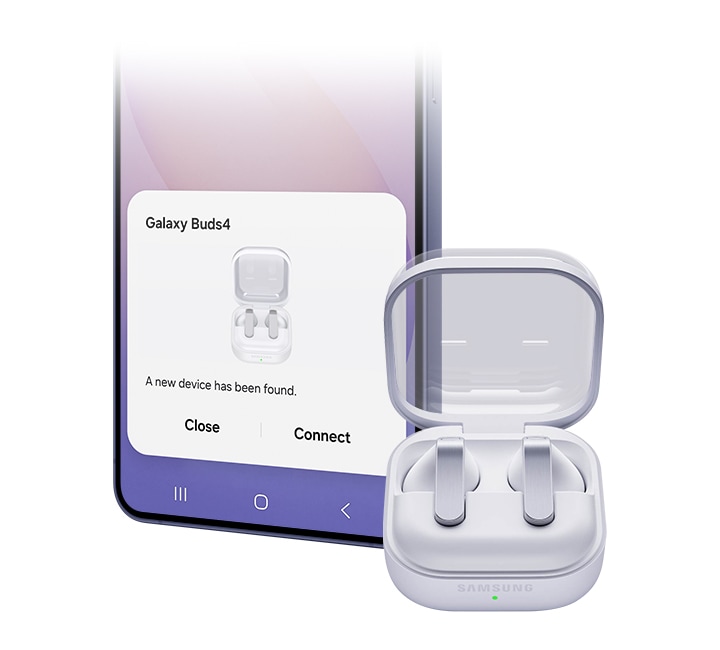
Just open the Charging Case and you’re all set — as simple as that. No apps, no downloads and of course, no hassle. Your Galaxy smartphone and Galaxy Tab detect Galaxy Buds4 for easy pairing.
Devices sold separately. Bluetooth must be turned on to pair Galaxy Buds4 with Galaxy smartphone and Galaxy Tab. UnifiedMgr module may need to be downloaded based on the version of One UI. For devices running on One UI versions below 8.0, Galaxy Wearable app needs to be downloaded. Connecting Samsung Galaxy Buds4 as Bluetooth Audio is available regardless of OS but to configure advanced settings on the Galaxy Wearable app, Samsung Galaxy Buds4 must be paired with a smartphone with Android 12.0 or above and minimum 1.5 GB Memory. Samsung Account login is required to activate and change the Galaxy Buds4 settings on the Galaxy Wearable app.

Devices sold separately. Bluetooth must be turned on to pair Galaxy Buds4 with Galaxy smartphone and Galaxy Tab. UnifiedMgr module may need to be downloaded based on the version of One UI. For devices running on One UI versions below 8.0, Galaxy Wearable app needs to be downloaded. Connecting Samsung Galaxy Buds4 as Bluetooth Audio is available regardless of OS but to configure advanced settings on the Galaxy Wearable app, Samsung Galaxy Buds4 must be paired with a smartphone with Android 12.0 or above and minimum 1.5 GB Memory. Samsung Account login is required to activate and change the Galaxy Buds4 settings on the Galaxy Wearable app.
Now one in One UI
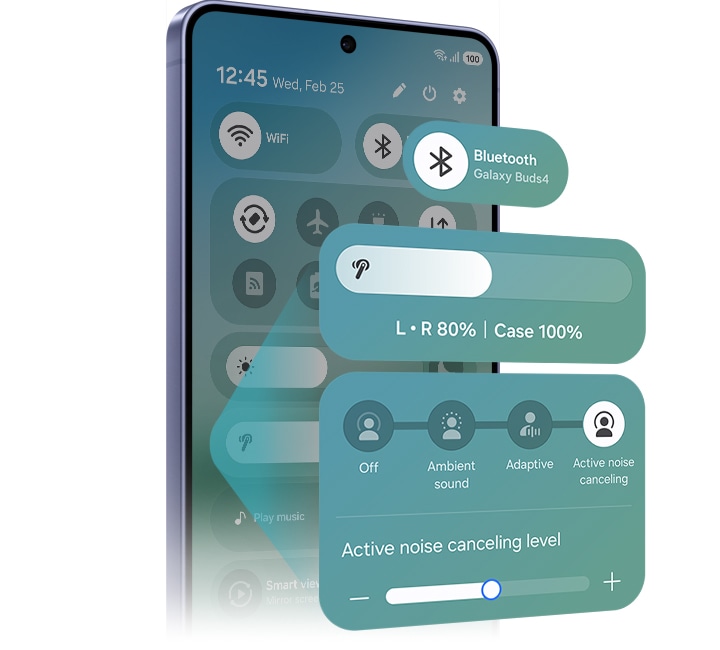
The evolved One UI 8.5 creates a deep connection between your Galaxy Buds and Galaxy smartphone, almost like a duet. Control has never been more intuitive — manage features from the device settings, without downloading a separate app. From the Quick Panel, you can easily access features and also set and save sound preferences for each app.
Devices sold separately. Samsung Account login is required to activate and change Galaxy Buds4 settings. For devices running on One UI 8.0 or later, settings can be configured directly in the phone settings. For devices running on earlier versions, configurations can be found in the Galaxy Wearable app. Additionally, to use the Galaxy Wearable app, Samsung Galaxy Buds4 must be paired with a smartphone running Android 12.0 or above with at least 1.5 GB of memory. Galaxy Wearable app is not supported on iOS. Connecting Samsung Galaxy Buds4 as Bluetooth Audio is available regardless of the OS.

Devices sold separately. Samsung Account login is required to activate and change Galaxy Buds4 settings. For devices running on One UI 8.0 or later, settings can be configured directly in the phone settings. For devices running on earlier versions, configurations can be found in the Galaxy Wearable app. Additionally, to use the Galaxy Wearable app, Samsung Galaxy Buds4 must be paired with a smartphone running Android 12.0 or above with at least 1.5 GB of memory. Galaxy Wearable app is not supported on iOS. Connecting Samsung Galaxy Buds4 as Bluetooth Audio is available regardless of the OS.


Personal AI translator in your ear
Break language barriers with a personal AI translator in your ear. Fully engage in the moment with Galaxy AI powered interpreter — hear it through Galaxy Buds4 and read it on your Galaxy smartphone. Galaxy AI steps in to ensure clear communication across different languages.


Devices sold separately.Interpreter is available on smartphone devices with Galaxy AI features included, running on One UI 6.1.1 or later.Galaxy Buds4 supports Galaxy AI features such as Interpreter and Live Translate when paired with compatible Samsung Galaxy devices. Availability of Galaxy AI features may vary by device model. Samsung Account login may be required to use certain Samsung AI features. Samsung does not make any promises, assurances or guarantees as to the accuracy, completeness or reliability of the output provided by AI features. Supported languages (Regions) are Arabic, Bahasa Indonesia, Chinese Simplified, Chinese Traditional (Hong Kong, Taiwan), Dutch, English (Australia, India, United Kingdom, United States), French (Canada, France), German, Hindi, Italian, Japanese, Korean, Polish, Portuguese (Brazil, Portugal), Romanian, Russian (Russian Federation), Spanish (Mexico, Spain, United States), Swedish, Thai, Turkish, Vietnamese, Tagalog, Gujarati. More languages will be added in future updates.
Your AI, hands-free
Ask for assistance with just your voice ― no phone-pulling required. Simply speak to AI agents such as Bixby to get answers to questions or manage tasks instantly without slowing you down.


Voice wake-up is off by default, and can be configured directly in the phone settings for devices running One UI 8.0 and later. For devices running on earlier versions of One UI, configurations can be found in the Galaxy Wearable app.Bixby is supported on most Samsung Galaxy smartphones and Galaxy Tab devices. Bixby provides real-time answers on devices running on One UI 8.5 or later. Service availability may vary by country, service provider, device model and OS version.Bixby supports 9 languages: Korean, English, German, French, Italian, Spanish, Portuguese, Chinese (Simplified) and Japanese.
Just nod and shake
Intuitive nods and shakes let you respond quickly, from answering calls to talking to Bixby, without lifting a hand. Get what you need effortlessly, even in situations where your hands are busy or when it’s not an ideal time to speak.


Head Gesture is off by default, and can be configured directly in the phone settings for paired devices running One UI 8.5 and later.Supported apps may vary by country. Gestures can be set by the user.
Switch instantly between Galaxy devices
Auto Switch shifts your audio to the most pressing task at hand. Take a call on your Galaxy smartphone while focusing on your creative project on your Galaxy Tab or Galaxy Book. Jump right back to where you left off, the instant you hang up. The experience is seamless across your Galaxy devices.


Devices sold separately.Auto Switch feature is only available on Samsung Galaxy Book series with One UI 6.0 Book or later, Samsung Galaxy smartphones and Galaxy Tab devices with One UI 4.1.1 or later and Galaxy Watch4 series or later. Samsung Galaxy devices must be logged in to Samsung Account to enable the Auto Switch feature. Auto Switch feature for Samsung TV is only available on Samsung TVs launched Feb ’22 or later after getting a firmware update from Jul ’22. Auto Switch with TV is only available for making and receiving phone calls.


Pair up with our all-new AI phone
Pair Galaxy S26 and S26+ with Galaxy Watch8 to your everyday life to spark excitement ― from listening to quality audio with an improved codec and stable Bluetooth 6.1 connection, to paying more attention to your sleep quality and cardio health.


Frequently Asked Question
Galaxy Buds4 Pro has an enhanced 2-way Speaker and a Dual Amplifier to reproduce Hi-Fi sound thats true to the original recording. It also comes with 3 sets of silicone ear tips in different sizes for sound delivery with less distortion. Features such as Voice Detect and Siren Detect are supported on Galaxy Buds4 Pro. Galaxy Buds4, on the other hand, is optimised for everyday listening. It produces balanced & clear sound in studio quality, bringing you closer to your favourite artists.
Adaptive Noise Control, Voice Detect and Siren Detect are off by default, and can be configured directly in the phone settings for devices running One UI 8.0 and later. For devices running on earlier versions of One UI, configurations can be found in the Galaxy Wearable app.
In the box, you'll find a pair of your chosen Galaxy Buds4, a Charging Case and the Quick Start Guide. USB Type-C cable is not included.
Galaxy Buds4 comes in two classic colours, White and Black. With timeless colours that never go out of style, Galaxy Buds4 blends into your outfit for any occasion.
Yes, Galaxy Buds4 Charging Case support wireless charging. Wireless charging pad is not included in the box and is sold separately.
No. The Charging Case for each Buds is shaped differently, making it incompatible between the two models.
You can use Pinch Control on Galaxy Buds4 using your index finger. First, wear the earbuds and try the following actions. Pinch once (Single pinch) to play or pause the track, answer or end a call and stop using features such as Read Notifications Aloud. Pinch twice (Double pinch) to play the next track. Pinch three times (Triple pinch) to play the previous track. Pinch and hold to turn on the preset feature or decline a call. Swipe up or down using your index finger to adjust the volume.
Samsung Seamless Codec (SSC) Ultra High Quality (UHQ) Audio Option allows you to listen to audio in full detail, with rich audio information. You can turn on SSC - UHQ option when Galaxy Buds4 Series is paired with an eligible Galaxy device. The audio is delivered in extended 24-bit bit depth and 96 kHz sampling rate.
Ultra High Quality Audio (UHQ) up to 24-bit / 96 kHz is available on Galaxy S26 Series, S25 Series, S24 Series, S23 Series, Z Fold7, Z Flip7, Z Fold6, Z Flip6, Z Fold5, Z Flip5 and Tab S11 Series, Tab S10 Series, Tab S9 Series with One UI 6.1.1 or above. Additional devices may be supported in the future.UHQ is off by default and can be configured directly in the phone settings for devices running One UI 8.0 and later. For devices running on earlier versions of One UI, configurations can be found in the Galaxy Wearable app.
SSC - UHQ supports up to 24-bit / 96 kHz and is available on Galaxy smartphones such as Galaxy S26 Series, S25 Series, S24 Series, S23 Series, Z Fold7, Z Flip7, Z Fold6, Z Flip6, Z Fold5 and Z Flip5. It's also available on Galaxy Tab S11 Series, Tab S10 Series and Tab S9 Series with One UI 6.1.1 or above. More devices may be supported in the future.
UHQ is off by default and can be configured directly in the phone settings for devices running One UI 8.0 and later. For devices running on earlier versions of One UI, configurations can be found in the Galaxy Wearable app.
Galaxy Buds4 Series isolates your voice input through an advanced Deep Neural Network (DNN) technology. The conversation between the caller and receiver is delivered through Super Wideband (SWB) up to 16 kHz, making the call crystal clear.
Each earbud contains three microphones (six in total across the device). The advanced DNN technology processes audio independently on each earbud, with no interaction between them.
To connect your Galaxy Buds4 to your Galaxy device, just open the Charging Case and the earbuds will automatically start pairing. A pop-up screen will appear on the Galaxy device. Tap Connect and the pairing is complete.
Bluetooth must be turned on to pair Galaxy Buds4 with Galaxy smartphone and Galaxy Tab. UnifiedMgr module may need to be downloaded based on the version of One UI. For devices running on One UI versions below 8.0, Galaxy Wearable app needs to be downloaded. Connecting Samsung Galaxy Buds4 as Bluetooth Audio is available regardless of OS but to configure advanced settings on the Galaxy Wearable app, Samsung Galaxy Buds4 must be paired with a smartphone with Android 12.0 or above and minimum 1.5 GB Memory. Samsung Account login is required to activate and change the Galaxy Buds4 settings on the Galaxy Wearable app.
You can control Galaxy Buds4 based on the version of One UI on your Galaxy device. On Galaxy devices running on One UI 8.0 or later, certain features can be controlled from the Quick Panel or you can manage Galaxy Buds4 in more detail from your phone's device settings without downloading any additional apps. For Galaxy devices running on earlier versions of One UI, configurations can be found in the Galaxy Wearable app.
Galaxy Buds4 can be connected to iOS devices but cannot be controlled through the device as Galaxy Wearable app is not supported.
The Interpreter feature in Galaxy Buds4 allows you to keep listening. Your speech is delivered to your Samsung Galaxy smartphone to be interpreted and played through its speakers. Your opponent's speech is delivered to Samsung Galaxy smartphone to be interpreted, but will be played through the Galaxy Buds4 Series.
Interpreter is available on smartphone devices with Galaxy AI features included, running on One UI 6.1.1 or later.Galaxy Buds4 supports Galaxy AI features such as Interpreter and Live Translate when paired with compatible Samsung Galaxy devices. Availability of Galaxy AI features may vary by device model. Samsung Account login may be required to use certain Samsung AI features. Samsung does not make any promises, assurances or guarantees as to the accuracy, completeness or reliability of the output provided by AI features. Supported languages (Regions) are Arabic, Bahasa Indonesia, Chinese Simplified, Chinese Traditional (Hong Kong, Taiwan), Dutch, English (Australia, India, United Kingdom, United States), French (Canada, France), German, Hindi, Italian, Japanese, Korean, Polish, Portuguese (Brazil, Portugal), Romanian, Russian (Russian Federation), Spanish (Mexico, Spain, United States), Swedish, Thai, Turkish, Vietnamese, Tagalog, Gujarati. More languages will be added in future updates.
Auto Switch allows you to switch seamlessly between your devices. For instance, you can take incoming calls while you're working on a creative project on your Galaxy Tab or Galaxy Book. Once the call is over, you can go right back to your project effortlessly.
Auto Switch feature is only available on Samsung Galaxy Book series with One UI 6.0 Book or later, Samsung Galaxy smartphones and Galaxy Tab devices with One UI 4.1.1 or later and Galaxy Watch4 series or later. Samsung Galaxy devices must be logged in to Samsung Account to enable the Auto Switch feature. Auto Switch feature for Samsung TV is only available on Samsung TVs launched Feb ’22 or later after getting a firmware update from Jul ’22. Auto Switch with TV is only available for making and receiving phone calls.
Compare Galaxy Buds


Your key to instant AI access
Galaxy AI Key gives you easy access to AI-powered assistant, Bixby or Gemini. Simply tap the dedicated key and let your AI assistant handle your query — it's that simple to get things done.


*Image simulated for illustrative purposes. Actual UX may be different. *Book Cover Keyboard sold separately and is only compatible with Galaxy Tab S10 FE+, on One UI 7.0 or later. *Book Cover Keyboard layout may vary by model or type of language. A network connection and Samsung/Google Account required to use Bixby or Gemini.*Gemini mobile application availability varies across devices, languages, and countries. Ensure responses for accuracy. Gemini is a registered trademark of Google LLC.*Pressing Alt + AI key provides the option to switch the AI assistant to Bixby or Gemini. To launch Gemini by using Galaxy AI Key, Google Assistant needs to be updated to Gemini. App shortcuts by Galaxy AI Key can be assigned for select apps only.
Slim and lightweight design


Accentuate the shape of your tablet with the slim and light Book Cover Keyboard Slim. It installs in a snap — all you have to do is wrap it around your tablet like a book cover and magnets will hold it in place. There's even a compartment to hold your S Pen for convenience.
*Image simulated for illustrative purposes.


*Image simulated for illustrative purposes.
A comfortable keyboard experience
Pair your tablet with the Book Cover Keyboard Slim to type documents or emails with accuracy. Combined with DeX mode, the keyboard delivers a convenient PC-like experience.
*Features and keyboard layout may vary by model or type of language.


*Features and keyboard layout may vary by model or type of language.
Enhance your productivity with wireless sharing
With Wireless Keyboard Sharing, you can easily connect to your other Galaxy devices and smoothly type or navigate on them. Switch between devices with ease and take control of your phone as you would on your tablet.


*Products sold separately.*Image simulated for illustrative purposes. Actual UX/UI may vary.*Wireless Keyboard Sharing is supported on Galaxy smartphones running One UI 3.1 or above and Galaxy Tab devices running One UI 2.5 or above, connected to the Book Cover Keyboard via POGO.*To enable Wireless Keyboard Sharing, both devices must be logged in to the same Samsung account. Performance may vary depending on user network environment.*Up to 3 devices can be registered for Wireless Keyboard Sharing.*Wireless Keyboard Sharing can be turned on/off in Settings > General Management > Physical Keyboard > Wireless Keyboard Sharing.
Supercharge your devices
The 45W Power Adapter is your companion for rapid charging and high efficiency. Designed with precision to seamlessly integrate with your Samsung Galaxy devices, this power adapter ensures that your device stays powered up wherever your day takes you.


* Super Fast Charging (SFC) 2.0 requires a USB Power Delivery (PD) 3.0 compatible device supporting Direct Charging. Devices lacking USB PD 3.0 standard or Direct Charging will charge slower than SFC speed. Charging speed varies based on usage patterns, conditions, connected devices, and other factors. Charging performance may be affected by device model, cable quality, and environment. To optimise results, use genuine Samsung 5A cables provided in the original packaging. Compatibility with additional devices can expand over time.
Power down with standby power
The 45W Power Adapter boasts low standby power consumption, below 5mw, reducing unnecessary standby power. Smart IC technology helps reduce power consumption during standby.


* Low standby power consumption, ensuring consumption remains below 5mW when not in active use.
Versatile compatibility
Designed to work seamlessly with USB-C enabled devices, this adapter is your all-in-one solution. Fast charge your tablet, smartphone, or any USB-C enabled gadget—enjoy optimal charging speeds.


* PD (Power Delivery) 3.0 is the USB Implementers Forum, Inc (USB-IF) standard for quick charging over USB-C. PDO (Power Data Objects) charging supports high-speed charging with set voltage and current. PPS (Programmable Power Supply) Fast charging adjusts voltage and current in real-time based on device charging status, providing high power (Added USB PD 3.0 Standard). Compatible with standard USB Type-C cables. For optimal results, use genuine Samsung 5A cables provided in the original packaging.
Power your devices safely
The 45W Power Adapter provides protection against overcurrent, overheating and short circuits, providing a worry-free charging experience. Power your devices safely, knowing they're protected.


Specifications
-
Processor
2.9GHz, 2.6GHz, 1.9GHz
-
Rear Camera - Resolution
13.0 MP
-
Weight (g)
664
-
CPU Speed
2.9GHz, 2.6GHz, 1.9GHz
-
CPU Type
Octa-Core
-
Size (Main_Display)
332.8mm (13.1" full rectangle) / 330.5mm (13.0" rounded corners)
-
Resolution (Main Display)
2880 x 1800 (WQXGA+)
-
Technology (Main Display)
TFT
-
Colour Depth (Main Display)
16M
-
Yes
-
Rear Camera - Resolution
13.0 MP
-
Rear Camera - Auto Focus
Yes
-
Front Camera - Resolution
12.0 MP
-
Rear Camera - Flash
No
-
Video Recording Resolution
UHD 4K (3840 x 2160)@30fps
-
Memory_(GB)
8
-
Storage (GB)
128
-
Available Storage (GB)
106.2
-
External Storage Support
MicroSD (Up to 2TB)
-
USB Version
USB 2.0
-
Location Technology
GPS, Glonass, Beidou, Galileo, QZSS
-
Earjack
USB Type-C
-
MHL
No
-
Wi-Fi
802.11a/b/g/n/ac/ax 2.4GHz+5GHz, HE80, MIMO, 1024-QAM
-
Wi-Fi Direct
Yes
-
Bluetooth Version
Bluetooth v5.3
-
NFC
No
-
Bluetooth Profiles
A2DP, AVRCP, DI, HAP, HFP, HID, HOGP, HSP, OPP, PAN, PBAP, PBP, TMAP
-
PC Sync.
Smart Switch (PC version)
-
Android
-
Form Factor
Tablet
-
Accelerometer, Fingerprint Sensor, Gyro Sensor, Geomagnetic Sensor, Hall Sensor, Light Sensor
-
Dimension (HxWxD, mm)
194.7 x 300.6 x 6.0
-
Weight (g)
664
-
Video Playback Time (Hours, Wireless)
Up to 21
-
Battery Capacity (mAh, Typical)
10090
-
Removable
No
-
Energy Efficiency Class
F
-
Minimum Battery Endurance in Cycles
2000
-
Video Playing Format
MP4, M4V, 3GP, 3G2, AVI, FLV, MKV, WEBM
-
Video Playing Resolution
UHD 4K (3840 x 2160)@60fps
-
Audio Playing Format
MP3, M4A, 3GA, AAC, OGG, OGA, WAV, AMR, AWB, FLAC, MID, MIDI, XMF, MXMF, IMY, RTTTL, RTX, OTA
-
Recycled Content (%)
9.7
-
Weight of Critical Raw Material - Cobalt (g)
20 ≤
-
Weight of Critical Raw Material - Tantalum (g)
0.01 ≤ < 0.1
-
Weight of Critical Raw Material - Neodymium (g)
1 ≤
-
Weight of Critical Raw Material - Gold (g)
0.02 ≤ < 0.1
-
Recyclability (%)
8.5
-
Gear Support
Galaxy Buds3 Pro, Galaxy Buds2 Pro, Galaxy Buds Pro, Galaxy Buds Live, Galaxy Buds+, Galaxy Buds3, Galaxy Buds2, Galaxy Buds, Galaxy Buds FE
-
Mobile TV
No
-
SmartThings Support
Yes
-
Security Update Period (Valid until)
30 April 2032
-
Bluetooth Version
Bluetooth v6.1
-
Sensors
Accelerometer, Gyro Sensor, Hall Sensor, Pressure Sensor, Proximity Sensor, Touch Sensor, VPU(Voice Pickup Unit)
-
Earbud Weight (g)
4.6
-
Number of MIC
6
-
Speaker
1-way
-
Ambient Sound
Yes
-
Adaptive Noise Control
Yes
-
Active Noise Cancellation
Yes
-
360 Audio
Yes
-
Audio Codec
AAC, SBC, SSC(Samsung Seamless Codec), SSC-UHQ, LC3
-
Adaptive EQ
Yes
-
Adaptive ANC
Yes
-
Super Wide Band
Yes
-
Bluetooth Version
Bluetooth v6.1
-
Bluetooth Profiles
A2DP, AVRCP, HFP, PBP, TMAP
-
LE Audio
Yes
-
Auto Switch
Yes
-
Accelerometer, Gyro Sensor, Hall Sensor, Pressure Sensor, Proximity Sensor, Touch Sensor, VPU(Voice Pickup Unit)
-
Earbud Dimension (HxWxD, mm)
30.5 x 18.3 x 19.3
-
Earbud Weight (g)
4.6
-
Case Dimension (HxWxD, mm)
51 x 28.3 x 51
-
Case Weight (g)
45.1
-
Durability
IP54
-
Talk Time (Hours, ANC On)
Up to 3.5
-
Total Talk Time (Hours, ANC On)
Up to 18
-
Music Play Time (Hours, ANC On)
Up to 5
-
Total Music Play Time (Hours, ANC On)
Up to 24
-
Talk Time (Hours, ANC Off)
Up to 4
-
Total Talk Time (Hours, ANC Off)
Up to 20
-
Music Play Time (Hours, ANC Off)
Up to 6
-
Total Music Play Time (Hours, ANC Off)
Up to 30
-
Power Required for Charging (Min / Max, W)
2.5 ~ 4.5
-
Earbud Battery Capacity (mAh, Typical)
45
-
Case Battery Capacity (mAh, Typical)
515
-
Samsung Find
Yes
-
Bixby Voice Wake-up
Yes
-
Neck Stretch Reminder
Yes
-
Compatible Models
Galaxy Tab S10 FE+
-
Packaging Contents
Book Cover Keyboard Slim, Reflet
-
Interface
POGO
-
Keys Quantity
65
-
Dimension (WxHxD)
196.7 x 301.3 x 13.1 mm
-
Weight
394 g
-
Black
-
Compatible Models
• Super Fast Charging : Galaxy S10 5G, Galaxy Note10, Galaxy Z Fold2, Galaxy Z Flip3 & Later / Galaxy A90 5G, A80, A70, A52, A33, A23, A05, A15 & Later / Galaxy M31s, M51, M62, M23, M53, M14 & Later / Galaxy Tab S7 & Later • Super Fast Charging 2.0 : Galaxy Note 10+, Galaxy S20 Ultra, Galaxy S22+, Galaxy S22 Ultra, Galaxy S23+, Galaxy S23 Ultra, Galaxy S24+, Galaxy S24 Ultra, Galaxy S25+, Galaxy S25 Ultra / Galaxy A36, A56 & Later / Galaxy Tab S7 & Later
-
Features
Super Fast Charging 2.0 max. 45W, PD 3.0 PDO/PPS max. 45W, Low Standby Power Consumption( <5mW )
-
Interface
USB-C
-
Packaging Contents
Power Adapter
-
Dimension (WxHxD)
48 x 75.6 x 28 mm
-
Weight
100.1 g
-
Input Voltage
100-240 V
-
Output Voltage (Max, Normal Charge)
5 V
-
Output Voltage (Max, Fast Charge)
PDO : 9 V, 15 V, 20 V / PPS : 5.0-20.0 V
-
Output Current (Max, Normal Charge)
3 A
-
Output Current (Max, Fast Charge)
PDO : 3 A(9 V, 15 V), 2.25 A(20 V) / PPS : 2.25 A(5.0-20.0 V)
Reviews
Galaxy Tab S10 FE+ 13.1" Student Bundle
- Customers consistently praise the large, bright 13.1-inch display with smooth 90Hz refresh rate as ideal for videos and navigation
- Reviewers highlight exceptional battery life lasting a full day or more, with many noting significant improvement over previous models
- Many find performance fast and smooth, with the processor handling everyday tasks, browsing, and productivity seamlessly
- Customers celebrate the included S Pen as precise and fluid, perfect for note-taking, drawing, and student use
- Most describe the design as premium and slim with excellent value for money, though a few mention slight weight for one-handed use
Reviews with images & videos
Filters
Relevancy sort puts the best reviews at the top. We look at things like helpfulness votes, latest review, pictures and other traits that readers look for in their reviews.
Filters
225 Reviews
2026-09-21
Samsung
We're delighted to see that you're enjoying your Galaxy Tab S10 FE+, Sougharudy. Its large display and versatile performance make it a great companion for everything from entertainment to everyday tasks. Thank you for taking the time to share your review with us, and keep enjoying! ^EW at Samsung Support
2026-09-11
Samsung
We're delighted to see we have given you the five-star feeling with your Tab S10 FE+! Enjoy! ^LB at Samsung Support
2026-08-30
2026-08-20
2026-06-24
London
Samsung
We are over the moon to see you are loving your Tab S10 FE+! Thank you for your continuing loyalty to us, and your kind words helps us continue to bring the wow factor to your life! ^LB at Samsung Support
2026-04-28
2026-04-23
2026-04-15
![[D] Alternative Text](https://photos-us.bazaarvoice.com/photo/2/cGhvdG86YXJnb3M/19cf937e-b35b-5d84-aa0c-7355d5593bf7)
![[D] Alternative Text](https://photos-us.bazaarvoice.com/photo/2/cGhvdG86YXJnb3M/0043ae8a-081c-59a6-9646-cd4c2b4e6d49)
2026-04-12
2026-04-12
Bristol
Samsung
We're saddened to hear that you're feeling this way, Bojack. The Galaxy Tab S10 FE+ is part of the Samsung Fan Edition series, which means it offers some of the best features of flagship Galaxy Tabs at a much lower price point. It features a large 13.1-inch display with a fluid 90Hz refresh rate, which is perfect for keeping the whole family entertained. It’s optimised with a powerful Exynos 1580 processor to handle all your entertainment needs with ease. As a Fan Edition tablet, it uses USB 2.0. It's equipped with a dual speaker system that provides stereo sound and supports Dolby Atmos to enhance spatial depth, and the speakers are professionally tuned by AKG to provide balanced and clear audio. We appreciate the time you've taken to share your feedback. ^EW at Samsung Support
2026-04-02
2026-03-24
CX
We are sorry to see that you are facing issues with your Tab S10 FE+. This is not what we expect to happen, and we'll be here to help this working again in no time! This great link will help resolve the issue with the display on your tablet: https://www.samsung.com/uk/support/mobile-devices/the-display-is-not-working-properly/?msockid=30eb39c9a5bf6357360d2c9da47b6201 Please reach out to our Support Teams who are on hand to help. You can find their contact details and opening hours here: https://www.samsung.com/uk/support/contact/ ^LB at Samsung Support
2026-03-17
CX
We are sorry to see you are having issues with the charging cable for your Tab S10 FE+, Paul. Check out this great guide to help you get this working in no time: https://www.samsung.com/uk/support/mobile-devices/what-to-do-if-your-tablet-is-not-charging/ If this is the cable that came with the device, we'd recommend reaching out to our Support Teams who will be on hand to help. You can find their contact details and opening hours here: https://www.samsung.com/uk/support/contact/ If this was purchased separately, you will need to purchase another charger, unless you are still within the returns period. We hope you get this sorted quickly! ^LB at Samsung Support
2026-03-09
![[D] Alternative Text](https://photos-us.bazaarvoice.com/photo/2/cGhvdG86YXJnb3M/d25131e2-7079-5793-b2d0-c2576ea33e66)
![[D] Alternative Text](https://photos-us.bazaarvoice.com/photo/2/cGhvdG86YXJnb3M/5e43453f-ee15-5981-bf14-2956aeb5fdc1)
2026-02-27
2026-02-26
2026-02-25
2026-02-24
2026-02-10
2026-02-02
2026-01-27
2026-01-21
Carlisle, Cumberland
CX
Excellent to see how much you are enjoying the upgrade to your Tab S10 FE+, especially the speedy performance! The Octa-Core processor runs this Tab like a dream, giving you lightening fast operation and smooth scrolling. It will be wowing you for years to come! ^SK at Samsung Support
2026-01-18
2026-01-17
Rotherham, South Yorkshire
2026-01-15
Suffolk
2026-01-08
Samsung
Thanks for taking the time to leave a review of your Galaxy Tab S10 FE+. We're sorry to hear that you are having issues with multiple things on your tablet. We would recommend setting up Face ID again and trying some troubleshooting steps which we will provide below. Here are some steps to set up Face ID and use it: https://www.samsung.com/us/support/answer/ANS10002519 Here are some steps to follow from our US partners if your touchscreen is not working properly. https://www.samsung.com/us/support/troubleshoot/TSG10001529 If these steps do not work, please get in touch, so that we can look into this further and assist. You can find our operating times and contact us here: https://www.samsung.com/uk/support/contact/ ^KF at Samsung Support
2025-12-31
North east
CX
Thank you for sharing your thoughts and feedback on the gorgeous Galaxy Tab S10 FE+, Pab. We're so pleased to hear that you're enjoying all of the amazing features within, from the large and bright display that delivers excellent clarity for all of your content, to the enhanced 10,090 mAh battery that supports Super Fast Charging to keep you powered for hours on end - no matter the task at hand! It looks stunning too, with a sleek and modern design adding a touch of cool for a head-turning look. You've made a brilliant choice with this model! ^EW at Samsung Support
2025-12-30
2025-12-24
Manchester
![[D] Alternative Text](https://photos-us.bazaarvoice.com/photo/2/cGhvdG86YXJnb3M/be16e047-80d8-5609-9cec-f0d2894f62ba)
![[D] Alternative Text](https://photos-us.bazaarvoice.com/photo/2/cGhvdG86YXJnb3M/7d869fa3-7cf2-568c-b903-bd4572794326)
2025-12-23
Walthamstow London
2025-12-23
2025-12-21
Birmingham
2025-12-18
CX
Congratulations on your gorgeous Galaxy Tab S10 FE, Tabarry! It's awesome to hear that you're enjoying getting to know the features of your tablet, and that you've found our support to be excellent. We totally understand that it can sometimes feel like a bit of a challenge when switching devices, and we're here for you every step of the way. In case you need it, you can find a brilliant user guide on the tablet itself. Just navigate to Settings > Tips and user guide. It's super handy and contains loads of tips for every feature on offer. It's regularly updated too, so it can be really helpful to check in now and again! We also offer a brilliant Remote Service, where our dedicated experts can show you around or help with any issues from the comfort of your home. You can find out more about this here: https://www.samsung.com/uk/support/remote-service/ Many thanks for taking the time to share your five star review - the world is your oyster with this tablet; keep enjoying! ^EW at Samsung Support
2025-12-10
2025-12-10
Surrey
2025-12-09
Leicester
2025-12-07
2025-12-01
manchester
2025-11-27
Leicester
2025-11-25
Bridlington
2025-11-15
Chesterfield
2025-11-05
Belfast
2025-10-30
2025-10-29
Bromsgrove
2025-10-29
Walsall
2025-10-24
South Ayrshire, Scotland
Samsung
We’re thrilled to read your thoughts and feedback. Thanks for sharing with us and giving us top marks! ^KF at Samsung Support
2025-10-19
2025-10-18
CX
Thanks for the great review and sharing your feedback with us! Should you ever need us, our friendly Support Team are on hand, you can find all our contact methods and opening hours here: https://www.samsung.com/uk/support/contact/ ^SK at Samsung Support
2025-10-18
Mendips Somerset
CX
We are delighted to see you are loving all of our products, especially your new Tab S10 FE+! We will continue to wow you for years to come! ^LB at Samsung Support
2025-10-07
Scarva
2025-09-30
Samsung
We’re thrilled to read your thoughts and feedback, Elmo! Thanks for sharing with us and giving the Galaxy Tab S10FE+ top marks! ^CL at Samsung Support
2025-09-30
glasgow scotland
Samsung
Congratulations on your Galaxy Tab S10 FE+, what a great decision you made. ^CL at Samsung Support
2025-09-29
Westyorkshire
CX
We’re thrilled to read your thoughts and feedback. Thanks for sharing with us and giving us top marks! ^EW at Samsung Support
2025-09-28
Somerset
2025-09-28
CX
We are disappointed to see you are facing issues with transferring data on your Tab S10 FE+. Take a look at this link to enable you to transfer data successfully from Samsung Cloud: https://www.samsung.com/uk/support/apps-services/use-the-samsung-cloud-to-back-up-and-restore-data-to-your-galaxy-device/ If you need further assistance, our helpful Support Teams are on hand to help. You can find their contact details and opening hours here: https://www.samsung.com/uk/support/contact/ ^LB at Samsung Support
2025-09-27
CX
We love reading that we’ve given you that five-star feeling. Keep enjoying! ^SK at Samsung Support
2025-09-24
Nottingham.
CX
We love reading that we’ve given you that five-star feeling. Keep enjoying! ^KF at Samsung Support
2025-09-16
CX
We’re thrilled to read your thoughts and feedback. Thanks for sharing with us and giving us top marks! ^EW at Samsung Support
2025-09-16
Didcot
CX
We love reading that we’ve given you that five-star feeling. Keep enjoying, Paul! ^EW at Samsung Support
2025-09-11
brighton
2025-09-11
Yorkshire
CX
We’re thrilled to read your thoughts and feedback. Thanks for sharing with us and giving us top marks! ^SK at Samsung Support
2025-09-10
Upton Park
2025-09-02
West Yorkshire
CX
We’re thrilled to read your thoughts and feedback. Thanks for sharing with us and giving us top marks! ^LB at Samsung Support
2025-09-02
Ilford
2025-09-01
newton aycliffe
2025-08-29
Somerset, UK
2025-08-27
Liverpool
2025-08-11
Wiltshire
2025-08-07
Rochdale
2025-08-03
Newport TF10, UK
2025-08-03
I.o.w
2025-07-20
West mids
2025-07-15
2025-07-08
Devon
2025-07-05
Farnham, Surrey
2025-07-01
St helens
2025-07-01
Great Ryburgh, Fakenham NR21, UK
2025-06-20
Southwest
![[D] Alternative Text](https://photos-us.bazaarvoice.com/photo/2/cGhvdG86c2Ftc3VuZy1lbl9nYg/80fc886b-5efa-5980-be51-c2e0c14a4cea)
![[D] Alternative Text](https://photos-us.bazaarvoice.com/photo/2/cGhvdG86c2Ftc3VuZy1lbl9nYg/63fc46b1-30d1-562b-9ff5-ddd565ff4160)
CX
We're thrilled to see how much you are enjoying your Tab S10 FE+! The stunning 13.1" TFT screen allows you to see every detail of your favourite content, including the high quality photos you take with the 13 MP camera. The Octa-Core processor runs all functions, including Bluetooth, super quickly, and works with the 10090 mAh battery to give you as much life from each charge as possible. It's a real powerhouse! ^SK at Samsung Support
2025-06-17
Waterlooville
2025-06-17
Lincolnshire
2025-06-14
CX
Thank you for your lovely five-star review of your Tab S10 FE+, Sashaa! With the powerful Exynos 1580 processor and massive 10,090 mAh battery, you'll get the ultimate performance to last hours! Giving you more time to enjoy the striking 13.1" display and 13MP Rear camera and 12MP Ultra-wide front camera! Along with 128GB of internal storage up to 2TB of external storage, you'll never be short of space for your precious data! ^LB at Samsung Support
2025-06-11
Ripon, North Yorkshire, England
2025-06-08
Merseyside
CX
We're ecstatic to see you're loving the Galaxy Tab S10 FE+! With its stunning display, speedy processor and intuitive software, we can see why you've awarded us five stars! ^CH at Samsung Support
2025-06-03
CX
We are thrilled to see you are loving your Tab S10 FE+! Thanks to the striking 13.1" display and massive 10,090 mAh battery, we can see why you love it so much! ^LB at Samsung Support
2025-05-28
Edinburgh, Scotland
CX
We're thrilled to see you're loving the Galaxy Tab S10 FE+, Myszka! With its stunning display, speedy processor, long-lasting battery and sleek, lightweight design, there's a lot to love! Many thanks for the five stars! ^CH at Samsung Support
2025-05-24
West Midlands
CX
It is great to see you are loving your Tab S10 FE+! With Smart Switch, you can transfer all the data from one device to another with no problems! The striking 13.1" display will bring everything to life, and with the powerful Exynos 1580 processor, you won't be disappointed by the performance! ^LB at Samsung Support
2025-05-20
CX
Thank you for your incredible feedback on the Galaxy Tab S10 FE+! We're absolutely thrilled to hear that switching to Samsung has transformed your tablet experience. Delivering outstanding performance, impressive screen clarity, and seamless phone syncing is exactly what we strive for, so knowing it has set a new standard for you means the world to us. It’s fantastic to hear that the camera quality and long battery life are exceeding expectations, ensuring you get the most out of your device every day. Your enthusiasm inspires us to continue innovating and delivering the best possible experience. Many thanks for the five stars! ^CH at Samsung Support
2025-05-14
North Yorkshire
CX
We're over the moon to see you're loving the Galaxy Tab S10 FE+! With its stunning display, amazing camera, speedy processor and long-lasting battery, we can see why you've awarded us five stars! ^CH at Samsung Support
2025-05-12
CX
We are delighted to see you are loving your Tab S10 FE+, John! Thanks to the striking 13.1" display, you will be blown away by the viewing experience you will get! Along with the 90Hz refresh rate, you will never be disappointed! Thank you for your love, and you will continue this love for years to come! ^LB at Samsung Support
2025-05-08
Nottingham
CX
Thank you for your lovely five-star review of your Tab S10 FE+, Koki! We appreciate your loyalty to us, and we will continue to wow you for years to come! With the slim 8.1mm bezel and striking 13.1" display, your eyes won't believe what they are seeing! This will enable you to enjoy the impressive S Pen and take your creativity to a whole new level! Along with the amazing 13MP rear camera and 12MP Ultra-wide front camera, you'll be taking epic pics to last a lifetime! Not to forget the availability to enhance your tablet screen to a TV will impress everyone you meet! Enjoy! ^LB at Samsung Support
2025-05-04
Carlisle
2025-05-02
Harrow, London
2025-05-02
Hull
2025-05-01
Greater Manchester
2025-04-29
South West
CX
Congratulations on your new and amazing Galaxy Tab S10 FE+! The large and immersive display of this device paired with its enhanced S Pen will unleash whole new levels of creativity! ^CL at Samsung Support
2025-04-29
West Midlands
CX
Thank you for your epic five-star review of your Tab S10 FE+, Mitaka! From the massive 10,090 mAh battery, powerful Exynos 1580 processor and striking 13.1" TFT display, we can see why you love it so much! ^LB at Samsung Support
2025-04-29
West Sussex
![[D] Alternative Text](https://photos-us.bazaarvoice.com/photo/2/cGhvdG86c2Ftc3VuZy1lbl9nYg/dbc1c8a2-4031-56c5-9310-058a20f89347)
![[D] Alternative Text](https://photos-us.bazaarvoice.com/photo/2/cGhvdG86c2Ftc3VuZy1lbl9nYg/af4791e5-236c-5dab-a07e-944e8ca36457)
CX
Excellent to see how much you are loving your Tab S10 FE+, Andy! The vast 13.1" screen beautifully displays the smooth operation of the intuitive software that the Octa-Core processor makes possible. The simple set up process and connection, in combination with SmartSwitch, ensures that you are up and running as quickly as possible, so that you waste no time enjoying your awesome new device. It looks like you have found the perfect Tab for you! ^SK at Samsung Support
2025-04-29
Plymouth Devon.
CX
Fantastic to see that you are loving all that the Tab S10 FE+ has to offer! This device is packed full of features, and can operate at lightening fast speeds thanks to the Octa-Core processor. We use only the highest quality materials and workmanship to create our devices, and it shows in the premium experience our users receive. Keep enjoying this awesome Tab! ^SK at Samsung Support
2025-04-28
Essex
CX
We’re thrilled that the Galaxy Tab S10 FE+ is delivering the multitasking experience you were looking for, NayAung. Its large, vibrant display and smooth split-screen functionality are designed to enhance productivity and convenience. Whether you're working or enjoying entertainment, we're glad it's meeting your needs. Many thanks for the five stars! ^CH at Samsung Support
2025-04-27
Rhondda, South Wales
CX
Thank you for your lovely review of your Tab S10 FE+, Garry! From the striking 13.1" TFT display will unlock more possibilities than ever before! This will enable you to explore the incredible Galaxy AI features and view the pics on the insane 13MP rear and 12MP Ultra-wide front camera! Along with the massive 10,090 mAh battery, you will get hours of fun! ^LB at Samsung Support
These reviews are managed by Bazaarvoice and comply with the Bazaarvoice Authenticity Policy, which is supported by anti-fraud technology and human analysis. Details at
https://www.bazaarvoice.com/trustmark/